• Please note that Audiokarma will be offline briefly for updates early on Monday morning, September 28th.

SX-1080 - no soft start, instant on

ultrasparc

Active Member
Hi

I recently took my SX-1080 to a professional audiorepair shop, to get it fixed. The operation was to repair a broken print path on the power supply. In addition to this, they unmounted and cleaned the protection relay (I beleive it was the protection relay, that is connected to pins 5,6,7,8).

Now about a month later I noticed that the soft start is not working I rarely power off). When I switch the unit on, there is instant sound, not the normal 1-2 sec delay (which was OK when I got it back from repair).

Is this critical, in the sense that I should power off, and do a repair asap, or is it safe to keep it running, until I have the time to fix it?

It's working normally as is, and I haven't done any checking.

Thanks ;)
 
Register to hide this ad
Due to the size of the power transformer in the unit and the associated high inrush current, the soft start circuit is in place to limit the inrush until the transformer core is partially saturated. This is necessary to prevent damage to the power switch, building wiring, and reduce voltage transients in your power system. This is separate from the output/speaker protection system which delays connection of the outputs until the unit voltages have stabilized.

It is important to resolve this before using the unit further.
 
Due to the size of the power transformer in the unit and the associated high inrush current, the soft start circuit is in place to limit the inrush until the transformer core is partially saturated. This is necessary to prevent damage to the power switch, building wiring, and reduce voltage transients in your power system. This is separate from the output/speaker protection system which delays connection of the outputs until the unit voltages have stabilized.

It is important to resolve this before using the unit further.
Thanks, I will power down right away!
 
If you have a multimeter handy a few quick checks might be useful. The big 20W load resistor, power relay, and thermal fuse for the soft-start circuit can be checked.

There are several good threads in the archives detailing the operation of the circuit.
 
Well, I opened up, pulled off the relay cover and noticed it was in the correct open position. I watched it while I switched on, and now it closes correctly.?

I wonder if the mere manipulation is the reason it operates now? Somehow it must have been stuck in the closed position, I guess.

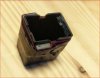
The photo I've attached is to show what seems a manufacturer modification (it has always been like that).
Would anybody care to suggest what those two pieces of magnets attached to the outside of the relay cover are good for? They are at the relay-connector (the moving part) end.


The relay closes 8 secs. after switching on, which I count as normal.
 

Attachments

  • relay-cover.jpg
    relay-cover.jpg
    18.4 KB · Views: 45
Methinks you are confusing two different circuits...the soft-start circuit (designed to reduce stress on rectifiers and power switches from large inrush currents) and the speaker protection circuit (designed to delay the speaket relay on power-up and to monitor DC offset to protect the speakers).

Both of these circuits use a relay, but the speaker protection circuit is the one responsible for 'instant sound' on power up. That should not happen.
 
Methinks you are confusing two different circuits...the soft-start circuit (designed to reduce stress on rectifiers and power switches from large inrush currents) and the speaker protection circuit (designed to delay the speaket relay on power-up and to monitor DC offset to protect the speakers).

Both of these circuits use a relay, but the speaker protection circuit is the one responsible for 'instant sound' on power up. That should not happen.

I think you are right ;) - I'm just supposing. The relay in question is 'ASR-048' that connects to pins 5,6,7 & 8

1: Is this the one that is the (speaker?) protection curcuit?
2: and the other 'ASR-046' the soft-start curcuit?

But in any case the relay is workning now - would you consider replacing it, or just keep it?

Thanks
 
The PA-3004 IC determines when the relay should turn on and off, but does this through external components. C3 sets the timing, and Q2 is the relay driver. If C3 is dried up the delay may be too short. And if Q2 has some sort of intermittent C-E leakage, the delay may be similarly affected.

I think the relay is an Omron MY4-02-DC48, which is a PITA to source (edit: Mouser actually has stock). But relays rarely fail...just that the contacts get worn. Not that it's a bad thing to replace it, but I simply doubt that it is your root issue.

Personally, I'd replace all the electrolytics on the board and install a new relay driver transistor + a new relay and see how it goes.
 
However, if the soft-start were functioning properly, would there still be "instant-on" even if the speaker relay is wedged closed? I suspect there would be some delay while the secondary voltages rise to the point where semis are biased correctly to pass signal. Perhaps I presumed "instant-on" was in fact instant and not after a half-second delay.
 
The PA-3004 IC determines when the relay should turn on and off, but does this through external components. C3 sets the timing, and Q2 is the relay driver. If C3 is dried up the delay may be too short. And if Q2 has some sort of intermittent C-E leakage, the delay may be similarly affected.

I think the relay is an Omron MY4-02-DC48, which is a PITA to source (edit: Mouser actually has stock). But relays rarely fail...just that the contacts get worn. Not that it's a bad thing to replace it, but I simply doubt that it is your root issue.
I found a reference in another thread to this http://www.mouser.dk/Search/Product...C48virtualkey65300000virtualkey653-LY2-0-DC48
Personally, I'd replace all the electrolytics on the board and install a new relay driver transistor + a new relay and see how it goes.

Well, this unit had a total re-cap (ALL electrolytics and trannys, most diodes and some resiststors, and tantalums by electrolytics), a couple of years ago, so I believe all should be OK in that regard, and the relay was cleaned by the repair shop.

I will wait and see how it acts and then only replace the releay if it begins failing again.

But... even though I recapped it back then, it still sounds muffled, congested and choked :( (the reason I recapped), so maybe I should take the final step and replace the ceramics and mylars (and the relay ) and see if that will do the job.

Thanks for contributing, EW :thumbsup:
 
why will replacing the other capacitors unmuffle it ?
I don't know if they will - I'm just desperately grasping for the straw that will bring back this beauty to its former level, and since all of the usual replacement components didn't make a difference, I have only the original 37-38 year old components left to turn to...
 
If the relay was 'cleaned' by the repair shop this is very often a 'fool's errand' - 'cleaning' relay contacts if they are pitted is a waste of time - once the plating is gone that's it, the relay is toast - replace it - incidentally, high resistance relay contacts could have something to do with your muffled sound...
 
If the relay was 'cleaned' by the repair shop this is very often a 'fool's errand' - 'cleaning' relay contacts if they are pitted is a waste of time - once the plating is gone that's it, the relay is toast - replace it - incidentally, high resistance relay contacts could have something to do with your muffled sound...

Well, the reason I was given for cleaning the relay, was that, due to its age, and that it is in the signal path, was that that could be what is muffling the sound. They unmounted it, and had it submerged in some kind of cleansing solution, drying up, cleaning, then re-mount. Didn't improve the sound :( - which points to a 'fools errand' task, as you say.

If I recall correctly they said that over (so long) time (carbon?) residue could collect on the contact surfaces, impeding its function - sounded reasonable to me...

Please pin it out for me:
'high resistance relay contacs' is what may be the case here, with this aged unit/relay, and there is a reasonable chance that replacing the relay, could bring back the good sound quality?​
 
You have a fault with the protection circuitry, the unit is old, due for a refresh, I recommend you do as directed by EchoWars and change the protection circuit components he suggests INCLUDING the relay. If that doesn't resolve the issue, then we can discuss further measures to get your unit working as it should.

EW is among the top tech's on this site, (if not THE best), if you can't listen to him, then I am no use to you. :rolleyes:
 
You have a fault with the protection circuitry, the unit is old, due for a refresh, I recommend you do as directed by EchoWars and change the protection circuit components he suggests INCLUDING the relay.

EW is among the top tech's on this site, (if not THE best), if you can't listen to him, then I am no use to you. :rolleyes:

Right - very true. I also agree with your acknowledgement of EW :thumbsup:

I will see if I can find a relay here in denmark, else I will get it from mouser.

If it's not too far off, I'd like your opinion on the probability of a positive effect of replacing the ceramics/mylars in the unit?
If yes, on all boards, or only on the tone control, flat amp, input selector and ?

When I recapperd it back in 2014 I was advised to leave those ceramics etc, along with resistors, and only replace electrolytics and trannys. So I'm still in search for that effective replacment that will make a difference, and if these components have a saying I'll just as well order them at mouser along with a new relay - shipping to denmark is noticable, if your'e not beyond the free shipping limit, which is around $ 50.
 
FWIW, your 'congested' sound may be related to:
1. Dirty switches (any of the front panel switches and pots can interfere with the signal with unpredictable results).
2. Related to '1', a worn speaker relay.
3. Incorrect capacitor values, faulty capacitors installed, or polarized capacitors installed with incorrect polarity when previously recapped.
4. Speaker or speaker cabling issue.
5. Power supply problem causing issues with preamp functions.
 
PSU-underside-1.jpg
FWIW, your 'congested' sound may be related to:
1. Dirty switches (any of the front panel switches and pots can interfere with the signal with unpredictable results).
2. Related to '1', a worn speaker relay.
3. Incorrect capacitor values, faulty capacitors installed, or polarized capacitors installed with incorrect polarity when previously recapped.
4. Speaker or speaker cabling issue.
5. Power supply problem causing issues with preamp functions.

Thanks Echo.
  1. I had all switches (toggle & push) dis-assembled end cleaned, and pots were sprayed and cleaned - they needed it
  2. Again - is this (the speaker relay) the relay I'm dealing with here - also named 'protection' relay?
  3. I will recheck, but I was very thorough when I replaced - all new from mouser. Also replacing caps didn't change anything => something else must be wrong
  4. will check again
  5. This may be another source to the problem. The power supply has taken a lot af heat - to the point where the print is burnt black, and the prints solder island have come off, calling for a repair like the one on the picture. One of the wires was on the upper/component side before the latest re-cap, during which another solder island came off, calling for another jumper. Having two jumpers close in parallel turned out to be an awesome noise generator :(, and I was then told, that a better way to this repair, was like I've done, i.e. bend a piece of stiff wire to the shape of the print lead track it shall repair. Everything (except the large D5 rectifier and the ceramics) have been replaced here.

So if I understand this correctly, I'll have a better chance curing the muffled sound by replacing the speaker/protection relay (as mentioned multiple times) and/or investigate something on the power suplly (assuming 1, 3 and 4 are not the cause) ? What to look for on the PSU I wouldn't know.

(PS. Away on a business trip for the rest of the week, ie. can't do any checks until return)
 
Back
Top Bottom