• The move to the new server is done. There are some software and database maintenance updates in process. This has us passing the hat around to help out. We appreciate any donations. Seriously, even a dollar helps. The payment page may be found here - https://www.audiokarma.org/support.html

Upgrading a Hafler DH-100

Bob

Super Member
I bought this DH100 to digitize my LPs. I needed a phono stage and the ability to control the output to my Analog-to-digital converter. It worked for a while but I wasn’t happy with the sound. I looked into the DH100 and discovered it was a series 1. And there was a series 2. Could this be the problem?
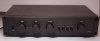
1-main.JPG

The original DH100 was Hafler’s model into the low-end. It used op-amps and was a minimalist design (my opinion based on parts count and size and price).
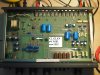
Insides look like:
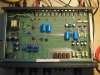
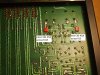
2-inside.JPG
 
Register to hide this ad
I wrote myself a note that the IC’s pin 1 was facing the rear. All of them. That way no explosions.

The DH100 was sold from the late 70’s to the mid 80’s. So here’s how you can tell it’s a series 1:

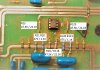
1. In the stenciling identifying the DH100, you can see the board version – 23. That means it’s the series 1 since they didn’t anticipate changing the board they didn’t id it as 23A.
2. There are three TL082s (ICs2-4) and one 5532 (IC1) opamps in the signal path, IC6 (LM393) is for the muting circuit.
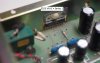
3. There’s a single chip IC5 (5553) for the VR that is mounted on the left (see pix)

3-how2tell-S1.JPG

Series 2 has

1. Board version 23B (I am told there is a 23C)
2. All signal path ICs (IC1-4) are 5532s.
3. There are two power supply VRs (7815 for +15, 7915 for -15) – the 5553s being obsolete.

It is the 5532s that are important to the upgrade. The original Series 1 only had one 5532 and it was right up in front, servicing the input signal from the phono input. The TL082s were older, slower, and noisier. The 5532 was new at that time and was probably too expensive to use in all four other IC positions. Series 2 changed all signal path ICs(1-4) to 5532.

The use of 5532 lowered the noise floor and had a higher slew rate so it was a good upgrade. That 5532 survives to this date as a good op-amp for audio.
 
The DH107 upgrade kit

Hafler issued an upgrade kit to convert Series 1 to Series 2. It consisted of

1. Replacement resistors for R18, R25, and R118, R125 (original=47.5K, new=22.1K)
2. Replacement resistors for R20, R21 and R120, R121 (original=475, new=1.1K)
3. Two 47pf caps (new C35, C135) to be added across R15 and R115
4. Set of three 5532 opamps to replace the TL082s in IC2-4 positions

The only difference left after the upgrade is that the single chip dual-voltage regulator (5553) remains in the system.
This part is now obsolete and if it fails then it will be time to consider a dual VR system.

One important note is that Hafler redesigned the circuit (#1, #2, #3 above) to be able to use the 5532s.
This was not your usual op-amp rolling “I-hear-that-XXXX-sounds-better”.
So before you replace the 5532s with 2604s, 2134s, 4562’s or whatever
boutique-op-amp-du-jour, check the circuit against the datasheets,
and apply good sound engineering in understanding what has to be done. Or your rolling is on the floor laughing.

BTW the 47pf caps stops oscillations in the feedback loop (R15/R115) – this means the only thing in your house that rings should be your telephone.
Upgrade steps 1 and 2 (old and new values on the second line in each box)

4-replace-resistors-for-opamp-upgrade.JPG
 
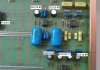
Upgrade step 3:

5-upgrade-S2.JPG

And the last step in the upgrade is to replace the 3 TL082s with 5532s (DH100 is already socketed)


6-replace-Opamps.JPG
 
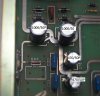
Now let’s refresh those eCaps that are now approaching 40 years old:

The whole list is

Qty ID old value new value

4 C5, C105, C9, C109 220/10 NP 220/16 NP
2 C26, C27 470/25 P
2 C16, C17 1000/50 P power supply
2 C18, C19 470/25 P 470/50 P power supply


7-caps-upgrade.JPG
 
And a look at the power supply:

8-psu.JPG


I like upgrading power supply caps to higher voltage rating. Generally speaking, caps
should have their voltage ratings no less or not close to the supply voltages (in this
case dual 15v) unless the circuit calls specifically for something less. The 50v in the
picture is fine for before the regulators and after.

Don’t forget the rectifier diodes – there’s four 1N4003s (200PIV at 1Amp) that’s replaced by UF4007s.

To sum up, just upgrading a Series 1 or 2 is a simple matter of 10 caps and 4 diodes and
you’re good to go for another 30 or 40 years. Even the upgrade to Series 2, the parts will
still be available for a long time to come (8 resistors, 2 caps, 3 ICs)

If you see a DH100 - they are a reasonable preamp for phono use in your system whether
it’s a starter or an advanced system.

Again, thanks to all those at AK that help everyone with problems, debugging, advice, and help.

enjoy,
Bob
 
Just a querie: if 3 opamps are being replaced, how come Hafler only modded the circuit for one of the opamps? (I havent seen the schematic, so I could be asking something stupid). :
 
op-amp design. if you look at different op-amps they have different characteristics. for example
different slew rates, compensation, and the BIG one called unity stability. feedback is usually
a combo of resistor for amount of gain and cap for frequency control. sometimes you need to
be careful with the feedback to prevent oscillation.

this is one reason why op-amp rolling is a bad idea unless you also test with a spectrum analyzer
to find any ringing in the high frequencies or a scope to see where there's high freq voltage spikes.

you should look at the schematic and figure out why Hafler put a cap there for the 5532 but
wasn't necessary for the TL082. they went to the trouble to revise the PCB to version "B"
so it was important.

one idea I didn't talk about is to decouple the Vcc/Vee to ground and from Vcc to Vee. Research
the internet for this.

if you discover the reasons for these then you begin to understand design, otherwise it's just
another factoid without the understanding. There's an old saying about teaching a man to fish
and he feeds himself forever...
 
Sorry I dont think I made it clear...happy with the changes for the new opamp, but above only specified the component changes for one of the opamps. there are another two TL082 on the board to change as well, but no peripheral components specified to be changed.
is that right?
 
by the way, if your DH100 has sound quality or volume balance (one channel louder than the other) problems
then the muting circuit is suspect - this is a common problem with DH110s which uses the same circuit
for muting. Maybe after 20 or 30 years the JFETs get tired.

see post 24 onwards
http://audiokarma.org/forums/index.php?threads/hafler-dh-100-issue.759730/page-2

the test is to remove the j112s, if the problem goes away then voila

if it happens more than once, either not use the J112s (permanent removal) or socket them
and buy a dozen. also replace the LM393 just in case. Socket that one, too.

Bob
 
Last edited:
Bob thanks for the help with the above thread. I am going to change one of my DH100's over to a series 2 to compare to the series 1.

So I need

Metal film 1/4w 1% resistors
4 each 22.1k and 1.1k ohm

2 each PP cap 47pf voltage ?

4 each 5532 opamps.

Anything I am leaving out?
 
while you're inside the unit,
upgrade the power supply caps, the other caps, and the rectifier diodes (four uf4007s)
see post 5 and 6
 
Ok. I replaced all the electrolytics already. Both the PS caps and the NP lytics. I will add the diodes to my shopping list.

Think these Wima caps are ok for the 47pf caps? They didn't have many options in this size

http://www.mouser.com/Search/m_ProductDetail.aspx?WIMA/FKP2O100471D00JSSD/&qs=sGAEpiMZZMv1cc3ydrPrFwgzP98AO9iddF9BMFB0sAM=

And theses for the diodes? They had quite a few options for the diodes. I dont quite know what are good qualities in a diode:). I do know they only work one way

http://www.mouser.com/Search/m_ProductDetail.aspx?Fairchild-Semiconductor/UF4007/&qs=sGAEpiMZZMtbRapU8LlZDz3zbYnpxBJB5elDBydTRZE=

I already have the resistors and opamps picked out.
 
Last edited:
there should be a lower voltage wima for the 47pf - cheaper if nothing else. any uf4007 should do it.

are you going to upgrade both units? it wouldn't make sense to keep the one that has "Taiwan" parts
as is. from one of the original posts, upgrade both. op-amp roll in one and have an instant
comparison without relying on memory.
 
The 1kv Wimas are only 64 cents each. I'll just go with those.
All parts for 1 preamp are just over 8 bucks.

If I do the other preamp I'll have to buy the lytics too. So it will be about 13$ for that one. Pretty cheap if you ask me:)

I'm kinda interested to see what the series 1 versus 2 sounds like.
TL082 are 75 cents. I'll buy 4 with my order to replace the made in Taiwan parts. I'll do a true A/B comparison before I start rolling opamps
 
actually, for that first unit, you'll only need three TL082s, the phono IC1 is already a 5532
but do replace it with a new one.

yes, you cannot a better bargain.

Bob
 
Bob
I like how you add labels on the pics. Is that done with one of the photo programs?
thanks
jim
 
its the Windows paint program, from file explorer hover over the JPG and right click,
4th one down is "edit". pick an object and click and drag to make it bigger. I can't
seem to add text to the arrow so I use a text box - select opaque and color to make
it stand out. You can also do a resize - click on pixels and over-ride the original
size - I use 500 pixels horizontal and click on keep aspect ratio.

if you click on the JPG you get the photo editor which is great for sizing and rotating
but doesn't do texts and other things.

while I love pictures everyone posts, I can never find the "xxx" when there's
dozens to hundreds of parts.
 
its the Windows paint program, from file explorer hover over the JPG and right click,
4th one down is "edit". pick an object and click and drag to make it bigger. I can't
seem to add text to the arrow so I use a text box - select opaque and color to make
it stand out. You can also do a resize - click on pixels and over-ride the original
size - I use 500 pixels horizontal and click on keep aspect ratio.

if you click on the JPG you get the photo editor which is great for sizing and rotating
but doesn't do texts and other things.

while I love pictures everyone posts, I can never find the "xxx" when there's
dozens to hundreds of parts.

Well thanks for the great pics and very informative thread. Its making working on my DH100 even easier. :thumbsup:
 
Back
Top Bottom