• The move to the new server is done. There are some software and database maintenance updates in process. This has us passing the hat around to help out. We appreciate any donations. Seriously, even a dollar helps. The payment page may be found here - https://www.audiokarma.org/support.html

Variable speed cooling fan for your gear

Bauhausler

Rational Subjectivist
I have found that moving a little air makes a huge difference in the operating temp of a piece of gear. Lower operating temp means longer life. For $20 and 15 minutes work you can make a variable speed fan to add on to existing gear.
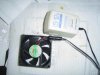
I used a radio Shack universal adaptor that will go from 1.5 to 12V @ 300ma:

http://www.radioshack.com/product/i...origkw=273-1662&kw=273-1662&parentPage=search

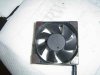
The fan is a 3" 12V 150ma unit I bought in multiples a while back. The adaptor will run two of these at full speed (a LOT of air) or 3 or 4 fans at lower voltages.

There are smaller fans available cheaply, and they can be useful in tight places, but to move the same air they have to run at a higher speed creating much more noise. I find that a larger fan turning slowly will move plenty of air and be inaudible.

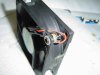
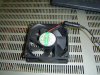
See the pix below.

I used a reamer to open up one of the mounting holes in the 'outflow' side of teh fan body to accept a mono mini jack. Other jack types will fit. The Radio Shack adapter comes with a variety of tips. I hardwired the jack to the fan lead wires. I had to grind the flange thinner to mount the jack because the mounting threads on the jack weren't long enough.

To hold the fan in place I used self adhesive magnetic material stuck on the 4 bottom corners. This is to be mounted horizontally on top of my friend's new AV receiver over the internal heatsinks, so it just needs to stay in place and not vibrate around. If it's to be mounted vertically, more powerful magnets can be glued on and covered in duct tape or felt to prevent scratching.

If you need to run 2 fans for a unit with dual heat sinks, put a second jack in parallel on one fan and to the second fan attach a lead terminated in a mini plug. Plug the adaptor into the first fan and plug the second fan into the first.

Note polarity of connection and direction of flow. By convention, fans have color coded leads and arrows for rotation and flow marked on the frame.
The fan will start and turn on as little as 4.5VDC. I find tha tfull flow is rarely necessary and something like 7 - 9V is adequate, more flow producing more noise and little increase in cooling.

This can be made in a few minutes and will greatly reduce the operating temp of your gear.
 

Attachments

  • Dsc02547.jpg
    Dsc02547.jpg
    33 KB · Views: 107
  • Dsc02548.jpg
    Dsc02548.jpg
    17.1 KB · Views: 87
  • Dsc02550.jpg
    Dsc02550.jpg
    13.7 KB · Views: 52
  • Dsc02551.jpg
    Dsc02551.jpg
    14.2 KB · Views: 86
Register to hide this ad
Nice post and description of how to do this. I did the exact same thing in my HT and split the power into two fans, one for my amp and the other for my AVR. You can buy the exact same setup at Fry's. I used stick on plastic bumpers on the bottom of the fan to keep any vibration noise down and to keep the fans from moving. I run mine at 6v which provides enough air flow yet keeps the noise to a minimum. This dropped the temps significantly. :yes:
 
To make this even cheaper, you can recycle common 24V fans from dead gear, or 12V fans from CPU coolers. If you have a 12V wall wart already you can put a 100Ohm pot in series, gluing it to the back of the wall wart case. That becomes the speed control.
 
I put small fans on all 4 of the external power transistors of my Technics 9060 mono strapped amps. NO thermal shutdownm NO overheating. I mean these little amps were built pretty dam good and now are damn near bullet proof!

Not to mention these amps sound very smooth and the fan noise is very low.
DC
 
Fans

Yes bigger is better. I took a 220 volt fan and ran it at 110 volt. i runs slower, moves a lot of air and is quite.
 
"Yes bigger is better. I took a 220 volt fan and ran it at 110 volt. i runs slower, moves a lot of air and is quite."

Be careful with this. Some AC motors will get pretty hot when run at reduced voltages if they are not made specifically for that duty (reduced voltage/variable speed operation). Just keep an eye on it. Rule of thumb is if you can't hold your hand on the motor case while it's running, it's too hot.
 
I think I'm going to do this to my Realistic receiver. You can fry eggs on it when I'm working it.
 
I've done the same thing, but use a 120mm Thermaltake fan. They're very quiet fans. Dead quiet when running at 6v.
-Wayne
 
how about a thermostat?

I would like to see this with a thermostat of some sort that turns the fan off when your gear is not in use. I am sure you dont want to plug that into the outlet on the back of the receiver (electrical noise) and you dont want to get up an unplug it when not in use... so a thermostat could control the on and off of the fan... right?

Carl
 
I would like to see this with a thermostat of some sort that turns the fan off when your gear is not in use. I am sure you dont want to plug that into the outlet on the back of the receiver (electrical noise) and you dont want to get up an unplug it when not in use... so a thermostat could control the on and off of the fan... right?

Carl

Great idea. When you develop and test that, would you post a parts list with your description of it? Other AK-ers would benefit from your insight.
 
I would like to see this with a thermostat of some sort that turns the fan off when your gear is not in use. I am sure you dont want to plug that into the outlet on the back of the receiver (electrical noise) and you dont want to get up an unplug it when not in use... so a thermostat could control the on and off of the fan... right?

Carl

I made one using Radio Shack parts. Used a variable resistor to set the on temp. The level can be set to any temp needed.I have it set to 90* F. The fan stays on for only a few seconds then cycles off when the temp falls below the preset level. On again when the temp rises back to the level set by the VR. 105 CFM fan moves a lot of air.
I would suggest using a solid state relay to prevent a pop through the speakers.

Ron
 
"Yes bigger is better. I took a 220 volt fan and ran it at 110 volt. i runs slower, moves a lot of air and is quite."

Be careful with this. Some AC motors will get pretty hot when run at reduced voltages if they are not made specifically for that duty (reduced voltage/variable speed operation). Just keep an eye on it. Rule of thumb is if you can't hold your hand on the motor case while it's running, it's too hot.

AC motor speed is controlled by the frequency. When voltage is adjusted the change in delivered current can exceed design intent...:)
cheers,
Douglas
 
Great idea. When you develop and test that, would you post a parts list with your description of it? Other AK-ers would benefit from your insight.

As I recall the Hafler 500 had a 2 speed fan. The manual with schematic and parts list is available at the Hafler site.
 
I used two 12v computer cooling fans, but run them with a 9v wall wart. At 9v they run very quietly, but still move ample air.
 
As I recall the Hafler 500 had a 2 speed fan. The manual with schematic and parts list is available at the Hafler site.

hey-Hey!!!,
The Carver PM900 had a DC fan that also ran two speeds. Two thermo-switches on the main heatsink. One made the transition to high speed, the other cut power to the amp if it got too hot. I had no problem getting to high speed but I never did get it to shut down...:)
cheers,
Douglas
 
Thermostat Controlled Fan

Great idea. When you develop and test that, would you post a parts list with your description of it? Other AK-ers would benefit from your insight.

I successfully used a thermostat to create a fan control that comes on at 90 degrees. I placed the thermostat above the amplifier so it will come on when the system is in use. I had to cut a trace and attach the power wires to make a simple circuit utilizing the heat-activated switch. I will post pictures and instructions in the next couple weeks. A quick parts list includes an old wall-wart cell phone charger (12v DC), some leftover wire, a big 120mm computer fan, and a simple cool-only (no heat) thermostat (which cost me $3 from an electronics overstock store). Details to follow.
 
I successfully used a thermostat to create a fan control that comes on at 90 degrees. I placed the thermostat above the amplifier so it will come on when the system is in use. I had to cut a trace and attach the power wires to make a simple circuit utilizing the heat-activated switch. I will post pictures and instructions in the next couple weeks. A quick parts list includes an old wall-wart cell phone charger (12v DC), some leftover wire, a big 120mm computer fan, and a simple cool-only (no heat) thermostat (which cost me $3 from an electronics overstock store). Details to follow.

Excellent. By Thermostat do you mean the conventional mechanical contacts type used in home heating/cooling systems?
 
Excellent. By Thermostat do you mean the conventional mechanical contacts type used in home heating/cooling systems?

Yes conventional mechanical contacts. The thermostat I used had a expansion / contraction coil with a magnet on the end and a glass tube with 2 unconnected metal contacts that are pulled together when a magnet on the end of the coil is in the right position.

Also, I have a dedicated circuit for my home theater gear so the thermostat / fan assembly runs on a different circuit so I dont have to worry about any popping sounds when it turns on.
 
Back
Top Bottom