• The move to the new server is done. There are some software and database maintenance updates in process. This has us passing the hat around to help out. We appreciate any donations. Seriously, even a dollar helps. The payment page may be found here - https://www.audiokarma.org/support.html

Very quiet right channel on old TEAC deck

toucantouc

New Member
I recently became the owner of a TEAC A-250s, and the left channel plays just fine but the right channel plays very quietly (on all outputs), I replaced the belt and cleaned the head and nothing has changed.

What should I do?

I have found very little documentation of it on the internet of this machine, but it is comparable to the A-350s minus the two output faders.
 
Register to hide this ad
Hi and welcome to AK. :)
There is a SM for the Teac A350 that can be found here, but I'm not sure what's different with the S model.
https://archive.org/details/manual_A350_SM_TEAC_EN/mode/2up
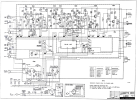
Here is the schematic for an A250, if it helps.
  • I'm not familiar with the A250 but if it is like other mechanical decks there is one long mechanical switch mounted on the PC board (S102 on the schematic below) that switches signals between Play and Record.
  • Sometimes these switch contacts become dirty and oxidized and need cleaning with a contact cleaner spray or isopropyl alcohol, then worked back and forth many times to clean the contacts.
  • If you can take apart the deck and locate this switch, you can try to clean it and see if it helps.
  • The switch is probably linked to the REC pushbutton by some levers so with power off, if you press the REC button down, you should see it move position.
  • As a test, you might try to press the REC button down/up many times then see if it helps any.
  • When you play a tape and the right channel is quiet, does the right VU meter move like the left or does it barely move?
  • If you put in a blank tape and try to record by pressing REC and PLAY simultaneously, do both meters move or still only the left meter?
Do you have any electronic troubleshooting skills and equipment like digital multimeters, soldering iron, oscilloscope, etc. that we can use to troubleshoot this problem?

1733813430405.png
 
Last edited:
Double check the cleanliness of heads again. Even the smallest bit of crud can result in poor performance on one channel.
 
Double check the cleanliness of heads again. Even the smallest bit of crud can result in poor performance on one channel.
Cleaned it again, no change. I don't think that is the issue here because I get the same problem during monitoring with the record function.
 
Back
Top Bottom