Follow along with the video below to see how to install our site as a web app on your home screen.
Note: This feature may not be available in some browsers.
The move to the new server is done. There are some software and database maintenance updates in process. This has us passing the hat around to help out. We appreciate any donations. Seriously, even a dollar helps. The payment page may be found here - https://www.audiokarma.org/support.html
its basically a dual tape setup that lets you play a tape and record it to the other at the same time. Sometimes the cheap ones ran a single motor for all this which forced them to run at the same speed, so "in sync". Might also be that brand's name for high speed dubbing, which is just running things at 2-3x the normal speed while it copies.
Thats where you change one or two channels to the record head for playback and then when you record the remaining desired channel used for recording will be in sync. Professional Ampex machines were equiped with an external " SEL Sync " switcher. I had one with a AG-440-4 C. But very seldom used it unless some one screwed up on the solo track. It was used some times when making sync announcements at the radio station that needed correcting then dubbed to carts.
Thats where you change one or two channels to the record head for playback and then when you record the remaining desired channel used for recording will be in sync. Professional Ampex machines were equiped with an external " SEL Sync " switcher. I had one with a AG-440-4 C. But very seldom used it unless some one screwed up on the solo track. It was used some times when making sync announcements at the radio station that needed correcting then dubbed to carts.
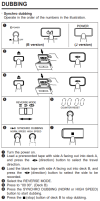
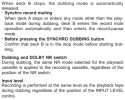
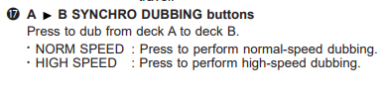
According to a JVC manual (if that's what you have) Synchro dubbing is copying one tape to another either at normal speed or high speed (see excerpt from JVC manual). @gadget73 described it above. It is used to make a duplicate tape. I think if you wanted to make a mix tape you would manually cue-up the song on the play deck slightly before the music you want to dub, place the record deck into REC PAUSE, start the playback and release the pause. Hit pause again when the song is over to stop recording and cue up the next song.