• The move to the new server is done. There are some software and database maintenance updates in process. This has us passing the hat around to help out. We appreciate any donations. Seriously, even a dollar helps. The payment page may be found here - https://www.audiokarma.org/support.html

WiiM WiFi Streamer

OK, played BT lastnight off and on for a few hrs. Switched back and forth between WiFi and BT from the app as shown up thread.

My phone, and the SOs phone has not auto connected to the WiiM BT and it is available as shown below. :dunno:
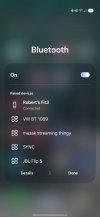
Screenshot_20260501_104036_One UI Home.jpg

Edit: And to the online discussions. Problems get the most traction and are the loudest, praise is rarely addressed. How many are actually having problems % wise. If one digs into it, odds are it is a low number compared to how many units are being used, and more than likely operator error driven (settings). I see this daily with the systems I work on.

And I understand that WiiM addressed this in discussions. Are they just trying to find a fix for technology tards? Maybe, good customer service if that's the case.
 
Last edited:
Just a thought.

Is the "last user" leaving the WiiM with BT being the input. If so auto connect makes sense. I switch the input back to WiFi when done. As mentioned, it has yet to auto connect.
 
OK, played BT lastnight off and on for a few hrs. Switched back and forth between WiFi and BT from the app as shown up thread.

My phone, and the SOs phone has not auto connected to the WiiM BT and it is available as shown below. :dunno:

It didn't auto connect because you haven't used Bluetooth or you've forgotten the device or updated the OS or whatever. Once you do connect, it will always reconnect automatically, though only when you select Bluetooth as input (which helps a lot, the auto-connect won't interrupt other inputs). At least that's how it works with my WiiM Ultra that I tested yesterday, will test the Pro+ when it arrives.

Are they just trying to find a fix for technology tards? Maybe, good customer service if that's the case.

I'm not really sure how you get away with implying people are technology tards. I'm pretty sure it's against the forum rules, and I know its against the spirit of the forum. The chronic inability to understand that there are other technology use cases, that differ from your own, is pretty much the polar opposite of technical brilliance.

Just a thought.

Is the "last user" leaving the WiiM with BT being the input. If so auto connect makes sense. I switch the input back to WiFi when done. As mentioned, it has yet to auto connect.

Yes, this is how it works -- it automatically connects to the last user. This "makes sense" only if there is only one person who uses the Bluetooth connection.

It does not "make" sense even if there are only two Bluetooth users. Why? Because if your wife was the last person who used it, and her phone is in the kitchen when you want to listen to Bluetooth in the living room -- her phone is going to auto connect and lock you out. How do you fix that? You either have to go find her phone and shut off bluetooth (or forget the WiiM device), or you need to walk to the WiiM device and hold down buttons for a few seconds to force it into pairing mode, then you can walk back to your phone, and only then will you be able to connect.

That's for a 2 people. My situation has multiple users.

Is it a major issue? No, but only because people don't often use WiiM for Bluetooth. However, for people who want to use the Bluetooth feature, it is a major annoyance for situations where there are multiple users (which is a very normal case for families). The simple solution is for WiiM to add an option to choose whether you want Bluetooth to a) auto-connect to last user; or b) not Auto-connect. It would take about 2-seconds to code, and the result would be a better product for those who use the WiiM Bluetooth feature.
 
I’ve three WiiM devices. I run my WiiM Ultra into a Cambridge Dac Magic 200 (usb). Much better sound.
 
It didn't auto connect because you haven't used Bluetooth or you've forgotten the device or updated the OS or whatever. Once you do connect, it will always reconnect automatically, though only when you select Bluetooth as input (which helps a lot, the auto-connect won't interrupt other inputs). At least that's how it works with my WiiM Ultra that I tested yesterday, will test the Pro+ when it arrives.


I'm not really sure how you get away with implying people are technology tards. I'm pretty sure it's against the forum rules, and I know its against the spirit of the forum. The chronic inability to understand that there are other technology use cases, that differ from your own, is pretty much the polar opposite of technical brilliance.


Yes, this is how it works -- it automatically connects to the last user. This "makes sense" only if there is only one person who uses the Bluetooth connection.

It does not "make" sense even if there are only two Bluetooth users. Why? Because if your wife was the last person who used it, and her phone is in the kitchen when you want to listen to Bluetooth in the living room -- her phone is going to auto connect and lock you out. How do you fix that? You either have to go find her phone and shut off bluetooth (or forget the WiiM device), or you need to walk to the WiiM device and hold down buttons for a few seconds to force it into pairing mode, then you can walk back to your phone, and only then will you be able to connect.

That's for a 2 people. My situation has multiple users.

Is it a major issue? No, but only because people don't often use WiiM for Bluetooth. However, for people who want to use the Bluetooth feature, it is a major annoyance for situations where there are multiple users (which is a very normal case for families). The simple solution is for WiiM to add an option to choose whether you want Bluetooth to a) auto-connect to last user; or b) not Auto-connect. It would take about 2-seconds to code, and the result would be a better product for those who use the WiiM Bluetooth feature.
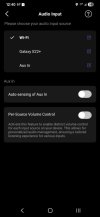
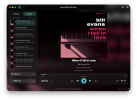
Are you leaving the input settings in the Wiim app on Bluetooth? If you switch back to Wi-Fi after a Bluetooth session, it will not auto connect because Bluetooth is turned off and the Wiim is not broadcasting Bluetooth. Auto connect is a pain in the ass for most Bluetooth devices, but in my experience Wiim is different because you can easily choose the input from the app.

Screenshot_20260501_124021_WiiM Home.jpg
 
It didn't auto connect because you haven't used Bluetooth or you've forgotten the device or updated the OS or whatever. Once you do connect, it will always reconnect automatically, though only when you select Bluetooth as input (which helps a lot, the auto-connect won't interrupt other inputs). At least that's how it works with my WiiM Ultra that I tested yesterday, will test the Pro+ when it arrives.
Did you actually read what I wrote in the quote for tgis response. You are wrong in everyone of your assumptions.

You are the one that asked a question of experienced WiiM users. As per your MO, when you didn't get the answers you expected from these users its just push back.

I am out goos luck?

Just got back home, SO has everything on listening to music, no auto connect.

And I understand your usage, we even recreated it lastnight, yes only 2 users, but that does not matter. Its all about each user using the settings properly.
 
Are you leaving the input settings in the Wiim app on Bluetooth? If you switch back to Wi-Fi after a Bluetooth session, it will not auto connect because Bluetooth is turned off and the Wiim is not broadcasting Bluetooth. Auto connect is a pain in the ass for most Bluetooth devices, but in my experience Wiim is different because you can easily choose the input from the app.

View attachment 3753270
This
 
Are you leaving the input settings in the Wiim app on Bluetooth? If you switch back to Wi-Fi after a Bluetooth session, it will not auto connect because Bluetooth is turned off and the Wiim is not broadcasting Bluetooth. Auto connect is a pain in the ass for most Bluetooth devices, but in my experience Wiim is different because you can easily choose the input from the app.

View attachment 3753270

Yes, you get it. Thank you.

As I said, the fact that it only auto-connects when you select Bluetooth in the WiiM app helps a lot.

As you've said, auto-connect can still be a pain in the ass for Bluetooth. With a single user for the system, auto-connect is great. Since I have multiple users, the phone that auto-connects when I do select Bluetooth, is usually the wrong one, and disconnecting that phone is a pain (either walking to the WiiM (which will be hidden in my room and not easily accessed) and holding down buttons for several seconds, or figuring out whose phone is connected and asking them to disconnect.

If you have to pick one, auto-connect when selected is the better option for single users. However, in 2026, when we have software-controlled devices, making the auto-connect switchable to on or off is trivially easy and would improve WiiM's Bluetooth offering.
 
Did you actually read what I wrote in the quote for tgis response. You are wrong in everyone of your assumptions.

You are the one that asked a question of experienced WiiM users. As per your MO, when you didn't get the answers you expected from these users its just push back.

I am out goos luck?

Just got back home, SO has everything on listening to music, no auto connect.

And I understand your usage, we even recreated it lastnight, yes only 2 users, but that does not matter. Its all about each user using the settings properly.

I read it. The problem is that you are repeatedly answering the question is not in debate (that it only auto-connects when you select Bluetooth) and repeatedly failing to absorb the issue I described many times (when the wrong phone auto-connects in Bluetooth mode in a multi-user environment, it is a pain). Lacking the ability to understand technical use cases that don't match your own is a pretty significant shortcoming for somebody labeling others technical tards.
 
Yes, you get it. Thank you.

As I said, the fact that it only auto-connects when you select Bluetooth in the WiiM app helps a lot.

As you've said, auto-connect can still be a pain in the ass for Bluetooth. With a single user for the system, auto-connect is great. Since I have multiple users, the phone that auto-connects when I do select Bluetooth, is usually the wrong one, and disconnecting that phone is a pain (either walking to the WiiM (which will be hidden in my room and not easily accessed) and holding down buttons for several seconds, or figuring out whose phone is connected and asking them to disconnect.

If you have to pick one, auto-connect when selected is the better option for single users. However, in 2026, when we have software-controlled devices, making the auto-connect switchable to on or off is trivially easy and would improve WiiM's Bluetooth offering.
This is not a problem with the WiiM, however. It's just how BT works. Clearly a first world "problem".
 
I read it. The problem is that you are repeatedly answering the question is not in debate (that it only auto-connects when you select Bluetooth) and repeatedly failing to absorb the issue I described many times (when the wrong phone auto-connects in Bluetooth mode in a multi-user environment, it is a pain). Lacking the ability to understand technical use cases that don't match your own is a pretty significant shortcoming for somebody labeling others technical tards.
My guess after all of this back and forth, is that the Wimm is not for you.
 
My guess after all of this back and forth, is that the Wimm is not for you.

I already ordered the Pro Plus. I think I'll love it in general as a replacement for the Chromecast Audio -- at least I hope so. I certainly love my WiiM ultra, except for the lack of a power button. I'll just have to keep doing the Bluetooth separately as I did with the current Chromecast Audio is being replace with the WiiM.

In my first post, I didn't know that you had to select Bluetooth before it would auto-connect -- that would have been a non-starter for my situation. I learned that from the discussion here, so that feedback was very helpful to see that the Pro Plus was viable as Chromecast Audio replacement. I would have really liked to get rid of my separate Bluetooth receiver and use the WiiM BT instead, but that won't work for my "shared user" situation.
 
I'm not sure anyone cares about this issue, but I contacted WiiM about adding the option to be able to disable the Bluetooth auto-connect. They have added it to the feature request list and pointed out a recent feature they added in December 2025 that allows you to place WiiM devices into Bluetooth pairing mode through the WiiM app. That can be used to kick off an auto-connected phone without needing to walk to the device and hold buttons to put it in Bluetooth pairing mode.

This describes Bluetooth pairing through the app => Use the "Enter Pairing Mode" Option in the WiiM Home App for Bluetooth Pairing : Help Center
 
Back
Top Bottom