• The move to the new server is done. There are some software and database maintenance updates in process. This has us passing the hat around to help out. We appreciate any donations. Seriously, even a dollar helps. The payment page may be found here - https://www.audiokarma.org/support.html

WiiM WiFi Streamer

I use the Anker Elite Dual Port 24W Wall Charger" - $15.
My view of switching power supplies is - dumbed down - bigger is better for similar rating. The stock Wiim 2A supplies may work fine, but they are tiny compared to, say, a common 2A Apple Ipad charger.
It takes more real estate to do things "right", and I'd had good luck with Anker power products so far. When I buy anything like this at Amazon now, I look for items that have a huge number of reviews, and try to find the one with the lowest % of negative 1 star ratings. Anker also makes 5V battery packs, and that could be another way to go.
I'll likely build linear supplies for the Wiim units eventually, in the mean time these Anker units work fine. Have not actually tested either one though. I do like the protection features built into this model Anker shown below.
Anker 24W 5V supply at Amazon
here's that DIY switch mode power supply filter kit. The thread describing it details the noise reduction possible. They will clean up the ultrasonic noise coming from any switching supply <3A
DIY Audio SMPS filter kit
Bigger isn't necessarily better. As the switching frequency goes up, component sizes go down. Higher switching frequency generally means it is farther from the audible band. Technology improves and things get smaller for same or better performance.

The Wiim Pro Plus has no noise from the power supply getting into the audio. See: https://www.audiosciencereview.com/forum/index.php?threads/wiim-pro-plus-streamer-review.50254/ Internally, there are switching supplies that convert the incoming DC voltage to +/- 12V for analog circuits and 3.3V and maybe 5V for logic circuits. None of that noise is found in the audio, either.

Likewise the SMSL SU-1 DAC. It gets power from USB port on a computer or wall wart, and has multiple internal switchers to generate the necessary voltages for the circuits to work. None of that noise shows up in the audio either. See: https://www.audiosciencereview.com/...surements-of-singxer-su-1-usb-to-s-pdif.7095/

Hanging an external linear power supply/filter at the DC input of these things is a waste of time and money. I suggest checking measurements at the ASR site for the product you're interested in "improving" with an external power supply/filter to see if there's anything that can be improved. The engineers who design these things know what they're doing, and probably know more about it that you and I (and I used to be an EE) and 10 other people put together.

OTOH, low current linear or switching power supplies are relatively cheap, so if it makes you feel better, have at it.
 
I would point out that any advice I give here is based on some experience, but then again, it's worth what you paid for it.
(edit)
Fully aware of the ASR reviews and people who buy stuff based on measurements alone. For me, measurements are only one data point.
Anyone who wants more info on SMPS power supply noise can read this DIY Audio thread, which has examples of noise reduction possible at the bottom of page 2.
This nose filter design uses large inductors and caps to reduce power supply noise quite effectively.
These L,C components take up more room in a well built supply. And make the enclosure larger - this enclosure size increase has no relationship to the switching frequency.
SMPS noise filter diy audio
I would also point out that most failures in audio gear are due to electrolytic caps, and their life is based on internal temperature. For filter caps, the temperature can be shortened by ripple current due to self heating. The more noise you send in, the more ripple current the filter caps see. Want to maximize your components life? Feed it good power. I'll leave it up to others, then, as to whether you can hear it or not.
 
Last edited:
New streamer arrived.
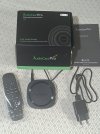
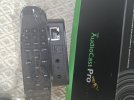
audiocast M20  1.jpgaudiocast M20  2.jpg
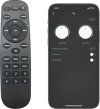
Something from Arylic/Wiim cooking facility. Remote is almost identical as Arylic one. Obviously generic one.(some buttons like Line In, USB, Optical In are not supported with functionality, there are not USB, optical, nor line In). Upon difficulties experienced with original Audiocast software, i managed to connect and use it with WiiM Home and 4Stream software.

PS
As declared , this is Wireless multi-room sound streamer, and also has Spotify label. I tried to use it in my heterogenous home network (WiiM Ultra, Arylic Up2Stream and now AudioCast PRO M20) but Spotify doesn't play multiroom, Internet radio does play multiroom. Is this Spotify issue, banning multiroom or I do not know to set up multiroom for Spotify?
Does anybody achieved to play Spotify multiroom?
 
Last edited:
New streamer arrived.
View attachment 3602409View attachment 3602410
Something from Arylic/Wiim cooking facility. Remote is almost identical as Arylic one. Obviously generic one.(some buttons like Line In, USB, Optical In are not supported with functionality, there are not USB, optical, nor line In). Upon difficulties experienced with original Audiocast software, i managed to connect and use it with WiiM Home and 4Stream software.

PS
As declared , this is Wireless multi-room sound streamer, and also has Spotify label. I tried to use it in my heterogenous home network (WiiM Ultra, Arylic Up2Stream and now AudioCast PRO M20) but Spotify doesn't play multiroom, Internet radio does play multiroom. Is this Spotify issue, banning multiroom or I do not know to set up multiroom for Spotify?
Does anybody achieved to play Spotify multiroom?
Are you in France? I noticed the plug ends.
 
I just had a small problem that reminds me about how many times I've had such problems on the last few years. I was trying to play some music on my WPP, and the Tidal app in my phone couldn't see the player. But the LMS server could see it just fine. After about 1/2 hour of screwing around trying to figure out if the problem was in the WPP, the Wiim home app, the Tidal app, etc., I discovered that my phone wanted an android update. Once I did the update, the WPP reappeared.

I love my WPP and my Squeezebox Touch, but stuff like this happens more often than it should. It seems like every time other time I want to listen to music I have to screw around to get something working properly before I can hear anything. Now I always have a little feeling of dread every time I want to listen to music. Will it work this time, or will I be chasing problems again? It's especially annoying if I have a visitor who wants to hear my wonderful stereo system. It will always fail under those circumstances.

Sometimes I use an android tablet to control the WPP, sometimes my phone, whichever is handiest at the moment. If I was last using the phone, and now want to use the tablet, I have to restart the Tidal app on the tablet to get it to take control of the WPP.

And that is why CDs are coming back...
Oh boy, do I agree!! And when is it only a 1/2 hour of screwing around?!!
 
I assume you tried a different 5V power supply? I've had a number of electronic things go flaky, but not totally die, and replacing the outboard wall wart supply fixed them.
That includes routers, TIVO devices, etc.
But also had a few Chinese made electronic things just totally died - a Bluetooth audio transceiver, small $50 DVD player, and most recently a Ninja blast smoothie blender. All less than a year old. Amazon reviews also show this same trend - looking at negative reviews for some devices, it seems like some small % die at the 6-12 month mark. Al these cost less than $50. so losing them was disappointing and confounding, but not a disaster financially.

The newer stuff is all SMD inside, so very difficult to even look for or replace obvious things like big caps that went bad. I fix a lot of things, but the root cause of all these failures was unknown. Works one day, does not the next.
Funny thing is, I own 3 Slim Devices streamers bought over 20 years ago, and they have been plugged in and used continuously all that time. All have bright displays and work fine to this day. They all have large oversized linear, well filtered power supplies. Not sure if that has anything to do with it, but it can't hurt.
I have 2 Wiim devices and don't use the small supplied 5V 2A power supply with either. I use larger units from Anker, and will be adding DIY Audio power supply filters to each.
I did try a few different power supplies. Thanks.
 
I cant help with your problem.

Ever product out there has a failure rate, stuff does just break. I have been repairing things as a profession since 1988, I have received plenty of brand new parts that are defective out of the box.

Hopefully someone has seen your symptoms and knows a fix.
It doesn't give you much confidence to spend money on another one.
 
New streamer arrived.
View attachment 3602409View attachment 3602410
Something from Arylic/Wiim cooking facility. Remote is almost identical as Arylic one. Obviously generic one.(some buttons like Line In, USB, Optical In are not supported with functionality, there are not USB, optical, nor line In). Upon difficulties experienced with original Audiocast software, i managed to connect and use it with WiiM Home and 4Stream software.

PS
As declared , this is Wireless multi-room sound streamer, and also has Spotify label. I tried to use it in my heterogenous home network (WiiM Ultra, Arylic Up2Stream and now AudioCast PRO M20) but Spotify doesn't play multiroom, Internet radio does play multiroom. Is this Spotify issue, banning multiroom or I do not know to set up multiroom for Spotify?
Does anybody achieved to play Spotify multiroom?
You might want to start a new thread for troubleshooting this device.
 
It doesn't give you much confidence to spend money on another one.
I bought a Parasound amp several years ago. It died after 6 months of life. I wasn't happy but I do understand that stuff happens. Initially they were going to repair it but then decided to replace it.
 
You might want to start a new thread for troubleshooting this device.
I do not think it needs troubleshooting. Just issue that Spotify doesn't work multiroom or I do not know to set up it.
Just wanted to introduce one more device based on LinkPlay and compatible with WiiM.
 
Last edited:
I do not think it needs troubleshooting. Just issue that Spotify doesn't work multiroom or I do not know to set up it.
Just wanted to introduced one more device based on LinkPlay and compatible with WiiM.
My bad, was not aware it was a LinkPlay-technology product.
 
My Up2Stream was replaced with WiiM Ultra and is connected to Beolab 4000 speakers. Thus this sistem consists of only 2 components: source and active speakers.
Up2Stream find his place with Tube amplifier (KT90) and alniko speakers Loewe Opta LO25. So my tubes are now Spotifyied.
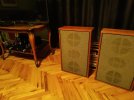
IMG_20251104_172210.jpgIMG_20251104_172540.jpg
Any suggestions for stands for speakers are welcome. DIY variant are good also ( give sketch or blueprint). Dimension are 38*60*16cm. I suppose no need for high stands. 20-30cm maximum. To lean back (how many degrees ) or not?


Empty place for source in bedroom ( after Up2Stream moved to vacuum setup) is filled with AudioCast PRO M20 about which I wrote some time ago.
Choose was made upon requirements it had to meet :

1. Compatibility with Arylic and WiiM streamers,
2. Cheap, good and small.
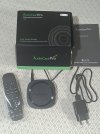
IMG_20250926_115850.jpg
The choice fell on the AudioCast Pro M20 (a device sometimes sold under the name iEast or HiFiMuse). It obviously comes from the Arylic/WiiM kitchen. It uses the same LinkPlay wifi module, the remote is almost identical to the one from Arylic Up2Stream (but the remotes are not swappable Huh) The software for Arylic and WiiM recognizes it, adds it to the list of active renderers, there is no difference in operation as far as the software is concerned. Condition 1 met Big Grin

It can be found with a remote for under 40€. So pretty cheap.
The DAC in it is ESS2093, supports PCM 24 bit/192kHz. Relatively good, not the ultimate audiophile but decent for what I intended it for.
Dimensions 86*84*21mm. Small. Condition 2 fulfilled

Now a little more about the M20.
There is no USB, it is powered by a jack (5V from the charger). It has UTP, 3.5mm Audio out and TosLink out. So it can also be connected to an external DAC, which significantly increases its versatility. It also has a remote control, and in the application you can adjust the tone color on the "analog buttons". Nice.

remote-control-600x654.jpg
Supports:
AirPlay (not AirPlay 2),
Bluetooth 5.0 with SBC codec,
DLNA, Spotify Connect, Qplay
WiFi 2.4 GHz (only . Not 5)
Lossless formats: Wav, Flac, APE, AICC. And also supports MP3, WMA, AIFF, ALAC
Internet radio iHeartRadio, TuneIn, then Tidal, Spotify connect and Nepster.
6 predefined Internet radio stations or playlists (works with Spotify) You don't even need a mobile phone to choose what to listen to. Just click on one of the 6 memories.

It plays decently, compatible with Arylic and WiiM, Spotify Connect "sees" it,...I'm satisfied.

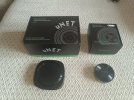
And then I got an AudioCast uNet. Minimalist NAS. The dimensions are almost identical to the described M20. There is no WiFi, but a wired connection is more stable and secure for home networks with multiple streamers. It only has UTP to connect to the router and has USB to plug in a flash drive or HDD with music.
IMG_20251006_115638.jpg
When I "opened up" for it, I decided to get the AudioCast M5. A miniature streamer with a diameter of 5 and a half cm, a height of 2 cm. It only has a power connector (the old USB) and a 3.5mm line out.

I tried various peripherals with uNet and had different experiences. It works with flash drives, HDDs and SSDs. The only limitation is that it supports peripherals up to 512 MB in size (I think that's a bit small these days). If there are few folders and they only contain music, it works without a problem. When I put a disk with many folders in it, only a few of which had music, it started to get confused. It doesn't see all the folders. In the end, I put a disk with two partitions with music on only one partition and it got completely confused.
But when you put a disk with only a few folders and only with music, it works perfectly. Well, that's what it's intended for, to read NAS music and not to rummage through the network drive through partitions and look for music. Among the disadvantages, I would mention that it does not support DSD. Maybe this will be fixed with a new firmware, maybe not.
And now about the good sides. When a disc with only music is inserted, even if it is full (up to 512MB), it works without any problems. The application sees all the music and allows you to send it independently or simultaneously to all (arylic-WiiM-AidioCast) streamers in the network. That's why I was looking for a streamer compatible with Arylic and WiiM.
PRO
See all streamers
plays simultaneously or independently on them
CON
limited disk capacity to 512 MB

I think this is a great device that allows you to create a NAS for a ridiculous low amount of money and that you don't have to have computers or expensive NASs turned on just to play music from the network.
Recommendation.

Finally, something about the little M5 streamer. Miniature, ideal for constantly carrying with you and improvising creating an AdHoc music network.
 
Last edited:
I contacted LinkPlay support to ask about problem of multiroom playing Spotify. Answer is to upgrade firmware of LinkPlay modules (A31 and A28).
And advice to consider WiiM products in future as WiiM is LinkPlay own brand.
 
I have a Wiim Pro now and like it a lot and want to add another to a secondary system.

Does the WiiM Pro Plus sound a lot better than the Wiim Pro?
 
Last edited:
If you are using the analog output of the Pro+ then yes, it does.
Done deal then . . . I run my WiiM Pro through my McIntosh preamp currently and I figured I'd jump up to the Plus for that system and use the Pro with the secondary system, thanks!
 
Back
Top Bottom