• The move to the new server is done. There are some software and database maintenance updates in process. This has us passing the hat around to help out. We appreciate any donations. Seriously, even a dollar helps. The payment page may be found here - https://www.audiokarma.org/support.html

B-2 basket case incoming , Rott, might need some parts ;)

Correct, its furthest to the right on both vfet boards.


Ok the amp is not coming out of protection and no relay click. :idea:

Weird as everything on the check list is correct.


Only one thing that is not connected, and checking back on my notes , I do not have the input cables from the selector switch board to the driver boards connected . I believe from my notes that the GND for the input wires need to be connected to the driver board . I believe that is why it won't come out of protection but everything else checks out ok.

What say you Pete?
I can't say why is not coming out of protection but that if everything was wired as intended, it should come out of protection. The driver boards do not need to be connected for the protection circuit to disengage and for the protection LED to go away.
I always test the power supply, vu-meter board, selector and protection circuit without the driver boards and without vfets. The amp must function correctly before introduceing the driver boards and vfets.

BTW, if you have the amp boards installed and the rear ground to chassis is not connected, you do not have ground of the input section of the amp boards and that is one reason why the circuit would not function correctly.
 
I can't say why is not coming out of protection but that if everything was wired as intended, it should come out of protection. The driver boards do not need to be connected for the protection circuit to disengage and for the protection LED to go away.
I always test the power supply, vu-meter board, selector and protection circuit without the driver boards and without vfets. The amp must function correctly before introduceing the driver boards and vfets.

BTW, if you have the amp boards installed and the rear ground to chassis is not connected, you do not have ground of the input section of the amp boards and that is one reason why the circuit would not function correctly.
Yes before I introduced the driver boards I did get the relay click and no protection light illuminated. So I got that correct.

I do have the GND on the input board connected to the chassis on the back.

The only thing not connected are the input wires from the switch board to the Driver board. So that has to be it.

I still need to make those cables, just waiting for a delivery.

Can I just run the GND wires from the switch board to the driver boards and see if it will then come out of protection for the time being?

Athanasios
 
Yes before I introduced the driver boards I did get the relay click and no protection light illuminated. So I got that correct.

I do have the GND on the input board connected to the chassis on the back.

The only thing not connected are the input wires from the switch board to the Driver board. So that has to be it.

I still need to make those cables, just waiting for a delivery.

Can I just run the GND wires from the switch board to the driver boards and see if it will then come out of protection for the time being?

Athanasios
yes, but it should not mater if you already tested the circuits separately.
 
yes, but it should not mater if you already tested the circuits separately.
That is whats strange. I can make all the adjustments even though the amp shows its in protection.

First, Im going to add a GND wire from the switch board to the drive board and see if it goes out of protection.
If it does then that was it, even though it should not matter as you state above.

If it doesn't , then I will remove the drive boards from the circuit one at a time and see if it goes out of protection, if with the drive boards removed it does go out of protection then something is amiss on the drive board even though I can make all adjustments. Which doesn't make sense ,:idea: this is going to be fun......NOT !!! ;)

At work now so this will be later ......

nashou
 
Yep, it was the GND wire of the input signal wires from the switch board to the Drive board that needs to be connected.

Connected a wire to each and the relay now clicks and the protection light goes off.

Thanks Pete for the info and help.

I knew I was missing something simple . 1706223283802.png


:D
 
Ok made some impromptu videos of the testing before introducing the Vfets . Not really going into details just wanted to show that the drive boards are working as should.

Next I need to adjust the meter board amp.

For that I don't think I need the
Vfets installed . Is that correct gentlemen ?

Test #1


Test #2


Athanasios
 
or you can use the external vu meter input and these them as standalone.
I'm thinking that since a proper vu meter calibration is done driving an 8 ohm load, you need the V-FETs installed in either case but please feel free to correct me if I'm wrong.
 
I'm thinking that since a proper vu meter calibration is done driving an 8 ohm load, you need the V-FETs installed in either case but please feel free to correct me if I'm wrong.
it can be done as stand alone if you feed this following voltage value (1kHz RMS) directly a the external VU-Meter inputs:
0.0245v (-30db)
0.078v (-20db)
0.245v (-10db)
0.78v (0db)

This is also one way to test the vumeter board before fitting it into the unit which is good practice. It requires and external power supply and a bit of setting up but it can save headaches later.

BTW, the C-1 vumeter circuit can be tested as stand alone too....

Back to B2, once in fitted in the unit, I still check the adjustment of the vumeter the conventional way as the last adjustment, with the vfets installed and 8 ohm load.
 
Last edited:
it can be done as stand alone if you feed this following voltage value (1kHz RMS) directly a the external VU-Meter inputs:
0.0245v (-30db)
0.078v (-20db)
0.245v (-10db)
0.78v (0db)

This is also one way to test the vumeter board before fitting it into the unit which is good practice. It requires and external power supply and a bit of setting up but it can save headaches later.

BTW, the C-1 vumeter circuit can be tested as stand alone too....

Back to B2, once in fitted in the unit, I still check the adjustment of the vumeter the conventional way as the last adjustment, with the vfets installed and 8 ohm load.

Where there's a will there's a way ... :thumbsup:
 
it can be done as stand alone if you feed this following voltage value (1kHz RMS) directly a the external VU-Meter inputs:
0.0245v (-30db)
0.078v (-20db)
0.245v (-10db)
0.78v (0db)

This is also one way to test the vumeter board before fitting it into the unit which is good practice. It requires and external power supply and a bit of setting up but it can save headaches later.

BTW, the C-1 vumeter circuit can be tested as stand alone too....

Back to B2, once in fitted in the unit, I still check the adjustment of the vumeter the conventional way as the last adjustment, with the vfets installed and 8 ohm load.

I can do it this way using my HP 8903A . I just flip the switch on the back to external Meter.

At least I'll try it and see what happens. I don't think it would hurt anything right?
 
I can do it this way using my HP 8903A . I just flip the switch on the back to external Meter.

At least I'll try it and see what happens. I don't think it would hurt anything right?
It should not. Just make sure that yo take care if that signal input ground to the vumeter.
At a high level, you want to make sure the vumeter amp works before yo assemble everything, I would still do a final check once everything is installed.
Couple of callouts:
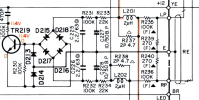
The schematic and silk screen on that PCB say 2.2k for the series resistors to the vumeter pickup points. It should be crossed out on the silk with a black marker already and noted in the parts list as 100k resistors. If you have 2.2k in there the meter would not be accurate. The schematic is wrong and I failed to catch the mistake before I printed the boards.
Second callout is to cancel the rear external vumeter switch befor you put the lid on that b-2. They are nothing but trouble even after you thoroughly clean them. If you want no future headaches, just bypass them.
 
It should not. Just make sure that yo take care if that signal input ground to the vumeter.
At a high level, you want to make sure the vumeter amp works before yo assemble everything, I would still do a final check once everything is installed.
Couple of callouts:
The schematic and silk screen on that PCB say 2.2k for the series resistors to the vumeter pickup points. It should be crossed out on the silk with a black marker already and noted in the parts list as 100k resistors. If you have 2.2k in there the meter would not be accurate. The schematic is wrong and I failed to catch the mistake before I printed the boards.
Second callout is to cancel the rear external vumeter switch befor you put the lid on that b-2. They are nothing but trouble even after you thoroughly clean them. If you want no future headaches, just bypass them.
Which location are you talking about from the ones in R235 though R240?

Can you tell which ones I used from this picture? I think 236 and 235 are 100k from the 1003F on the resistor .

52703134776_a2444821bf_h.jpg
 
B-2 arrived yesterday and I will start the renovation soon. Question of who to contact for the new PCBs I see being used or for the gerberas. I didn't have time to read everything, so if that's not a problem.
 

Attachments

  • izvana.jpg
    izvana.jpg
    62.2 KB · Views: 12
Couple of callouts:
The schematic and silk screen on that PCB say 2.2k for the series resistors to the vumeter pickup points. It should be crossed out on the silk with a black marker already and noted in the parts list as 100k resistors. If you have 2.2k in there the meter would not be accurate. The schematic is wrong and I failed to catch the mistake before I printed the boards.
Perhaps it's also worth mentioning is that the R235, 236 100Ks are part of the protection circuit input and with 2.2Ks installed, this will have an impact on the protection detection threshold ...

:thumbsdown:

1706610825892.png
:thumbsup:

1706610940487.png
:)
 
Ok got the V-fets in !!!

53498913633_1ebe0cc217_b.jpg

53497923742_338068fa95_b.jpg


I used a small box and some foam to support Heat sink and the V-fet socket board in place while I pressed in the V's .

53498918068_ac497cb40a_b.jpg


53498982863_7eabb38849_b.jpg


So I connected the Multimeter to the bias points and turned it on, heard the click and the protection light went off !!! Yeah!!!!

However I got no reading on the NS and CT points and turning the trimpot
did nothing !! Mother%^$@# !!!! So now I'm thinking the worst. Blown Outputs !! NO!!!!!! But the relay clicked and no protection? :idea:

WTF?

So I decided to at least try DC Balance and that is adjusting just fine. Dialed it in to 0.

So I said what the heck , I'll hook up my bench speakers and hope for the best with my iPhone as the source.

Well I get the test tone playing from the iPhone test tone app I use.
So the V-vets are fine. Put on some music and it's playing fine.
At this point I still had the DMM hooked up to the Bias points and I noticed that there is a reading going with the music up or down depending on what's playing.

So , more info, I only tried to adjust the bias pot a little in either direction
( multi turn pots ) and nothing moved on the meter. The pots were turned for maximum voltage from the previous test between the two points of PG and NG.

Would the bias voltage stay at 0 till I adjust the pot enough to lower that voltage?

I'm stumped as the bias adjustment worked using the jumper and those two test points mentioned.

Amp is shut down for now , not playing with it any more till I get an answer.

But playing the B 52's June Bug from Cosmic Thing album sounded very nice with great stereo separation, clarity .... etc.

Athanasios
 
Ok got the V-fets in !!!

53498913633_1ebe0cc217_b.jpg

53497923742_338068fa95_b.jpg


I used a small box and some foam to support Heat sink and the V-fet socket board in place while I pressed in the V's .

53498918068_ac497cb40a_b.jpg


53498982863_7eabb38849_b.jpg


So I connected the Multimeter to the bias points and turned it on, heard the click and the protection light went off !!! Yeah!!!!

However I got no reading on the NS and CT points and turning the trimpot
did nothing !! Mother%^$@# !!!! So now I'm thinking the worst. Blown Outputs !! NO!!!!!! But the relay clicked and no protection? :idea:

WTF?

So I decided to at least try DC Balance and that is adjusting just fine. Dialed it in to 0.

So I said what the heck , I'll hook up my bench speakers and hope for the best with my iPhone as the source.

Well I get the test tone playing from the iPhone test tone app I use.
So the V-vets are fine. Put on some music and it's playing fine.
At this point I still had the DMM hooked up to the Bias points and I noticed that there is a reading going with the music up or down depending on what's playing.

So , more info, I only tried to adjust the bias pot a little in either direction
( multi turn pots ) and nothing moved on the meter. The pots were turned for maximum voltage from the previous test between the two points of PG and NG.

Would the bias voltage stay at 0 till I adjust the pot enough to lower that voltage?

I'm stumped as the bias adjustment worked using the jumper and those two test points mentioned.

Amp is shut down for now , not playing with it any more till I get an answer.

But playing the B 52's June Bug from Cosmic Thing album sounded very nice with great stereo separation, clarity .... etc.

Athanasios
the beauty of using 25turn pots :biggrin:

problem statement:
You have the Vgs set at somewhere around ~15v (polarity dependent on the P or N channel vfets)
The transistors are completely turned off at this Vgs as the pinch-off voltage is much lower than that
You have to turn that pot quite a few times to get to the pinch-off region and start turning that transistor ON. This can be a scary feeling.

So to save yourself the heart attack, do this:
1) you need two DC multimeters; focus one channel at the time
2) with the power off so you do not slip something, see if you can attach minigrabbers on any of the two vfets at the top...on the gate and source pins of any of the two vfets at the top. You would have to reach between the heatsink and the vfet board with your minigrbbers so that's why is best to have the amp off
3) put your other DC voltmeter back on the two bias test points (verify that you are on the correct test points).
4) turn the amp; observe the Vgs DC voltmeter at something about ~15v (polarity not important); Observe your bias test points multimeter at 0v where you left it
5) start turning the pot so that the Vgs decreases (it does not matter if it starts at 15v, higher or lower, as long as it starts decreasing). This will tell you if you are going in the right direction.
6) keep on adjusting without fear, until you start getting a pulse on the mV bias DC voltmeter, then adjust according to the bias voltmeter (~20mv, then higher after the amp bakes for a bit).
7) do the other channel and voila, no heart attack and emergency room trip avoided
 
Back
Top Bottom