• The move to the new server is done. There are some software and database maintenance updates in process. This has us passing the hat around to help out. We appreciate any donations. Seriously, even a dollar helps. The payment page may be found here - https://www.audiokarma.org/support.html

Bose 901 Equalizer problems!

scootypuffjr

New Member
I recently purchased a pair of bose 901 IV series speaker along with the equalizer.
Both the speakers and the equalizer had been refurbished, before i purchased them. First i had them hooked up to a Technics receiver with a tape monitor function. They worked great for a bit, but then the equalizer seemed to cut in and out, and eventually got to the point where no sound would come out if the tape monitor function was selected, turn it off, sound comes out.
Soooo, i bought a different receiver. Kenwood KR V9080, which also has a tape monitor function to use in conjunction with phono.
After hooking everything back up to the Kenwood, using the tape monitor, the speakers sound is very very low even turned at the highest volume. I turn off the monitor function, sound goes back to normal. HELP!
 
Register to hide this ad
I might be wrong, but I am not sure about the "tape monitor function to use in conjunction with phono". Have you tried hooking another component to the tape monitor loop? I am certainly not an expert on the Bose 901s, but the Series IV is very old (1974 or so I believe). Refurbished or not, there might be something going wrong with the speaker's EQ. Also, as the EQ is for the speakers and not the system, that might be an issue too. If the speakers come produce sound at a very low level, you might try swapping input / output as there might be a little cross feed.

I'm sorry I couldn't be of more assistance to you! :)
 
So the bose 901 IV equalizer uses the tape monitor function. It worked for a little bit on a different receiver with a tape monitor as well. Can you please explain more about the input/output swapping? I'm not certain what that is?
 
So the bose 901 IV equalizer uses the tape monitor function. It worked for a little bit on a different receiver with a tape monitor as well. Can you please explain more about the input/output swapping? I'm not certain what that is?
I thought it uses line level inputs, but I might be wrong. Here goes: The "tape monitor" function is basically in internal method of connecting an external equalizer. The "tape deck" would then be connect to the EQ. There are "record" and "playback" RCA connectors on their receiver and EQ. They could also be labeled as "out" and "in". Each will also have a "left" and "right" plug. The tape monitor, I believe is not designed for use by the EQ for the 901s. It is my understanding that it is to be used as a line-level (speaker level) input. Now if your receiver has a specific phone input, that is ONLY to be used with phonograph, and not regular components.

https://www.google.com/search?q=bos...wKHf-4BiYQ9QEwDHoECAQQHA#imgrc=H91jQbz_EmXTBM:

and

https://www.techwalla.com/articles/how-to-install-a-bose-901-equalizer


If you have the "in" jacks hooked to the "out" there is a possibility of cross-feed.
I hope this helps,
Tasha :)
 
I thought it uses line level inputs, but I might be wrong. Here goes: The "tape monitor" function is basically in internal method of connecting an external equalizer. The "tape deck" would then be connect to the EQ. There are "record" and "playback" RCA connectors on their receiver and EQ. They could also be labeled as "out" and "in". Each will also have a "left" and "right" plug. The tape monitor, I believe is not designed for use by the EQ for the 901s. It is my understanding that it is to be used as a line-level (speaker level) input. Now if your receiver has a specific phone input, that is ONLY to be used with phonograph, and not regular components.

https://www.google.com/search?q=bose+901+hookup&rlz=1C1CHBD_enUS849US849&sxsrf=ALeKk00CxwXI99EIagz01HVOqZmcj-uRKw:1589956196968&tbm=isch&source=iu&ictx=1&fir=H91jQbz_EmXTBM%3A%2CcuZ8lO0hLwPNUM%2C_&vet=1&usg=AI4_-kS2cw1HHvM3r_MvK8x5rhfJTqGCww&sa=X&ved=2ahUKEwi8ntCy6MHpAhVObKwKHf-4BiYQ9QEwDHoECAQQHA#imgrc=H91jQbz_EmXTBM:

and

https://www.techwalla.com/articles/how-to-install-a-bose-901-equalizer


If you have the "in" jacks hooked to the "out" there is a possibility of cross-feed.
I hope this helps,
Tasha :)

So it seemed to work fine before with the tape monitor on my technics receiver i was using before. Then it worked fine at first, then intermittently, to the point where it would be working great then the sound would just cut out. When i clicked off the monitor function the sound would work again, but you could hear the difference in sound that the equalizer was helping to produce. Now with the kenwood the sound is very very low, so it seems to "kinda" be doing something. compared to the technics receiver produced no sound.
Does this make sense? I followed the direction from the techwalla link before, coincidentally, when i have set up everything.
 
Pictures of the connections might help. Receiver and Bose EQ.
Could be dirty switch as mentioned above.
Are you sure you are running it through a monitor loop and have the correct settings on the receiver?
Check mute switch (if you have one).
 
I thought it uses line level inputs, but I might be wrong. Here goes: The "tape monitor" function is basically in internal method of connecting an external equalizer. The "tape deck" would then be connect to the EQ. There are "record" and "playback" RCA connectors on their receiver and EQ. They could also be labeled as "out" and "in". Each will also have a "left" and "right" plug. The tape monitor, I believe is not designed for use by the EQ for the 901s. It is my understanding that it is to be used as a line-level (speaker level) input. Now if your receiver has a specific phone input, that is ONLY to be used with phonograph, and not regular components.

https://www.google.com/search?q=bose+901+hookup&rlz=1C1CHBD_enUS849US849&sxsrf=ALeKk00CxwXI99EIagz01HVOqZmcj-uRKw:1589956196968&tbm=isch&source=iu&ictx=1&fir=H91jQbz_EmXTBM%3A%2CcuZ8lO0hLwPNUM%2C_&vet=1&usg=AI4_-kS2cw1HHvM3r_MvK8x5rhfJTqGCww&sa=X&ved=2ahUKEwi8ntCy6MHpAhVObKwKHf-4BiYQ9QEwDHoECAQQHA#imgrc=H91jQbz_EmXTBM:

and

https://www.techwalla.com/articles/how-to-install-a-bose-901-equalizer


If you have the "in" jacks hooked to the "out" there is a possibility of cross-feed.
I hope this helps,
Tasha :)


The Bose 901 EQs, all of them, are intended primarily for installation in a tape monitor loop. Bose's alternate recommendation is between pre amp out and main amp in, where that may be available in lieu of a tape monitor loop.

Note "line level" is a general reference to the low level signal to from sources, amps, etc. "High level" (or just speaker level) would be more synonymous with amplifier output/speaker connections.
 
Last edited:
There is a dial to select modes, and a button for the tape monitor 2 function. How would i know if this is the issue?

I'm not immediately familiar with this receiver but on first pass it appears to be an A/V type receiver. A lot.of A/V-type receivers do not have true tape monitor loops. Not saying for sure this one doesn't, but it is a possibility.

Another "gotcha" is that some gear has independent record and play paths. If your receiver would happen to have independent record and play paths, you must set the Record Out selector to the source you want to play AND select the Tape input you have connected to the Bose EQ.

As well, have you double or triple checked it's not simply that the input/output connections to/from the EQ are backwards?
 
The tape monitor switch and jacks on the equalizer are to allow you to use a 3-head type tape deck, when you have used those items on your receiver or amp. The tape monitor on the receiver should be "on" and the tape monitor switch on the Bose equalizer should be set to "normal" when you are not using an outboard deck.

The preamp out / amp in connections on a receiver can be used instead, but some say that introduces unwanted noise.
 
Ok.... looked at the receiver manual and found only Tape 2 is a true tape monitor loop. That means the 901 EQ must be connected to Tape 2.

Connect as -

Tape 2 "Rec" > 901 EQ "Amplifier Connections" "Input"
Tape 2 "Play" > 901 EQ "Amplifier Connections" "Output"

Switch on/engage the Tape 2 button. Have to leave that on/engaged at all times to send the signal through the 901 EQ.

Then, you select the source you want to play using the input/source selector knob on the receiver.

As Bill explained, the Tape Mon button on the 901 EQ must be in the "Normal" position unless you are using the Tape Mon jacks on the 901 EQ.
 
I recently purchased a pair of bose 901 IV series speaker along with the equalizer.
Both the speakers and the equalizer had been refurbished, before i purchased them. First i had them hooked up to a Technics receiver with a tape monitor function. They worked great for a bit, but then the equalizer seemed to cut in and out, and eventually got to the point where no sound would come out if the tape monitor function was selected, turn it off, sound comes out.
Soooo, i bought a different receiver. Kenwood KR V9080, which also has a tape monitor function to use in conjunction with phono.
After hooking everything back up to the Kenwood, using the tape monitor, the speakers sound is very very low even turned at the highest volume. I turn off the monitor function, sound goes back to normal. HELP!

First, welcome to the AK forum! Hope you can find good info here, as well as valuable opinions. There will be no shortage of opinions, as you probably are learning.

So when you say that both the speakers and their EQ have been refurbished, let’s assume for now you meant professionally serviced. We here don’t know that, but for the sake of conversation, let’s assume that.

You have vintage tech....which I’m sure you know. As others have pointed out, that 901 system was designed to work with an amp or receiver that has tape monitor inputs / outputs. The challenge, that you might be encountering, is finding modern amps or receivers that actually have tape monitor jacks.

If you’re set on ‘going vintage,’ that’s great, and many here do just that. So let me suggest that it might be easier for you to find a vintage amp or receiver from that era, which has also been serviced. The vintage gear is very popular ( I have 2 Pioneer receivers from the 70’s), and you should be able to find something compatible.

Just my .02 cents worth.

Good luck on the situation, and let us know how it all works out.
 
Whenever I have an issue like this, here's the steps I do:

1. Simply connect an RCA cable between the Play/Rec jacks of the tape monitor loop. Then switch the tape monitor switch in & out. It should sound exactly the same in both positions. If it doesn't, when in the "on" position, then you either have a bad cable, (swap it first), a dirty switch, or a bad solder connection on the Rec or Play jacks. If it sounds the same on both positions, go to step two.

2. Connect whatever device you have. If flipping the Tape Monitor changes the sound, (I mean in a bad way), then there's something wrong with either of your cables, or the device.

That's basically it.
 
I will note, at one time, the tape monitor switch on my Series II equalizer got dirty and that would reveal itself with the signal dropping in and out intermittently. Cleaned switch and all was good.

You must insure you have good cables, an intterminent one will drive you crazy! Could be even a little corrosion on a unit's connection.

Last resort, if you are sure that the equalizer is at fault, call Bose support. They have a very reasonable repair service, postpaid, that I have used successfully in the past.
 
All good info in due course but, before the OP is entirely coerced into believing something must be broken, let's see if confirming the proper connections and switch settings get it sorted out.
 
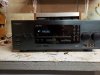
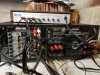
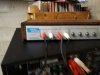
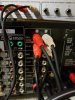
Okay so all these problems I have are with the tape2 monitor function on in unison with the phono function. As soon as I hit the tape 2 button the sound cuts out. I wiggled the buttons and Jack's on the equalizer, didnt make a difference. Here are some pictures of my set up. I know only the phono function is selected in the pictures. I recorded a video to show me pushing the tape 2 button to show the sound cutting out.
 

Attachments

  • 20200520_220144.jpg
    20200520_220144.jpg
    90.3 KB · Views: 41
  • 20200520_220205.jpg
    20200520_220205.jpg
    118.6 KB · Views: 40
  • 20200520_220208.jpg
    20200520_220208.jpg
    62.6 KB · Views: 38
  • 20200520_220229.jpg
    20200520_220229.jpg
    91.3 KB · Views: 39
  • 20200520_220235.jpg
    20200520_220235.jpg
    96.4 KB · Views: 37
Okay so all these problems I have are with the tape2 monitor function on in unison with the phono function. As soon as I hit the tape 2 button the sound cuts out. I wiggled the buttons and Jack's on the equalizer, didnt make a difference. Here are some pictures of my set up. I know only the phono function is selected in the pictures. I recorded a video to show me pushing the tape 2 button to show the sound cutting out.
I have a question, just out of curiosity: Does that receiver have controls which allow you to select which component you are recording from? If so, it will probably be necessary to switch the "record" function to "tape monitor (tape 2)" as well as turning on the "tape monitor" function itself. I had an Onkyo integrated amp where you need to do this.
 
I have a question, just out of curiosity: Does that receiver have controls which allow you to select which component you are recording from? If so, it will probably be necessary to switch the "record" function to "tape monitor (tape 2)" as well as turning on the "tape monitor" function itself. I had an Onkyo integrated amp where you need to do this.


I'm not sure what you mean by "recording from"? Also what do you mean by record function?
 
So I looked up the manual for the kenwood kr-v9080. On the diagram it says the tape 2 monitor function if for tape deck or graphic equalizer. The Bose 901 IV equalizer is a active equalizer. Does that mean I'm SOL for using this reciever?
 
Back
Top Bottom