• The move to the new server is done. There are some software and database maintenance updates in process. This has us passing the hat around to help out. We appreciate any donations. Seriously, even a dollar helps. The payment page may be found here - https://www.audiokarma.org/support.html

Build a DIY Squeezebox Touch

chicks

Lunatic Member
A Squeezebox Touch clone with a 4" touchscreen.

1. Download piCorePlayer, Standard (32-bit) version, write to a micro-SD card.
2. Set up wpa_supplicant.conf per instructions, save to the SD card, so that the pi will connect to your WiFi.
3. Put the micro SD card into a Raspberry Pi Zero WH.
4. Mount the Hyperpixel 4" Touchscreen to the Pi Zero. (Also available here).
5. Follow these instructions to install Jivelite, the touchscreen drivers, and calibrate the screen.
6. Connect the USB DAC of your choice (or no DAC if simply controlling another SB). You'll need a micro-usb adapter cable for most desktop DACs.
7. Point your browser to http://pcp.local to configure the DAC.
8. Mount the Pi assembly to this stand *, using bolts and nuts, for a very stable mount with adjustable angle. Will have to drill a couple of holes in the stand (it's plastic, I drilled them with a manual hand drill).
9. Enjoy some tunes!

* For some reason, AK is redirecting this Amazon URL to Wally World, though it points to Amazon. It's cheaper on Amazon. https://www.amazon.com/gp/product/B017TU5KMQ/


KFZ3pqNAQuOqxnI4OiBlkQ.jpeg


j0IwQALwRy6N7tvEm5xIAw.jpeg


R1Igqs9QSpqpBICIK4K8mQ.jpeg
 
Register to hide this ad
I do love what can be done with the little Pi Zero W and a modest dose of creativity.

* For some reason, AK is redirecting this Amazon URL to Wally World, though it points to Amazon. It's cheaper on Amazon.

I've noticed a few changes in AK in the past week or so, subtle ones. ^^^ This, however, is a bit of a slippery slope if it is a site wide change. Redirecting product links to equivalents on another site could lead to breakage in a project. Just say'n.

Mark Gosdin
 
Very cool tool! Thanks for the heads up and details!
Ordered the display and the stand! I have a piZero laying around unused,
and think I've already got the rest!
Now I just need some tinkering time.


Now about viglink CHANGING an Amazon Link to a walmart Link!
Wow, thats seriously RUDE -
I wouldn't buy from Wallyworld if just for that reason alone!

https://audiokarma.org/forums/index...ms-with-ads-here.816408/page-42#post-14776449
 
Last edited:
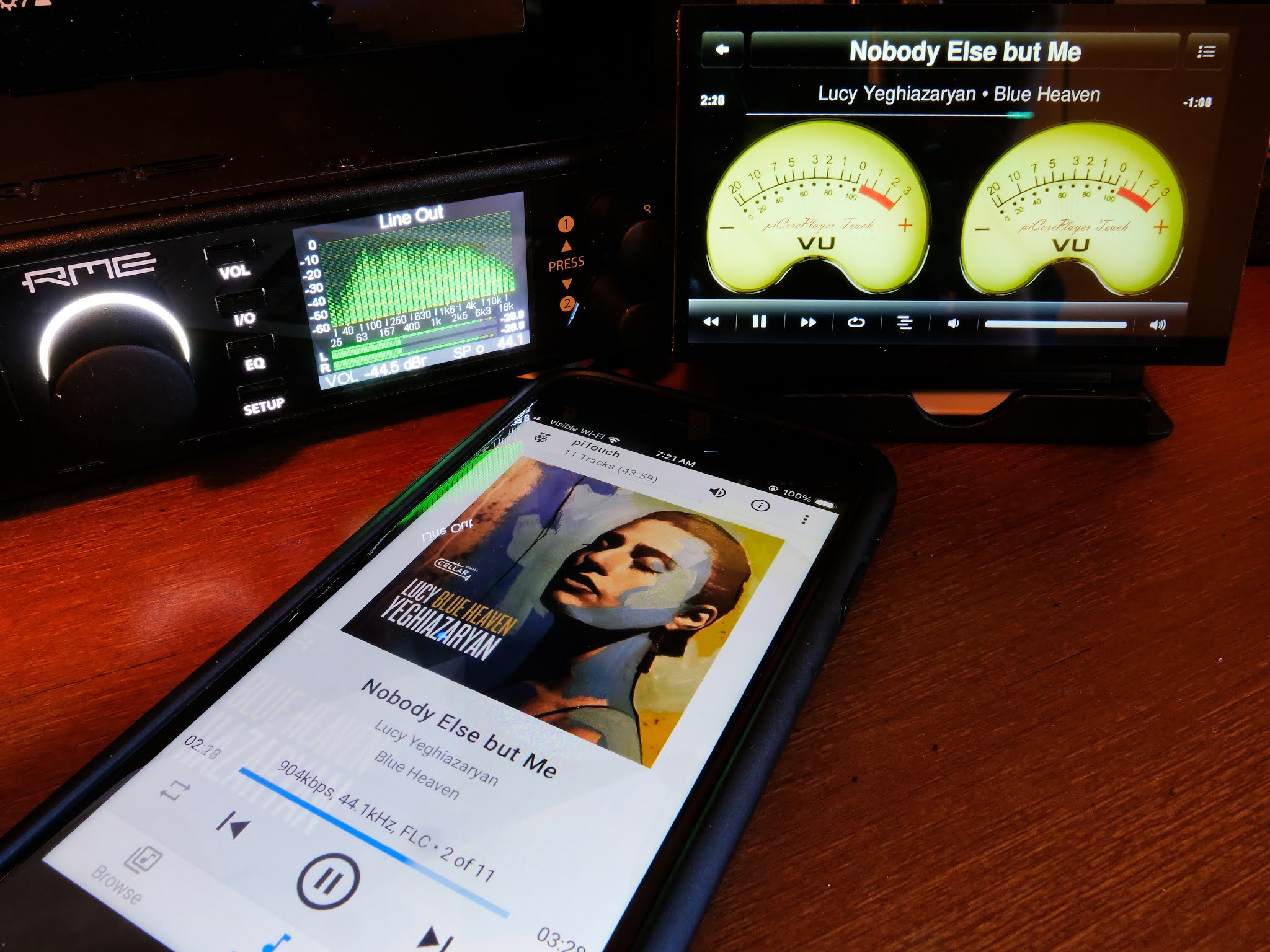
I'm using a TOSLink adapter from the piTouch into my RME DAC's optical input at the moment, working well. Requires the micro-usb to usb-c adapter in previous post.

Love those VU meters, but of course the piTouch can display the current track with art, as well.

https://www.amazon.com/gp/product/B07VSFBT82

P1290108.jpg
 
Got a question. I have the default pCP7 loaded on an SD card - it all boots fine.
When I try to SSH to it, it asks for a password for my Pi and far as I know, there isn't one - I never set one!
I checked all the screens and don't see a place to set one -
any tips on how to figure that out?
 
Thank you VERY much!.
As I headed to bed last night I wondered if they just might have used some variant of the name as default password,
and I decided "nope - stop troubleshooting, relax, head to bed ..." So I did.
(I'd done a bunch of yard work, digging up and moving some Hostas before the gas company comes in and moves their meter in a couple weeks).

Yes indeed, I will change the default promptly!
Again, thank you VERY much!
 
Made great headway in the early hours (yep, my internal clock is set for 06:15 - ugh!)
What a very cool display!
Anyway, I have a visible screen when it boots the screen comes up asking me to select a language,
and then offers screen settings ...
I suspect I have something funky with the jivelite settings ... touch doesn't seem quite aligned with the screen -
I'll recheck all my config settings when I get back from church later today.

IMG_3867.jpg IMG_3872 (1).jpg
 
Did you run the calibration step for the touchscreen?

BTW, I used the most flexible power cord I had so that it could be bent back and through the top slot in the stand for cosmetics
 
I did run the calibration steps ...it seemed to respond well, then did a backup to save it all.
The black wire is a microUSB plug for the wall wart/power supply.
The white wire is a microUSB cable I'll use to feed my SMSL M100 DAC -
 
I started to backtrack through the directions - https://github.com/piCorePlayer/hyperpixel4
I found - /mnt/mmcblk0p1/config.txt no longer exists (?)-
maybe there is a loop in boot - "if exists, read, else, run a different file" (guessing).
I know the file DID exist when I was doing all the edits -
so, my alternative is to take a fresh SD card and start from scratch,
just in case I fat-fingered something Sunday morning.
Anyway - just taking a lunch break - will check all that after dinner tonight.
 
I started to backtrack through the directions - https://github.com/piCorePlayer/hyperpixel4
I found - /mnt/mmcblk0p1/config.txt no longer exists (?)-
maybe there is a loop in boot - "if exists, read, else, run a different file" (guessing).
I know the file DID exist when I was doing all the edits -
so, my alternative is to take a fresh SD card and start from scratch,
just in case I fat-fingered something Sunday morning.
Anyway - just taking a lunch break - will check all that after dinner tonight.

That partition isn't normally mounted, which is why you don't see anything in that directory. The "m1" command mounts it, and "c1" cd's to it.

Here's what the bottom of my config.txt looks like:

Code:
#Custom Configuration Area, for config settings that are not managed by pCP.
#pCP will retain these settings during insitu-update
#---Begin-Custom-(Do not alter Begin or End Tags)-----
dtoverlay=hyperpixel4,touchscreen-size-x=800,touchscreen-size-y=480
display_rotate=1
overscan_left=0
overscan_right=0
overscan_top=0
overscan_bottom=0
enable_dpi_lcd=1
display_default_lcd=1
dpi_group=2
dpi_mode=87
dpi_output_format=0x7f216
hdmi_timings=480 0 10 16 59 800 0 15 113 15 0 0 0 60 0 32000000 6
----------------------------------------
 
Ok - that's exactly what was posted on the pyperpixel4 config page,
and (pretty sure) exactly what I typed into mine Sunday morning.

Thank you.


That partition isn't normally mounted, which is why you don't see anything in that directory. The "m1" command mounts it, and "c1" cd's to it.

Here's what the bottom of my config.txt looks like:

Code:
#Custom Configuration Area, for config settings that are not managed by pCP.
#pCP will retain these settings during insitu-update
#---Begin-Custom-(Do not alter Begin or End Tags)-----
dtoverlay=hyperpixel4,touchscreen-size-x=800,touchscreen-size-y=480
display_rotate=1
overscan_left=0
overscan_right=0
overscan_top=0
overscan_bottom=0
enable_dpi_lcd=1
display_default_lcd=1
dpi_group=2
dpi_mode=87
dpi_output_format=0x7f216
hdmi_timings=480 0 10 16 59 800 0 15 113 15 0 0 0 60 0 32000000 6
----------------------------------------
 
Okay, starting it all over again on another SD card seems to have been helpful.
I have a screen that responds to touches, I expanded the drive size to 500 meg and installed LMS, and loaded Qobuz and Radio Paradise on the piZero.
I'll have to dig further when I have more time.
 
Oh, a Zero isn’t powerful enough to run LMS. That should be installed on a Pi 4 or a PC. The Zero is like a Squeezebox Touch, which needs LMS on another server…
 
Back
Top Bottom