• The move to the new server is done. There are some software and database maintenance updates in process. This has us passing the hat around to help out. We appreciate any donations. Seriously, even a dollar helps. The payment page may be found here - https://www.audiokarma.org/support.html

Denon DP-47F has two issues after re-capping

mschool

Active Member
1. Still need to toggle from 45 to 33 to get the quartz lock to engage (this was a problem before re-capping)
2. The VTR dial is still off. If a scale reads 2 grams, the dial reads 2.3

Do I need an oscilliscope to fix this? i can't imagine it being a contact problem, but I'll give that a try with DeOxit.
 

Attachments
  • IMG_2960.jpeg
    IMG_2960.jpeg
    81 KB · Views: 20
  • IMG_2967.jpeg
    IMG_2967.jpeg
    144.2 KB · Views: 19
  • IMG_2978.jpeg
    IMG_2978.jpeg
    163.9 KB · Views: 19
Last edited:
Register to hide this ad
The TT senses a 12” record on the platter and the LED flashes and does not change to solid red. When I press the 45 button for a second, and then press the 33 button, the 33 LED locks solid red. Why? Because I brought the speed to 45 and then slowed the platter down. And the reason I conclude this, is that the 45 LED never goes to solid, ever. Unless I flick the side of the spinning platter with the tip of my finger. The flick gets the motor to achieve a slightly “higher” speed, so the quartz locks it lower (and at the speed I need). Crazy workaround!
 
Last edited:
The TT senses a 12” record on the platter and the LED flashes and does not change to solid red. When I press the 45 button for a second, and then press the 33 button, the 33 LED locks solid red. Why? Because I brought the speed to 45 and then slowed the platter down. And the reason I conclude this, is that the 45 LED never goes to solid, ever. Unless I flick the side of the spinning platter with the tip of my finger. The flick gets the motor to achieve a slightly “higher” speed, so the quartz locks it lower (and at the speed I need). Crazy workaround!
Ahhh ok. This is just intriguing, no direct experience here.

Does the flick trick work on 33rpm?
 
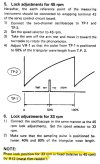
This is from the SM.
  • See the note at the bottom of the instructions. The 33rpm is fixed (relative to the 45rpm) by R12.
  • It sounds like the lock adjustment is performed at 45rpm only using VR1. You don't quite get a lock so you might be just beyond the lock range.
  • When you change the speed, you hit the right speed and can get it to lock, then it maintains lock.
  • If you have a scope, then you can check the relationship of the pulse with respect to the ramp according to the timing diagram.
  • If not, you can try adjusting VR1 slightly (one way or the other) to see if you can get it to lock in at 45rpm, then check for lock when you switch to 33rpm
  • If 45rpm cannot lock, then maybe R12 is out of tolerance.
Screenshot 2026-06-20 082329.jpg
Screenshot 2026-06-20 083839.jpg
Screenshot 2026-06-20 081811.jpg
 
Last edited:
Thank you very much for doing that research. Wow!!

The VR-1 is located on the main circuit board and I don’t have an oscilloscope. Acquiring an oscilloscope is not a problem, but understanding how to use one and read the screen is.

The DP47-F would have to be opened up again and flipped upside down.

I’m assuming that if I were able to achieve that workbench set-up again, the oscilloscope probes would be used while the TT was powered OFF?

And I would use a flathead screwdriver to adjust the VR-1 to match the sine wave show in the service manual.

That’s kind of above my pay grade, so I am going to hope this is a dirty switch issue and I’m going to open it up again and apply DeOxit to the switch contacts, which I have never done before.

If that is a failure, then I am going to live with the unit as-is and study the service manual vis-a-vis the oscilloscope and decide if I want to go down that path.

Again, the speed issue and my workaround was in place before I did the capacitor upgrade. The TT did not have the problem when I first acquired it used and serviced around 5 years back.

[In other news, I just calibrated the antiskate/tracking wheel on the TT via VR5 and flat head screwdriver, so I can scratch that problem off of the list !!!]
 
Last edited:
You do not need an oscilloscope to set the speed, a phone app to show speed stability is ok. Oscope is just simpler
 
Thanks but an iPhone oscilloscope app by itself will not help because:

  • The FG (frequency generator) signals are inside the electronics.
  • You must probe specific test points.
  • The signal levels may exceed what an iPhone audio input can safely accept.
  • Service manual adjustments assume a proper oscilloscope.
 
Thanks but an iPhone oscilloscope app by itself will not help because:
@Sleiven is not talking about an oscilloscope app, he is referring to a turntable speed app.
No electrical connection to turntable electronics, just install it on your iPhone. See below.
Place the iPhone on the center of the turntable and let it spin as it measures RPM, wow and flutter over a period of time.

Screenshot 2026-06-21 071106.jpg
 
The DP47-F would have to be opened up again and flipped upside down.

Opening equipment up tends to be the case for oscilloscope tests. But for this turntable and that scope test, you shouldn't be testing it upside down, I would say. Though I'm willing to be corrected on that.
 
Last edited:
It looks like you might just be out of lock range. At 33 rpm you measure 31.65 rpm.
  • I bet if you put it on 33 rpm with LED flashing, then use your finger to slightly spin the platter a little bit faster, then it will then lock.
  • Same thing with 45 rpm. Start it on 45 rpm and the LED flashes, turn it by hand a little faster and see if it then locks.
When you toggle from 45 rpm to 33 rpm the platter is initially rotating faster and slowing to 33 rpm so it locks, but when you just start up at 33 rpm you are at too slow a speed 31.65 rpm for the circuit to lock.
 
It looks like you might just be out of lock range. At 33 rpm you measure 31.65 rpm.
  • I bet if you put it on 33 rpm with LED flashing, then use your finger to slightly spin the platter a little bit faster, then it will then lock.
  • Same thing with 45 rpm. Start it on 45 rpm and the LED flashes, turn it by hand a little faster and see if it then locks.
When you toggle from 45 rpm to 33 rpm the platter is initially rotating faster and slowing to 33 rpm so it locks, but when you just start up at 33 rpm you are at too slow a speed 31.65 rpm for the circuit to lock.

Yes. I'm slightly lower. At 33 rpm, with the LED flashing, I hit the 45 rpm button and the platter spins faster, so when I hit the 33 button, it locks because it is slowing the platter down to 33 rpm. I don't have the same option with the flashing LED 45 rpm, so when I flick the platter with my finger it locks at 45 rpm. I don't know how to diagnose and correctly adjust a servo/motor-drive capture problem on this Denon DP47-F turntable.
 
Last edited:
Opening equipment up tends to be the case for oscilloscope tests. But for this turntable and that scope test, you shouldn't be testing it upside down, I would say. Though I'm willing to be corrected on that.
I don't know how to diagnose and correctly adjust a servo/motor-drive capture problem
 
Last edited:
I don't think your problem is a contact issue. It's probably component drift with age.

You need to adjust VR1 slightly CW or CCW just a bit and see if you can get it to lock.
According to the procedure, you adjust the 45 rpm speed, not the 33 speed.

With power off and unplugged, you can turn the variable resistor (VR) just slightly CW (clockwise).
Plug it in and try it with your RPM phone app and see if the unlock speed increases or decreases from before.
If it decreases, you turned it the wrong way... go back and turn it slightly CCW (counterclockwise)
Adjust VR1 to get the 45 rpm unlock speed close to 45 rpm as you can. It should now lock in to 45 rpm when you turn it on.
Next, try the 33 rpm, it should also lock (no adjustments)

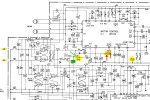
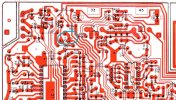
Here is the board layout with VR1 circled in blue. I don't have a photo of the board so this is the best I can do unless you take a photo of this part of the board and post it.
Screenshot 2026-06-21 172736.jpg
 
I don't think your problem is a contact issue. It's probably component drift with age.

You need to adjust VR1 slightly CW or CCW just a bit and see if you can get it to lock.
According to the procedure, you adjust the 45 rpm speed, not the 33 speed.

With power off and unplugged, you can turn the variable resistor (VR) just slightly CW (clockwise).
Plug it in and try it with your RPM phone app and see if the unlock speed increases or decreases from before.
If it decreases, you turned it the wrong way... go back and turn it slightly CCW (counterclockwise)
Adjust VR1 to get the 45 rpm unlock speed close to 45 rpm as you can. It should now lock in to 45 rpm when you turn it on.
Next, try the 33 rpm, it should also lock (no adjustments)

Here is the board layout with VR1 circled in blue. I don't have a photo of the board so this is the best I can do unless you take a photo of this part of the board and post it.
View attachment 3787129
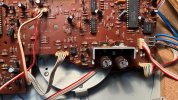
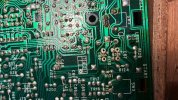
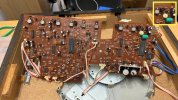
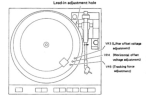
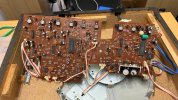
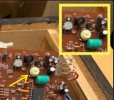
There's a photo of the main board. I also isolated VR-1 on the upper right of the image. The service manual photo only shows access holes for VR3, VR4, VR5.
VR1 on the board is a larger yellowish component with a phillips head shaped indent.
 

Attachments

  • VR1.001.jpeg
    VR1.001.jpeg
    137 KB · Views: 23
  • Screenshot 2026-06-22 at 10.43.18 AM.png
    Screenshot 2026-06-22 at 10.43.18 AM.png
    268 KB · Views: 24
  • Board.jpeg
    Board.jpeg
    157.7 KB · Views: 24
Yes, that's the one that you have found, VR1.
Can you access that when the board is mounted or is it on the opposite side facing the platter?
First, (with it unplugged), mark the current position of the VR using a marker. Then, pick a direction (50/50 chance), and turn it a small amount using a small phillips screwdriver.
Next, put it back and plug it in to see if the 45rpm speed has changed for the better.

Screenshot 2026-06-21 193548.jpg
 
Back
Top Bottom