• The move to the new server is done. There are some software and database maintenance updates in process. This has us passing the hat around to help out. We appreciate any donations. Seriously, even a dollar helps. The payment page may be found here - https://www.audiokarma.org/support.html

HDD or SSD?

Just for experimentation and fun, I bought a single cheap generic Chinese SSD to see what they were like. I tried to put Windows on it and run it as the os drive. I got nothing worthwhile as an os drive; so I cleared the drive and tried using it as a backup drive. It failed at that, as it did as an os drive. When it was functioning, I really did not find that the drive was significantly faster when moving files around. My Seagates were almost as fast.

After my trial run started, it was not long until the drive took a dump and that was all. So, don't buy a cheap drive; stick with a recognized drive company that offers a real warranty. I am glad I tried this looksee. As storage size starts dropping in cost, then I will jump in and pick up a quality SSD. It will only be for this Thinkpad, not the other 7 that I own. I could not afford that. This is my daily Thinkpad and it would be nice to have the os drive as an SSD.

The brand "Crucial" has provided me excellent SSD performance, and total multi-yr. reliability on all 11 of my machines, even the (3) 24/7/365 operating laptops !
Yes, KB, I never would trust any non long time in reputable business non name brand SSD, and flash drives !

Not too long ago hjames (Heather) IIRCC, had problems with a Chinese no name inexpensive flash drive through Amazon, NOT having the advertised capacity, and she returned it and was refunded her money.
 
I find the cheap “no name Chinese” flash drives like everything else Chinese these days: counterfeit and prone to failure in short order.

Go buy something like a 2SA747 transistor and pop it in your rig and you’ll find out in short order what I’m talking about.

I swear by SSD now, but I buy brand name from local stores, nothing off the internet. Too easy to get rooked that way.
 
Last edited:
What worries me is the reported ten year data retention with SSD’s.

Can even be quite a good bit less. But that foremost refers to SSDs, that are just stored - and it also depends on cell wear. I.e., if you'd have the idea to re-purpose an SSD, that already has a good bit of cell wear, for long-term achival, that would be a very questionable idea. Whereas an SSD, that's actually in use, will be less problematic, as in that case its firmware can do its job and re-write blocks/sectors in time, before uncoorrectable read errors occur.

Greetings from Munich!

Manfred / lini
 
Unquestionably SSD for OS/data, and HDD for backup.

I suspect it would be very slow to run a modern computer on HDD these days.

You don't need SSD speed for backup purposes, and HDD doesn't have an expiration number of writes. The mechanical components of HDD can fail, but tend to be very reliable among quality brands, especially since they are only used sporadically when they serve as backup drives.

Backing up continuously to HDD is trivially easy on Mac with Time Machine, not sure how to do it on PC.

I've used Samsung SSD's. I buy SSD's at Microcenter or Best Buy -- not on Amazon because it's too easy to unknowingly buy a fake knockoff (Amazon doesn't police their sellers that carefully). You don't want a fake with SSD for the reasons stated in several other posts in this thread.
 
Last edited:
The first SSD I got was not a major brand. It had a bug that would cause it to run for only one hour and shut down, after the first 5000 hours of use. They issued a firmware fix, but warned not to use it if you had an ASUS motherboard (which I did), as the combo would brick the SSD! No compensation or recourse was provided. I replaced it with a different brand SSD, which worked for a number of years before developing bad sections; I now have a Samsung 1 TB that has been fine for several years (fingers crossed).
 
samsung evo ssds have always had a solid reputation. i'm still running 850 evos and i've installed a number of 950 evos in friend's laptops.

crucial makes good ssds too. i've had good success with a couple sandisk ssds also. i have no experience with wd ssd or any other name.
 
20 second boot time vs 4:00+ boot time. I was shocked at the difference, and SSDs give OLD Macs a couple more years of quicker, more responsive life.

No experience in the Windows world.

I picked up a $30 W10 computer last week with a single 1TB drive. It took FOREVER to boot vs. my slightly newer model with a 256SSD and 1TB SATA HD. There’s no way I’d go back to a SATA HD to boot.
 
Last edited:
I'd add one detail: make sure the SSD you buy has enough internal backup power (usually provided via capacitors) to complete a write out if the host system suddenly goes down for any reason (PSU, main board or drive interface failure) as this will usually prevent the SSD from suffering corruption and irrecoverable errors. A write to flash memory that is interrupted is a thing of much badness and anguish.

Intel drives typically had this feature, but I've not really kept up on the current state of the art lately. Confirming this capability may require some digging in the specs, but one can probably assume cheapo Chinesium drives don't have it.
 
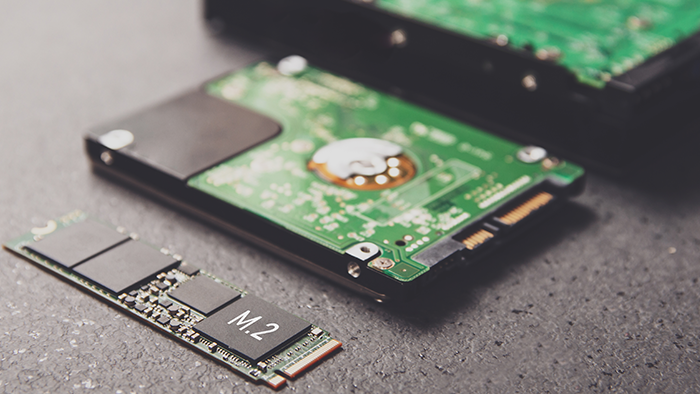
FWIW, here's a new NVMe drive next to a tradional 2.5" laptop SSD. It's smaller than a stick of RAM.

I found out about these about a year ago when I bought a few old laptops....

SSD_vs_HDD-which_should_you_buy-Thumb.png
 
That hard drive comparison pic. is a regular 2.5" spinning rust drive, not a SSD as you indicate, Sir. !

Yes, but the older SATA based SSDs were the same size. Anyway...

If you don't need a lot of cheap storage, SSD. It's not even close or debatable.
 
FWIW, here's a new NVMe drive next to a tradional 2.5" laptop SSD. It's smaller than a stick of RAM.

I found out about these about a year ago when I bought a few old laptops....

SSD_vs_HDD-which_should_you_buy-Thumb.png

to be technically correct, it is a m.2 formfactor with an nvme protocol:)

pcie drives can be nvme
m.2 can be nvme or sata or ahci
u.2 IS only nvme

there is also msata which is similar

there are different keys(notches in the connectors) of m.2 drives. some on the left, some on the right. some with 2 notches

you can buy 2.5" ssds in sata 2 or 3. for the most part you could plug a sata 2 or 3 2.5" drive into a computer that only supports sata 1 and sata 1 speeds are all you will get.

same thing goes to connecting sata 3 drive to a board that only supports sata 2. you will only get sata 2 speeds

you can connect a sata 1 drive to a board that supports sata 2 or 3 but you will only get sata 1 speeds.


ssds have gotten EXTREMELY complicated.
 
Yes, but the older SATA based SSDs were the same size. Anyway...

If you don't need a lot of cheap storage, SSD. It's not even close or debatable.

Yes, all 11 of my computers employ the 2.5" formfactor SSDs, with the use of 3.5 to 2.5 adaptor drive mounting sled/brackets for the towers.
Actually the 2.5" SSDs are slightly thinner, and some laptops require the use of a usually included adhesive backed shim to make up the several mm difference in height to keep the SSD from moving up/down and stressing the machine`s and drive`s SATA connectors from rough handling of the laptop.
 
to be technically correct, it is a m.2 formfactor with an nvme protocol:)

pcie drives can be nvme
m.2 can be nvme or sata or ahci
u.2 IS only nvme

there is also msata which is similar

there are different keys(notches in the connectors) of m.2 drives. some on the left, some on the right. some with 2 notches

you can buy 2.5" ssds in sata 2 or 3. for the most part you could plug a sata 2 or 3 2.5" drive into a computer that only supports sata 1 and sata 1 speeds are all you will get.

same thing goes to connecting sata 3 drive to a board that only supports sata 2. you will only get sata 2 speeds

you can connect a sata 1 drive to a board that supports sata 2 or 3 but you will only get sata 1 speeds.


SSDs have gotten EXTREMELY complicated.

Yeah, similar to USB ports/devices backwards compatibility compared to the maximum desired data throughput speed.
Choke points if not using USB 3 flash drive to USB 3 computer ports, as an example, though the lesser speed USB 2 will function perfectly, just much slower.
 
Usually these are 7 mm - but there are 7 mm HDDs, too.

Greetings from Munich!

Manfred
all my 2.5" ssds are 5mm as bill started, (i think i have 11). i think crucial supplies or used to supply the 2mm adapter for laptops.
 
all my 2.5" ssds are 5mm as bill started, (i think i have 11). i think crucial supplies or used to supply the 2mm adapter for laptops.

Sure? The Crucial MX500 is 7 mm, but comes with a spacer for 9.5 mm. And Samsung's 850/860/870 Evos all were 7 mm, too.

Greetings from Munich!

Manfred / lini
 
Sure? The Crucial MX500 is 7 mm, but comes with a spacer for 9.5 mm. And Samsung's 850/860/870 Evos all were 7 mm, too.

Greetings from Munich!

Manfred / lini
you might be right and i may be confused but i just measured an 870 evo and it was 1/4"(go figure) not 7mm. i'm not splitting hairs, i just guess i shouldn't trust my eyes:oops:

i'd have to open a computer to measure an mx500 so i'm just going to take your word for it.
 
Sure? The Crucial MX500 is 7 mm, but comes with a spacer for 9.5 mm. And Samsung's 850/860/870 Evos all were 7 mm, too.

Greetings from Munich!

Manfred / lini

Yes, some various manufacturers offerings were maybe thicker, but I went with Crucial exclusively almost 10yrs. ago so all my SSD purchases included the stick on shims, which of course were not needed when mounting in the adapter brackets for towers.
 
Back
Top Bottom