• The move to the new server is done. There are some software and database maintenance updates in process. This has us passing the hat around to help out. We appreciate any donations. Seriously, even a dollar helps. The payment page may be found here - https://www.audiokarma.org/support.html

Kenwood KX-1030 Worth Keeping?

Homebrook

Member
I recently purchased a Kenwood KX-1030 on Ebay. It didn't work, but externally it was in excellent condition, so I went for it at the reasonable price being asked. I thought it might just need belts and that perhaps I could get it working.
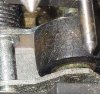
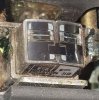
After getting it I was initially pleased, because it looked almost new. It did need belts as I thought, but as I examined the tape compartment and the heads and pinch roller I started to wonder if I made a mistake. The tape head had a piece of white material on it. I've cleaned it off repeatedly with alcohol, but the head just doesn't look right. It looks like it might be damaged, but don't really know exactly what it should look like. My thinking is that it should look clean and shiny, with clear borders of the record and play areas. I wonder if some of you who have much more experience than I have could take a look at my pictures and tell me what you think? I also notice that the pinch roller is in bad shape. It is significantly cracked on one side and quite dirty, and the dirt isn't coming off.

What do you think? Is it worth keeping, or should I put it back on sale and look for another? Thanks for any feedback you might offer.
Jim
 

Attachments

  • Tape Head Closeup.jpg
    Tape Head Closeup.jpg
    150.8 KB · Views: 326
  • Pinch Roller Closeup.jpg
    Pinch Roller Closeup.jpg
    157.1 KB · Views: 310
Register to hide this ad
I think the head is ok but that pinch roller is toast. That's going to be the hard part of this restoration. See if you can find one.
Kenwood only made 2 good cassette decks; the KX-1030 and the KX-1060. Worth repairing. Having said that, I think these used the LM1011N Dolby chips. Many of these chips were defective, but in order to check them you have to replace the pinch roller so the deck can play and record. Some of Dolby IC's were ok, some had no highs or one channel out. They are no longer available. Look and see what Dolby ICs it has. If it has the NE646 (or NE645, I can't remember) those are good.
 
Warren,
Thanks for the information! I figured the pinch roller was done for. It looks pretty bad. You mention that replacing the pinch roller is the hard part. Is the difficulty finding one, or is it that it is hard to replace it once you have one? I have looked for information on how to do it, but haven't had any luck so far.
It looks like the Dolby ICs have are labeled "NE545B 7816". It looks like I have three. Are those OK?
 
Warren,
Thanks for the information! I figured the pinch roller was done for. It looks pretty bad. You mention that replacing the pinch roller is the hard part. Is the difficulty finding one, or is it that it is hard to replace it once you have one? I have looked for information on how to do it, but haven't had any luck so far.
It looks like the Dolby ICs have are labeled "NE545B 7816". It looks like I have three. Are those OK?
You've got the good Dolby chips so no worries there.
It is impossible to find a complete pinch roller assembly, with it mounted on the metal arm, so what you are going to have to do is measure the pinch roller, including the shaft it mounts on, and try to find a replacement, which is really hard to find. First remove the assembly and then you have to remove the roller. Get a small piece of hard wood and drill a hole in it a little larger diameter than the shaft. Look carefully at the arm. You will see that one hole is larger than the other hole. The shaft is press fit into the smaller hole. Place the smaller hole over the hole in your board and drive the shaft out with a small nail and a hammer. Drive it out just enough to be able to remove the roller, NOT all the way. When you put the new roller in, reverse the process, driving the shaft with the hammer and a nail set, gently, till it's flush.
 
Got one that is a bit problematical. Light staticy noise in background on one channel. Replaced the dolby chip and it didnot solve the problem. Put it on the shelf for another day.
 
You've got the good Dolby chips so no worries there.
It is impossible to find a complete pinch roller assembly, with it mounted on the metal arm, so what you are going to have to do is measure the pinch roller, including the shaft it mounts on, and try to find a replacement, which is really hard to find. First remove the assembly and then you have to remove the roller. Get a small piece of hard wood and drill a hole in it a little larger diameter than the shaft. Look carefully at the arm. You will see that one hole is larger than the other hole. The shaft is press fit into the smaller hole. Place the smaller hole over the hole in your board and drive the shaft out with a small nail and a hammer. Drive it out just enough to be able to remove the roller, NOT all the way. When you put the new roller in, reverse the process, driving the shaft with the hammer and a nail set, gently, till it's flush.
Warren,
That's good news on the Dolby chips.
I just purchased a transport assembly with both a head and the pinch roller assembly. The pinch roller looks in pretty good shape, at least good enough until I can find a replacement. Perhaps I'll be able to remove the pinch roller assembly from it to practice. It doesn't look like a straight-forward process! Thank you for the great explanation on how to get the pinch roller on.
I am sorry to hear terrysrubberrollers.com doesn't do cassette rollers. I did ask, but did not get a reply.
 
Well, good news! I got it working, despite the lousy pinch roller. It sounds excellent via my headphones. I have replaced the flat drive belt, the "square" belt, and the easy counter belt. I haven't yet figured out how to replace the belt that actually drives the counter yet. I have read over the great posts on replacing the belts, but am still mystified. I'll sleep on it...
 
I'm sure I replaced that counter belt 40 years ago. I haven't seen one of these decks since then Sometimes you have to disassemble the mechanism to get to a belt. Usually for a counter belt you can remove the cover plate in the cassette well and get to the belt. If it doesn't have a remove-able plate you have to take the mechanism out.
 
Got one that is a bit problematical. Light staticy noise in background on one channel. Replaced the dolby chip and it didnot solve the problem. Put it on the shelf for another day.

My solution to a static problem (from another Kenwood KX-1030 thread):

The channels will develop more static over time...I fixed one channel and then had to do the 2nd channel after static appeared there. I don't recall if it was in that link, but a fellow orger stated that Kenwood used inferior caps for C27, C28, C89 and C90, and that they'd all need to be replaced at some point. Changing these absolutely worked for me.

I don't have an easy link but I did save the original bag the caps came in. I may have gotten these from Mouser or Parts Express...I don't recall.
It lists:
MLR273K50
CAP-MYLAR .027MF 50V
QTY 6
S/O 87341
 
I'm sure I replaced that counter belt 40 years ago. I haven't seen one of these decks since then Sometimes you have to disassemble the mechanism to get to a belt. Usually for a counter belt you can remove the cover plate in the cassette well and get to the belt. If it doesn't have a remove-able plate you have to take the mechanism out.
"I'm sure I replaced that counter belt 40 years ago." I love it! I'm at that place in life too. It is amazing to be able to make statements like that!
Yes, I more or less came to that conclusion myself, that I'd have to disassemble, or remove, the counter mechanism to properly route the belt, and removing the cover plate would be a given. Thanks for the help. I'll post details of the process if I figure it out.
Cheers, Jim
 
Update - I have replaced the belts and it now works. I didn't have to replace the ones up front driving the counter. They looked new. However I am having wow problems. I thought it was because of my pinch roller, since the pinch roller was in bad shape. I purchased a tape transport on eBay and used the fairly good pinch roller from it to replace my bad one. It improved (I think), but I still had significant wow problems. I thought that there might be resistance in the pinch roller because it wasn't turning freely, so I worked on cleaning it up and got it spinning nicely and conditioned the surface, but I still have wow problems! Is it my tapes? It seems to be happening on most of them. It is somewhat random, not regular like the wow caused by belts. What could be causing the wow? Any ideas?
 
Is it really wow, a slow variation in speed or are the highs going in and out, due to the tape skewing on the capstan. If it's the highs, the pinchroller must be replaced. If it's a slow speed variation, see if it's cyclical and determine the rhythm of each cycle. Then look for something that turns at that rate. If it's slow, it's most likely associated with the reels. Could be the take up clutch is grabbing or the supply reel is binding. Could be one of the spindles is not straight.
 
Thank you for the diagnostic questions. Yes, I do believe it is wow. There is a pronounced, painful slowdown at times. Sometimes it plays a tape for quite some time without any obvious wow. It is not cyclical.
 
Thank you for the diagnostic questions. Yes, I do believe it is wow. There is a pronounced, painful slowdown at times. Sometimes it plays a tape for quite some time without any obvious wow. It is not cyclical.
That is probably the capstan motor. Pacific Stereo on Tapeheads sells capstan motors.
 
My solution to a static problem (from another Kenwood KX-1030 thread):

The channels will develop more static over time...I fixed one channel and then had to do the 2nd channel after static appeared there. I don't recall if it was in that link, but a fellow orger stated that Kenwood used inferior caps for C27, C28, C89 and C90, and that they'd all need to be replaced at some point. Changing these absolutely worked for me.

I don't have an easy link but I did save the original bag the caps came in. I may have gotten these from Mouser or Parts Express...I don't recall.
It lists:
MLR273K50
CAP-MYLAR .027MF 50V
QTY 6
S/O 87341
Thanks for that tip, my tech was stuck on that repair for a while. It solved the problem and he quickly identified a couple of those capacitors in another circuit, causing a popping. The results are I have a pristene KX1030 that works as good as new. Again thanks.
 
Thanks for that tip, my tech was stuck on that repair for a while. It solved the problem and he quickly identified a couple of those capacitors in another circuit, causing a popping. The results are I have a pristene KX1030 that works as good as new. Again thanks.

Yes, thanks! I have the .027 capacitors in my hot little hands for exactly that purpose. I am in the process of replacing them now. I find that I can easily see where the correct solder pins are on the board by shining a bright flashlight on the circuit board from the reverse side where the traces are and then looking at the capacitor. I can easily see the traces on the opposite side and where the capacitor solder points are.
 
Success!
Yesterday I spent about seven hours on a second Kenwood KX-1030 I purchased. I replaced the pinch roller, the belts, the motor with Pacific Stereo Universal Capstan Motor, and the four problem capacitors, C27, C28, C89 and C90. Apparently someone had replaced one of them with a .022 MF ceramic capacitor, which isn't quite correct. I also noticed that someone had replaced the original motor with a cheap Mabuchi.

I discovered that when I connected it up to my regular system in my living room there was a regular popping sound. I was quite disappointed. At first I thought the problem was somewhere in the belts or motors, but when I noticed that the popping persisted even when the motor was stopped I knew the problem was elsewhere. Then I also realized that when I had first tested it back in my office it sounded perfect. I wondered whether the location was the difference. Indeed it was, because in my living room where I had placed the cassette deck was immediately in front of my wifi router. If I disconnected the router the popping sound disappeared. Have any of you encountered that problem? I just had to move it a couple feet to eliminate the problem.

I have to say I don't know when I have enjoyed myself as much as I have fixing and improving my KX-1030. In the process of doing my replacements I had the whole deck disassembled and articulating as a mass of parts loosely connected by wires. Though I had carefully placed parts in labeled zip-lock bags, I wondered if I would ever get it back together again! But I just proceeded one step at a time each time considering what part could I reassemble next and after a time I had it back together again.

Thanks to all of you at AudioKarma for the willing counsel and information. I guarantee I could never have done it without your help. You guys have opened up a whole new world of rewarding enjoyment for me. I love the fact that all my stereo components have a story behind them - how I purchased them, how I repaired them, the problems I solved, and the things I learned in the process. Great stuff!! Every time I look at or listen to my KA-9100, KT-8300, and now my KX-1030, I smile.

I am still working on the first KX-1030 where I have the wow problems. Now that I feel that I know a lot more of what I am doing I am more optimistic. I will change out the capacitors on that one as well and take a closer look at the motor. When I get it all working I'll sell it and recoup most of the money I spent on both of them.
 
Back
Top Bottom