• The move to the new server is done. There are some software and database maintenance updates in process. This has us passing the hat around to help out. We appreciate any donations. Seriously, even a dollar helps. The payment page may be found here - https://www.audiokarma.org/support.html

Macbook Pro -> USB -> C47, nothing happens?

TSmith8605

Senile Member
Subscriber
I just got around to trying a USB connection from my MacBook Pro to my C47 for digital audio playback.

I got the optical link to work but I could not get the USB link to work. The MacBook does not see anything when the C47 is connected via USB. I turned on the USB input from the C47 setup menu and it just reports "Silent." I tried 2 different USB cables.

The C47 Op's manual says no special drivers are needed for OS 10.6 or later (I have 10.13) but when I hook up, nothing happens.

Anyone tried this combination before?

Thanks,
 
Register to hide this ad
Optical is a completely different animal than the USB input.

The C47 should show up in your System Preferences> Sound>Output.

If nothing is there then the computer is not connected to the C47. Things you can try are, power cycling the C47 whilst it is connected to the C47.
Reboot the computer whilst connected to the C47.

What media program are you using to play music?
Depending on that there are a few things to try also.

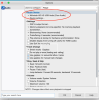
You can also go to Audio Midi Setup, this is in Utilities, there is an Audio Device tab there, you should see the C47, if you don't then there is no connection.
You will be able to change the sample rate etc etc in this tab if the device (C47) is seen by the computer...

There are no drivers or other shenanigans you have to load to use an apple computer with the C47.

Let us know how you get on...
 
Good luck, I really hope you get it but as I've mentioned many times the USB on my MAC6700 and C2500 is deadsville.....

They both used to work but just one day quit. Apple, Windows, doesn't matter. Cables, drivers, different computers doesn't matter. Optical and coaxial work fine. USB. Dead as a doornail. Nobody can really tell me what's going on. Audio Classics is willing to fix it if I ship it to them but no way am I putting that gear in harms way to fix the USB.

Still love the gear though.
 
I tried reseating the USB plug on the back of the C47 and then tried it again. Also, rebooted the computer with C47 on and power-cycled the C47. The USB does not show in computer's Sound Setup preferences or Network preferences nor in the Audio Midi Setup Ap nor in iTunes or in the Qobuz app.

I guess I'll call McIntosh but I guess post 3 is the answer I'll get. I had heard of USB issues with McIntosh DACs on in this forum but thought (hoped) they related to different version of Windows USB drivers.

I am considering setting up a high-quality music streaming system, maybe Roon-based with a central Core / Library Server and network bridges at the Main 1 and / or Main 2 systems. The plan was to use the C47 as the DAC.

The first step is to see if I like the streaming service idea so I got the free trial of the Qobuz streaming. This one features higher-res files (as does Tidal) and one reviewer said its library has more of the Jazz and Classical music (they all have rock / pop).

For this trial step, I am just using the Qobuz app on my Laptop connected directly to the C47. No money spent so far. The Qobuz SW is not great, good enough to play music via the laptop, but there's no remote-control support so you have to go sit in front of the computer to see / change the music. I guess Roon SW will be an improvement for that and for metadata discovery and display.

Still, I've decided I like Qobuz and so will proceed with this little project. (I'll look into Tidal and other services latter). Even with just the computer feeding the C47 DAC via the optical link, the sound from the few Qobuz albums I listened to was excellent. So I'm hooked on the idea.

The laptop has no digital coax out and the USB appears to not be an option with the C47 so that leaves the optical link. The optical link only supports PCM up to 24 / 96 while the USB (and C47 specs) support up to much higher res and DSD streams. I guess if I get streaming network bridges, I'll have coax as an option. I guess I'll have to get another USB DAC for all the streaming types available.

Without USB, I don't think the C47 supports all of the advertised bit rates or DSD. Improving my digital sources has been in the back of my mind for awhile and was part of the plan for getting the C47.
 
Without USB, I don't think the C47 supports all of the advertised bit rates or DSD. Improving my digital sources has been in the back of my mind for awhile and was part of the plan for getting the C47.
Correct, without the USB connection, you are limited to 96/24 through the optical/coaxial.
That is a shame about the reliability of these onboard DAC's, I have had my C48 for nearly 8 years and I have never had any trouble with the onboard DAC apart from the usual reboot of the C48 every now and then to get it to appear....
But generally its been pretty good.

I have noticed a trend of failing DAC's in Mc pre-amps of late with the newer models.....I have to say this makes me a bit nervous about changing my C48 for a newer model!!
 
Correct, without the USB connection, you are limited to 96/24 through the optical/coaxial.
That is a shame about the reliability of these onboard DAC's, I have had my C48 for nearly 8 years and I have never had any trouble with the onboard DAC apart from the usual reboot of the C48 every now and then to get it to appear....
But generally its been pretty good.

I have noticed a trend of failing DAC's in Mc pre-amps of late with the newer models.....I have to say this makes me a bit nervous about changing my C48 for a newer model!!

I don't know that it's the DAC failing per se (although not working is failing). It has to be a software thing or something because the optical and coaxial inputs work perfectly. I loved it when it worked but it's not a major issue for me.
 
I don't know that it's the DAC failing per se (although not working is failing). It has to be a software thing or something because the optical and coaxial inputs work perfectly. I loved it when it worked but it's not a major issue for me.
My point is the usb has nothing to do with the optical/coax, so it’s something to do with the USB hub, plus there is another whole hardware section in the dac which is to do with the usb and the sample rates etc etc before it gets to the analogue converter which in this case is clearly working because the optical and coax works.
Historically when this problem has arisen, it seems to have been some sort of hardware issue with the dac.......but, who knows this could be a completely different thing.

this is why I am asking if he can see the C47 in the audio devices.
 
Hoping I'm not derailing the thread but I do have about the same symptoms on two different units. If his is acting like mine, there is nothing to show. The computers simply do not recognize that another sound device is present, or I should say the McIntosh. Any other USB DAC I've tried shows up, like an Oppo Sonica and a Klipsch Heritage Headphone amp/dac.
Multiple computers and cables in my case. The USB is dead!
 
McIntosh C50 USB Input Not Working


I did find this:


Long story short, having problems with the USB input on my McIntosh C50 pre-amp/processor. I use this input to process computer audio files (on a MacBook Air running Aurdirvana Plus). I was intermittently loosing the "handshake" between the USB port on the C50 and HDMI port on the MacBook Air. Contacted McIntosh, they advised me to do a firmware update. First attempt erased the USB audio firmware. Second attempt froze the C50 rendering it completely inoperable. Tried all the McIntosh advised solution to re-set the processor, all to no avail. Sent the unit back to McIntosh for repair under guarantee. After 4 weeks I got it back. Pre-amp/processor working fine except there is no USB input. Tried connecting the MacBook Air up to my Oppo BDP 105 Blu-ray player, Aurdirvana found the USB input fine. Looks like the problem is in the C50. Before I send the C50 back to McIntosh for another 4 week, any idea what may be wrong and what I can do about it?
mgattmch09-15-2017 10:29pm


  • gs5556
    887 posts
    09-16-2017 6:53pm
    It could be the C50 is demanding too much power from the Mac. You can try an external USB 2.0 powered hub. As always, you first have to see if the problem can be replicated on another MacBook and another cable before you blame the C50.

    mgattmch OP
    419 posts
    09-17-2017 8:33am
    I have tried connecting another laptop and different USB cables, same problem every time, nothing could detect the USB port on the C50. It's as if the USB port is simply not there or disconnected?

    mgattmch OP
    419 posts
    10-08-2017 8:33pm
    Turns out the problem was relatively simple to fix. Turns out Magnolia (Best Buy) did not send the processor back to McIntosh for repair, they sent it to their own repair center. Here they loaded the processor firmware but not the USB audio firmware! As I thought, the USB port was effectively not there. After another 3 weeks I now have the pre-amp/processor working perfectly with fully update firmware (Processor and USB audio).

    A special thanks goes out to Ron at McIntosh who was very helpful identifying the problem; even though McIntosh had nothing to do with creating the problem in the first place.

 
The OP has not shown any screenshot of his Macbook so anything is a guess.


I tried reseating the USB plug on the back of the C47 and then tried it again. Also, rebooted the computer with C47 on and power-cycled the C47. The USB does not show in computer's Sound Setup preferences or Network preferences nor in the Audio Midi Setup Ap nor in iTunes or in the Qobuz app.. . ..

Edit: Posting a screen shot is a bit harder as I don't use that subject laptop for AK and it would serve no purpose.

I have an older Cambridge audio DAC and I just hooked the same USB cable from the Mac Laptop to that DAC and it showed up immediately on the computer and I had sound in less than a minute.
 
Last edited:
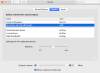
Here it is

Check your Macbook setting

index.php
 
McIntosh C50 USB Input Not Working


I did find this:


Long story short, having problems with the USB input on my McIntosh C50 pre-amp/processor. I use this input to process computer audio files (on a MacBook Air running Aurdirvana Plus). I was intermittently loosing the "handshake" between the USB port on the C50 and HDMI port on the MacBook Air. Contacted McIntosh, they advised me to do a firmware update. First attempt erased the USB audio firmware. Second attempt froze the C50 rendering it completely inoperable. Tried all the McIntosh advised solution to re-set the processor, all to no avail. Sent the unit back to McIntosh for repair under guarantee. After 4 weeks I got it back. Pre-amp/processor working fine except there is no USB input. Tried connecting the MacBook Air up to my Oppo BDP 105 Blu-ray player, Aurdirvana found the USB input fine. Looks like the problem is in the C50. Before I send the C50 back to McIntosh for another 4 week, any idea what may be wrong and what I can do about it?
mgattmch09-15-2017 10:29pm


  • gs5556
    887 posts
    09-16-2017 6:53pm
    It could be the C50 is demanding too much power from the Mac. You can try an external USB 2.0 powered hub. As always, you first have to see if the problem can be replicated on another MacBook and another cable before you blame the C50.

    mgattmch OP
    419 posts
    09-17-2017 8:33am
    I have tried connecting another laptop and different USB cables, same problem every time, nothing could detect the USB port on the C50. It's as if the USB port is simply not there or disconnected?

    mgattmch OP
    419 posts
    10-08-2017 8:33pm
    Turns out the problem was relatively simple to fix. Turns out Magnolia (Best Buy) did not send the processor back to McIntosh for repair, they sent it to their own repair center. Here they loaded the processor firmware but not the USB audio firmware! As I thought, the USB port was effectively not there. After another 3 weeks I now have the pre-amp/processor working perfectly with fully update firmware (Processor and USB audio).

    A special thanks goes out to Ron at McIntosh who was very helpful identifying the problem; even though McIntosh had nothing to do with creating the problem in the first place.

Thanks. Gives me hope.

An outboard, self-powered USB hub is something to try. Also, I have my computer working with a different USB DAC.

My C47 came from Audio Classics a couple months ago. They said they would load the latest firmware prior to shipping. I guess I should call them.
 
Back
Top Bottom