Skycraft is fun to visit but their selection of good components is poor.Winter Park, Florida (Orlando area). There's a local shop here called Skycraft that sometimes has components. Hit or miss though.


Skycraft is fun to visit but their selection of good components is poor.Winter Park, Florida (Orlando area). There's a local shop here called Skycraft that sometimes has components. Hit or miss though.


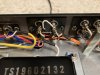
They look pretty normal to me. If you decide you want to try swapping those transistors, message me with an address. I have a bunch of Onsemi 1845's and 992's. I'll send you enough to get them replaced.Here's what the back of the jacks looks like- just want to make sure it looks like it should and hasn't already been fussed about with?
EDIT- the more I look at this the more I'm thinking something ain't right... but maybe that's just me?
Thanks! PM'd.They look pretty normal to me. If you decide you want to try swapping those transistors, message me with an address. I have a bunch of Onsemi 1845's and 992's. I'll send you enough to get them replaced.
Contact @EastPoint or look for the seller peace.love.and.music on FleaBay. Same guy.Thanks! Replacements are backordered at Mouser, Digi-Key, and everywhere else I found in the last 3 minutes on Google. I hate going the eBay route as too many knockoffs. Might be able to find some at a local shop near me that sometimes has this kind of stuff though.

Dagummit, Steve. I already owe you. Now you're just showing off.No load resistors needed to test preamp. Inject a signal - maybe 1000 Hz - into the Aux inputs. Connect scope inputs to signal in - JE01 ( L channel in) and signal out - JE06 (L channel out). They should look the same, except out will be stronger (adjust vertical and/or volume to make the two signals about the same size). You are looking to see if a clean looking sine wave on the in side looks overly fuzzy on the out side. Also, look with volume at zero to see if out side looks noisy. Hiss will usually show up here unless it is volume dependent. In side should be a flat line - and so should Out. Then check JE02 (R channel in) against JE07 (Right channel out) again looking for a less than clean looking sine wave coming out compared to the in signal. This should also give you an idea if one channel looks worse than the other. You can check your amps the same way (with a dummy load). In is J701 and J702. Out is the speaker terminals. Obviously there is a big difference in voltage, but by adjusting your vertical axis and/or volume, you should be able to get them close in size to compare in and out. Don’t short anything - make connections with unit off!
Lol. I remember the things that took me a while to grasp. But on the totem pole of expertise, I am the guy on the bottom. I just hope I don’t lead someone down the wrong path, and if I do, I hope someone catches it and corrects me. I don’t mind being corrected. We all learn that way.Dagummit, Steve. I already owe you. Now you're just showing off.
(Thanks.)
It's been a long time since anyone has asked me to put tape on my probe while moving it around. Ugh. So stupid, but had to be done. I'm new. Don't ban me.Things I learned here - most problems are not bad components, rather bad connections (tarior). And always put a tape on your probe to avoid shorting something while moving it around (not a question of if, but of when) (dr*audio).
Cool! Hantek scope came with mini grabbers. I'm sure I'll still find a way to screw something up, though...As @Steven Tate pointed out you may want to use mini grabbers instead of pointy probes. The only thing is, you need to turn off, set the probes and turn on again. Not an issue for preamps, but amps sometimes take time to stabilize.
Good tip here as well- maybe I can get away just reflowing some connections...Things I learned here - most problems are not bad components, rather bad connections (tarior). And always put a tape on your probe to avoid shorting something while moving it around (not a question of if, but of when) (dr*audio).