• The move to the new server is done. There are some software and database maintenance updates in process. This has us passing the hat around to help out. We appreciate any donations. Seriously, even a dollar helps. The payment page may be found here - https://www.audiokarma.org/support.html

Marantz 2325 PU01 Multipath and Speaker Relay Short

Thanks for your important suggestions. I have finally got all voltages correct. J805, 806, 807 35v, 19v, and 14v respectively. The receiver is back, sounding great, I did have an issue with some hum, intermittently, but still audible at times. I kept playing music for 3-4 hours now, no problems yet. After a break, I will next redo the P700 power amps, left and then, after everything checks out alright, I will dare to do the right channel.
 
Thanks dankik! I have my power supply providing all the correct voltages. But now I have a bad 60HZ hum and it is very audible. My receiver is in a wooden case, no top metal cover, only bottom has metal case. Where should I troubleshoot for the source of that hum?
 
Some questions:
  1. Is the hum in both channels, or only on one channel (L/R)?
  2. Do you hear the hum on all selector inputs (AM/FM/Phono/Aux/Tape) or only some?
  3. If hum is only when connected to Phono input, it is a grounding wire from the Phono to the receiver.
  4. Does the hum volume change with the volume control or stay the same?
  5. Make sure that you do not have your receiver next to any fluorescent light, transformer, or motor.
 
These are the answers to your questions:
both channels have the same hum, same volume
any input, or no input, has the same hum
volume setting does not not effect hum
no change in the setting, lights, motors and the like
the hertz measurements of the hum is ca. 60
the hum is also on the pre-amp output.

The is some other change. the relay clicks in less than 2 seconds and than the speakers are turn on, making a popping sound, in 1-2 more seconds it makes not a clean click but a kind of swishing noise, the speakers stay connected.
 
How did you test to see that the hum was on the preamp outputs?
Here are a couple of things to try:
  1. Externally connect the Pre-Out to Main In jacks with an external RCA cable and see if the hum sounds the same
  2. If you have another Preamp (any brand), connect it to the Main In jacks and see if the hum is still there
When you recapped the P800 power supply board, did you replace all of the electrolytic capacitors, or only some?
Did you replace the main 15,000uF capacitors, or are they original?
 
Ok, I tested by measuring the hertz on the preamp out.
I don't have another preamp, but I could connect the computer line out. Could that work?
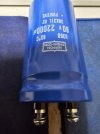
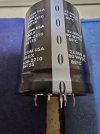
I have not replaced the main capacitors yet, as this hum situation just started a about a week ago, about 2 weeks after I started working on the unit. I plan to replace the main capacitors with NIPPON CHEMI-CON U36D 85 degree centigrade, 80v capacitors 22000 uF 38X31L 02. I also have another set, same specs but it has five connectors (see pictures) The Nippon seem to be same size, the CDM-USA are a bit shorter, same diameter. KakaoTalk_20240807_003223818.jpgKakaoTalk_20240807_003220551.jpgKakaoTalk_20240807_003227853.jpg
 
Connecting to your computer line out should be OK. BE SURE TO TURN THE PC VOLUME ALL OF THE WAY DOWN. Otherwise, you will be driving the Main Amp at full volume/power. Do you still hear the hum? If no, then it's isolated to only the Preamp. The large filter caps only drive the Main amp boards, not the preamp boards. If it only started a while ago, look for any ground wires that could have broken off or forgot to be connected, or wires that attach to the front panel controls.
 
I reduced the Power Supply Board R809 to ca. 33 DCV, the hum is very, very low, almost inaudible. In case the DCV is at 34 of above, big hum is back.
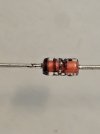
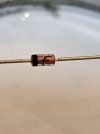
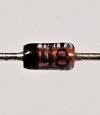
My next question is (*-?) a renew kid has 3 glass diodes, where are these supposed to connect? KakaoTalk_20240807_134358474.jpgKakaoTalk_20240807_143414871.jpgKakaoTalk_20240807_143357868.jpgKakaoTalk_20240807_142541452.jpgKakaoTalk_20240807_142527260.jpgKakaoTalk_20240807_142503966.jpgKakaoTalk_20240807_141449862.jpgKakaoTalk_20240807_141341935.jpg
 

Attachments

  • KakaoTalk_20240807_142511956.jpg
    KakaoTalk_20240807_142511956.jpg
    82 KB · Views: 2
If this hum is like gone, I will proceed with the P700 boards, one board at a time. Thanks for you assistance. If you don't mind, I will keep posting my progress here.
 
Sounds like you have some AC leakage into the 35VDC PS output. Please check the capacitance value and installed polarity of C806, C807, C809.
According to the schematic:
C806 = 220uF/63V​
C807 = 330uF/50V​
C809 = 10uF/50V​
Do you have an oscilloscope? If not, set your DMM to ACV and measure the 35VDC output on J805.
Good luck on the P700 boards. Do one at a time.
It is helpful to take a permanent marker and put a small dot on the top cap of each electrolytic capacitor on the board oriented to the front of the receiver (arbitrary).
This is useful for two reasons:
1) if after recapping you still see caps with dots, you know that you forgot some, and​
2) if there is a question on the orientation of the new cap, you can go back and look at the orientation of the cap that was removed.​
Keep us posted on your progress. ;)
 
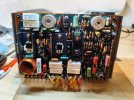
Hi folks! I wonder whether anyone here has compiled a list of transistors used on the Marantz 2325 P700 boards? Especially the 5 large square shaped ones? Any suggestions as to what good replacements are available? Thanks.

2325 P700 - front side - components .jpgSee pic:
 
Take a look at my thread, it details the parts needed and where I obtained them and their installation.

 
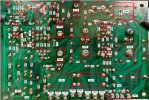
Thanks a lot! Replacements for transistors H706 - H709 and H715 are hard to come by, mouser and digikey ship to Korea, but some parts do not show up. Also would anyone have a clear power amplifier assembly P700 component location? Much appreciated.
 
Does this help?
Screenshot 2024-08-13 070419.jpg
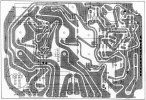
Here are a couple of things that I did when helping someone else. They might be helpful to you also.
Backside of the P700 with components labeled.
Screenshot 2024-03-04 091317.jpg
Reverse component layout (looking at backside of the board).
1723558324705.png
 
Back
Top Bottom