• The move to the new server is done. There are some software and database maintenance updates in process. This has us passing the hat around to help out. We appreciate any donations. Seriously, even a dollar helps. The payment page may be found here - https://www.audiokarma.org/support.html

MC7300 One Channel On Fritz

Johnny_Law

o.O
Subscriber
Aw, nuts. My left channel has developed interesting symptoms:

-Higher output than right channel
-Higher meter than right channel
-Sound is choppy / distorted when right channel remains clean
-Goes into protection at moderate volumes, unlike right channel
-Higher output no matter what output tap selected
-Stays with left channel when inputs swapped, and also when speaker cables swapped
-However, quiet when inputs disconnected

Time to get it under the knife. Swapped my SAE MKIV DM in ... gotta have meters at all times. It'll hit the bench soon but I'd love a head start if anyone has good first checks from past experience with this sort of issue (kind of suspecting an OPT?).

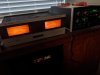
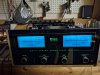
Here's a pic showing the meter difference at very low volume, I didn't take a protection pic but you can imagine it ...
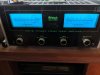
IMG_20200816_152111.jpg

Just not the same ...

IMG_20200816_184259.jpg
 
Last edited:
Register to hide this ad
Ran a 1kHz test tone into the amp. As the input signal increased in amplitude, the left channel meter rose much more quickly than the right channel meter. The left channel goes into protection at around 30watts indicated power, while at that input level the right channel is showing much less power, and is not in protection.

First thought was to check the left predriver/driver/outputs (everything mounted on the heat sinks) for shorts. Didn't find any - all MJ15025s (and one MJ15021) and MJ15024s (and one MJ15020) have no shorts.

However ... when I was trying to unplug the thermal bias device (it's a 36T21 thermostat "therm-o-disc"?), it came apart. It won't stay snugly in place if I put it back together ... do I need a new one? Or do people generally re-crimp, glue, or solder it back together?

PXL_20221121_013608511.jpg
 
Last edited:
I tried to crimp it back into the little bracket and heard a small pop - and can feel something rattling around inside. Hopefully I didn't mess it up. It measures continuous at room temperature which is normal, for the 36T21 according to this datasheet.

So, I put the heat sinks back in, and hooked up the input 1kHz signal again.

The left channel meter now matches the right channel meter power level from no volume up to a certain point. At some point, all of a sudden the left channel meter jumps up and enters protection. When this happens, the amp emits a buzzing sound (I wasn't able to figure out where specifically it was coming from).

After only a minute or so of turning the input up and down, the left channel heat sinks are warm to the touch, and the right channel heat sinks are cold.
 
Last edited:
Time to get the voltmeter out (and/or scope if you have one) and focus on the driver board. Possibly a bias or offset issue, but it's obvious something is causing distortion. Possible that the amp could be oscillating as well.
 
Started with the multimeter tonight, can take out the scope if needed ...

The good (?) news is that I'm not seeing DC voltage at the outputs.

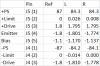
What I am seeing is drifting +/-Drive values out of the driver board on the left side. At no volume, they are the correct +/- 1.8V. But when it's in protection, they have drifted to +1.0V / -0.7V. Compared to the right channel, those +/- Drive values stay very close to +/- 1.8V.

Boy, those Left heat sinks sure do get hot fast though. And I've identified that buzzing sound while in protection as coming from the heat sinks somewhere. Something in there ain't happy - I can't fathom what might make a buzzing sound though. I may need to pull them again and check all the other components. The emitter resistors were all fine when I had them out yesterday.

I didn't test the bias output, power supplies, current limiter or anything else yet. Baby steps.
 
Sounds like the amp is oscillating, the buzz could be coming from the autoformer. I'd focus on measuring all of the voltages going to the output modules, then take a look with a scope when it's in PG to see if it's oscillating. Suspect areas would be the bias regulator, pre-driver, and feedback circuits.

If you don't have the service manual it's on HiFi Engine.
 
Thanks, I do have the service manual. Appreciate the heads up.

But, when I went to continue the diagnosis today ... it decided to start behaving normally. The left channel now matches the right and it's not going into protection. Of course, I'm feeding it a sine wave from my cell phone via an app, and the cell phone's headphone RCA voltage output is only enough to see around 0.3watt on the meters (it was going much higher before on the left channel, as I posted above). I don't have a signal generator so I'll need to hook up a pre-amp if I want to feed it any stronger an input signal.

In any event, hard to diagnose something a fault that isn't being faulty right now. Kind of like going to a mechanic to explain a strange symptom, only for it to disappear as soon as the mechanic goes for a drive.

On the bench it remains ... and by the way I replaced that SAE amp above with an MC2105 so at least I have something McIntosh running the rig inside while I diagnose this in the garage.
 
There's just nothing worse than trying to repair something with an intermittent fault... but try yoinking the plugs on the boards and cleaning the contacts with DeOxit - and, as a fellow member just found out with his MA6200, check to make sure the wires in each connector are secure. I had an intermittent in one of the driver board connectors on my MC2500 and it drove me nuts.
 
Ha! Well I just confirmed that if I lift up gently under the face plate, the channel goes into protection, the buzz comes back, and also the "McIntosh MC7300" logo illumination goes dark. If I let go and sit the unit back down, it goes out of protection, no more buzzing, and the McIntosh MC7300 light comes back on.

So ... clearly something physical, it would seem. Time to poke around.

... and it's been on the shelf over 2 years because of this. Sheesh.
 
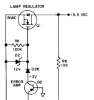
Try unplugging the PG indicator board completely, including the logo lights and stress the front. Then insert the 4-pin plug for the PG indicator board, but leave the logo lights unplugged.... repeat until you find it. Looks like maybe the 13.5VAC powering the PG and logo lights might be shorting to ground, which could be drawing down the +/-12V and 6V supplies. Could even cause relay chatter which might be your buzzing. Then again all bets are off on this one.... good luck!
 
Will do, great tip. Thanks. For a little while first ... Going to enjoy some tunes for the first time in a while.

PXL_20221124_012615809.jpg
 
I would start by looking at the edge-card connectors and other connectors within the unit. Likely this is either a connector problem (can be easy), a "cold solder joint", or a cracked trace (in order of odds (decending) and difficulty to find/repair (ascending).
 
The MC7300 is an awesome amp. Good luck finding the fault.

I agree with @SaturationPt that it is likely a bad connection, cold solder joint, or a cracked trace. I would get a magnifying glass and bright light and take a real close look at the solder side of the board in that area. If that doesn't reveal any obvious issues poking components with a chopstick or non-conductive tool is also very helpful.

-Matt
 
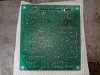
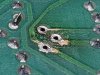
I can't imagine Q1's solder pads left the factory this way - or maybe they did. Strange dirt / corrosion and two of the pads are lifted but still connected.

PXL_20221124_200604431.jpg

PXL_20221124_205039297.jpg

I guess that would correspond to the light going out when jostled...

upload_2022-11-25_11-52-27.png

Rest of the board looks fine. No obvious signs of broken leads, cold joints, burnt resistors, leaky / bulging caps, or evidence of poor wire connections.

PXL_20221124_204951515.jpg

PXL_20221124_205823457.jpg

I scraped a little more of the leads free and soldered Q1 back into place, making sure to get solder up the leads.

PXL_20221125_182108172.jpg

PXL_20221125_184035035.jpg

It's back up and running and the light doesn't go out any more when I lift up the front.

Have some more jostling to do to make sure I'm in the clear in regards to the left channel, though. I am going to jostle more stuff to make sure. Right now it's sitting there playing music happy as a clam.
 
You need to spray some flux remover on that location and clean it off with a soft toothbrush. I do this on every solder point I work on.
 
About the light, yes! Yee-haw!

But ... hmm ... while playing a 1kHz test tone, lifting it up from the front still causes the left channel to go into protection and an audible electric buzzing sound to happen.

So it appears the light issue and the protection / buzzing issue were related only in that they were triggered by the same thing. Rats.

To try to see if there's something loose or close to touching where it shouldn't be, and if so to isolate it, I took a wooden stirrer stick and gently pressed and prodded all the wires, all the connections, all the pots, and all the circuit boards. I was not able to replicate it, nothing caused the same issue.

At the end of my poking and prodding and getting it to buzz the left channel's heat sinks were noticeably not to the touch, with my IR thermometer they measured 118degF and the right channel 97degF.

So I turned it off and let it cool and now I'm going to see if I get a temp mis-match (a) power on with no signal and then (b) power on with 1kHz test tone, but leaving it alone and not messing with it.
 
Well that was determinative, quickly. With the unit on and NO input signal, after ~15 minutes, the left heat sinks measure 103degF and the right heat sinks measure 88degF.

Checking the left channel's driver board outputs ... most correct (within 5-10% or so): +1.8V drive, -1.1V bias, -1.8V emitter. It's got 84V on the power supply.

However ... I measured the "limit" value (0V ref) at 0.026V and initially thought that was close enough, but the right channel measures 0.008V. So, maybe that's a sign of an issue.
 
Last edited:
Back
Top Bottom