• The move to the new server is done. There are some software and database maintenance updates in process. This has us passing the hat around to help out. We appreciate any donations. Seriously, even a dollar helps. The payment page may be found here - https://www.audiokarma.org/support.html

Mirage M595IS troubleshooting

topwik

New Member
Hello and good day!

I have a question about the Mirage m-595is.
I just hooked these up as my bedroom speakers powered by an Onkyo TX 8160 stereo amp.

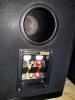
I've noticed today that the rear tweeter might not be working. If I close-in my ear to the back of the speakers, I hear the woofer doing it's thing but I'm not hearing any high end at the back. This is true for both speakers

I'm trying to, I guess, biwire using a small wire just long enough to connect from the lower to the upper rear inputs.

I tested plugging in the main speaker wires to the top and then the bottom inputs at the speaker rears. Without the so called biwire installed, the sound only works from the lower rear inputs. With the biwire installed, I can plug the main speaker wire plugs into either the top or the bottom inputs.

Is the bipolar design is supposed to emit the exact same sound from the front and the back? I understand the speaker is supposed to be positioned in a corner so the sound emitted from the rear reflects off the wall behind it. I'm not sure if I'm supposed to hear the exact same sound presentation when I close-in and focus my hearing at the rear as I do at the front. Seems lacking in the high end at the rear even though there is the same tweeter woofer setup at the rear as at the front. Not sure how to troubleshoot this.

Is anyone here familiar with the 595is from Mirage? Any advice would be appreciated. thanks!
 
Last edited:
Register to hide this ad
I would think the rear tweeters would be putting out audible sound.
Have you managed to get ANY sound from the rear tweeter?
Have you checked the jumpers where you attach the speaker wires from the receiver/amp?
Sometimes those jumpers don't get a good connection on one end or the other.
 
there should be a copper or brass piece that connects the top terminals to the bottom ones
if not some speaker wire will suffice
 
Right, both my speakers are missing those plates.
However I have a short piece of speaker wire connected from the lower to the top instead of the plate.

I just now tried a different cable that has the black and red separated into 2 ends each for the speaker end and at the amp end they are twisted together into a single banana plug and plugged into the amp and still the same result.

I'm trying to rule out whether both of these speakers have a defective rear tweeter driver or something or whatever
I might assume that if it was one speaker, but because I'm not getting much noticeable high end from the rear, I assume it must be a connection issue; user error...
 
Now would be a good time to remove the rear tweeter(s) and take an ohm (resistance) reading with a multi-meter (available for about $9 at Walmart/Lowes/etc, let us know what reading you get.
 
When I remove the wire that connects the top and bottom terminals and just plug a standard wire into the bottom terminal, I get no tweeter high end at the front or back.
When I connect the top and bottom terminals, I get the tweeter high end at the front, but I don't seem to notice or hear any high end at the rear. Both speakers behave the same way.
Are they both defective in some way? Very odd. Quite bothersome.
 
Then just take an ohm reading on any tweeter that does not produce sound.
At least one wire must be disconnected from a tweeter take an accurate reading. Otherwise you're measuring the whole tweeter circuit and the crossover components in that circuit.
 
At the risk of uh-oh, you could try wiring from the receiver directly to the not working tweeter..LOW VOLUME, NO loudness,tweeter control at mid range, bass TURNED down. Just long enough to hear if it produces tones.
DO NOT LET THE BARE WIRE ENDS TOUCH EACH OTHER OR A COMMON CONDUCTIVE SURFACE
Bad things may/will happen.

NOTE--it is always good practice to have the power off when connecting or disconnecting any system cables or wires.
Again, bad things may/will happen if power is on.
 
Last edited:
Well I do have a multimeter. However it's not very intuitive as to how to remove the rear tweeter. There's 6 screws. I unscrewed the outer 3 and it wasn't obvious what those are actually trying to hold in place... then the inner three are already a bit loose but that doesn't loosen anything around what's securing the tweeter in place. Might have to remove the entire rear plate... here's a sample pic from a for sale ad....

983515-d38aa4fa-pair_of_angstrom_radix_300.jpg
 
JMO-I'd be very leary of removing the three inner screws, I suspect those may hold the driver together.
It may be that the driver is held in place by a gasket or chemical (putty/caulk/glue) and prying carefully around the outer edge of the face plate would loosen it.

ADDED---I think this image shows that the three outer screws are holding the tweeter to the cabinet...
images
 
Last edited:
You might something like a jewelers screwdriver or a thin putty knife to lift the edge of the tweeter, but it looks like it should pop out from the front of the cabinet.
 
Just thought i'd follow up here. So as it turns out I was able to pull those tweets out with ease. I used a small screwdriver to pry them out until i could pull it out with my fingers. They fit really well in there. It dug in a small dent or chip in the casing around the tweeter there as it seems to be soft, but i'm gonna try sanding that a bit and going over with a sharpie to clean it up to appease my ocd.

Anyway taking out the tweeter revealed both tweets in both cabinets were intentionally disconnected! for some reason. i wonder why someone would choose to do that. I guess it doesn't change the sound all that much really. Depends on speaker placement or whatever. But I think I'd rather that both tweeters be singing. Sounds crisper and cleaner and something something to my ears anyway! placebo effect ;0

Great speakers though anyway. I really like these :)

So, was a simple fix afterall. Just connect the tweeters. phew. Kind regards!
 
Last edited:
Back
Top Bottom