• The move to the new server is done. There are some software and database maintenance updates in process. This has us passing the hat around to help out. We appreciate any donations. Seriously, even a dollar helps. The payment page may be found here - https://www.audiokarma.org/support.html

pac1085's rambling test equipment thread

Yeah...I've been having this feeling a lot over the past 6 months. I sold a whole bunch of stuff for little money after convincing myself that I'd never use it, but time and time again, a few months later I find some reason why I should have kept it. Many times I end up buying it again at a higher price.

I'm just going to go full on hoarder at this point. Lol.

I have a dead SG503 hopefully I can revive that. I just bought a dead TG501 on eBay, well it powers on but doesn't produce any output. Hopefully I can fix that but I'm a little worried since the seller himself seems to be pretty technical. Between those and the Leo Bodnar pulser that I already own, I think I can get this thing pretty darn close to proper.
I Hope your documenting the calibration procedure for the benefit of others.....Like me ;) lol

I have a 2445 thats all good but I never opened it up or did any maintenance on it. My 2335 has got wanky and I need to check that out at some point.

Good luck Phil !

Athanasios
 
Yeah ill post notes here if anything but im not sure that ill make a video on it. Maybe at some point once I master it.
I have a 2445B as well (I actually just bought it so steal the A5 board out of for this scope, but it was in such nice shape I had to leave it alone lol). On that one I properly backed up the nvram and replaced the chip with one of those RAMTRON FRAM chips. It's been fine. Although that one needs the power supply rebuilt still. I have all of the parts set aside in a bag, just need to bang it out one of these days.
 
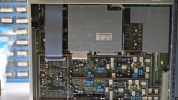
Things aren't looking good for my SG503. It was totally dead but I tracked that down to U610, an LM741 in the 5v supply section. It was dead. I didn't have any LM741's but I had an LF411 which worked fine and now it turns on.
IMG_1078M81w1t.jpg

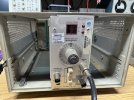
Now for the really bad news. This plastic cam mechanism is broken. All of the gold fingers are fine, but the front part of the plastic is broken off from the main barrel so turning the knob on front does not move it. I couldn't figure out how to remove it, I was hoping I could maybe glue it back together. It must be possible but seems pretty involved. I'd also need to figure out how to clock it correctly..

This unit was dropped when I originally picked it up out of a junk pile. This module wasn't latched into the chassis and slid out, bummer. Perhaps it broke then.

IMG_1079D0dnqt.jpg

And now the main issue. It does display a sine wave when I move that barrel manually, but I am unable to vary the amplitude with the amplitude control knob. The 0.01/.1/1x switch works, but not the precision pot. Also, the front display blinks all the time. I did some searching and found this thread of someone who had all of the exact same symptoms and tracked it down to this hybrid module. Supposedly there is a diy replacement for it... but this unit is feeling like a lost cause. BUMMER!
IMG_1071577M2t.jpg
 
Last edited:
UPL Showed up. Bad CMOS battery. Tearing it apart, replacing it & settings the correct BIOS options got it running again. The PC motherboard capacitors look to be bulging a bit (but not leaking), but that's a project for another day. It passed the self test and works just fine on both channels. And the most important part? IT HAS THE LOW DISTORTION OSCILLATOR!! Woohoo!

IMG_1139.jpeg

Screenshot 2026-09-24 at 7.46.41 PM.png
 
Well, the “broken” tg501 showed up today and works perfectly fine. I think the poor guy who sold it must not have known that you get no output from it if it’s not terminated into 50 ohms. I felt bad since he mentioned how disappointed he was in the eBay listing, so I sent him a mention and told him. Anyways, I’m keeping it. Lol

IMG_1170.jpeg
IMG_1172.jpeg
 
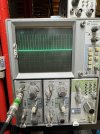
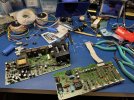
Recapped a Tek 2445B. I already fixed up the A5 board, replaced the Dallas with a RAMTRON FRAM, but on occasion the scope would boot to an error. I noticed after it ran for a bit, if you turned it off and turned it back on, it wouldn't error until it sat for a few weeks again. I figured the power supply needed attention, but maybe it reformed. I'm pretty sure this thing was in storage for 20+ yrs before I acquired it. The power supply in my 2467B was a total disaster with leaking out of spec caps, but surprisingly this 2445B was in really nice shape. It is a very late production unit, 1994 date code, and they seem to have switched to better caps.

I forgot how much of a pain in the a$$ it is to remove the PSU module from the chassis. Mainly the part where you have to somehow reach in and disconnect the connectors for the power inlet/fuse - but not enough room to get your hand in there.

IMG_1193.jpeg
IMG_1195.jpeg
 
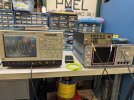
Got the TDS7104 working. This thing was a bit of a basket case.

1. Did not power on when I got it. This was due to the CMOS battery on the Intel PC motherboard being totally dead.
2. Once the battery was replaced I could turn the unit on, but it wouldn't boot. It was not detecting the hard drive.
3. I was unable to get into the BIOS by pressing F2 to enter BIOS setup. It would acknowledge the keystroke but continue the boot process to nowhere.
4. I had to download an ancient MS-DOS utility called "KILLCMOS.COM" from MajorGeeks (man, haven't used that site in like 25 years), and put it on a Win 98 boot disk. Running this tool apparently deleted any corrupted CMOS config and allowed me to get into the BIOS setup.
5. Confirmed that the HDD was not being detected in the BIOS. HDD was making a clunking sound when I took it out, so I thought it might have been bad. I connected it to a dock on another PC and cloned it's contents to a file - it was fine. I wrote that image to a new CF card and installed it in the scope with a CF-IDE adapter. Still not detected.
6. This scope uses a quick release hard drive sled. I took that out of the picture and plugged the hard drive directly into the cable that goes to the motherboard and it booted. I reflowed the connectors on the quick release adapter and tried again but that did not change anything. It turns out that the 1" long IDE cable on the sled was bad. I ordered another on eBay. I could have just double sided taped the CF-IDE adapter in place but I like to do things right.
7. Windows 98 booted but the TekScope app just hung and didn't start. This is a common issue on these scopes and usually indicates that the Dallas NVRAM "PowerCap" battery is dead and the scope loses it's VxWorks boot config. I ordered a new PowerCap module anyways, might as well swap it out now so I don' have to pull it apart again in the near future.
8. I bought some cables to be able to plug into the PowerPC Serial debug port to check out what was going on with Vxworks. I have no idea what happened but after poking around in there (and not doing anything) the scope is now starting fine.
9. Thankfully the actual scope application itself works perfect. It passes all diagnostics and the SPC. All of the inputs work as expected.
10. I need to figure out how to replace the power button. I am hoping Tektronix has them in stock. A few other people mentioned recently that they still have parts for these scopes! I asked for a quote on all of the knobs/buttons on the front, the front panel (the tabs are cracked on mine) and the power button. That would be awesome if I can get them since it will look brand new.
11. The LCD backlight is pretty dim compared to my TDS5054B. I have a parts unit TDS5054B I may try swapping the LCD out of - but I'm not sure of it's condition. Worse case I should be able to change the ccfl tubes over to LED's.

IMG_1316.jpeg
 
I have a Spectracom 9283 serving up 10 MHz and NTP in the lab. Earlier this year it experienced the GPS WNRO issue and I was no longer able to use it for NTP since it thought it was 2006.

This device uses a Trimble Resolution T GPS receiver with the 1.14 firmware (compiled 3/2/2006). It is using the Trimble TSIP protocol.

I ordered a bunch of parts to try and fix it (like a serial interposer, and also a newer Resolution SMT board from China) but didn't end up needing them - yet.

I connected the device to a usb console using this usb to ttl cable (set for 3.3v and had to use some jumpers since the sockets were too big) Amazon.com: waveshare Industrial USB to TTL (C) 6pin Serial Cable, Original FT232RNL Chip, Multi Protection Circuits, Multi Systems Support, with Hardware Flow Control : Electronics

I discovered using Trimble DSPMon that it was running firmware 1.14. There is a newer version available dated 1/21/2010, 1.17. Everything I've read indicates that the GPS week number references the firmware build date so I suspected that updating it would buy me a few more yeas.

It took a while to find after digging around in archive.org, etc but I was able to locate the Trimble GPS Studio software package that is referenced in the firmware update document.
Firmware Update -> Firmware 1.17 & Instructions
Resolution T GPS Downloads -> GPS Studio Download

Anyways, firmware updated, Spectracom device had no issues with it and it fixed the issue! I have proper date/time again. I'm guessing it will break around 2029 again.

I will try the resolution smt module when it comes in. It sounds like there is a version 2.02 firmware that shouldn't rollover until 2032, but I haven't been able to find where to download it. If anyone knows let me know. Also curious if there are any other modules that could serve as a drop in replacement (need to support TSIP protocol)


IMG_14544BjsOO.jpg

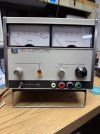
I also got the HP current source cleaned up nice. Thankfully someone I sold another junk HP device to was kind enough to mail the feet back to me to complete it! I 3d-printed some spacers and such to be able to fit these banana jacks in place of the broken binding posts.

IMG_1403.jpeg

Also, one of the UPL's I bought showed up today and works fine - woohoo. Sadly no low distortion board in it.
IMG_1451.png
 
Last edited:
Back
Top Bottom