

You are using an out of date browser. It may not display this or other websites correctly.
You should upgrade or use an alternative browser.
You should upgrade or use an alternative browser.


just to check, when you say power amp outputs would that be pins 15 and 20 on the power amp board or would you need them measured at the actual speaker posts with the top cover reinstalled?
Thanks
when buttoned up, there is only one place.

MAG_1944
Member
so speaker post readings are as follows with both top and bottom covers reinstalled. checked with headphones before hand to double check adding/removing the cover doesn't influence the hum. no change noticed
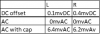
@EastPoint your right I had another Ak'er do some service work on the amp around 2 years ago, when I first got it there were several capacitors showing some doming and a issues with both phono inputs. Most of the caps were replaced and the trim pots also replaced as trying to DC adjustment with the old ones had resulted in wild swings in voltage.
@EastPoint your right I had another Ak'er do some service work on the amp around 2 years ago, when I first got it there were several capacitors showing some doming and a issues with both phono inputs. Most of the caps were replaced and the trim pots also replaced as trying to DC adjustment with the old ones had resulted in wild swings in voltage.
Now we wait for someone with a buttoned up SA-8800 to install shorting jumpers and measure the AC hum out of their speaker terminals. To see if this is typical or an exception.
One thought does occur to me, this unit when tested had no other cables plugged in? Power and speaker wires only?
One thought does occur to me, this unit when tested had no other cables plugged in? Power and speaker wires only?
MAG_1944
Member
with these measurements I didn't have speakers attached and had reinstalled the pre amp jumpers. Il take some more measurements tomorrow with the blanking caps in the pre amp.
should I have a load on the speaker terminals rather than having just the DMM?
All other input are empty currently
should I have a load on the speaker terminals rather than having just the DMM?
All other input are empty currently
MAG_1944
Member
So I rechecked the voltages with the blanking caps in today and there was no change from the values I measured yesterday with the pre amp jumpers in.
If I had an oscilloscope would that help with checking the frequency of the hum and the AC ripple? I can ask around at work as see if any of the guys in our electrical group have one I could borrow. Might be a bit slow atm as the UK is still in a lockdown so travelling is pretty limited buy I can ask around if it wold help with fault finding
If I had an oscilloscope would that help with checking the frequency of the hum and the AC ripple? I can ask around at work as see if any of the guys in our electrical group have one I could borrow. Might be a bit slow atm as the UK is still in a lockdown so travelling is pretty limited buy I can ask around if it wold help with fault finding

alexhastings
Active Member
Hey guys! at @MAG_1944 's request, I hauled my 8800 off the shelf (oof) and took some measurements!
The closest blocking cap I had to 0.1uF was a 0.22uF/63V WIMA cap leftover from a recap project. I'm curious Mark - is this just a safeguard in case the multimeter doesn't block DC for AC measurements? In any case, I took both straight AC measurements and measurements with the cap. All measurements were taken with reference to case ground.
Measurements with case on, volume turned all the way down, no inputs or speakers plugged in:
Speaker main AL
DC: 4.9mV
AC: 0.003V
AC with cap: 0.004V
Speaker main AR
DC: 1.9mV
AC: 0.002V
AC with cap: 0.004V
Measurements with case and bottom panel removed:
Power supply board
Pin 20
DC: 50.70V
AC: 0.665V
AC with cap: 0.040V
When power is turned off, declines to about 4V in 90 second
Pin 22
DC: -50.9V
AC: 0.000V
AC with cap: 0.000V
When power is turned off, stays at voltage
Pin 23
DC: -50.6V
AC: 0.000V
AC with cap: 0.026V
When power is turned off, stays at voltage
Pin 25
DC: 50.5V
AC: 0.668V
AC with cap: 0.026V
When power is turned off, stays at voltage
Power amp board
Pin 26
DC: -49.5V
AC: 0.000V
AC with cap: 0.000V
Pin 25
DC: 48.6V
AC: 0.625V
AC with cap: 0.000V
Looks like my C7 behavior is the same as yours! Hope this helps otherwise!
The closest blocking cap I had to 0.1uF was a 0.22uF/63V WIMA cap leftover from a recap project. I'm curious Mark - is this just a safeguard in case the multimeter doesn't block DC for AC measurements? In any case, I took both straight AC measurements and measurements with the cap. All measurements were taken with reference to case ground.
Measurements with case on, volume turned all the way down, no inputs or speakers plugged in:
Speaker main AL
DC: 4.9mV
AC: 0.003V
AC with cap: 0.004V
Speaker main AR
DC: 1.9mV
AC: 0.002V
AC with cap: 0.004V
Measurements with case and bottom panel removed:
Power supply board
Pin 20
DC: 50.70V
AC: 0.665V
AC with cap: 0.040V
When power is turned off, declines to about 4V in 90 second
Pin 22
DC: -50.9V
AC: 0.000V
AC with cap: 0.000V
When power is turned off, stays at voltage
Pin 23
DC: -50.6V
AC: 0.000V
AC with cap: 0.026V
When power is turned off, stays at voltage
Pin 25
DC: 50.5V
AC: 0.668V
AC with cap: 0.026V
When power is turned off, stays at voltage
Power amp board
Pin 26
DC: -49.5V
AC: 0.000V
AC with cap: 0.000V
Pin 25
DC: 48.6V
AC: 0.625V
AC with cap: 0.000V
Looks like my C7 behavior is the same as yours! Hope this helps otherwise!
MAG_1944
Member
Thanks @alexhastings for taking those measurements 
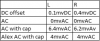
I've done a summary table of my measurements vs Alex's for references
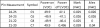
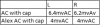
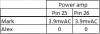
Looks like the ripple on the main filters caps when measured with a blocking cap are very close and C7 also shows the same discharging behaviour
Looks like I've got about 2.2/2.4mvAC more at the speaker outputs
And approx. 4mvAC on the power amp pins vs 0!
@markthefixer does this give any more insight into where next in the amp I should be reviewing?
when you asked me to check AC ripple on power amp pins 25 and 26 should I also have checked the +/-32V line on pins 7 & 8 into the Tone amp board?
Thanks for all the help so far
I've done a summary table of my measurements vs Alex's for references
Looks like the ripple on the main filters caps when measured with a blocking cap are very close and C7 also shows the same discharging behaviour
Looks like I've got about 2.2/2.4mvAC more at the speaker outputs
And approx. 4mvAC on the power amp pins vs 0!
@markthefixer does this give any more insight into where next in the amp I should be reviewing?
when you asked me to check AC ripple on power amp pins 25 and 26 should I also have checked the +/-32V line on pins 7 & 8 into the Tone amp board?
Thanks for all the help so far
Attachments
When you short the inputs TO the power amps you eliminate any contribution from the preamp.
That test for hum with the power amps inputs shorted was on purpose,
Q11, Q12, Q5 & Q6 constant current regulators whole purpose is to servo out the hum.
That test for hum with the power amps inputs shorted was on purpose,
Q11, Q12, Q5 & Q6 constant current regulators whole purpose is to servo out the hum.
I was saying exactly the OPPOSITE. They are functioning, and their design into the system results in exceptionally quiet power rails - especially for the preamp power.Are you thinking the the 2SK34 for Q5, Q6, Q11 and Q12 might not by functioning correctly?
How would I go about checking if they are working correctly?
Thanks
From the data supplied by alexhastings I am led to believe that the unit is behaving as other specimens of it's model.
Thus tracing the bit of hum you discovered using headphones, others were able to measure similar hum.
Any changes would lie in the realm of re-engineering the unit, an activity that precludes my participation due to inflexible demands upon my time.
MAG_1944
Member
Hey Mark, thanks for all your help and support on this, really appreciate you guiding me though all the checks. Do you believe that the hum I'm hearing is simply the inherent noise within the amp as it is designed or of its age?
Before I put the amp back into my system is there any concern with the -48V rail (pin 14) running at -49.8V, the -32V rail (Pin15) running at -33.3V and Pin 19 feeding the indicator board being at 47.3V 'vs' 45V per spec. Obviously everything has a tolerance band it will run in, these are about 4% off but I've no frame of reference if this is in or out of spec
thanks
Before I put the amp back into my system is there any concern with the -48V rail (pin 14) running at -49.8V, the -32V rail (Pin15) running at -33.3V and Pin 19 feeding the indicator board being at 47.3V 'vs' 45V per spec. Obviously everything has a tolerance band it will run in, these are about 4% off but I've no frame of reference if this is in or out of spec
thanks

merlynski
Curmudgeon Electronicist
ten percent tolerance band. resistors being 5% ought to provide some guidance.
The numbers you posted are tighter than are found on most models.
I would attribute hum down by the noise floor more to design than age.
And a lot of effort to find out how it's getting in and changing that.
The numbers you posted are tighter than are found on most models.
I would attribute hum down by the noise floor more to design than age.
And a lot of effort to find out how it's getting in and changing that.

petehall347
the brandy coffee man
thought i would mention the sa-8800 can hum badly from the speakers with the cover removed . i cant remember ever trying mine with headphones . speakers were just fine . well never noticed anything .
if i remember i will try with headphones soon ..its being stored right now . it needs powering up anyway .just hoping it doesn't self destruct at power on .
if i remember i will try with headphones soon ..its being stored right now . it needs powering up anyway .just hoping it doesn't self destruct at power on .
MAG_1944
Member
@merlynski thanks for checking the numbers over .
The strange thing is the hum over speakers is barley noticeable, unless you have your ear next to them its just not loud enough. But with the headphones its very noticeable enough to become tiring after about 20 30 mins. For a sanity check I plugged them into all my other kit just to see how they behaved, was wondering if this was a modern headphones vs older equipment with different input/output sensitives and impedance. I'm using a pair of Bose quite comfort II
Started with the 2 Pioneer SA-506 amps I've got, hum is there but so low its barely noticeable. (I have recapped these and replaced most of the diodes in the power supply.)
Pioneer PD 5030 and PD 6010 CD players, quiet as the grave
Pioneer CT-F950 exactly the same hum as the SA-8800, as far as I can tell this is factory original
I might try and borrow some other headphones at some point to see if that make any difference.
@markthefixer if all the measurements looks good to you then I il get her buttoned up and back onto the shelf. had become paranoid this "hum" was a early sign of something going south..... il keep an eye on it.
Really appreciate all the help you guys have given to me, this is what makes AK such a great place
. The strange thing is the hum over speakers is barley noticeable, unless you have your ear next to them its just not loud enough. But with the headphones its very noticeable enough to become tiring after about 20 30 mins. For a sanity check I plugged them into all my other kit just to see how they behaved, was wondering if this was a modern headphones vs older equipment with different input/output sensitives and impedance. I'm using a pair of Bose quite comfort II
Started with the 2 Pioneer SA-506 amps I've got, hum is there but so low its barely noticeable. (I have recapped these and replaced most of the diodes in the power supply.)
Pioneer PD 5030 and PD 6010 CD players, quiet as the grave
Pioneer CT-F950 exactly the same hum as the SA-8800, as far as I can tell this is factory original
I might try and borrow some other headphones at some point to see if that make any difference.
@markthefixer if all the measurements looks good to you then I il get her buttoned up and back onto the shelf. had become paranoid this "hum" was a early sign of something going south..... il keep an eye on it.
Really appreciate all the help you guys have given to me, this is what makes AK such a great place
petehall347
the brandy coffee man
ok i got mine out and tried with speakers and headphones .zero hum on all inputs even with vol right up . only way i could make it hum a little was to have my test cd player plugged into aux . it has really bad rca leads so not unexpected .
on another note it now has random shot noise .its looking like i need some new transistors .
on another note it now has random shot noise .its looking like i need some new transistors .
 interesting to know that there was no hum on your unit, I might need to look at acquiring a scope to establish exactly what output there is on the speaker terminals
MAG_1944
Member
@petehall347 would it be possible for you to take a few pictures of the internal wiring or your unit, merlynski has mentioned that the risk of internal wiring having been moved around in the past which might be contributing to the issue. I cant fine any high res pictures on google showing the right orientation to see the wiring
thanks
thanks
petehall347
the brandy coffee man
will try after dinner . will have to use the camera flash so maybe the pics wont be so good . will give it a go anyway .