• The move to the new server is done. There are some software and database maintenance updates in process. This has us passing the hat around to help out. We appreciate any donations. Seriously, even a dollar helps. The payment page may be found here - https://www.audiokarma.org/support.html

Sansui qrx-9001 - no sound

Sansui77

Khosaku Kikuchi's Grandson
Hi guys,

I brought a qrx-9001 the other day and need some help trying to fix it.
Theres no sound on the speaker terminals. I plug my headphones in and i hear sound on the right channel but the left channel has a buzzing sound. All the relays click on. All the fuses ok. I put the fm, tune a radio station without an antenna.... unreal and only one vu meter is moving. If i switch the selector switch to 2 channel x2 power no meters move. This 9001 is in beautiful condition and want to get her running again. Any help would be appreciated?? Also where can i get replacment globes?
97a908824c1da4520519627cb9788ed5.jpg
 
Last edited:
Register to hide this ad
It's VERY likely that the fusible resistors in the output driver boards have gone way out of spec and the amps have DC voltage offsets that are causing the protection relay to trip. As the saying goes, "They all do that."

See Jim's excellent assessment process and repair information here. He can sell you kits of the fusible resistors you will need. Clean the controls and replace those resistors first, then see how it works.

If it doesn't work after that, it's probably going to need some serious work. These are tough to work on so you might want to contact Jim at QRX Restore and send it off to him for restoration if you're not an experienced hand with this kind of thing. If you are, have fun with it. There are plenty of threads here on AK that will help you.

They're great receivers. I'm listening to an 8001 right now.
 
^ ^ ^
Like he said. QRXRestore also has the procedure for checking and setting the bias on the box. If you've got sound from the headphones, that may be enough to bring it back to life.

Something else you need to try is switching between the mode buttons while listening and see if any channels wander or go intermittent. That's a classic sign of problems with the dolby switch board.

As far as the lamps go, those are pretty much unobtanium. You can either rewire the unit for fuse bulbs or go LED. I'm using 12v "warm white" bayonet types normally used for interior car lights with the original Sansui base. Plenty of light, nice even wash across the faceplate, no noticeable flickering, and no circuit mods required.

led-lighting.jpg


Lower left, you can see one base with the rounded section clipped off and another with that still in place for comparison. Just shave them with a razor blade.

Here's a pic with a standard incandescent bulb, but those were too tall. Procedure's the same though.

meter-lamps-(3).jpg


Pry the wire away from the side of the bulb and straighten it to make it long enough to thread into the base. Once you put them together, just plug em in and be done with it. The long stem looks like it won't fit, but those Sansui bases are real flexible and form right around it. I also put a spot of hot glue in each for better support - not necessary, but easy enough to do.

EDIT > > I forgot. The bayonet base on these LEDs pops right off once you pry the wires away. Just thread the leads on the LEDs in the same way the old bulbs were. Nice fit inside the Sansui holders. I also added a spot of hot glue to seat them better.

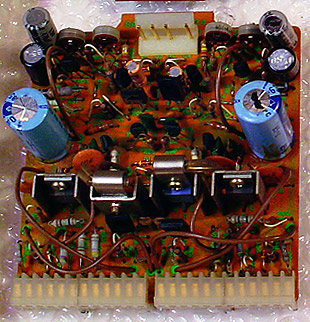
The fusible resistors are meant to be sacrificial to protect some of the more sensitive bits. You should be able to see if one or more of them is bad. Easy enough to spot because they're mounted high on the board because they do get hot. They're located on the F2624 boards - there's two of those mounted vertically in pin connectors towards the back center of the chassis.

qrx9001-f2624.jpg
 
Last edited:
Thanks guys. I will replace the fuse resistors, re-pin the double sided board and see how she comes up. Once shes working i will recap her. Let you know how i go.

I will contact Jim at QRXrestorations too.
 
Re-pin? As in, already pinned? <G>

Don't take any shortcuts there - it's not something you'd want to do more than once. Desolder each pass through, scrape back the circuit traces both sides, solder a pin in the hole, fold that over tight to each trace and solder, then flow the (w)hole thing one more time to make it purty.

As one who's been there, done that, it's more like ... yikes! NEVER AGAIN!!

(We should start a club or something ... maybe use :yikes: for a logo ... )

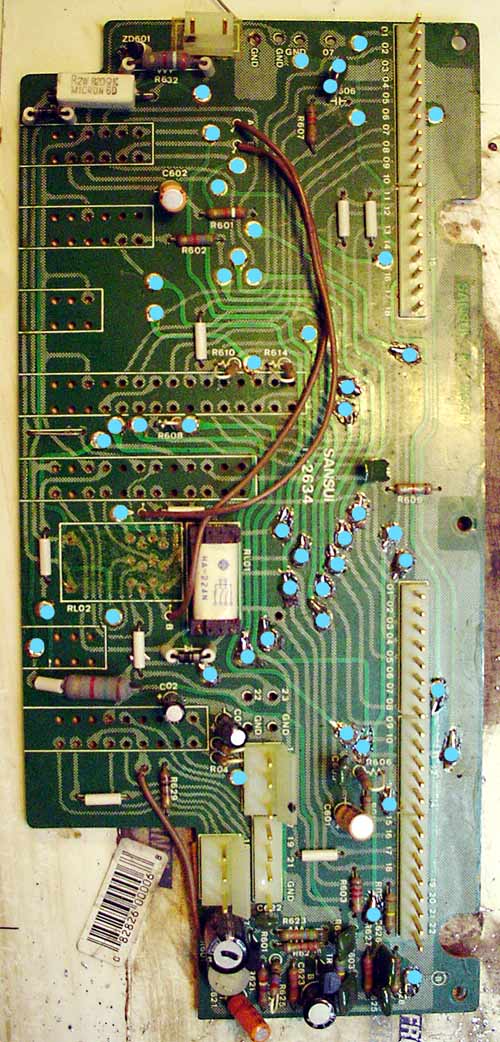
You'll also need to remove all the switches and relay to get at all the pass throughs. 51 total if I remember right.

PCB-F-2634-passthrus-small.jpg


(Don't forget the one hiding under the gumdrop!)
 
^ ^ ^
Like he said. QRXRestore also has the procedure for checking and setting the bias on the box. If you've got sound from the headphones, that may be enough to bring it back to life.

Something else you need to try is switching between the mode buttons while listening and see if any channels wander or go intermittent. That's a classic sign of problems with the dolby switch board.

As far as the lamps go, those are pretty much unobtanium. You can either rewire the unit for fuse bulbs or go LED. I'm using 12v "warm white" bayonet types normally used for interior car lights with the original Sansui base. Plenty of light, nice even wash across the faceplate, no noticeable flickering, and no circuit mods required.

led-lighting.jpg


Lower left, you can see one base with the rounded section clipped off and another with that still in place for comparison. Just shave them with a razor blade.

Here's a pic with a standard incandescent bulb, but those were too tall. Procedure's the same though.

meter-lamps-(3).jpg


Pry the wire away from the side of the bulb and straighten it to make it long enough to thread into the base. Once you put them together, just plug em in and be done with it. The long stem looks like it won't fit, but those Sansui bases are real flexible and form right around it. I also put a spot of hot glue in each for better support - not necessary, but easy enough to do.

The fusible resistors are meant to be sacrificial to protect some of the more sensitive bits. You should be able to see if one or more of them is bad. Easy enough to spot because they're mounted high on the board because they do get hot. They're located on the F2624 boards - there's two of those mounted vertically in pin connectors towards the back center of the chassis.

qrx9001-f2624.jpg


Hi, re the bulbs, looks like these are the same as used in the TU-417 to TU-717 series. These is an OEM type solution (althought those Led options look pretty good and warm white is definitely the way to go)

See here

http://www.audiokarma.org/forums/showthread.php?t=369708

Good luck with the repair, the 9001 is a great quad receiver (I have its little brother - a 7001 - in the collection

Cheers

John
 
I have its little brother - a 7001 - in the collection.

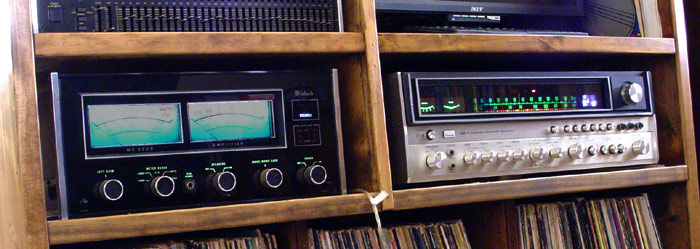
I also have a 6001 that I picked up to keep me in quad heaven while ripping into the 9001. Excellent receiver with the same TOTL vario-matrix. Less power, but that's ok ... I run an external amp on the front anyway.

6001-mac-combo.jpg
 
Hi sKiZo, I tried to PM you with a couple of QRX questions but it looks like you are not PM-able. Send me one with an email address if you're willing to. Nothing major, I'm just wondering if you've done anything on the 6001/7001 systems to make their sound more like the 8001/9001. I have one of each in my house right now! Thanks. --Dan
 
I'm just wondering if you've done anything on the 6001/7001 systems to make their sound more like the 8001/9001. I have one of each in my house right now! Thanks. --Dan

Haven't done anything to the 6001 - didn't really need it. Just cleaned the controls and fixed the dial lights is all.
 
Re-pin? As in, already pinned?

Don't take any shortcuts there - it's not something you'd want to do more than once. Desolder each pass through, scrape back the circuit traces both sides, solder a pin in the hole, fold that over tight to each trace and solder, then flow the (w)hole thing one more time to make it purty.

As one who's been there, done that, it's more like ... yikes! NEVER AGAIN!!

(We should start a club or something ... maybe use :yikes: for a logo ... )

You'll also need to remove all the switches and relay to get at all the pass throughs. 51 total if I remember right.

PCB-F-2634-passthrus-small.jpg


(Don't forget the one hiding under the gumdrop!)
Looks like its going to be a full restore. She in beautiful condition not a mark on her so Im going to take my time re-pining the board, full recap, replace all fuse resistors etc. One board at a time. This 9001 is all original untouched but the 35years of use has come to a halt.

Because the amp is protection and i have a bad left channel listening through the headphones, would it be more likely the driver boards, causing the channel buzz?
Is it worth repairing the dead channel first before restoration?
 
Last edited:
Easiest way to test that would be to swap the boards ... they're identical, and you'll know immediately if the problem follows the board.

Next step up would be to do the bias check and set ... easy enough to do and no fancy tools required.

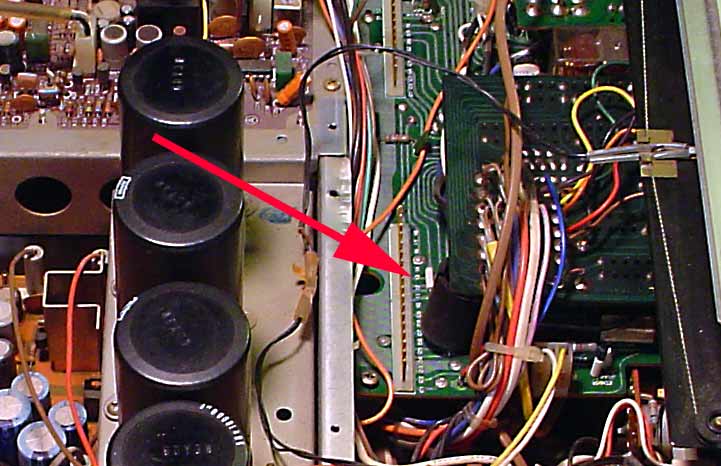
Don't forget to cycle the mode buttons while listening at low levels and see if that channel pops back in. You can try putting a bit of pressure on the dolby board while doing so - a bit of a bow can temporarily close any open connections and help point towards the problem. Here's what I found in mine when I first cracked it open ... at that point, all I'd done is remove the vertical daughter cards to get a better peek inside.

4channel-wedgie.jpg


That's an old chassis foot jammed in there to do just what I described ... so I know it works ... kinda sorta. Couldn't even see it with the daughter cards in the slots. That foot probably worked long enough to get the beast out of the shop and cost a former owner a couple hundred bucks. <G>


* I'd definitely try to get it working before recapping, then do that one board at a time with a hot retest at each stage. Not always possible - I did all the boards that had to be done with the faceplate off, then tested once I got to the point where the rest of the boards could be accessed with the chassis back together. Too complex a box to just rip into it and hope for the best, and every little bit helps.

PS ... some real decent threads scattered about on the project. I'm partial to this one (blush!) <G>

QRX 9001 Restoration (as in "yet another one")

More or less a collection of some of the stuff that had me scratching my head along the way. A lot of other good tips 'n tricks can be found elsewhere - just do an advanced search on "QRX 9001".

Have fun with it!
 
Last edited:
Easiest way to test that would be to swap the boards ... they're identical, and you'll know immediately if the problem follows the board.

Next step up would be to do the bias check and set ... easy enough to do and no fancy tools required.

Don't forget to cycle the mode buttons while listening at low levels and see if that channel pops back in. You can try putting a bit of pressure on the dolby board while doing so - a bit of a bow can temporarily close any open connections and help point towards the problem. Here's what I found in mine when I first cracked it open ... at that point, all I'd done is remove the vertical daughter cards to get a better peek inside.

4channel-wedgie.jpg


That's an old chassis foot jammed in there to do just what I described ... so I know it works ... kinda sorta. Couldn't even see it with the daughter cards in the slots. That foot probably worked long enough to get the beast out of the shop and cost a former owner a couple hundred bucks. <G>


* I'd definitely try to get it working before recapping, then do that one board at a time with a hot retest at each stage. Not always possible - I did all the boards that had to be done with the faceplate off, then tested once I got to the point where the rest of the boards could be accessed with the chassis back together. Too complex a box to just rip into it and hope for the best, and every little bit helps.

PS ... some real decent threads scattered about on the project. I'm partial to this one (blush!) <G>

QRX 9001 Restoration (as in "yet another one")

More or less a collection of some of the stuff that had me scratching my head along the way. A lot of other good tips 'n tricks can be found elsewhere - just do an advanced search on "QRX 9001".

Have fun with it!
Thanks sKiZo: really appreciate it. Will let you know how i go.
 
Dang ... the full monty!

Happy ending as well? :D

For anyone who does remove the board completely, DO pay attention to the black wires. They're NOT common ground and hooking them up bass ackwards can make things real interesting ...
 
Dang ... the full monty!

Happy ending as well? :D

For anyone who does remove the board completely, DO pay attention to the black wires. They're NOT common ground and hooking them up bass ackwards can make things real interesting ...
Ok i now have no sound coming out of the headphones. No bias on driver boards. No audio at all.
 
Step one ... check all your fuses. There's quite a few inside on the main power board. Hard to see the element on some of the low amp ones, so a flashlight and a pencil to give em a tonk and see if you can spot anything vibrating works.

Find a blown fuse, time to track down WHY it blew. You'll also want to get hold of a schematic and service manual for tracking back to find the source of the problem.

DO perform a complete visual inspection looking for crispy components, bulging caps ... the usual suspects ... before going any further, and if you do find a bad fuse, at least you know (at this point) that the problem is more or less protected. No promises there ... I'd say you're at the point now that you could end up with some serious damage if you're not careful.

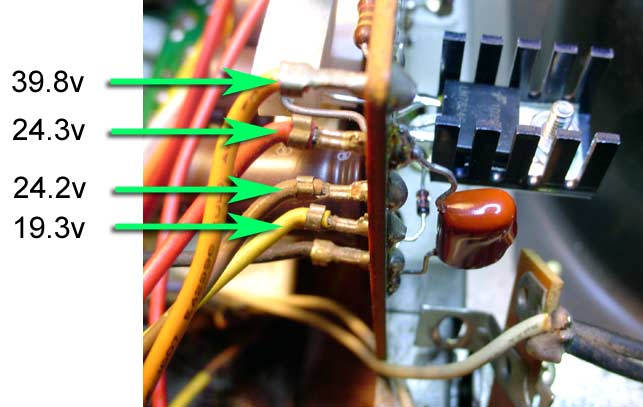
Possible you're having problems with the power supply. Check the voltages on the F2639 pre-power board ... that's the vertical board a bit to the right of the tone controls and provides critical voltage for the drivers ...

regulator-volt-check.jpg


Probably worth repeating - the bias controls are REAL sensitive. Doesn't take much of a turn to get out of range and into dangerous territory. Don't want to blow any of those rare IC chips, doncha know.

PS ... ignore the weird transistor with the heat sink and other odds and ends on the back of my board ... for now anyway. That's a highly recommended regulator mod that provides more stable current to those ultra sensitive driver boards. That's covered in the my build thread and elsewhere.
 
Last edited:
Step one ... check all your fuses. There's quite a few inside on the main power board. Hard to see the element on some of the low amp ones, so a flashlight and a pencil to give em a tonk and see if you can spot anything vibrating works.

Find a blown fuse, time to track down WHY it blew. You'll also want to get hold of a schematic and service manual for tracking back to find the source of the problem.

DO perform a complete visual inspection looking for crispy components, bulging caps ... the usual suspects ... before going any further, and if you do find a bad fuse, at least you know (at this point) that the problem is more or less protected. No promises there ... I'd say you're at the point now that you could end up with some serious damage if you're not careful.

Possible you're having problems with the power supply. Check the voltages on the F2639 pre-power board ... that's the vertical board a bit to the right of the tone controls and provides critical voltage for the drivers ...

regulator-volt-check.jpg


Probably worth repeating - the bias controls are REAL sensitive. Doesn't take much of a turn to get out of range and into dangerous territory. Don't want to blow any of those rare IC chips, doncha know.

PS ... ignore the weird transistor with the heat sink and other odds and ends on the back of my board ... for now anyway. That's a highly recommended regulator mod that provides more stable current to those ultra sensitive driver boards. That's covered in the my build thread and elsewhere.
Thanks sKiZo.
I will check when i get home.
 
Step one ... check all your fuses. There's quite a few inside on the main power board. Hard to see the element on some of the low amp ones, so a flashlight and a pencil to give em a tonk and see if you can spot anything vibrating works.

Find a blown fuse, time to track down WHY it blew. You'll also want to get hold of a schematic and service manual for tracking back to find the source of the problem.

DO perform a complete visual inspection looking for crispy components, bulging caps ... the usual suspects ... before going any further, and if you do find a bad fuse, at least you know (at this point) that the problem is more or less protected. No promises there ... I'd say you're at the point now that you could end up with some serious damage if you're not careful.

Possible you're having problems with the power supply. Check the voltages on the F2639 pre-power board ... that's the vertical board a bit to the right of the tone controls and provides critical voltage for the drivers ...

regulator-volt-check.jpg


Probably worth repeating - the bias controls are REAL sensitive. Doesn't take much of a turn to get out of range and into dangerous territory. Don't want to blow any of those rare IC chips, doncha know.

PS ... ignore the weird transistor with the heat sink and other odds and ends on the back of my board ... for now anyway. That's a highly recommended regulator mod that provides more stable current to those ultra sensitive driver boards. That's covered in the my build thread and elsewhere.
Measured the leads running to F-2639 and got zero AC volts. Theres a Sanyo transistor which had dry joins so i desoldered and resoldered the pins. Checked the board, touched a few up and still nothing. Just want to let you know that the chassis is live and if i put one of my multimeter probes on the chassis it measures 7 - 10vac. I was pushing down on F-2638 and went back to measure F-2639 and the voltages came up all measured good. Chassis wasn't live as well. Turned the amp off to have alook under F-2638 board to see if any dry joins but couldnt find any. Turned amp back on no voltages.
 
I just need a hole day without kids interrupting me then i will be able to fault find the issue. I plan to do a full resto on her. Thanks for all who have tried to help me.
 
Back
Top Bottom