

You are using an out of date browser. It may not display this or other websites correctly.
You should upgrade or use an alternative browser.
You should upgrade or use an alternative browser.
Stereo/TV help please
- Thread starter TattRotten78
- Start date
-
- Tags
- s702 sherwood sherwood s702


TattRotten78
New Member
Yeah,thats how I thought I had it before when it worked...but then I moved,got different TV provider,and now there's no soundYou should be able to connect using the white/left and red/right "audio out" jacks visible in the photo to the "aux in" jacks on the receiver -- have you tried that?
TattRotten78
New Member
Unfortunately no luckAudio out jacks to the aux in on your receiver and all should be well.

johnebravo
I should be practicing
Yeah,thats how I thought I had it before when it worked...but then I moved,got different TV provider,and now there's no sound
Is there an HDMI cable from the DirecTV box into the TV? If there is, it'll say so at the TV.
TattRotten78
New Member
Yes sir..no luckYou should be able to connect them using RCA cables from the white/left and red/right "audio out" jacks visible in the photo to the "aux in" jacks on the receiver -- have you tried that?
TattRotten78
New Member
Yeah there is...I'd need the HDMI cable ,but yesIs there an HDMI cable from the DirecTV box into the TV? If there is, it'll say so at the TV.
TattRotten78
New Member
I'm sorry,yes its routedYeah there is...I'd need the HDMI cable ,but yes

stevo137
Super Member
This is all that you need for stereo from your TV to your auxiliary input on your receiver.
An 1/8" diameter stereo male to RCA stereo male audio cable.
Connect the 1/8" stereo male into your TV audio out and RCA's into your aux left and right and that's it, enjoy your tv on your rig in stereo.
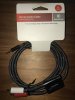
An 1/8" diameter stereo male to RCA stereo male audio cable.
Connect the 1/8" stereo male into your TV audio out and RCA's into your aux left and right and that's it, enjoy your tv on your rig in stereo.
johnebravo
I should be practicing
I might try using the TV remote to go through the TV Menu items to see if the Audio Out is controllable -- maybe it is turned off? I'm just spit balling here, really! 
TattRotten78
New Member
That's what I just said to my girl a few minutes ago.I might try using the TV remote to go through the TV Menu items to see if the Audio Out is controllable -- maybe it is turned off? I'm just spit balling here, really!
That I should check menu options..lol

cademan
Lunatic Member
Yeah check any on screen menu's.
Also, maybe check the inputs on your amplifier to make sure you are getting a signal into it. You can also try the tuner input. It is line level just like the aux input.
Oh, and some TV's might have to have the volume control raised one notch to activate the rear outputs. Some cheaper brand TV's might have the rear outputs adjustable with the main speakers only.
Also, maybe check the inputs on your amplifier to make sure you are getting a signal into it. You can also try the tuner input. It is line level just like the aux input.
Oh, and some TV's might have to have the volume control raised one notch to activate the rear outputs. Some cheaper brand TV's might have the rear outputs adjustable with the main speakers only.
johnebravo
I should be practicing
The cable that stevo137 has shown will work if you have an audio out that accepts a stereo miniplug type connector; however, the picture you showed of the back of the TV only shows RCA type output jacks for audio. Is there also a headphone jack for listening to the TV?
TattRotten78
New Member
I tried all of the different inputs..phono,tuner,auxs',etc.Yeah check any on screen menu's.
Also, maybe check the inputs on your amplifier to make sure you are getting a signal into it. You can also try the tuner input. It is line level just like the aux input.
How do I check for signal? I apologize in advance for any dumb questions..lol
TattRotten78
New Member
Headphones jack on the amp or TV?I just looked..both doThe cable that stevo137 has shown will work if you have an audio out that accepts a stereo miniplug type connector; however, the picture you showed of the back of the TV only shows RCA type output jacks for audio. Is there also a headphone jack for listening to the TV?
johnebravo
I should be practicing
I tried all of the different inputs..phono,tuner,auxs',etc.
How do I check for signal? I apologize in advance for any dumb questions..lol
He's suggesting that you check to make sure it's not the amp that's the problem -- you can connect any source (cd or ipod etc) to check that the aux input really is working. If it was working before, it probably is not the problem, but you should check to make sure if you can.
cademan
Lunatic Member
I tried all of the different inputs..phono,tuner,auxs',etc.
How do I check for signal? I apologize in advance for any dumb questions..lol
Take the RCA jacks and plug them into your aux inputs. With the volume turned down, touch the other end of the RCA jacks with your finger and slowly turn up the volume. If the cords are good, you should hear a buzz. If you do, the aux input is working and the cords are good and that just pretty much leaves it at the tv end of things.
johnebravo
I should be practicing
Headphones jack on the amp or TV?I just looked..both do
The headphone jack on the TV should another way to get the tv sound out to the amp -- you'll need a connector like stevo137 showed with a stereo miniplug on one end, and twin RCAs on the other.
TattRotten78
New Member
He's suggesting that you check to make sure it's not the amp that's the problem -- you can connect any source (cd or ipod etc) to check that the aux input really is working. If it was working before, it probably is not the problem, but you should check to make sure if you can.
He's suggesting that you check to make sure it's not the amp that's the problem -- you can connect any source (cd or ipod etc) to check that the aux input really is working. If it was working before, it probably is not the problem, but you should check to make sure if you can.[/QUO I can try that
TattRotten78
New Member
Cool..I'll give it a try..t.y..Take the RCA jacks and plug them into your aux inputs. With the volume turned down, touch the other end of the RCA jacks with your finger and slowly turn up the volume. If the cords are good, you should hear a buzz. If you do, the aux input is working and the cords are good and that just pretty much leaves it at the tv end of things.
stevo137
Super Member
Headphones jack on the amp or TV?I just looked..both do
There ya' go! Run the 1/8" stereo cable from your headphone jack on your TV out to your receiver aux RCA left and right and done.