• The move to the new server is done. There are some software and database maintenance updates in process. This has us passing the hat around to help out. We appreciate any donations. Seriously, even a dollar helps. The payment page may be found here - https://www.audiokarma.org/support.html

Virtual Device of Noise Reduction Systems

ASRHTB

Member
Hello,

I am working on digitizing old recorded R2R tape project, but the main problem here is hiss sound and echo. I suppose these tapes is not recorded in any noise reduction encode. I have tried to reduce hiss with dolby B and dbx 1, and I am planning to use the Super D noise reduction system if possible (but I think, without the encoding option, it is not meant to use).

So,

I use a couple of software-related solutions to reduce hiss effects on old tape records, but it reduces original sound quality and creates metallic noises.

As for the hardware solutions on the forums, people sometimes say Super D best, or dbx 224, etc.

If I record the playback of the sound of tapes to the computer, is there any plugin or virtual device that simulates these noise reduction systems generally used in hi-fi systems (like Super D or others)?
 
Register to hide this ad
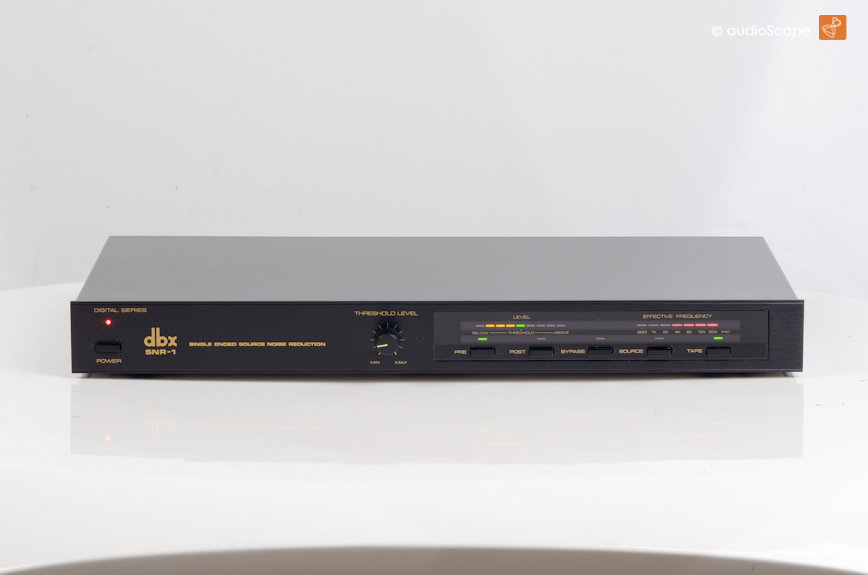
The best single-ended noise reduction system I have is the DAK BSR-1, also sold as the dbx SNR-1.
dbx_snr_1-2.jpg


It's a more sophisticated form of Dynamic Noise Reduction (DNR), which is explained and demonstrated in this video:

 
The best single-ended noise reduction system I have is the DAK BSR-1, also sold as the dbx SNR-1.
dbx_snr_1-2.jpg


It's a more sophisticated form of Dynamic Noise Reduction (DNR), which is explained and demonstrated in this video:

Thank you very much info. Is there any software that replicates this device?
 
I use a couple of software-related solutions to reduce hiss effects on old tape records

What are those software solutions?

Audacity has a noise reduction filter, using a sampled noise and configurable degree. It allows you to listen to what will be removed, so you can tell if is removing significant wanted signal.
 
What are those software solutions?

Audacity has a noise reduction filter, using a sampled noise and configurable degree. It allows you to listen to what will be removed, so you can tell if it is removing significant wanted signal.

Hello,
At the beginning, I have used audacity, but now I am using adobe audition. But removing noise by getting noise print is reduces audio quality.
 
Well, realistically, you will never remove noise without losing some signal, because the noise, being random, cannot be distinguished from the actual signal.

Noise reduction systems such as Dolby work by boosting certain frequencies (those found in tape noise) during recording, and then attenuating accordingly on playback. Thus the signal returns to the correct level, but noise is attenuated.

Dynamic noise reduction is most useful when signal is low, so noise is not masked by strong signal. But low signal is more susceptible to statistical noise removal techniques; see the Audacity user manual.
 
I note you also mention echo. I suspect you mean printthrough. The delay will vary with position on the reel (due to the change in circumference with radius of the remaining tape on the reel. I would imagine that a modern cross-correlating based algorithm should be able to accurately track the delay, and determine the level of printthrough, and remove it quite successfully.
 
cpt_paranoia, Thank you for the answers. I believe when you mean statistical noise removal is related to getting a noise print from the audio, then use that area's statistics to remove similar noise from the rest of the sound (this is not the thing that I am looking for). I couldn't find what you mean by dynamic noise reduction. Is it the compressor?

Also, The echo, I mean is caused by room effect (audio's reflection is recorded multiple times from a single mic). It is not due to various speakers or multiple microphones effects. The tapes I am working with are recorded mono records, generally not for direct music, only speech (also, I am working on stereo recorded music, but it is not the issue right now).
 
Well, realistically, you will never remove noise without losing some signal, because the noise, being random, cannot be distinguished from the actual signal.

Noise reduction systems such as Dolby work by boosting certain frequencies (those found in tape noise) during recording, and then attenuating accordingly on playback. Thus the signal returns to the correct level, but noise is attenuated.

Dynamic noise reduction is most useful when signal is low, so noise is not masked by strong signal. But low signal is more susceptible to statistical noise removal techniques; see the Audacity user manual.
I'd expand on this a bit: I don't think you can reduce noise without giving up fidelity, especially at high frequencies. It's a personal tradeoff. If the hiss drives you crazy, roll off the treble. When I listened to commercially recorded 7.5 inches per second tapes, I preferred them to records because the record masters reduced hiss by rolling off. (This is before Dolby masters, of course.) But that was my preference, I could block out the hiss better than I could tolerate bad-sounding triangles and other instruments with a lot of high-frequency harmonic content.
 
You can also opt for a Pioneer cassette deck with built-in Digital NR, which gives even non-Dolby-encoded tapes a signal-to-noise ratio almost as good as a CD, and also has FLEX (Frequency Level EXpander) to boost the high end of old or poorly-recorded tapes:

 
I'd expand on this a bit: I don't think you can reduce noise without giving up fidelity, especially at high frequencies. It's a personal tradeoff. If the hiss drives you crazy, roll off the treble. When I listened to commercially recorded 7.5 inches per second tapes, I preferred them to records because the record masters reduced hiss by rolling off. (This is before Dolby masters, of course.) But that was my preference, I could block out the hiss better than I could tolerate bad-sounding triangles and other instruments with a lot of high-frequency harmonic content.

Thanks.
 
You can also opt for a Pioneer cassette deck with built-in Digital NR, which gives even non-Dolby-encoded tapes a signal-to-noise ratio almost as good as a CD, and also has FLEX (Frequency Level EXpander) to boost the high end of old or poorly-recorded tapes:


I don't see how to use it with the reel to reel machine which I have.
 
I don't care much for Dolby, all of these years later. I feel that a proper azimuth adjustment goes further. I do my cassette transfers without any NR application.
I've learned of a few different Dolby NR software programs, but, know little to nothing of them.
Here are a few
http://www.anaxwaves.com/DDiCodec/
https://sourceforge.net/projects/dolbybcsoftwaredecode/
https://www.bing.com/search?q=dolby...8-5&sk=&cvid=7CB81B4B4682460C8EA40E585F89CABB

Thank you for the answer, I owe these apps looking forward for alternatives.
 
I don't care much for Dolby

Dolby is all a bit moot; we are talking about tapes that have already been recorded, and trying to reduce tape hiss from them. Fundamentally, this is an impossible task to do perfectly, due to the random nature of the tape hiss. You cannot perfectly remove random noise algorithmically, without degrading the wanted signal to some extent.
 
The echo, I mean is caused by room effect (audio's reflection is recorded multiple times from a single mic).

Okay. An autocorrelation filter should be able to reduce echo. Essentially, it would end up modelling the echo characteristics of the room, and create an 'anti echo' filter. Since speech is by nature bursty, it is easier to find the echo behaviour, provided the inter-speech gaps are longer than the echo response of the room; you get a 'pure audio' period at the start of each speech phrase, before the echo artefacts start to be recorded with the direct path. For continuous music, you only get the 'pure audio' period at the start of the continuous audio; thereafter it includes echo.

Note that a perfect anti-echo filter will produce recordings that sound like they are in an anechoic chamber; rather unnatural. You could then add whatever echo response you wanted to make it sound more 'natural'.
 
Okay. An autocorrelation filter should be able to reduce echo. Essentially, it would end up modelling the echo characteristics of the room, and create an 'anti echo' filter. Since speech is by nature bursty, it is easier to find the echo behaviour, provided the inter-speech gaps are longer than the echo response of the room; you get a 'pure audio' period at the start of each speech phrase, before the echo artefacts start to be recorded with the direct path. For continuous music, you only get the 'pure audio' period at the start of the continuous audio; thereafter it includes echo.

Note that a perfect anti-echo filter will produce recordings that sound like they are in an anechoic chamber; rather unnatural. You could then add whatever echo response you wanted to make it sound more 'natural'.

Nice touch, thanks.

Could you recommend me a plugin that works in dynamic noise reduction to reduce noise?
 
I've learned of a few different Dolby NR software programs, but, know little to nothing of them.

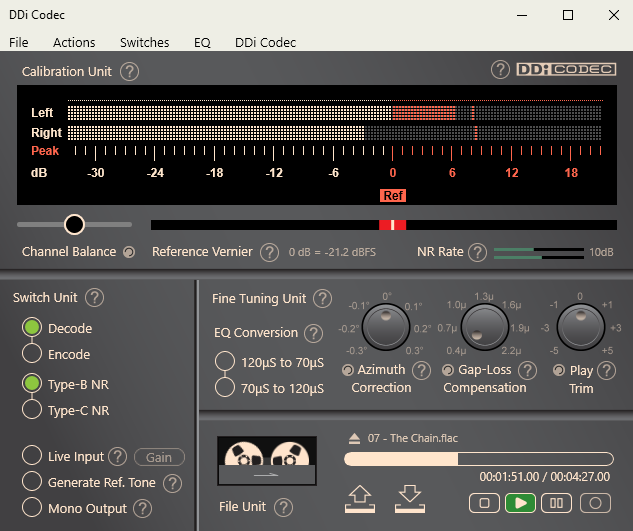
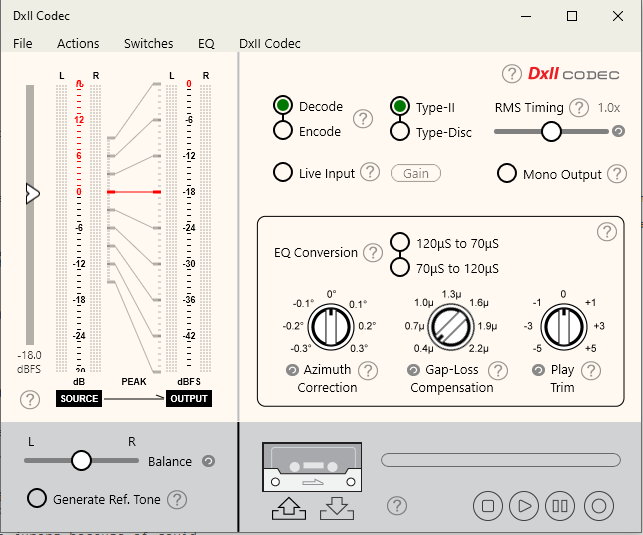
I have DDi Codec and it's brother DXII Codec for dbx II.

nhmk1mt9.png
zexx15ti.png


Both do a more than adequate job in dealing with the noise reduction. Results with DDi depend if you can get a good reference level set; dbx is a little less sensitive to this. I was actually able to get Dolby C to work *really* well with my Integra TA-207. I tried DxII on a real dbx unit...but that thing is in need of a major overhaul. It mostly worked...but I'm assuming any "errors" I heard were more due to the age of the components in that wood-sided box.

The EQ conversion options are interesting. You can either fix tapes recorded with the "wrong" curve; or modify the sound to virtually force a curve.

As far as the idea of dynamic noise reduction; I never looked at how they did that in the analog world in stuff like DNR. Digitally it's not very reliable; it's gotten better, but you can still tell it's having to guess at what the noise level is.
 
Back
Top Bottom