• The move to the new server is done. There are some software and database maintenance updates in process. This has us passing the hat around to help out. We appreciate any donations. Seriously, even a dollar helps. The payment page may be found here - https://www.audiokarma.org/support.html

Yamaha C4 preamp fault. Hum. Phono switches.

If... I should fail to find the cause of the hum... is it likely that a good audio repair technician would be able to readily locate the source? Is there any equipment that they use that makes tracing it fairly straightforward?
 
If... I should fail to find the cause of the hum... is it likely that a good audio repair technician would be able to readily locate the source? Is there any equipment that they use that makes tracing it fairly straightforward?


Is there hum with no sources connected to the pre amp?

No CD, no Tape, no iPhone, no turntable.

Also what amp are you connecting it to?

Is there any GND connectors on the Amp and if so is the C4 GND connected to it?

If no GND connector on amp can you try to run a wire to a chassis screw on the amp case?

With out the pre amp connected to the amp does that hum?

Athanasios
 
Last edited:
Thanks, so...

Is there hum with no sources connected to the pre amp?
No CD, no Tape, no iPhone, no turntable.
-Yes-

Also what amp are you connecting it to?
-Power section of a NAD 3020A which works perfectly and recently serviced. Hum also present though with other power amps.-

Is there any GND connectors on the Amp and if so is the C4 GND connected to it?
- NAD has a GND. The C4 GND (next to the Phono RCA’s ) is not connected to it. Should / Does it need to be?

If not GND connector on amp can you try to run a wire to a chassis screw on the amp case?
- Could run a wire from GND to GND on each amp. Can do this tomorrow. -

With out the pre amp connected to the amp does that hum?
-NAD doesn’t hum. The C4 has emitted a hum when connected to other well- functioning power amps.-
 
Thanks, so...


Is there any GND connectors on the Amp and if so is the C4 GND connected to it?
- NAD has a GND. The C4 GND (next to the Phono RCA’s ) is not connected to it. Should / Does it need to be?

If not GND connector on amp can you try to run a wire to a chassis screw on the amp case?
- Could run a wire from GND to GND on each amp. Can do this tomorrow. -

-
Yes connect the GND's and see if that helps. the same should have been tried with the other amps.

Athanasios
 
“Yes connect the GND's and see if that helps. ”
Thanks, but this had no effect at all on the hum, not even a flickering sound of connection etc.
 
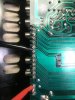
Have just put the DMM/diode test on the solder points connecting the RCA jack board to the Function Board.
All points showed perfect continuity except the two solder points shown in the photos, which displayed 753 each time.
Does this seem correct?
FB553158-FEE3-4C94-8CFF-C4EF8AC754F3.jpeg 5F49B9C8-B0CA-4C2E-A487-CDB05E114DCD.jpeg
 
At the other end of the RCA board, the solder point joins to the Function Board all read open except for the one in this photo which reads 000 continuity.
Does this seem correct?
3B90572C-3F92-4C87-BE02-34FD11F01DCD.jpeg
 
The RCA board is currently completely disconnected.

Am generally checking for solder joins etc but given the hum issues are there any checks that could be performed on it with a DMM to eradicate the possibility that it’s this board that contains the source of the hum?
 
Hi @avionic, @Nashou66 and others..

Had just buttoned up the amp after the latest repairs. Switched on power and there was a snappy spark sound near to the power switch, the amp didn’t start working and mains power was immediately switched off at the wall plug. No magic smoke occurred.

Looking inside I can see that the blue lead connected to the power switch has perished/disconnected from the switch. It was just resting on the pcb below.

Should I just check the fuses, any visibly damaged components, and try switching on?

Or is there something else I should do first?
294C5781-14F7-4422-86DC-E317BB55F1D2.jpeg
 
Should I just check the fuses, any visibly damaged components, and try switching on?

Or is there something else I should do first?


Going out on a limb here.....

Re-connecting the blue wire would be the first thing . Dontcha think ?
 
I remember a whole lot of **** with a C6 that traced back to shorted diode strings (on the heatsink). Assuming this would be similar in the C4, you might wan to give those diode strings a quick check.

Also, I remember there where bipolair electrolytic capacitors in there, looking nearly the same as the common ones. Might want to give that a double check as well.
 
shorted diode strings (on the heatsink).
There are no " diode strings" or what ever your referring to on any heatsinks within a C-6 or a C-4. Just regulated power supply " pass " transistors on the heatsinks. Unless your referring to VD1212 varistors. Which are in close proximity to the heatsinks.
 
Ah yes, must have been a pair of VD1212 varistors then. I just remember replacing them with two diodes each (long time ago).
 
Thanks guys.
So, have reconnected the blue wire and when power is switched on nothing happens.
No lights, no clicks or anything audibly or visibly upsetting..
Have checked all the fuses with DMM on continuity and they didn’t blow.
Can’t see any obviously damaged components in the PSU area near to the power switch.
What to do next for fault finding?
 
Thanks guys.
So, have reconnected the blue wire and when power is switched on nothing happens.
No lights, no clicks or anything audibly or visibly upsetting..
Have checked all the fuses with DMM on continuity and they didn’t blow.
Can’t see any obviously damaged components in the PSU area near to the power switch.
What to do next for fault finding?

Is the AC voltage to the switch?

Nashou
 
Thanks Nashou.
Apologies for having to ask such a basic question but how should I check for this?
Please feel free to rephrase the question or maybe suggest a basic step by step series of checks.
 
What could be at fault?
Guessing I should check the reed relay RY301 but how does one check it?
Does it need to be removed from the board?
What readings should I get from its contacts?
What is the best replacement?
 
The blue cable (like others in this) has a fault, the softeners in the insulation disappear within the years and the insulation is hardening. So the litz at the soldering points often were breaking. I had to cut this cable a little bit and soldering new on the switch.
 
Back
Top Bottom