

You are using an out of date browser. It may not display this or other websites correctly.
You should upgrade or use an alternative browser.
You should upgrade or use an alternative browser.
Yamaha RX V-2095 Error Code
- Thread starter Cody AOC
- Start date
Register to hide this ad
Power ON was aborted after approx 2 seconds because the RX-V went into dc protection.
For stereo gear this would normally mean excessive dc on the speaker line caused by
failing transistor, or cap, or, or,,. However, for home theater/RX-V's it's a bit more
complicated. While it still can be a failed component in the power amp stage, dc
protection can be envoked for some obscure reasons. These units are microprocessor
managed, the chip will have a PRD (PRotection, DC) pin, maybe called something
similiar. Need to study service manual as to triggers. This is a lot of work.
As a punt, you should diode check the output transistors, in circuit should be ok.
Another punt is, the diagnostic was DC PROT, 0%. From memory, the percentage level
it the detected level versus the expected level. This kinda suggests to me that there
was no dc where dc was expected, eg, failure in power supply, eg regulator. Suggests
checking each regulator output (during 2 sec window).
I've 2-3 RX-V's in the shed with similar faults, couldn't fix. Suggest find a tech or
sell it for parts. Maybe others can help you diy... Download the service manual from
hifiengine.
For stereo gear this would normally mean excessive dc on the speaker line caused by
failing transistor, or cap, or, or,,. However, for home theater/RX-V's it's a bit more
complicated. While it still can be a failed component in the power amp stage, dc
protection can be envoked for some obscure reasons. These units are microprocessor
managed, the chip will have a PRD (PRotection, DC) pin, maybe called something
similiar. Need to study service manual as to triggers. This is a lot of work.
As a punt, you should diode check the output transistors, in circuit should be ok.
Another punt is, the diagnostic was DC PROT, 0%. From memory, the percentage level
it the detected level versus the expected level. This kinda suggests to me that there
was no dc where dc was expected, eg, failure in power supply, eg regulator. Suggests
checking each regulator output (during 2 sec window).
I've 2-3 RX-V's in the shed with similar faults, couldn't fix. Suggest find a tech or
sell it for parts. Maybe others can help you diy... Download the service manual from
hifiengine.

Cody AOC
Active Member
Do you think this could have anything related to a speaker relay or a cable being placed in the wrong port?Power ON was aborted after approx 2 seconds because the RX-V went into dc protection.
For stereo gear this would normally mean excessive dc on the speaker line caused by
failing transistor, or cap, or, or,,. However, for home theater/RX-V's it's a bit more
complicated. While it still can be a failed component in the power amp stage, dc
protection can be envoked for some obscure reasons. These units are microprocessor
managed, the chip will have a PRD (PRotection, DC) pin, maybe called something
similiar. Need to study service manual as to triggers. This is a lot of work.
As a punt, you should diode check the output transistors, in circuit should be ok.
Another punt is, the diagnostic was DC PROT, 0%. From memory, the percentage level
it the detected level versus the expected level. This kinda suggests to me that there
was no dc where dc was expected, eg, failure in power supply, eg regulator. Suggests
checking each regulator output (during 2 sec window).
I've 2-3 RX-V's in the shed with similar faults, couldn't fix. Suggest find a tech or
sell it for parts. Maybe others can help you diy... Download the service manual from
hifiengine.
I don't think that replacing the speaker relay(s, 1 per channel??) will solve this problem.
The units are faily robust, not sure what you mean by wrong port. No issues with RCA's however if this "port"
had a power pin then outside chance you may have shorted something/power supply.
If you have the basic skills to investigate this then I suggest the following,
- download service manual from hifiengine
- diode check output transistors(8-10??) in power amp stage, ideally diode check all TR's in power amp stage
in circuit is ok, looking for c-e short.
- with unit powered ON (2 seconds) verify dc voltage regulators
You should also study the SM, looking for the PRD pin(or whatever it's called in this RX-V) and work out
what can trigger it.
The units are faily robust, not sure what you mean by wrong port. No issues with RCA's however if this "port"
had a power pin then outside chance you may have shorted something/power supply.
If you have the basic skills to investigate this then I suggest the following,
- download service manual from hifiengine
- diode check output transistors(8-10??) in power amp stage, ideally diode check all TR's in power amp stage
in circuit is ok, looking for c-e short.
- with unit powered ON (2 seconds) verify dc voltage regulators
You should also study the SM, looking for the PRD pin(or whatever it's called in this RX-V) and work out
what can trigger it.
Cody AOC
Active Member
I'm still thinking it might have something to do where some of the wires inside the unit because i had it apart and was cleaning it and had to take some things apart and seen 1 solder joint that needed fixed that was only for a rca connection and i'm thinking i might have gotten a wire in the wrong port but i was sure i thought i did so last night i tried moving some of these wires into other places in it's area and still nothing i still get the same problems but i never messed with any of these white flat cables into other ports to see if it was one of them but most of them only have one of their own size.I don't think that replacing the speaker relay(s, 1 per channel??) will solve this problem.
The units are faily robust, not sure what you mean by wrong port. No issues with RCA's however if this "port"
had a power pin then outside chance you may have shorted something/power supply.
If you have the basic skills to investigate this then I suggest the following,
- download service manual from hifiengine
- diode check output transistors(8-10??) in power amp stage, ideally diode check all TR's in power amp stage
in circuit is ok, looking for c-e short.
- with unit powered ON (2 seconds) verify dc voltage regulators
You should also study the SM, looking for the PRD pin(or whatever it's called in this RX-V) and work out
what can trigger it.
oops... then put it back together and it doesn't work. You should not try different cable connections, you may do further/permanent damage. Only
you know which boards and cables were removed. Best that you take some hi res photos of any boards that were removed clearly showing cable
connections. The correct cable connections can be extracted from the service manual. Also indicate what cables were removed, they will have a
number printed on the circuit boars eg, CN102... This list of what you did needs to be complete.
you know which boards and cables were removed. Best that you take some hi res photos of any boards that were removed clearly showing cable
connections. The correct cable connections can be extracted from the service manual. Also indicate what cables were removed, they will have a
number printed on the circuit boars eg, CN102... This list of what you did needs to be complete.
Cody AOC
Active Member
I had all the boards removed and almost all wire connections was disconnected to be exact the ones that are meant to be removed just by pulling on them easily done when i went though cleaning the boards but air to be exact NOT canned air just the air compressure out in my garage kind of air i can show the pictures of it all assumed i had some numbers on the white flat cables don't mind that part.oops... then put it back together and it doesn't work. You should not try different cable connections, you may do further/permanent damage. Only
you know which boards and cables were removed. Best that you take some hi res photos of any boards that were removed clearly showing cable
connections. The correct cable connections can be extracted from the service manual. Also indicate what cables were removed, they will have a
number printed on the circuit boars eg, CN102... This list of what you did needs to be complete.
Last edited:
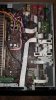
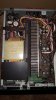
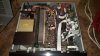
The photos are not that helpful. From what I can see, the flat white cables appear correct, insufficient resolution for other connectors.
Please confirm that the RX-V was working OK before you disassembled.
Normally the other connectors, male/female connectors, have the same colour plastic, however in some cases they can be all white.
Suggest you download the service manual from hifiengine, need to register, it's safe.
Starting at page 71 of the manual (page 57/100 of the pdf), PCB MAIN 1 slowly work through each of the connectors.
The process should be,
- identify connector on RX-V
- find connector on service manual
- from service manual identify destination
- on RX-V verify destination and orientation
Please confirm that the RX-V was working OK before you disassembled.
Normally the other connectors, male/female connectors, have the same colour plastic, however in some cases they can be all white.
Suggest you download the service manual from hifiengine, need to register, it's safe.
Starting at page 71 of the manual (page 57/100 of the pdf), PCB MAIN 1 slowly work through each of the connectors.
The process should be,
- identify connector on RX-V
- find connector on service manual
- from service manual identify destination
- on RX-V verify destination and orientation

Cody AOC
Active Member
lol i've been doing that for years it can get very hot in the hot summerLooks hot!!! Try cooling with a computer fan at 12V DC sitting on the top. Just a suggestion for what it's worth.

Oldsansui441
Super Member
My Yamaha receiver has been giving me some problems first off i turn it on it turns itself off in 2 seconds and i tried the effect + program + standby/on buttons to get the code: chk sum: 99B9 E
If it has only happened since you have had the boards out, make sure all of the board screws are firm as some of them may have earth points under them.
However, for home theater/RX-V's it's a bit more
complicated.
mbz is right, they are more complicated, l am trying to diagnose one at the moment, sometimes the regulated voltages etc can be perfect but the monitoring circuit is faulty.

Yamaha5000
Never settle for 2nd best
Yamaha MX-A5000: Anyone ever tried to understand the diagnostic error code?
What flashing sequence are you seeing? EDIT, need to count the number of flashes of p-on lampYamaha MX-A5000: Anyone ever tried to understand the diagnostic error code?
Yamaha5000
Never settle for 2nd best
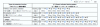
What flashing sequence are you seeing? EDIT, need to count the number of flashes of p-on lamp
View attachment 2228880
When starting with the simple power on and watching, I see three flashes.
When conducting the procedure outlined in pages 27 & 28 I find it very confusing. I have tried to video the sequence with little to no luck.
Yamaha5000
Never settle for 2nd best
What flashing sequence are you seeing? EDIT, need to count the number of flashes of p-on lamp
View attachment 2228880
The unit is cold, so I don't think the issue is THM
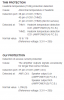
If I am reading this correctly I should be able to look at Speaker output Lch & Rch and the value (?) would be LOW (O) ? Reference voltage: 3.3 V = 255 (?)
The 3 flashes correspond to both thermal and overload (OLV) protection.
The test points will be on the AMPPOWER 2,3 PCB not the speaker posts.
Little busy, will followup later today.
EDIT probably best to create a new thread, easier for others with similiar problem to find.
The test points will be on the AMPPOWER 2,3 PCB not the speaker posts.
Little busy, will followup later today.
EDIT probably best to create a new thread, easier for others with similiar problem to find.
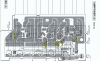
Below is my take on the OLV test points. For the left channel AMPPOWER(2) board
In turn, measure the dc voltage between indicated wire and chassis/ground.
- Orange
- White
- Blue
- Red
- Violet
Similiar wires on the right channel AMPPOWER(3)
- Yellow
- Orange
- White
- Blue
- Red
- Violet
each wire to GND should be less than 100mV, ideally 0mV.
In turn, measure the dc voltage between indicated wire and chassis/ground.
- Orange
- White
- Blue
- Red
- Violet
Similiar wires on the right channel AMPPOWER(3)
- Yellow
- Orange
- White
- Blue
- Red
- Violet
each wire to GND should be less than 100mV, ideally 0mV.
Yamaha5000
Never settle for 2nd best
After the three flashes the unit doesn't power on.each wire to GND should be less than 100mV, ideally 0mV.
If these measured values are greater than 100mv what is that telling me?