• The move to the new server is done. There are some software and database maintenance updates in process. This has us passing the hat around to help out. We appreciate any donations. Seriously, even a dollar helps. The payment page may be found here - https://www.audiokarma.org/support.html

2385 reconnect PS00 to P400 pin question

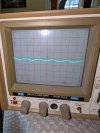
OK, let's look at the calculation of frequency from your scope photo.
But first we need to understand the relationship between time and frequency. (Please stop me if I am being too basic.)
  • The oscilloscope trace lets you view a voltage waveform in a graph with Voltage on the vertical (y-axis) and Time on the horizontal axis (x-axis)
  • The trace triggers on a voltage threshold set with the trigger knob
  • Once it triggers, the scope will display the voltage as it varies with time, for a sine wave it goes up then down then up again
  • The scope has ONE control that selects the TIME displayed on the screen, the TIME/DIV
  • What this means when you set the TIME/DIV to 0.1sec is that on the display screen, each line on the x-axis represents an increment of 0.1 second
  • There are 10 divisions across the horizontal screen so at 0.1 sec/div, you can display a total of 0.1 x 10 = 1 second of a waveform across the full width of the screen
  • For a sine wave you want to measure the "period" of the sine wave, or time from peak to the next peak
  • On an earlier photo, we measured that at about 3.2 horizontal divisions
  • So, with some math... if you have 3.2 horizontal divisions times 0.1 milliseconds/division = 0.32 milliseconds per sine wave cycle
  • Remember the relationship between frequency (f) and time (t)... f = 1/t
  • So, f = 1/0.32 milliseconds = 1/0.32 x 10^-3 = 3125 cycles/second (or 3125 Hz)
Next, let's look at the vertical scale (Volts)
  • Just like the horizontal time scale, the vertical volts scale is shown on the display with only 8 divisions
  • The signal voltage on the display shows the measured voltage at a particular point in time
  • The scaling of the vertical is set by the VOLTS/DIV control.
  • Your sine waveform looked like it was about 1 vertical division from the top peak to the bottom peak of the waveform
  • You have the VOLTS/DIV set at 0.1V/DIV and looking at the photo, the sine wave spans about 1 division, therefore the peak-peak voltage is 0.1v x 1 div = 0.1V
  • If you put the scope probe switch in the 10X position the voltage will appear at 1/10 the amplitude... very small because your voltage is small
  • Since this is the voltage that you will be inputting to the Aux or Tape input of your Marantz receiver, I would like you to get it up to at least 0.5V to 1V/DIV
  • You can adjust the CH1 VOLTS/DIV by turning it clockwise to increase the size of the signal on the screen
  • It seems odd that you cannot turn up the voltage level with the PC volume control... unless you need a load on the signal output line
I hope that this helps you understand the scope controls and what you are seeing.

There are two questions:
  1. If your signal generator is set to 1kHz, why do you measure 3125 Hz? Make sure that all of your knobs are in the CAL positions.
  2. Why is your signal amplitude only 0.1V?

Its not a signal generator , it is a computer program, you type in the hertz you want, not sure if the issue is the computer is digital instead of analog. From what i read you dont get very much voltage from the computer. I will try and get someone over to set this up...
 
OK, but that still does not answer the question of why your frequency on the scope is 3.125kHz not 1kHz.
Look... instead of using the unknown program, why don't you just play some YouTube audio on your PC and see what the voltage levels look like. You won't see a nice waveform but you will see the peaks of the sound.
 
Hi i sent the photo of the last wave i sent you to an engineer that works with a friend of mine, he has no time to help me but he feels that wave is fine to test the receiver to signal trace. If you feel it will not work i will need to wait until next week for him to come over and confirm the set up. pete
 

Attachments

  • PXL_20260617_193915706.jpg
    PXL_20260617_193915706.jpg
    115.6 KB · Views: 0
OK, but that still does not answer the question of why your frequency on the scope is 3.125kHz not 1kHz.
Look... instead of using the unknown program, why don't you just play some YouTube audio on your PC and see what the voltage levels look like. You won't see a nice waveform but you will see the peaks of the sound.
Sorry just saw this post i will try a you tube audio
 
When you use your scope to signal trace, YOU NEED TO BE CAREFUL WHERE YOU CONNECT THE SCOPE GROUND CLIP. The ground alligator clip is tied to earth ground while your Marantz receiver typically is not tied to earth ground. Always attach the scope ground to the chassis, not to what appears to be a ground signal and make sure the clip is securely attached to the chassis so it doesn't pop off and short something out.
 
I assume that your PC sine generator will generate signals on BOTH L & R channels so you can connect the stereo RCA plugs into the AUX input or TAPE 1 Input jacks. Select that input and listen to see if you can hear the tone on the good channel speakers (Left=good, Right=bad)?
 
I assume that your PC sine generator will generate signals on BOTH L & R channels so you can connect the stereo RCA plugs into the AUX input or TAPE 1 Input jacks. Select that input and listen to see if you can hear the tone on the good channel speakers (Left=good, Right=bad)?
Yes its both left and right
 
So plug the RCA cable into the TAPE 1 IN RCA jacks on your receiver, push TAPE 1 MON button in, turn your Marantz volume control all the way down to start, then gradually turn up the volume until you hear a tone on one or both channels on your speakers. (Don't forget to turn on your Main speakers)
 
When i use the 1 k test tone from you tube my screen is not affected when touching the probe to the positive of the rca, i would need to redo settings to see it.
 
ok after some adjustment both the signal generator program, and the 1k rest tone on you tube show the exact same wave when using the probe.
 
So plug the RCA cable into the TAPE 1 IN RCA jacks on your receiver, push TAPE 1 MON button in, turn your Marantz volume control all the way down to start, then gradually turn up the volume until you hear a tone on one or both channels on your speakers. (Don't forget to turn on your Main speakers)
I connected to tape 1, set selector to Tape 1, pushed in Tape 1 monitor, get very clear sound on left side, no sound on right
 
OK, now we have a signal source. Let's jump all the way to the PE00 Pre/Tone Amp board input.
  • The signal will be going through the Tape Switches, Mode Control, Balance control all the way to JE04.
  • Put your balance control to center to start.
  • I think you can do this part of the test with power off to prevent shorting something out
  • Clip your scope ground to the Marantz chassis for ground
  • Find connector JE04 on PE00 and put your scope probe tip on JE04 pin 3 and look for that same sine waveform
  • If you have some small test clips, it might be easier to clip one onto the connector post then clip the probe to the other side of the wire.
  • Screenshot 2026-06-17 160616.jpg
  • You should be able to see your sine wave signal on the scope on either pin 1 or pin 3
  • It might be the other channel if we got the wires reversed
Screenshot 2026-06-17 155606.jpg
 
OK, now we have a signal source. Let's jump all the way to the PE00 Pre/Tone Amp board input.
  • The signal will be going through the Tape Switches, Mode Control, Balance control all the way to JE04.
  • Put your balance control to center to start.
  • I think you can do this part of the test with power off to prevent shorting something out
  • Clip your scope ground to the Marantz chassis for ground
  • Find connector JE04 on PE00 and put your scope probe tip on JE04 pin 3 and look for that same sine waveform
  • If you have some small test clips, it might be easier to clip one onto the connector post then clip the probe to the other side of the wire.
  • View attachment 3784761
  • You should be able to see your sine wave signal on the scope on either pin 1 or pin 3
  • It might be the other channel if we got the wires reversed
View attachment 3784758
JE04 pin 1 good wave, pin 3 good wave. I had to partially disassemble the front to access so i will take a while for each test
 
Can you disconnect either the L or R RCA input and tell me which JE04 pin does have a signal and which does not to determine L & R channel mapping?
 
You will need power on for this next test.
  • Keep the input signal on the R & L Tape 1 inputs
  • Turn the Tone Mode knob to OUT
  • Turn the Volume control down
  • Scope ground on chassis
  • Scope probe tip on JE07 pin 1 and see if you see a signal. If not, increase the volume a little and see if you can see it (I think this should be the R channel)
  • If not, the put the probe on JE07 pin 3, the other channel and see if you see the signal. (I think this should be the L channel)
  • If you do, find out which channel (L or R) is on each pin.
 
You will need power on for this next test.
  • Keep the input signal on the R & L Tape 1 inputs
  • Turn the Tone Mode knob to OUT
  • Turn the Volume control down
  • Scope ground on chassis
  • Scope probe tip on JE07 pin 1 and see if you see a signal. If not, increase the volume a little and see if you can see it (I think this should be the R channel)
  • If not, the put the probe on JE07 pin 3, the other channel and see if you see the signal. (I think this should be the L channel)
  • If you do, find out which channel (L or R) is on each pin.
Pin 1 huge waves, pin 3 two squiggly lines no wave
 
Good. Now unplug the R then L channel Tape 1 RCA input and see which JE07 pin 1 or pin 3 corresponds to L & R channels.
 
Back
Top Bottom