

You are using an out of date browser. It may not display this or other websites correctly.
You should upgrade or use an alternative browser.
You should upgrade or use an alternative browser.
2385 reconnect PS00 to P400 pin question
- Thread starter sendust
- Start date

I connected the leader by using alligator clips, one clip on positive, one on negative, the other end positive clip on probe, the other clip negative on negative, set both up as per internet, no signal no mater what i try so i think the leader is not working. can i use another source or do i need to find a generator?

Ok, here is the setup to see if the LAG-120A works. Do you have scope probes?
This is setup for a 1kHz sinusoidal signal.
It is important that you have the trigger mode set to AUTO and SOURCE to CH1.
Then you need to turn the LEVEL control left/right to see if you can lock into a signal.
Without a signal to the probe, do you get a trace on the scope. If not, then you might have something setup incorrectly.
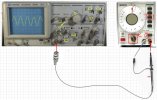
This is setup for a 1kHz sinusoidal signal.
It is important that you have the trigger mode set to AUTO and SOURCE to CH1.
Then you need to turn the LEVEL control left/right to see if you can lock into a signal.
Without a signal to the probe, do you get a trace on the scope. If not, then you might have something setup incorrectly.
Last edited:
Thats the way I set it up , my generator has an issue, ive downloaded a signal generator for my computer and i have a patch cord that connects to the computer and has rca on the other end, i have connected them to aux on the marantz. I feel i can use it to do the tests needed.Ok, here is the setup to see if the LAG-120A works. Do you have scope probes?
This is setup for a 1kHz sinusoidal signal.
It is important that you have the trigger mode set to AUTO and SOURCE to CH1.
Then you need to turn the LEVEL control left/right to see if you can lock into a signal.
Without a signal to the probe, do you get a trace on the scope. If not, then you might have something setup incorrectly.
View attachment 3784123
OK. Get the scope and PC setup and see if you can generate a 1kHz sine wave signal. Connect your scope probe to the end of the RCA and see if you can see the signal. Adjust the output of the PC signal to give you about 0.5V peak signal. Take a picture of it when you get it on the scope so I can see the display and scope settings.


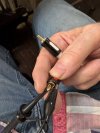
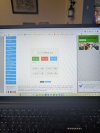
Check this first! You can test your scope by connecting your scope probe to the calibration point (red arrow). You should see a 1kHz. 2V, square wave.Maybe also my oscilloscope is defective.
Also, make sure that the push buttons I have marked "Out" are not pressed in. It's a little hard to tell from your picture.
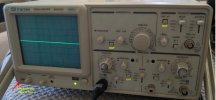
this is what i get probe on testCheck this first! You can test your scope by connecting your scope probe to the calibration point (red arrow). You should see a 1kHz. 2V, square wave.
Also, make sure that the push buttons I have marked "Out" are not pressed in. It's a little hard to tell from your picture.
View attachment 3784260
Attachments

Make these scope adjustments and post another photo.


- Rotate center gray knob on CHX VOLTS/DIV CW until it clicks into the CAL position to display true voltage on the screen
- Change TIME/DIV CW to make individual pulses wider on the screen
- Make sure the SWP VAR knob is turned CW to CAL
- Rotate POSITION knob CW to move entire trace to right so the trace fills the screen width
- Make sure the probe red slide is on 10X
- Find the small screw on the probe and use a small flat head screwdriver to rotate it CW or CCW to flatten out the overshoot at the beginning of the pulse
- It looks like your scope is working fine
Does your function generator PC program output the waveform to the Line Out RCA jacks or to the Speaker output jack?i have a patch cord that connects to the computer and has rca on the other end, i have connected them to aux on the marantz.
Are you using a stereo 3.5 male plug into the laptop headphone jack? The other side of that cable is a stereo pair or RCA plugs?
What is the name of the program?
I tried all of your settings, i dont get a change when touching the rca coming out of the computer sending a sine wave at 477 hertz. I picked up a scope that was known to work, photo supplied. Is it possible that the scope cannot see the signal because the computer is digital, should i not see a sine wave when touching the rca , ive tried the ground on the outer part of the rca and touching probe to center nothing. I get the same grid pattern when using just the test with the probe on this scope, ground not connected.
Attachments

Your other scope looks like it works fine. You need to stop changing equipment because it makes it harder for me to tell you what to do to get it working. All I asked you to do with the first scope was to change a few settings to get the scope and probe to display the signal correctly. We have not gotten to the part of checking your PC output. Please stay with me otherwise if you keep using other equipment, we need to verify the setup all over again.
First, you didn't provide information on the PC function generator program you are using and what PC port you have the RCA cable connected to. Either you or I need to verify that you first have the Physical and software connection to the PC correct.
First, you didn't provide information on the PC function generator program you are using and what PC port you have the RCA cable connected to. Either you or I need to verify that you first have the Physical and software connection to the PC correct.
- What make and model laptop PC are you using?
- What version of Windows (10, 11)?
- How do you have the RCA cable that you connect the scope up to connected to your laptop? Which port (speaker, headphone, USB)?
- If it is through the headphone 3.5mm jack, can you hear the tone through headphones?
- How do you control the level of the output signal from the PC?
Laptop is asus, windows ver 11, rca connected to headphone , If i connect the rcas to aux on marantz i can hear the tone on left side, there is a slider on the the signal program for volume. I connected ground to one rca and touched center of other rca, as per photos i get wave when generator is on i get the other photo when not, if i turn off generator and touch center of tca i get a perfect strait lineYour other scope looks like it works fine. You need to stop changing equipment because it makes it harder for me to tell you what to do to get it working. All I asked you to do with the first scope was to change a few settings to get the scope and probe to display the signal correctly. We have not gotten to the part of checking your PC output. Please stay with me otherwise if you keep using other equipment, we need to verify the setup all over again.
First, you didn't provide information on the PC function generator program you are using and what PC port you have the RCA cable connected to. Either you or I need to verify that you first have the Physical and software connection to the PC correct.
- What make and model laptop PC are you using?
- What version of Windows (10, 11)?
- How do you have the RCA cable that you connect the scope up to connected to your laptop? Which port (speaker, headphone, USB)?
- If it is through the headphone 3.5mm jack, can you hear the tone through headphones?
- How do you control the level of the output signal from the PC?
Attachments


In your photo, you do not have the scope settings correct. It's a little hard to see your exact settings because of the blurry photo.
See my comments below.
Let me review your photos above.
(When you take a photo of the scope screen, you need to include the control settings because I can't tell from looking at just the waveform what the voltage and time scale is.)
One more thing, your scope trace looks like it slants down to the right, you need to adjust the scope rotation control on the front panel to make it perfectly horizontal.
It looks like your generator is working since you get a sine wave output from the RCA. We need to set the output voltage level so you don't overload your Marantz Aux input!
Scope settings:

See my comments below.
Let me review your photos above.
(When you take a photo of the scope screen, you need to include the control settings because I can't tell from looking at just the waveform what the voltage and time scale is.)
One more thing, your scope trace looks like it slants down to the right, you need to adjust the scope rotation control on the front panel to make it perfectly horizontal.
It looks like your generator is working since you get a sine wave output from the RCA. We need to set the output voltage level so you don't overload your Marantz Aux input!
Scope settings:
Source Switch: Should be on CH1 not Ext Sync.
CH1 Volts/Div: Should be on 0.1 or 50mV/Div (for < 1V input)
Make sure that your CAL knobs are turned CW
Can't tell your setting on Time/Div: Looks like it is 10uS/div which is (1/10x10-6) or 100kHz... too fast.
SWP. VAR.: Should be fully turned CW to CAL
Last edited:
Hopefully this photo is better, i made the settings now it doesnt see the wave anymore?In your photo, you do not have the scope settings correct. It's a little hard to see your exact settings because of the blurry photo.
See my comments below.
Let me review your photos above.
(When you take a photo of the scope screen, you need to include the control settings because I can't tell from looking at just the waveform what the voltage and time scale is.)
One more thing, your scope trace looks like it slants down to the right, you need to adjust the scope rotation control on the front panel to make it perfectly horizontal.
It looks like your generator is working since you get a sine wave output from the RCA. We need to set the output voltage level so you don't overload your Marantz Aux input!
Scope settings:
Source Switch: Should be on CH1 not Ext Sync.CH1 Volts/Div: Should be on 0.1 or 50mV/Div (for < 1V input)Make sure that your CAL knobs are turned CWCan't tell your setting on Time/Div: Looks like it is 10uS/div which is (1/10x10-6) or 100kHz... too fast.SWP. VAR.: Should be fully turned CW to CAL
View attachment 3784491
Attachments

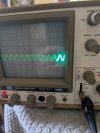

From your previous photo you don't have the scope setting correct (see below).
We need to get the scope set up properly to view the signal waveforms otherwise it means nothing.
EDITED:
Do you have a problem understanding my directions. I can be a little more detailed if you don't understand what I mean.

We need to get the scope set up properly to view the signal waveforms otherwise it means nothing.
EDITED:
Do you have a problem understanding my directions. I can be a little more detailed if you don't understand what I mean.
- CH1: You have the lever set to GND instead of AC. You won't see any signal when it's set to GND
- Volts/Div: As I said before, you need to set it to .1 V/Div not 1V/Div shown. If the other photo (about 1v) is with probe at 10X and Volt/Div=1 (per photo), then the waveform is at 10V! Too high.
- Time/Div: You have it set to CHOP 50uS(?). It should be ALT .1uS.
- Trigger Source: You have it set to EXT (external-from BNC connector input), it should be set to INT.
- Trigger Holdoff: Small knob needs to be fully CCW to NORM, then adjust outer knob to lock in the display waveform.
Last edited: