• The move to the new server is done. There are some software and database maintenance updates in process. This has us passing the hat around to help out. We appreciate any donations. Seriously, even a dollar helps. The payment page may be found here - https://www.audiokarma.org/support.html

2385 reconnect PS00 to P400 pin question

From your previous photo you don't have the scope setting correct (see below).
We need to get the scope set up properly to view the signal waveforms otherwise it means nothing.

EDITED:
Do you have a problem understanding my directions. I can be a little more detailed if you don't understand what I mean.
  1. CH1: You have the lever set to GND instead of AC. You won't see any signal when it's set to GND
  2. Volts/Div: As I said before, you need to set it to .1 V/Div not 1V/Div shown. If the other photo (about 1v) is with probe at 10X and Volt/Div=1 (per photo), then the waveform is at 10V! Too high.
  3. Time/Div: You have it set to CHOP 50uS(?). It should be ALT .1uS.
  4. Trigger Source: You have it set to EXT (external-from BNC connector input), it should be set to INT.
  5. Trigger Holdoff: Small knob needs to be fully CCW to NORM, then adjust outer knob to lock in the display waveform.
Try again.

View attachment 3784563
CH1 was on DC not ground, as per photo i have set as per instructions but i have no idea how to change trigger source to internal, i see no burron
 

Attachments

  • PXL_20260617_162010222.jpg
    PXL_20260617_162010222.jpg
    110.8 KB · Views: 7
I see if i move the wand setting down from 10 to 1 i see a bit of a wave when using wand on rca center when wave is selected. with a little tweaking from your direction i get this wave when testing live signal, it stays stationary, but its easy to see.
 

Attachments

  • PXL_20260617_174219906.jpg
    PXL_20260617_174219906.jpg
    93.1 KB · Views: 3
Last edited:
i have no idea how to change trigger source to internal, i see no burron
The SOURCE lever. I think you are OK pushed up to X-Y.
i see a bit of a wave when using wand on rca center when wave is selected.
Need to be a little more specific... I cannot see what you are doing so you need to be extremely explicit on where you have the probe and what conditions you are testing.
Thanks.
  1. When you say "wand" I assume you mean scope probe?
  2. When you say "RCA center" I assume you mean the center conductor or the RCA cable that is connected to the headphone jack of your PC?
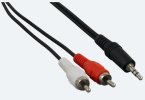
  3. First, is the cable that you are using from your laptop PC to RCA a stereo cable with 3.5mm stereo plug on one end and red and white RCA plugs on the other? The 3.5mm end should have 3 conductor bands like shown in the photo. Red is the Right channel, White should be the Left channel.
  4. If you remove the cable and plug headphones into the headphone jack do you hear the tones from your signal generator program? If not, then there is a PC setup issue.
Screenshot 2026-06-17 104824.jpg
 
if i move the wand setting down from 10 to 1 i see a bit of a wave when using wand on rca center when wave is selected.
When you set the probe to 1X, that means that the voltage shown on the screen corresponds to the Volts/Div setting.
  • You have about 0.6 of a division on the screen and if you have the probe set to 1X and Volts/Div set to .1 V, then you have only 0.06V coming out of your PC... too low.
  • You need to increase your PC volume so that the peak-peak voltage is about 0.5V.
  • With Volts/Div set to .1 it should show about 5 divisions peak-peak. (5 div x 0.1V/div = 0.5v)
Screenshot 2026-06-17 105718.jpg
 
The SOURCE lever. I think you are OK pushed up to X-Y.

Need to be a little more specific... I cannot see what you are doing so you need to be extremely explicit on where you have the probe and what conditions you are testing.
Thanks.
  1. When you say "wand" I assume you mean scope probe?
  2. When you say "RCA center" I assume you mean the center conductor or the RCA cable that is connected to the headphone jack of your PC?
  3. First, is the cable that you are using from your laptop PC to RCA a stereo cable with 3.5mm stereo plug on one end and red and white RCA plugs on the other? The 3.5mm end should have 3 conductor bands like shown in the photo. Red is the Right channel, White should be the Left channel.
  4. If you remove the cable and plug headphones into the headphone jack do you hear the tones from your signal generator program? If not, then there is a PC setup issue.
View attachment 3784624
1. Yes the probe
2. Yes the center pin on rca
3. Yes i have the same cable you are showing
4. Yes when i remove the cable i hear it from the computer speaker, then when i plug in head phone i hear it on that
 
Good. I see that the volume on the tone generator panel is almost at its max. So I think that you need to turn up the PC volume.
You need to open up the Sound Control panel and turn the slider up. Or, if your laptop has a Vol +/Vol - buttons, you need to press the Vol+ to get the volume louder.
 
Good. I see that the volume on the tone generator panel is almost at its max. So I think that you need to turn up the PC volume.
You need to open up the Sound Control panel and turn the slider up. Or, if your laptop has a Vol +/Vol - buttons, you need to press the Vol+ to get the volume louder.
I set computer to full, now the wave is much larger when testing signal but still stationary.
 
You want to adjust the PC volume so that you read about 0.5V peak-peak on your oscilloscope.
If you put the volts/div to .1, a 0.5v p-p waveform should span 5 vertical divisions.
 
but still stationary.
It should be stationary on the screen (if that's what you mean). The scope is sync'ing on the rising edge of the waveform at a voltage determined by your position of the scope trigger level knob. You also want to adjust the CH1 vert position knob to line the trace with the center graticule line so you can measure the voltage.
  • You have about 3.2 horiz divisions x 0.1msec/div = 0.32 msec/cycle
  • 1/(0.32 x 10^-3) = 3.125kHz?
  • Did you have your PC sine generator set to about 3.125kHz?
Screenshot 2026-06-17 105718.jpg
 
Last edited:
It should be stationary on the screen (if that's what you mean). The scope is sync'ing on the rising edge of the waveform at a voltage determined by your position of the scope trigger level knob. You also want to adjust the CH1 vert position knob to line the trace with the center graticule line so you can measure the voltage.
This is what i have now
 

Attachments

  • PXL_20260617_183520562.jpg
    PXL_20260617_183520562.jpg
    100 KB · Views: 4
Sorry, but I would like to see the whole front of the scope so I can see your control settings because seeing just the screen without knowing the settings is worthless.
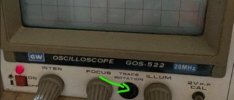
You still didn't adjust the Trace Rotation to straighten out the trace.
Screenshot 2026-06-17 114836.jpg
 
Last edited:
Sorry, but I would like to see the whole front of the scope so I can see your control settings because seeing just the screen without knowing the settings is worthless.
 

Attachments

  • PXL_20260617_184544429.jpg
    PXL_20260617_184544429.jpg
    106.5 KB · Views: 6
With those settings:
  • Time = 0.2msec/div x 3.2div = 0.64msec
  • Freq = 1/Time = 1/0.64 x 10-3 = 1,562 Hz (1.5kHz)
  • You previously had the sig gen set at 1,000Hz. Did that change?
  • Voltage = 1V/div x 1 div = 1Vp-p (assuming a 1X probe)
Do those sound correct?
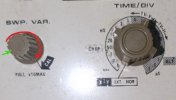
Maybe you don't have the Sweep Var. set correctly? It needs to be fully CW in rotation so the line on the knob goes to the CAL position. You might feel an indent at the end.
Screenshot 2026-06-17 115945.jpg
 
Last edited:
With those settings:
  • Time = 0.2msec/div x 3.2div = 0.64msec
  • Freq = 1/Time = 1/0.64 x 10-3 = 1,562 Hz (1.5kHz)
  • You previously had the sig gen set at 1,000Hz. Did that change?
  • Voltage = 1V/div x 1 div = 1Vp-p (assuming a 1X probe)
Do those sound correct?
1. 0.1
2. ?
3. still at 1000 hertz
volt/div set at .1 probe set at 1x
 
1. 0.1
2. ?
3. still at 1000 hertz
volt/div set at .1 probe set at 1x
Comments:
1. 0.1: Measuring the waveform from peak to next peak it is about 3.2 div. At 0.1msec/div x 3.2div = 0.32msec​
2. ?: To convert time to frequency, use the equation f = 1/t. So, f = 1/(0.32msec) = 1/(0.32 x 10^-3) = 3,125 Hz​
3. still at 1000 hertz: One of your settings is off because your scope shows it is 3,125 Hz​
volt/div set at .1 probe set at 1x: Your sine wave covers about 1 vertical division. If your probe is set to 1X and volt/div is .1 volts/div, then your signal is 0.1V peak-peak. This needs to increase to at least 0.5V to 1V peak-peak.​
 
With those settings:
  • Time = 0.2msec/div x 3.2div = 0.64msec
  • Freq = 1/Time = 1/0.64 x 10-3 = 1,562 Hz (1.5kHz)
  • You previously had the sig gen set at 1,000Hz. Did that change?
  • Voltage = 1V/div x 1 div = 1Vp-p (assuming a 1X probe)
Do those sound correct?
Maybe you don't have the Sweep Var. set correctly? It needs to be fully CW in rotation so the line on the knob goes to the CAL position. You might feel an indent at the end.
View attachment 3784656
If i move the swp all the way to the right and i set the time to .5 i get a good wave
 
Comments:
1. 0.1: Measuring the waveform from peak to next peak it is about 3.2 div. At 0.1msec/div x 3.2div = 0.32msec​
2. ?: To convert time to frequency, use the equation f = 1/t. So, f = 1/(0.32msec) = 1/(0.32 x 10^-3) = 3,125 Hz​
3. still at 1000 hertz: One of your settings is off because your scope shows it is 3,125 Hz​
volt/div set at .1 probe set at 1x: Your sine wave covers about 1 vertical division. If your probe is set to 1X and volt/div is .1 volts/div, then your signal is 0.1V peak-peak. This needs to increase to at least 0.5V to 1V peak-peak.​
I cannot understand where you get the 3.125 hertz i also dont understand how ho get 0.5 to 1 v peak... i may need to get someone to set this up, not sure what i am trying to achieve,
 
I cannot understand where you get the 3.125 hertz i also dont understand how ho get 0.5 to 1 v peak...
OK, let's look at the calculation of frequency from your scope photo.
But first we need to understand the relationship between time and frequency. (Please stop me if I am being too basic.)
  • The oscilloscope trace lets you view a voltage waveform in a graph with Voltage on the vertical (y-axis) and Time on the horizontal axis (x-axis)
  • The trace triggers on a voltage threshold set with the trigger knob
  • Once it triggers, the scope will display the voltage as it varies with time, for a sine wave it goes up then down then up again
  • The scope has ONE control that selects the TIME displayed on the screen, the TIME/DIV
  • What this means when you set the TIME/DIV to 0.1sec is that on the display screen, each line on the x-axis represents an increment of 0.1 second
  • There are 10 divisions across the horizontal screen so at 0.1 sec/div, you can display a total of 0.1 x 10 = 1 second of a waveform across the full width of the screen
  • For a sine wave you want to measure the "period" of the sine wave, or time from peak to the next peak
  • On an earlier photo, we measured that at about 3.2 horizontal divisions
  • So, with some math... if you have 3.2 horizontal divisions times 0.1 milliseconds/division = 0.32 milliseconds per sine wave cycle
  • Remember the relationship between frequency (f) and time (t)... f = 1/t
  • So, f = 1/0.32 milliseconds = 1/0.32 x 10^-3 = 3125 cycles/second (or 3125 Hz)
Next, let's look at the vertical scale (Volts)
  • Just like the horizontal time scale, the vertical volts scale is shown on the display with only 8 divisions
  • The signal voltage on the display shows the measured voltage at a particular point in time
  • The scaling of the vertical is set by the VOLTS/DIV control.
  • Your sine waveform looked like it was about 1 vertical division from the top peak to the bottom peak of the waveform
  • You have the VOLTS/DIV set at 0.1V/DIV and looking at the photo, the sine wave spans about 1 division, therefore the peak-peak voltage is 0.1v x 1 div = 0.1V
  • If you put the scope probe switch in the 10X position the voltage will appear at 1/10 the amplitude... very small because your voltage is small
  • Since this is the voltage that you will be inputting to the Aux or Tape input of your Marantz receiver, I would like you to get it up to at least 0.5V to 1V/DIV
  • You can adjust the CH1 VOLTS/DIV by turning it clockwise to increase the size of the signal on the screen
  • It seems odd that you cannot turn up the voltage level with the PC volume control... unless you need a load on the signal output line
I hope that this helps you understand the scope controls and what you are seeing.

There are two questions:
  1. If your signal generator is set to 1kHz, why do you measure 3125 Hz? Make sure that all of your knobs are in the CAL positions.
  2. Why is your signal amplitude only 0.1V?
 
Set to 1v
Again, could you please be more specific... what is set to 1V? I can't see what you are doing when you say that. :dunno:
The scope VOLTS/DIV is set to 1V?​
The waveform generator PC is set to 1V output?​
It would be good to increase the vertical scale to make the waveform larger on the screen so you can more accurately measure it.
Again, what is the TIME/DIV set to?
 
Back
Top Bottom