

You are using an out of date browser. It may not display this or other websites correctly.
You should upgrade or use an alternative browser.
You should upgrade or use an alternative browser.
2385 reconnect PS00 to P400 pin question
- Thread starter sendust
- Start date

Can you take a photo of what the pins and socket connector look like?
Attachments


I noticed on the PS00 board that a row of connection pins were loose, i tested them for continuity following each trace meeting each pin, no connection. I realize these go to switches but im sure they are needed. You can see ive cleaned a bit of the trace in front of each, before i clean and paste them am i correct they need to have continuity.
Attachments
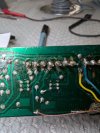

They should have continuity from the connector pin to at least the first component on the trace. You can test continuity from each connector pin to the solder pad and the end of the trace as shown below.am i correct they need to have continuity.
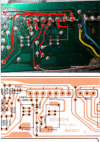
Reconnected all traces to pins on J205 ,I tinned the pins for the board connections on PS00 and filed to make round. Boards fit much better now but no change with sound distortion on left channel. Re checked all connectors , i dont see any issues ,, I will retest with probe to see if i see any issues with locations you suggested but i wonder if its a transistor or component issueThey should have continuity from the connector pin to at least the first component on the trace. You can test continuity from each connector pin to the solder pad and the end of the trace as shown below.
View attachment 3816820
That's why you need to look at the signal integrity on the scope. I thought that you said that the signals on both channels looked good and the same.but no change with sound distortion on left channel.
Do you hear the distortion of a test sine wave on the left channel, through the speakers?
You need to use your scope and signal generator to trace the signal through the path to determine where the signal quality goes bad. That's what I tried to have you do for the past couple of days and each time you said that the L & R channels looked identical, even when you turned up the Volume. You are doing something wrong and I don't think that you can isolate a bad component until you can pinpoint where the signal gets distorted.
The PS00 board is not even in the audio path unless you select the Tape switches. If you try to listen to AM/FM/Phono/Aux, it does not go through that board.
Last edited:
I did see a good wave at each test point, i was just going to try again, And when using the test sine wave they both sound clear ,no distortion.That's why you need to look at the signal integrity on the scope. I thought that you said that the signals on both channels looked good and the same.
Do you hear the distortion of a test sine wave on the left channel, through the speakers?
You need to use your scope and signal generator to trace the signal through the path to determine where the signal quality goes bad. That's what I tried to have you do for the past couple of days and each time you said that the L & R channels looked identical, even when you turned up the Volume. You are doing something wrong and I don't think that you can isolate a bad component until you can pinpoint where the signal gets distorted.
The PS00 board is not even in the audio path unless you select the Tape switches. If you try to listen to AM/FM/Phono/Aux, it does not go through that board.
With new wave tested JE02 L perfect R a bit of change, my right channel sounds great but moving the board or pressing down at the corner with the RE42 sound goes up a bit
Tested JE07 L and R perfect both signals the same
Tested J414 L and R perfect both signals the same.
Tested JE07 L and R perfect both signals the same
Tested J414 L and R perfect both signals the same.
Moved it to 10k ,larger wave same results, I dont see a difference between left and right channel on JE04, JE07 J414. On JE02 i see a bit of an issue with right channel volume but clear as a bell.You can change the frequency of your input sine generator from 1k to 10k and see if it still looks the same on both channels. You will need to adjust your scope for the new frequency to see it.
The wave on the R pre out is steady , The wave on the left is mostly the same but the screen flickers at times and the wave changes size for a split second every 5 seconds or soTry to look, again, the the Preout L & R RCA jacks and see if they look the same.
Something looks inconsistent and I'm not sure what to make of it.
From previous posts:
From previous posts:
- wave on the R pre out is steady
- wave on the left is mostly the same but the screen flickers at times and the wave changes size for a split second every 5 seconds
- bit of an issue with right channel volume but clear as a bell.
- tested JE02 L perfect R a bit of change, my right channel sounds great but moving the board or pressing down at the corner with the RE42 sound goes up a bit
- when i tested JE04 both L and R were identical.
- no change with sound distortion on left channel.
- Tested JE07 L and R perfect both signals the same
- Tested J414 L and R perfect both signals the same.
I spent alot of time today getting the right channel perfect for sound, no volume change. I took time retesting and did it many times. I can say with certainty Pre out Left and Right same signal, JE07 same signal, J414 same signal, JE02 same signal, JE04 same signal. I dont think the signal is the issue.Something looks inconsistent and I'm not sure what to make of it.
From previous posts:
Go back and look at both signals at JE07 and J414 and see if you see the symptoms that you describe above (screen flicker, wave size change, volume change with board press). We really need to isolate the point at which the sound is affected on one channel (or the other) is affected.
- wave on the R pre out is steady
- wave on the left is mostly the same but the screen flickers at times and the wave changes size for a split second every 5 seconds
- bit of an issue with right channel volume but clear as a bell.
- tested JE02 L perfect R a bit of change, my right channel sounds great but moving the board or pressing down at the corner with the RE42 sound goes up a bit
- when i tested JE04 both L and R were identical.
- no change with sound distortion on left channel.
- Tested JE07 L and R perfect both signals the same
- Tested J414 L and R perfect both signals the same.
I played the 1khz through both Aux and Tape 1, they both are the same , The tone is constant but when i move the balance slider to the left the tone is higher then when i move it to the right . Also at 10khz it is too high of a pitch to really tell if it is clear.When you play that 10kHz or 1kHz signal through the speakers does it sound good?
If it sounds good, then maybe the problem is with your input source?
Your statement about input source made me try something, before when i used the selector for Reverse, Stereo, L and R , L ,R all of the selections changes sound, also when i would select L only sound from left same if i selected R i would only get sound from Right. Now when i use selector its the same on all selections, both speakers are always on.