• The move to the new server is done. There are some software and database maintenance updates in process. This has us passing the hat around to help out. We appreciate any donations. Seriously, even a dollar helps. The payment page may be found here - https://www.audiokarma.org/support.html

2385 reconnect PS00 to P400 pin question

I tested continuity from JE02 Pin 1 Pink wire to Pink wire at pre out perfect continuity, then pink wire at inside of pre out to center of Left pre out perfect continuity. I didnt test ground because right channel is fine. I dont believe its the wires connecting to pre out .
 
I don't know what to tell you. You tested the entire path from J415 all the way to the Preamp outputs and you say they all look good except for J414 pin 1 to JE04 pin 1 which was bad. But when I asked you to look at the Preamp outputs now you say both channels look good and are the same amplitude... how can that be???

1786675472525.png
1786676766050.png
1786676826181.png
1786676873456.png

1786676914351.png
 
Last edited:
I have always found a good wave on both channels while using a scope on all test points.
I once saw a bit of flickering on the left pre out when using the scope, no where else and an issue with volume on right but thats the slider
I turned the connector on JE04 ,bad channel changed sides
I turned connector on JE02 bad channel changed sides
I turned connector on J414 bad channel did not change
Today i have found new pins to insert into pre outs left and right for testing with probe
I re adjusted wave i have gotten better at doing this to a 1 inch high wave
Tested JE02 perfect waves both sides
Teste JE04 perfect wave both sides
Tested J414 perfect wave both sides
Tested JE05 perfect wave both sides
Tested JE07 perfect wave pin 9 and 7
Tested pre outs perfect wave both sides
Played music using phono 1 and wave radio using Aux and switched connector on JE02 = bad channel changes sides
Switched connector on JE04 = bad channel changes sides
Switched connector on J414= no change
 
Am I correct in thinking that the wave i see when testing is also what i should hear when playing music, or is the wave the signal moving from board to board. ?
 
Of course it's going to be the same, it's the same path for a sine wave vs music, the sine wave is steady state and music is variable so the sine wave is easier to use during troubleshooting, since it's steady and not variable.
 
The sine wave that you look at with the scope should be the same as an audio signal like when you play music from a player. The difference is that a sine wave is a single frequency whereas with the music contains many frequencies combined into a single waveform.

Let's review these observations again:
  1. Reversing the cable at J414 does not affect the bad channel = bad channel is NOT generated before J414
  2. Reversing the cable at JE04 causes the bad channel to change sides = problem occurs before or at JE04
  3. This should mean that the distortion is introduced somewhere along the path from J414 to JE04... agree?
  4. You jumpered around the Balance control so we can rule that out
  5. Use your scope to make sure that the signal levels of the sine wave and music is about the same when you look at it and that you are not overloading one of the amplifier stages.
  6. Could the "Loudness" tap on the volume control be causing the problem? Make sure that you have the Loudness button OFF.
 
When i use music it is harder to follow the scope but the signals look the same on all test points, loudness is off
I still do not understand when playing music the selector that has the reverse, Stereo, left right selections on it used to make a difference on each selector, now when playing music no change on any settings. Could my issue be on the p400 board?
 
I still do not understand when playing music the selector that has the reverse, Stereo, left right selections on it used to make a difference on each selector, now when playing music no change on any settings.
It probably will sound the same if the input source is MONO (L+R), not Stereo.
If L = R, then:
  1. REVERSE (R, L), sounds the same as
  2. STEREO (L, R)
  3. L+R (L+R) = Sum of the two channels
  4. L = Left only
  5. R = Right only, same as L only if in MONO
Can you confirm that your source signal is a Stereo source?
 
It probably will sound the same if the input source is MONO (L+R), not Stereo.
If L = R, then:
  1. REVERSE (R, L), sounds the same as
  2. STEREO (L, R)
  3. L+R (L+R) = Sum of the two channels
  4. L = Left only
  5. R = Right only, same as L only if in MONO
Can you confirm that your source signal is a Stereo source?
I am using record player and wave radio, the signal from the wave radio is stereo. It used to be when i set the selector to left, only left speaker would have sound, also set right and only right would have sound. Now all setting both speakers have sound ..
 
It used to be when i set the selector to left, only left speaker would have sound, also set right and only right would have sound. Now all setting both speakers have sound .
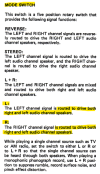
I don't think so. This is from the 2385 Handbook of Instructions:
1786758842419.png
You can check it with your Wave radio in Aux input by only plugging in the L channel, then you should hear it from both speakers when you select "L" and not hear anything when you select "R". If you put it in "REVERSE" the sound from the "L" channel should move to the "R". When you put it in "L+R" the signals will be added (but you only have the L channel plugged in, but you will hear it on both L and R.

Here's a test that you can try:
  1. Play your Wave radio or a record.
  2. Use the MODE switch to select the L channel. You should hear the same mono out of both speakers. Do they both sound the same? Or are they both bad?
  3. Now select the R channel on the MODE switch. You should hear the same mono out of both speakers. Do they both sound the same? Are they both good or bad?

 
Last edited:
I don't think so. This is from the 2385 Handbook of Instructions:
View attachment 3818742
You can check it with your Wave radio in Aux input by only plugging in the L channel, then you should hear it from both speakers when you select "L" and not hear anything when you select "R". If you put it in "REVERSE" the sound from the "L" channel should move to the "R". When you put it in "L+R" the signals will be added (but you only have the L channel plugged in, but you will hear it on both L and R.

Here's a test that you can try:
  1. Play your Wave radio or a record.
  2. Use the MODE switch to select the L channel. You should hear the same mono out of both speakers. Do they both sound the same? Or are they both bad?
  3. Now select the R channel on the MODE switch. You should hear the same mono out of both speakers. Do they both sound the same? Are they both good or bad?
Wave radio on , selector on L position Left speaker distortion, Right speaker clear
Mode set on R position Left speaker distortion, Right speaker clear
On all settings exact same. No change at all
 
We previously measured the DC voltages on QE01 and QE02. Can you please measure the voltages on QE03 and QE04?
Maybe there is a bad TA7136P preamp IC here?

1786804925545.png
 
We previously measured the DC voltages on QE01 and QE02. Can you please measure the voltages on QE03 and QE04?
Maybe there is a bad TA7136P preamp IC here?

View attachment 3818892
Will do, it will take me a while because the receiver is apart for testing, I need to re assemble to stand on side to access points for testing.
 
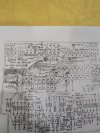
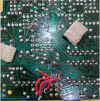
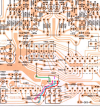
I have a question before i re assemble , as per in photo 1 you can see four jumpers, they are on pin 1,2,3and 4. In the photo pin 2 has a second trace that seems to go to the pin, on the schematic from the service manual ,no second trace goes to the second pin, should that trace be connected or not. I dont believe this has anything to do with the issue
 

Attachments

  • PXL_20260816_223742643.jpg
    PXL_20260816_223742643.jpg
    154.9 KB · Views: 11
  • PXL_20260816_235645309.jpg
    PXL_20260816_235645309.jpg
    141.6 KB · Views: 9
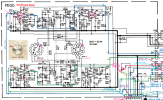
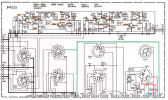
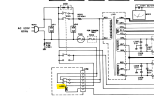
Looking at the schematic and board layouts, it should not be connected. I assume you mean where I have drawn the short purple line.
That trace just above the purple line is a ground trace and Pin 2 eventually goes to pin 2 of J414. (Although it might also be tied to ground somewhere else since I think it is tied to the cable shield.

1786934548707.png
1786934589806.png
1786934128318.png
 
Before putting face plate back on i tested unit, still right and left but left distortion, I added some electrical tape under power supply switch and under speaker switch just to make sure nothing touches when putting back together, that area is extremely tight.
After partially installing plate i tried unit, it came on but only the first switch , no second click. I removed plate and checked all wires, nothing seems to have moved but second click is not there anymore. I realize thats the protection relay
Im not sure if it had anything to do with trying to reassemble or if part causing distortion has gotten worse.
Do you think its better just to re cap unit so im not chasing a ghost.
 
Last edited:
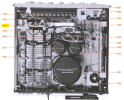
It looks like there are three relays:
  • LN01, 48V on PN00
  • LC01, 24V on PC00
  • L005, Soft Start
Can you tell me which are operating and which are not?
 
It looks like there are three relays:
  • LN01, 48V on PN00
  • LC01, 24V on PC00
  • L005, Soft Start
Can you tell me which are operating and which are not?
The LN01 is not engaging
LC01 is working
Still looking for the L005
 
Back
Top Bottom