• The move to the new server is done. There are some software and database maintenance updates in process. This has us passing the hat around to help out. We appreciate any donations. Seriously, even a dollar helps. The payment page may be found here - https://www.audiokarma.org/support.html

Buzz after recap

EvilDingo

Active Member
Hi all,

Started the process of full recap on my SX980
Started with the power supply board. Fired it up. Sounded great!
Last night replaced filter caps with the the E36D 18000uf 75 volt caps
Removed, trimmed, bent and drilled the bar between the two caps ( i also used a wire wheel to clean up the surface...removed a finish on the bar....hope that's not a issue)
Soldered connections to crimp connectors since these caps are screw-in.
Added Bypass caps (non polar)
All went smooth.

Moved on to the protection board and replaced all the caps on that. Did not replace the relay because it looks like there are only 6 posts on the original (did not remove, just observed from under the circuit board) and the new omron that digi sent has 8? Possibly two are not used, or I ordered the wrong one....

Anyway powered it up, relay clicked, everything plays but now I have a Buzz/Hum when volume is down. It is there in all modes, if I pick aux or phono without an input its there, then as I raise the volume it lowers in volume but is still notable. When a mode is selected and I apply input, it plays as it should but still a buz when volume nob is all the way down.

I checked my polarity and solder joints.
From what I read, this can be a sign of bad filter caps.....they are new....did I screw the pooch somehow? ugh....

There is one capacitor I did not have for the filter assembly its the little 1uf/80v that jumps to filter cap assembly ( I only had one for protection assembly between posts 2&3. I used a 1uf/100v for that one).

I am really just getting back into electronics and pretty much forgot everything technical. I solder pretty good and mechanically I get things...but I need to relearn everything regarding troubleshooting.

Any help would be appreciated.

Thanks
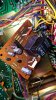
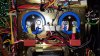
View media item 22226View media item 22225View media item 22224
AF1QipOBHXvcWE_Y-QG7eAqY4p-XzgNOuogNwONb-lJu
 

Attachments

  • 20200521_075223.jpg
    20200521_075223.jpg
    120.5 KB · Views: 6
  • 20200521_075215.jpg
    20200521_075215.jpg
    125.2 KB · Views: 7
  • 20200519_202414.jpg
    20200519_202414.jpg
    129.3 KB · Views: 5
Last edited:
Register to hide this ad
Ok, the more I am looking for things, the more I wonder if the relay could be the source of the buzz and the more I look at this Omron relay I have..I may be off here, but since this is a N/O relay do I even need the first two pins; 1 & 4 since those appear to be unused and are the end result in protection mode engaging? And whats with the magnet on the relay? Is that to prevent false trip?
 
Last edited:
What happens if you use the amps only?
Both speakers?
 
Last edited:
I"m also thinking I'm going to go ahead install the omron relay... see if that makes a difference...I think if I clip pins 1 and 4 it should work, since that would just put the relay into open thus cutting pwer... correct? Anyone? Why is there a magnet there?
 
I'm pretty sure the relay won't fix the hum.
The magnets are to suppress the electrical arc when opening and closing.

Pull the jumpers on the back and run a separate pre amp to the main-in's only. See if the amps are where the buzz is.

Both speakers means a power supply issue.

Do not run the set on the DBT. The DBT limiting will strangle the receiver and it will do weird things.
 
Looking at the power board looks like one of caps is tied to a transistor. Sometimes I notice when changing caps close to transistors or resistors you need to be sure the legs of the components next to them do not get unsoldered. Just went through that issue two days ago where the leg of resistor and cap were on same pad and sure enough the resistor leg backed its way out of the hole when cap was changed.
 
I'm pretty sure the relay won't fix the hum.
The magnets are to suppress the electrical arc when opening and closing.

Pull the jumpers on the back and run a separate pre amp to the main-in's only. See if the amps are where the buzz is.

Both speakers means a power supply issue.

Do not run the set on the DBT. The DBT limiting will strangle the receiver and it will do weird things.
Only other amp I have is a Sony STR-DG500, can I run that in there?

Both speakers buz, even when I fade to left and right.

I replaced the relay. Did not eliminate the buz.

So Left it on for a little bit and raised the volume some...the relay started clicking and then lost sound.
Came back after I turned it down.
 
Is the volume/tone/balance etc pot secured to the chassis with a washer/nut or are the boards hanging free? Do you hear a difference if you touch the chassis or pots? Could be a buzz from a ground issue.

Tops open, face off. all boards are currently where they are supposed to be. No change in touching chassis or pots.
 
Looking at the power board looks like one of caps is tied to a transistor. Sometimes I notice when changing caps close to transistors or resistors you need to be sure the legs of the components next to them do not get unsoldered. Just went through that issue two days ago where the leg of resistor and cap were on same pad and sure enough the resistor leg backed its way out of the hole when cap was changed.

Checked the power supply board resistor. It is not touching. Sure does look that way in the pic though! Would have been nice to have an easy fix.
 
Not speaking of them touching on top side of the board, its the bottom side with the solder where the issues occur. If it was not humming before, check the solder joints and be sure a near by component wasn't supposed to have its leads on the same pad or you have solder bridge over to a pad its nots supposed to be touching.
 
Last edited:
Not speaking of them touching on top side of the board, its the bottom side with the solder where the issues occur. If it was not humming before, check the solder joints and be sure a near by component wasn't supposed to have its leads on the same pad or you have solder bridge over to a pad its nots supposed to be touching.

Thanks, I missunderstood. I checked didn't see anything. Hit all the replaced cap solder joints one more time just to be sure.

The thing is. I did the power supply board first. fired it up and there was no buzz, cranked it up halfway and still sounded good. LED upgraded display lights still pulsated with Base but not as much as did prior to power supply recap. No other issues in a 5 minute test.

The next evening I tore back into it and swapped the main filters and protection board. fired it up and there was the buzz/hum. Never put it at volume in fear of damaging anything.

Came back in last night and replaced the relay, and checked solder points. Fired it up, buzz was still there put volume up with tuner on and the relay started clicking open - closed - open - closed lost sound.

When I was replacing the filter caps and modifying the - to + bar to fit the screw tap, I wire wheeled the old solder off the bar and took the finish of the bar (you can see it in the pic at top if you look close). Not sure if that possibly screwed up the conductance on that bar or not. It appears to be solid copper? Other than that, everything went in as it came out.
 
I had replaced the filter caps on a 750 and soldered the Output rail wires to soldered ring terminals. It was fine for a few months before it began to buzz.
One lead was not soldered in the group in that ring terminal. Only a slight connection. Enough to work but not enough to keep the AC at bay.
 
If the issue just appeared after you replaced the main filter caps, I would jump the old ones in, in parallel with the new ones, and see if the hum goes away. You might just have a defective brand new capacitor. I would also look for something that should be connected to the center ground bar between the capacitors, that is not connected (like the wire between the bar and the chassis pan)
 
Both the power supply board and protection assembly board both had obvious signs they were worked on in the past with some traces that look questionable. When I was replacing the 220uf capacitor the trace was loose ans separated from the board before I applied heat or pressure. I thought I got it soldered down alright, but maybe I didn't. The power supply board has had one of the transistors replaced bu the other is original, both appear to have been worked and overheated around the heat sinks. I found a really clean and good looking protection assembly board that "states it was tested as good" on ebay, so I ordered it. On the hunt for a replacement AWR-156 power supply board......not finding one! I figure I can swap out the new caps I just installed.

I think I'm if I discharge the main filter caps, and the power supply caps with my multimeter, ( dont have a discharge tool - I need to build one but I dont have any resistors) I should be able to check for continuity for the wire wraps leading to and from correct. I am wondering how brittle the wraps are after all these years. Do you think this is a good first step?

Dave
 
If the issue just appeared after you replaced the main filter caps, I would jump the old ones in, in parallel with the new ones, and see if the hum goes away. You might just have a defective brand new capacitor. I would also look for something that should be connected to the center ground bar between the capacitors, that is not connected (like the wire between the bar and the chassis pan)

That is a good idea. I think will do both...thanks
 
Back
Top Bottom