• The move to the new server is done. There are some software and database maintenance updates in process. This has us passing the hat around to help out. We appreciate any donations. Seriously, even a dollar helps. The payment page may be found here - https://www.audiokarma.org/support.html

How to reach controls on a 661

MattCarroll

AK Subscriber
Subscriber
Greetings, all.

My humble apologies for asking an age-old question, as I'm sure I'm not the first to ask...but how do I access the pots and switches on my 661 receiver to clean them? I am familiar with the process of using Deoxit, and have had success using it on other older gear. I cannot see any way to get at them, even with a spray straw, without removing the PCB that they're mounted to.

The issue is an occasional drop out of the left channel. It will get scratchy sounding, and sometimes will drop out completely. If I add a tiny bit of volume, the channel comes right back to life. Seems to only do it at low volume levels. Am I on the right track? Also is D5 the correct cleaner?

Thanks for any/all input.

Matt
 
Register to hide this ad
I'm not familiar with the construction of that unit but there are a few where you have to do some disassembly to get at the controls. There are huge threads here about what to use where. D5 is technically for metal-to-metal switch contacts, not pots, but many use it with success there. It will remove lubricants and can damage old tracks, though not often. Still, you might start with F5 Faderlube, which is designed more for that application. See https://audiokarma.org/forums/threads/the-idiots-guide-to-using-deoxit-revisited.207005/
 
Thanks, I will go back and review that thread. I wouldn't want to damage any irreplaceable parts. I will add that none of the controls sound "scratchy" when being used. I just figured a good cleaning couldn't hurt. Open to other ideas.
 
I will be getting back into my 661 this weekend. It is difficult for me to work with fine details in the evenings after work. In the mean time, I have a couple more questions:

The pcb that the pots are mounted to seems to be held in place only by the pots themselves. If I detach all of the pots/switches from the faceplate, will it just slide out, or am I missing something? It looks like I could wiggle it around enough to clean the pots without removing any wires?

I re-read the "Deoxit for dummies" thread, and from what I gather the F5 is also not recommended for pots, because of the high concentration of solvents. I have a can of D100, any potential issue with using that?

I think I will try tapping on the relay before attempting any cleaning, and see what that does. Is there a way to clean relay contacts, or do I just replace the relay?

Thanks again for the help, and I will be reporting back this weekend.
 
I think you are misunderstanding the use of Deoxit.

Deoxit F5 is for use in pots.
Deoxit D5 is for switches and contacts.
Deoxit D100 is similar to D5, which is just less aggressive and used more for regular maintenance
 
My above post was referring to what I read in the first post in this thread:

  • DeoxIT DN5S-6N spray would be fine [for potentiometers], however, the DeoxITR 100% spray (D100S) would be the preferred choice.
    The carbon may be damaged by the solvent in the 5% solution. It is more likely to occur if the carbon is worn to begin with. The 100% spray has much less solvent and is OK for potentiometers.
    Therefore, some newer potentiometers could be fine with Deoxit D5, but since most of the people here do this job on vintage device, it may be best to not take any chances.
  • Deoxit Fader (formerly Faderlube) F100
    Spoiler
    From this website Fader F5 can also damage the carbon track on Vintage potentiometers:
    There is some discussion about using Deoxit Fader F5 on vintage pots as one of the chemicals contained in the flushing solution is known to degrade the carbon in the pots, thus degrading them over time until they become useless.

Thus, my confusion. No disrespect intended.
 
I have ordered a bottle of F100. Seems to be the safest bet, based on what I have read. It also means my project will be delayed for another week, while I wait for delivery. If anyone has any tips about accessing the pots and switches, please do speak up. Otherwise I plan to (carefully) start removing parts until I can reach everything. I haven't found much in the way of instructional videos, so I'm hoping that an experienced person will chime in.
 
The issue is an occasional drop out of the left channel. It will get scratchy sounding, and sometimes will drop out completely. If I add a tiny bit of volume, the channel comes right back to life. Seems to only do it at low volume levels. Am I on the right track? Also is D5 the correct cleaner?

You have described the classic dirty protection relay behavior. Goose the volume a bit and the channel comes back. You can certainly test it as @Robisme suggests.

IMO it is best to replace the relay. They can be opened and the contacts mechanically cleaned, just hitting them up with a spray won't solve the problem for long if at all.
 
You have described the classic dirty protection relay behavior. Goose the volume a bit and the channel comes back. You can certainly test it as @Robisme suggests.

IMO it is best to replace the relay. They can be opened and the contacts mechanically cleaned, just hitting them up with a spray won't solve the problem for long if at all.
Thank you! I'm slowly learning how to do maintenance and small repairs. The only reason I mentioned cleaning the controls is because that solved a similar issue with a newer Yamaha amp that I have. I also figured that while I have the cover off, I might as well service the pots and switches. I understand that spray cleaners are not to be used in relays. If the relay in my 661 can be opened and mechanically cleaned, then that is what I will do.

This Sansui is a very pleasant sounding receiver, and I would love to be able to enjoy it without losing the left channel.
 
The problem is likely the speaker relay. The plating on the contacts gets worn and exposes the base metal which rapidly tarnishes. Replacing the relay is the best remedy. Digikey has relays. If you look on the case of the relay there is a part number and specs; coil voltage and contact rating in Amps. If you remove the relay (requires de-soldering) and post pictures, in focus, of the writing on the case and the bottom of the relay so we can see the pinout, we can tell you what part to order. Also, the controls should be cleaned and if you post some pictures I can advise the best way to access them. Sometimes you have to remove the front panel and remove the pc boards they are on to access them.
 
The problem is likely the speaker relay. The plating on the contacts gets worn and exposes the base metal which rapidly tarnishes. Replacing the relay is the best remedy. Digikey has relays. If you look on the case of the relay there is a part number and specs; coil voltage and contact rating in Amps. If you remove the relay (requires de-soldering) and post pictures, in focus, of the writing on the case and the bottom of the relay so we can see the pinout, we can tell you what part to order. Also, the controls should be cleaned and if you post some pictures I can advise the best way to access them. Sometimes you have to remove the front panel and remove the pc boards they are on to access them.
This makes good sense. I was hoping to be able to just service the existing relay, because I'm still building my skills with soldering. I certainly don't want to damage the circuit board. I will get in there and see how everything looks, maybe try to get a few pictures, and report back. Thanks for your help
 
Ok, so I pulled the top cover off, connected a pair of speakers, and a CD player. Been playing CDs at low volume levels for nearly 4 hours now, listening for static or cut-out. It has been playing flawlessly. Not a single glitch. Did I scare it into submission? Normally the left channel will cut out within minutes of when I turn it on.

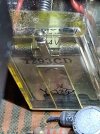
ETA here is the relay from above:
20261011_164756.jpg
 
Ok, so I pulled the top cover off, connected a pair of speakers, and a CD player. Been playing CDs at low volume levels for nearly 4 hours now, listening for static or cut-out. It has been playing flawlessly. Not a single glitch. Did I scare it into submission? Normally the left channel will cut out within minutes of when I turn it on.

ETA here is the relay from above:
View attachment 3854728
An Omron MY2. That's the first part of the part number. It will have more numbers on it. Digikey has the MY2 series. It's going to be something like MY2-01-DC24.
 
An Omron MY2. That's the first part of the part number. It will have more numbers on it. Digikey has the MY2 series. It's going to be something like MY2-01-DC24.
How about this?
20261013_063528.jpg
It is tricky to get a good angle on it, while also holding a flash light. I can't see any other numbers anywhere.
 
Be sure to remove cover & clean the contacts on the new relay. I've installed several Omron relays, and a few months later have drop out issues.

Recently started installing TE connectivity brand with good results, did clean contacts before installation.

 
Be sure to remove cover & clean the contacts on the new relay. I've installed several Omron relays, and a few months later have drop out issues.

Recently started installing TE connectivity brand with good results, did clean contacts before installation.

I have never had an issue with new Omron relays. Where did you purchase them?
 
Back
Top Bottom