• The move to the new server is done. There are some software and database maintenance updates in process. This has us passing the hat around to help out. We appreciate any donations. Seriously, even a dollar helps. The payment page may be found here - https://www.audiokarma.org/support.html

Kenwood Basic C1 Preamplifier Restoration/Upgrade

I've looked the whole thing over pretty good with a fine tooth magnifier. Can't see anything obvious. I've even looked down as well as I could into the pots and the wipers all seem to be intact.

 
I guess you will need start checking voltages, comparing one channel to the other signal tracing and stuff. I cant even begin to say what to do with all that. I am not that good at it anyway. Just a hobbyist here. Perhaps some of the more knowledgeable folk here will chime in. May need start a new thread...
 
Sup guys, I'm new to electronics, but taking minimal courses on line ,but I got a Kenwood C1 and M1 I'm going to attempt to replace capacitors on, DRM audio has some capacitor kits for some units, but were do go to order other parts that might be bad, for example, D6, D7, I'm not sure what they are, in the schematics the description isn't very good, so is there somewhere to go you can give them the part number to get the replacement part?
 
Yeah I bought the C1 and M1 a couple months ago, I rocked out a few times, then a month ago I turned it on and no sound, both units came on but no sound, so I took the cover off the M1 and checked the pots and fuses, it looked ok, so I took the cover off the C1 and all the bigger pots were all leaking, ah ha, bingo, just my luck.
Looking it over between C43, C44, and C45, C46, is D6, D7, they are stripped diodes or resistors not sure which cause in the description doesn't say, so I'm just going to start with all the pots first then go from there, but I know the color rings on D6, D7 are a code and I guess I could decode them, but was just wondering the easiest is to order them with the part number given in the schematics cause the description says BZ-182, whatever that means, lol, thanks, I'll be back on later.
 
James, you might conciser starting a new thread. Generally "D", stands for diode. Just typing in "BZ-182" in a google search comes up with that info. and suggestions for a replacement part. "C", generally stands for Capacitor, "R" resistor and on and on. Fact is re capping almost never fixes a non working unit. If one does not work then troubleshooting and then fixing the unit good enough for it to work would be the way to go to start with. Then, and only then a re cap. All of this is general info. and does not mean it is right 100% of the time. To answer the question about ordering parts. This can be a mess. Most parts numbers cross over to a modern equivalent as the original part is no longer produced. For a little info on that read. " https://audiokarma.org/forums/index.php?threads/marantz-2265-power-board-diode-replacement.792908/" and I think you will start to see what I mean. Also, how do you know the parts are bad ? Have you tested them ? Do you have a DVOM ? Like the Capacitors, in many an old unit there is glue down at the bottom that at first glance look like they gave ruptured. Safety, do you know how to address that ? There are some parts in that amplifier especially that can knock your socks off if you touch them even after the is unplugged. I would strongly suggest that at this point you start a brand new thread in "Kenwood-Trio" here on site and add pictures. Read everything you can find on other threads (and this one) about repairing the C1 too. You fixing this up will then in turn help others. PM with the info. or post it here so I can come to the new thread that way I can come help if at all possible. Thanks, Jim.
 
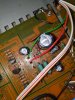
So coming back to this, I posted on some trouble I had with a missing left channel in my C1 back on page 12 and about 8 months ago. Like others here, I originally suspected a dirty relay so I replaced it but I saw no improvement. I did find that tape inputs did work with both channel but he others did not. I was going to check the RCA connections tonight when I noticed that D3 also looked a little damaged. I didn't have my multimeter out of storage but does anyone know if this is serious or just some minor corrosion? That was the only visual issue I saw thus far. The other thing I wanted to ask about was where exactly to look for trouble on the RCA connections. I am assuming failures tend to happen where the plug assembly is soldered to the board it self? I should also that I previously had deoxit/faderlube on the pots and the switches as well butit sounds like some others are having these channel dropouts as well. PXL_20210412_015717087.jpg
 
That is almost undoubtedly glue that Kenwood used on the board to glue the capacitors down. It could cause some corrosion even though it never happened on any c1 or c2 I ever had and I have had quite a few. As far as the RCA connections yes, where they solder to the boards at times needs to be flowed again.
 
I've been having trouble with an intermittent left channel that keeps coming in and out. At first it seemed like it would go out when I turned on the sub bass filter, or when I had the tuner on. I did the Deoxit dance on all the pots and switches, but after that it seemed like it was permanently out

@chembot, you could hook it up, play some music with the volume low and try selecting various switches until you can get sound. my guess is a dirty switch (the black foam blocks turn to dust and can get into the switch contacts). it might narrow down the dirty switch. or use a scope and signal generator. just keep the volume 'low-ish'. you don't want any pops blowing out your speakers.

or leave it on the step by the front door and i'll look at it.
 
@chembot, you could hook it up, play some music with the volume low and try selecting various switches until you can get sound. my guess is a dirty switch (the black foam blocks turn to dust and can get into the switch contacts). it might narrow down the dirty switch. or use a scope and signal generator. just keep the volume 'low-ish'. you don't want any pops blowing out your speakers.

or leave it on the step by the front door and i'll look at it.

@rickl I forgot you PM'd me a while ago about looking at it. I think the channel could be from a dirty switch and I will try messing around with it like you suggested. I guess not sure what you mean about the black foam blocks. Are you talking about the one that looked it was on the underside of the cover? I only see a brown area that looked to be some adhesive.
 
@ricklI guess not sure what you mean about the black foam blocks. Are you talking about the one that looked it was on the underside of the cover?

i don't have a c1 but my c2 had some small black foam blocks on the circuit board (support the blue selector?) that broke down and created a mess.

I thought the c1 had similar setup.

<checked youtube...>
looks like the c1 doesn't have them in the youtube video i found. sorry for the confusion.
 
Last edited:
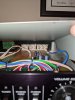
OK, so I've been messing around with my C1 tonight; I was running it through my CR-2020 (via main in). I played some music through my DAC/computer and it turns out that it plays perfectly through both A and B Tape loops, but I only get the right channel to play when running it on the tuner and aux inputs. I recleaned all the switches with deoxit beforehand so i was hoping to rule out dirty switches. So now what? Looking at the setup of the jacks on the board (see pic), the three on the far right are Phono, Tuner, and Aux which are the three inputs I am having trouble with. I guess the next thing to check is those RCA board connections as vsat88 suggested. If anyone has anything else, let me know!
 

Attachments

  • PXL_20210414_021741908.jpg
    PXL_20210414_021741908.jpg
    85.8 KB · Views: 35
So, you are saying that the unit works when you use either of the tape inputs and using the right and left output connected to an amplifier right ? But then you switch it to AUX or Tuner and it drops a channel right ? If so it would seem that the switch is the problem, follow me ? Just sprayed detox does not always work. Sometimes a switch must be replaced or re built.
 
So, you are saying that the unit works when you use either of the tape inputs and using the right and left output connected to an amplifier right ? But then you switch it to AUX or Tuner and it drops a channel right ? If so it would seem that the switch is the problem, follow me ? Just sprayed detox does not always work. Sometimes a switch must be replaced or re built.
Yep, you've got it right. When I physically unplug the computer inputs from tape in and reconnect into the aux or tuner input and push the corresponding switch, the L channel drops out.
 
OK, so both will drop the left channel out. The AUX and the Tuner. What you probably need to do is to start your own thread. This thread is about Restoration/Upgrade not repair. Just to be honest I kinda just realized that. Start a thread and PM me so I know where to look so I may possibly be of help to you. Also, leestereo's thread will not be capped with info not related to the original thread as per his intent. Thanks.
 
@chembot, your c1 is fine. I touched up a few pins on the switch board and the channel works great.

Both tuner and aux inputs sound great.
 
@rickl is the man ! Good you cats got together and fixed another one. The C1 is a great preamp. I totally restored mine and I like it a lot. Awesome.
 
I got my C1 back from @rickl yesterday and listening to it yesterday and tonight (really for the first time in the condition that it is supposed to be in) I gotta say it sounds excellent!! I have yet to pair it with the M1 I have but running it through the Main In on my Yamaha CR-2020 (which might get usurped at the rate things are going!). Again, just a huge thanks to Rick for helping me out with this.
 
Back
Top Bottom