• The move to the new server is done. There are some software and database maintenance updates in process. This has us passing the hat around to help out. We appreciate any donations. Seriously, even a dollar helps. The payment page may be found here - https://www.audiokarma.org/support.html

Marantz 2220B problem.

those white knobs are preset trimmers that finely adjust the circuits to work properly . they have to be set as per service manual . saying that marantz are good at having errors in the manual but luck is on your side as the errors have been documented on AK .
as for the current problem it is most likely something happened whilst changing the cap . you can see it better than we can .check for short circuits from stray solder and any broken wires .
 
Can you take a picture of the backside of the board so we can see the soldering?
Can it be that you have connectivity to another pin now?

You said it happened when you swapped C705 initially and when you swapped back to the old capacitor it's still muffled?

To check the bias you can use the multimeter you have.
  • Power off amp.
  • Connect black lead to J714 and red lead to J716
  • Set multi-meter to V on the dial
  • Set volume to zero
  • Nothing connected to AUX in
  • Power on amp
  • Adjust R733 until multimeter reads 20mVDC

  • Power off amp.

  • Repeat procedure above by measuring on J715 to 717 and adjust R734 for 20mV.
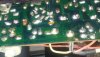
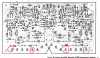
Screenshot 2020-12-09 174334.png
 
I've checked literally everything I'm capable of checking.
Yes I switched back to the old capacitor & it still has this problem.
I had no choice but to connect one lead another part on the board because it came off when I was taking out the original cap... But it's on the same trace & I've been told by several people that is ok & should be fine.
Same thing happened when replacing a cap on the FM board & when i used the same method it worked great.
 
Ok... Correction: I've checked literally everything except for a loose wire somewhere. (& of course the bias because I didn't know how to, but those never seemed to even do anything)
 
I mean, I suppose I can try THIS, but I'm a little nervous about it.
 

Attachments

  • Screenshot_20201204-174025~2.png
    Screenshot_20201204-174025~2.png
    361.5 KB · Views: 21
Can you take a picture of the backside of the board so we can see the soldering?
Can it be that you have connectivity to another pin now?

You said it happened when you swapped C705 initially and when you swapped back to the old capacitor it's still muffled?

To check the bias you can use the multimeter you have.
  • Power off amp.
  • Connect black lead to J714 and red lead to J716
  • Set multi-meter to V on the dial
  • Set volume to zero
  • Nothing connected to AUX in
  • Power on amp
  • Adjust R733 until multimeter reads 20mVDC

  • Power off amp.

  • Repeat procedure above by measuring on J715 to 717 and adjust R734 for 20mV.
View attachment 2060642

Yeah... I tried that just now but I have no idea what I'm doing. Like I said, those "white knobs" never had any affect on the sound anyway.
& I don't know how to use a multimeter.
 
I'm just gonna look for loose wires though I really don't think there are any...& guess I'll try what I posted in the last picture about scraping the board to expose copper.
I don't know what else to do & this is totally unacceptable.
 
Yeah... I tried that just now but I have no idea what I'm doing. Like I said, those "white knobs" never had any affect on the sound anyway.
& I don't know how to use a multimeter.
The white knobs are not really meant to affect sound. They balance the circuit electrically in two very important ways. If they are not correct, overheating and component failure as well as speaker damage are a possibility. If you have moved them significantly, you are wasting your time trying to fix this unit until that is corrected. Take it to someone who knows what they are doing.
 
I made sure to check their approximate positions before I ever messed with them.

I. Just need to figure out what happened with my left channel...
Taking it to someone isn't an option right now. **** I couldn't even afford the rebuild kit; my girlfriend got it for me. So I don't know hiw I'd even pay someone else.
It's definitely crossed my mind. I just can't afford that.
 
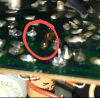
Here's a picture of the pad that broke...near the left side about halfway up.
I don't have any other picures at the moment & I'm not at the house.
20201204_213109~2.jpg
 
Like I said I tried connecting the lead to another point on the same trace. Didn't work.
& just earlier when I was at the house I scraped the trace to expose some copper & soldered the lead to that. Still not any better. I didn't think it would be but figured I'd try anyway. Couldn't hurt - but didn't help.
 
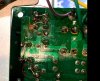
Here's what I did earlier, scraping the trace to expose some copper.
It didn't help...same result as soldering the lead to another point on the trace.
 

Attachments

  • Screenshot_20201210-111023~2.png
    Screenshot_20201210-111023~2.png
    655.2 KB · Views: 23
those white knobs are preset trimmers that finely adjust the circuits to work properly . they have to be set as per service manual . saying that marantz are good at having errors in the manual but luck is on your side as the errors have been documented on AK .
as for the current problem it is most likely something happened whilst changing the cap . you can see it better than we can .check for short circuits from stray solder and any broken wires .

.
& just out of curiosity, why are y'all saying to test those when they don't affect the sound?
I mean, I get what they do...kind of.
But since that's obviously not the issue I was just wondering about that
 
Back
Top Bottom