• The move to the new server is done. There are some software and database maintenance updates in process. This has us passing the hat around to help out. We appreciate any donations. Seriously, even a dollar helps. The payment page may be found here - https://www.audiokarma.org/support.html

Marantz 2325 has high THD in both channels

runningdog

AK Subscriber
Subscriber
This 2325 had symptoms that included high Total Harmonic Distortion, made even worse with an 8 ohm load. While I was looking into this the receiver behaved inconsistently. This was after a rebuild. I set it aside in hopes that with a long rest it would fix itself. LOL. After digging in again this week and fixing two failed solder joints, the misleading side issues were gone. Now it acts like this:

THD in both channels measures high when an 8 ohm load is added. For example, at 5V output with no load it's 0.002% THD, but add the load and it jumps to 0.40%. Increase the output to 31V (near rated maximum) and the THD drops to about 0.20% Still way too much.

-Both channels are affected the same.
-Applying the signal to the Main In jacks, distortion remains low all the way up to rated output with or without a load. Right now it makes a great main amp.
-Measuring directly off the Pre Out jacks, THD measures 0.02%.
-No change if jumpers are put on the Main/Pre jacks.

IMHO the issue is not with the PU01 board (replaced), the PE01 (swapped out), or any part of the main amplification circuits.

I've been looking for something that affects both channels before the signal reaches the Pre Out jacks, including a broken or pinched lead or a bad solder joint. Or a single point in a circuit that affects both channels. I've not found where the distortion is being introduced.

Your thoughts and questions welcomed.
 
Register to hide this ad
Controls and potentiometers were properly cleaned?
All controls were cleaned and treated with a non-residue contact cleaner followed by DeoxIT. The pots and balance slider also got FaderLube. They are all smooth and mostly not noisy. Thanks for asking.
 
I'm confused. :confused: In the first you say that the THD is high with load, but the Main Amp has low distortion with or without load. This seems to contradict the first statement.
For example, at 5V output with no load it's 0.002% THD, but add the load and it jumps to 0.40%.
Applying the signal to the Main In jacks, distortion remains low all the way up to rated output with or without a load.
  • If the issue is in the Preamp, then load or no load on the speaker outputs should not make a difference (unless you are dropping the input AC voltage with higher current)
  • Does the distortion occur with all inputs (Phono, FM, AM, Aux, Tape In, and Tape Monitor)?
  • Since it affects both channels, I would check the DC power to the Preamp boards to make sure that it is not limiting with volume turned up.
  • Follow the input signal through the Preamp with a scope to see where the distortion starts.
  • One final note... are you running this on a DBT? With a lower wattage bulb might be dropping the voltage too much at higher volumes causing the distortion. Try to increase the bulb wattage and if you feel it is safe, take it off of the DBT and see if it clears up. I couldn't find the wattage of the 2325 at rated output, but for a 2385, at rated output with both channels driven, the power consumption is a whopping 670 Watts! If you can approximately scale wattage, that means that the 2325 will draw ~450W. That's one big light bulb for a DBT to not current limit and reduce operating voltages. This could be the cause of your distortion. ;)
  • This seems to be consistent with your observations, when you turn up the volume, the distortion increases significantly. This is because your voltage drops as you draw more line current.
  • Does you DBT glow brightly?
If I did this right, a 100W bulb @ 120VAC I = P / V = 100W / 120V = 0.83A
So, now if we use 450W we have, I = 450W / 120V = 3.75A!
If you have a 100W bulb, you will be limiting the max current to only <22% of the power.
 
Last edited:
you say that the THD is high with load, but the Main Amp has low distortion with or without load. This seems to contradict the first statement.
Thanks for all your comments. I'll clarify: if a signal is applied to the Main In jacks, instead of AUX, there are normal distortion levels, with or without a load. This part of the receiver works normally.

If the issue is in the Preamp, then load or no load on the speaker outputs should not make a difference
Exactly! So I'm trying to figure out why. It's not on a DBT when I'm testing. The input setting makes no difference. The issue does not appear to be with the PE01 preamp board as it has been swapped out with known working ones.

Since it affects both channels, I would check the DC power to the Preamp boards to make sure that it is not limiting with volume turned up.
This makes sense. I have checked the voltage from the P800 power supply to the boards and I don't observe any voltage drop when the volume is increased. What is the best way to test if the power supply is keeping up?
 
Do you have the same problem if you connect your input source to Tape 1 input and press the Tape Monitor 1 button in? This should bypass the input selector switch, if that is the problem.
Since it seems to be affected by turning up the volume control, I would start looking at the circuit after the volume control and before the Preamp outputs.
If you run the Preamp output to another amp and turn up the volume, it sounds OK? And, if you connect another Preamp to the Main amp inputs, it sounds OK also?
Are you relying on the internal jumpers to connect the Pre out to Main In. If so, have you tried to connect an RCA cable to jump these?
 
Do you have the same problem if you connect your input source to Tape 1 input and press the Tape Monitor 1 button in?
Yes, it performs exactly the same.

If you run the Preamp output to another amp and turn up the volume, it sounds OK?
Yes, I connected the 2325 Pre Out to a 1060 Main In. The THD measured is typical of the 1060.

have you tried to connect an RCA cable to jump these?
I have tested connecting and cross connecting the Pre Out/Main In jacks with no change.

Since it seems to be affected by turning up the volume control, I would start looking at the circuit after the volume control and before the Preamp outputs.
I agree. The PE01 preamp and PU01 boards and all their leads have been my focus. The PE01 has been swapped out with no change, and the PU01 was replaced with no change. I have not successfully identified where the distortion starts being part of the signal.

I also think what you said about the power supply not keeping up was worth checking. When testing the power supply 35V output I put a voltmeter on it and raised the volume to 25V output, and watched to see if the voltage dropped. It did not drop. Is there a better way to test if the boards are getting sufficient power?
 
What level is your signal source? What is the measuring instrument?

The measuring instrument is a QuantAsylum QA401 audio analyzer.

1KHz @ 0.0dB input.

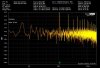
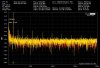
Here's some screen shots at 10V and 30V output.

2325 10V output no load:
2325 GP 10V output no load.jpg

2325 10V output with load:
2325 GP 10V output with load.jpg

2325 30V output with load:
2325 GP 30V output with load.jpg

THD is highest between 10V and 20V output. At 1V and 30V the load does not raise the THD as much.

Just to be sure my test setup is working I measured a different 2325 this evening and got normal results.

Edit: the three screenshots were replaced with correct ones, more accurately showing how much THD goes up with the load applied.
 
Last edited:
Check the 19V (J806)
  • goes to PL01 Dolby Tone & Meter
  • goes to P600 Dolby Unit
and 14V (J807)
  • goes to ??? (schematic shows it open?)
PS output voltages also.
upload_2023-5-12_0-5-16.png
 
The voltages measured at J805 (35V) J806 (19V) and J807 (14V) did not change when a load was applied. Tested at 1V, 10V, and 30V output.

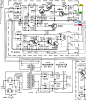
For fun here's a redraw of the P800 schematic with details on what gets 14V and when:

2325 P800 schematic redrawn.jpg

Drawing courtesy of Tim C.
 
1KHz @ 0.0dB input.
dB is a relative measurement. Did you actually mean dBm?
upload_2023-5-12_7-2-55.png

Let's try to further isolate the problem:
  1. Does the balance control affect the distortion noise level?
  2. Do the tone controls (bass, mid, treble) affect the noise?
  3. What about the loudness button?
If they do, then it is occurring before the PU01 (filters, loudness) and PE01 (tone control) boards. If not, then it is after the boards in the signal chain.

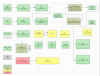
I started to diagram this out based on the schematic and color-coding what does not affect the issue and what needs to be investigated. Here is what I started:
upload_2023-5-12_9-10-1.png

You can inject the signal and with your scope trace it through the Preamp boards until you start to see the distortion.
 
Last edited:
0.0 dBV I believe I meant to type. 1V.

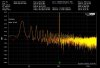
No effect from the tone controls or loudness button. But a big effect from the balance control:

When centered, both channels show high noise.
When fully to the left, the left channel no longer shows high noise.
When fully to the right, the right channel no longer shows high noise.
Back to center, high noise in both channels.

Balance centered:
2325 GP 5V output balance centered.jpg

Balance all the way to the left:
2325 GP 5V output balance to left.jpg
 
I started to diagram this out based on the schematic and color-coding what does not affect the issue and what needs to be investigated.

Nice chart, very helpful for organizing thoughts. Thank you.

Starting with the red unknown:
  • PL01 (meters, 400Hz tone), I checked it over again for broken leads or soldering issues. I was looking at it because one of the Dolby vU meters is not working. I've been pursuing it because it has to fixed, and in case it is related to the distortion. Hard to see a connection.

The yellow maybes:
  • PH01 buffer amplifier checked again for leads/soldering issues. Measured the inputs and outputs and it seems consistent with what I have observed in other 2325's. Darned if I know WHY it converts the signals to low output impedance. But the varistor VD1222 at HH11 is a single component that I assume affects both channels and I have not replaced it.
  • Switches...could be issues but they have all been treated multiple times.
  • PT01 tape monitor assembly-
  • PS01 Dolby tone assembly-
  • P600 Dolby assembly has been removed and examined for soldering issues and replaced, checking lead placement as well. The signal for the Dolby meters makes it to the P600 board from the PL01, but only the right meter works. So there is an unresolved issue there but it's hard to see it causing the distortion seen, especially when the Dolby board is bypassed.

The gray one:
  • Dubbing jacks have not been forgotten as a potential cause of issues. I've made visual inspections of the leads to both jacks but have not tested further.
The leads going to the balance control are factory original except for one I resoldered. I'm not sure how to test it in place. I have another 2325 balance control I can use but before removing the first one I'm trying to get some indication that the original balance control has an issue? Any advice on this?

And any thoughts on whether the balance control itself could be an issue? It has been cleaned and treated and it is not noisy going from side to side.
 
Have a look at the power supplies to the preamp while inputting the signal into Aux or Tape and running the amp into a load. I bet you have some bad caps and when the amp is loaded it is modulating the power supplies. Either that or you have a bad ground somewhere and when the amp is loaded, current flowing through the inherent resistance of said bad ground causes a voltage.
 
The leads going to the balance control are factory original except for one I resoldered. I'm not sure how to test it in place.
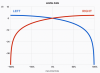
The balance control should work similar to this graph:
upload_2023-5-12_19-28-36.png
It is basically two potentiometers (variable resistors) that are hooked up to the L & R channels in opposite orientations. When you slide the control L & R, you are moving the position the sliders horizontally on this graph. So you can see if you are in the middle, both apply a small attenuation to each signal. As you slide left or right, the slider increases on one channel while simultaneously decreasing the other.

Your balance control observation might not be the problem since the consequence of sliding it to either end to eliminate the noise is that you are basically not passing audio through one channel. If there is a voltage or current supply problem, it will be lessened.

You might be able to test it (power off) by connecting a ohm meter to one of the leads (not the ground) and the sliding contact. If you have 2 ohm meters you can connect one to each set of terminals. Now when you slide from center to L to R, you should see the resistance change from 0 to maximum (50K?) while the other side goes from maximum to 0. You might be able to see if there is any jumpiness near the center, otherwise we need to look downstream in the audio chain a bit.

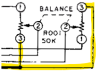
Yours looks like pin 3 is connected to ground?
upload_2023-5-12_19-49-50.png
 
Last edited:
Have a look at the power supplies to the preamp while inputting the signal into Aux or Tape and running the amp into a load.
I tested the outputs of the power supply while inputting a signal and running with a load. I do not see any change in voltages with an increase in volume. Am I using the wrong measure?

Either that or you have a bad ground somewhere and when the amp is loaded
Yep. I'm checking every ground constantly knowing there could still be a bad ground somewhere. The ground leads going to and from the balance control test good back to the common ground post on the 2325.
 
Here's a simple test that is similar to your balance control test, except without using the control.
  1. Both L & R channels on an 8ohm load
  2. Balance control centered
  3. Verify distortion still exists (either listening or your analyzer)
  4. Shut off, then disconnect the Main amp from the Preamp for L channel, then power up
  5. Now check to see if the distortion still exists in the other channel or if it cleared up like using the balance control.
  6. Do the same for the other channel.
 
I tested the outputs of the power supply while inputting a signal and running with a load. I do not see any change in voltages with an increase in volume. Am I using the wrong measure?


Yep. I'm checking every ground constantly knowing there could still be a bad ground somewhere. The ground leads going to and from the balance control test good back to the common ground post on the 2325.
You need to use a scope and look for ripple. Sorry, I meant to specify that.
 
This is an interesting problem! My questions were directed at a suspicion that the analyzer was being overdriven and you may want to try again at a drive level of -10dBv which is the "standard" unbalanced signal level. I assumed that your rebuild included all new electrolytics and replacing tantalum caps too.

I suggest testing the amps separately at the specified output levels by directly driving the Main In jacks. Start out low on the source level, like -40dBv, to sneak up on it that is! Also test just the preamp outputs at various output levels of the volume control at both -10dBv and 0dBv generator levels.
 
Back
Top Bottom