• The move to the new server is done. There are some software and database maintenance updates in process. This has us passing the hat around to help out. We appreciate any donations. Seriously, even a dollar helps. The payment page may be found here - https://www.audiokarma.org/support.html

Measurements for dummies…

Gigantic

A big, big love
Before I do the deep dive and hack up my Super H clones and mount the K-604 horns in them, I feel compelled to take the next step in my audio journey and do some before and after measurements. I’ve downloaded REW and have been browsing calibrated mics; what do I need to know before I get started? I’m an artist, not an engineer, so this process is somewhat anathema to how my brain operates. Can youse give me some simple tips on speaker and room measurements?
92F0F770-4497-4E63-BA63-A6653FE8A7AE.jpeg
 
Register to hide this ad
Buy the mic and start messing around with REW software. There is definitely a learning curve, but eventually you will figure out the basic measurement techniques.

Once you get consistent results from test measurements, place the mic "nearfield" about 3 feet from the speaker with the mic pointed at the middle of the speaker center relative to a vertical axis. REW can do a lot, but getting the frequency response plots down first is what people usually try and figure out.

BTW, no hearing protection is required, just a very quiet test environment.
 
Following with interest. I’m self-taught about REW and could benefit from the knowledge and experience of others.

Lance, you’ll find the REW forum on AV Nirvana to be helpful. The help info and tutorials for REW are good, but often presuppose a level of knowledge that newbies may not have.
 
Your PC(?) needs to be connected to the amplifier driving you speaker, as you will be selecting this playback device as output in REW. The mic will be connected to the same PC, and selected as the input device. I found out right away that the cabling can be a little frustrating.

Great thread! I'm sure most of us (well me) will learn a better way to measure, as REW can be overwhelming.
 
Agree. Great thread!
Also agree about cabling frustration. Once new flooring is in our music room I want to EQ the room. Last time I tried had feedback loops with input/output via PC.
Watching this thread.
 
Your PC(?) needs to be connected to the amplifier driving you speaker, as you will be selecting this playback device as output in REW. The mic will be connected to the same PC, and selected as the input device. I found out right away that the cabling can be a little frustrating.

Great thread! I'm sure most of us (well me) will learn a better way to measure, as REW can be overwhelming.

most likely I’ll be connecting my MacBook Pro to my Schiit Modi DAC. I can’t connect my amp, as it features the best analog valve technology the 50’s had to offer, (updated to the present day) and I’m not sure my 10 year-old AVR is up to the task.
.
 
most likely I’ll be connecting my MacBook Pro to my Schiit Modi DAC. I can’t connect my amp, as it features the best analog valve technology the 50’s had to offer, (updated to the present day) and I’m not sure my 10 year-old AVR is up to the task.
.

That should work. Sorry, I didn't mean directly to the amp.
 
You need to learn where the direct or near field is and where the reverberant or far field is in your room. Your can voice the direct sound but not the ambient sound. So Ideally your listening position should be where the direct near field sound level is equal to the reverberant far field sound meet. What you do is with the sound being reproduced, pink noise back away from the speakers to a point where the measured sound level with the test mic becomes constant. Then move 10% closer and voice each speaker by changing placement and rotation to get the flattest balanced response. Then check the voicing with both speakers combined and move front to back for the presentation you prefer and that is where your listening chair goes. Now if the over all response is marginal then and only then do you consider electronic voicing, Equalization.
 
I’m picking up a mic later this week, but in the meantime, I downloaded the House Curve app and did some measurements using the app and the microphone on my iPhone.

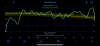
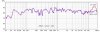
here are the curves at 1m from the speaker:
C96CD4F1-C562-4508-97E9-E2381097952A.png

This is curious:
E3D30D88-6D09-4E83-98F4-168D684827A0.png

87253AC1-436C-491B-BD02-0FB60374293B.png

drivers are eminence Delta Pro 12a
K604 horn and PRV D270PH-S
sMAHL and DE120

Universal network
 
Magnitude (frequency response) does not look too bad for using an app and your iPhone mic. Tweeter may be a bit hot, but could be an anomaly.
 
I thing my squawker may be over-attenuated, I have it set an additional -3dB with an adjustable l-pad. I am also limited with the length of my usb cable, which won’t be a problem when I get a proper mic
 
Tweeter may be a bit hot, but could be an anomaly.

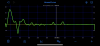
I've been waiting for someone else to measure the sMAHL and DE120 and confirm the 5db peak around 16khz. I came up with a series notch to tame it.

I doubt my old ears can hear the difference, but my OCD compelled me to flatten it out.

SMAHL with and without 16khz notch.jpg
 
The greatest power of REW is comparing changes before and after. This applies to speaker positioning, tweaks to gear or EQ, room acoustics, etc. In order for your comparisons to be valid, you need the testing to be identical before and after. I either leave everything set up exactly, or recalibrate each setup.

Testing speakers in the near field, your best graphics will be frequency response and distortion. Use the FR window that lets you show multiple measurements on one chart and apply some smoothing to each measurement (I like 1/6 octave). For distortion, compare THD but also look at individual harmonics, particularly the 2nd and 3rd. Try to find where harmonic distortion is rising above the noise floor.

Testing room response requires you to put the mic where your head would normally be during listening. Frequency response is useful here, but the most powerful tool is the waterfall to show reverb time at various frequencies. This will clearly show room modes and anomalies; your goal is to minimize reverb and make the curve as smooth as possible. Room acoustics are where you have the most opportunity for improvement. Any decent gear can reproduce audio to +/- 3db across the spectrum in an anechoic environment, but room acoustics often vary +/-30db or more with lots of time-based distortion that can ring audibly for a second or more.

 
Last edited:
It's incredible how much a reasonable flat speaker's output changes a few meters out into the room let alone a few inches from your head location.
 
I've been waiting for someone else to measure the sMAHL and DE120 and confirm the 5db peak around 16khz. I came up with a series notch to tame it.

I doubt my old ears can hear the difference, but my OCD compelled me to flatten it out.

View attachment 2816897
You can see this with my original plot from 9 years ago with the Super Heresy 1.0.
 
Back
Top Bottom