

You are using an out of date browser. It may not display this or other websites correctly.
You should upgrade or use an alternative browser.
You should upgrade or use an alternative browser.
MS750 Clone
- Thread starter masterlu
- Start date
Register to hide this ad
I have backed up everything on an external hard drive and then transferred it all back to a new one... It took a lot of time though....
I know, I am looking to go direct from MSxxx to MSxxx.

:thmbsp:
Spider-pig, Spider-pig, does what no other spider pig does...
Ivan is the help line.
Remove the HDD, ghost it to 1.5tb drive, reinsert 1.5 tb drive, invent MS1.5K.
Spider-pig, Spider-pig, does what no other spider pig does...
Ivan is the help line.
Remove the HDD, ghost it to 1.5tb drive, reinsert 1.5 tb drive, invent MS1.5K.
That is what I figured, ghosting it would be much faster than any other way.
I have norton ghost 2003, I plan on ghosting the MS300 hard drive to a 750 gb hard drive. I will use the cloning feature. I will then save the 300 gb drive as a backup for the MS300 operating system.
Let me know how you make out.

That is what I figured, ghosting it would be much faster than any other way.
I never opened one up, but are the MSXXX's at least on SATA?

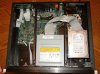
I have had my MS750 open for the fan upgrade. The hard drive is not SATA.
I'm not a computer technician, but just a thought. If you swap a hard drive in a computer, the BIOS has to be reconfigured to recognize the new drive, its size, sectors, etc. It would seem to me that just swapping a 1.5TB hard drive in place of a 750GB hard drive would require a BIOS upgrade for the MS750 (or MS300) to recognize the hard drive before it will operate.
I'm not a computer technician, but just a thought. If you swap a hard drive in a computer, the BIOS has to be reconfigured to recognize the new drive, its size, sectors, etc. It would seem to me that just swapping a 1.5TB hard drive in place of a 750GB hard drive would require a BIOS upgrade for the MS750 (or MS300) to recognize the hard drive before it will operate.
Attachments

mike175gr
Super Member
I have had my MS750 open for the fan upgrade. The hard drive is not SATA.
I'm not computer technician, but just a thought. If you swap a hard drive in a computer, the BIOS has to be reconfigured to recognize the new drive, its size, sectors, etc. It would seem to me that just swapping a 1.5TB hard drive in place of a 750GB hard drive would require a BIOS upgrade for the MS750 (or MS300) to recognize the hard drive before it will operate.
Yes, you are correct. You need to the format software for a MS300 to recognize a 750gig hard drive. The correct 750g hard drive is a Seagate DB35 Series ST3750840ACE hard drive it is ATA version, not SATA
They seem to be discontinued, but can be found for about $187
Michael
Dan....Thanks for searching for that pic :thmbsp: ..
side note...since you got that Sonos hooked up to your MS750.....are you using the Sonos Controller to access your library or the monitor I saw in one of your pics?:scratch2:
'cisco.......When I am listening to my MS750, the Sonos controller will not control the server. I use the monitor with the MS750 along with its remote control, or I use my computer interface when I am in the office, as I just did to play a Dan Siegel CD.
The Sonos controller lets me access all the MS750 files, including cover art, when I am listening to the Sonos, but I don't listen to the MS750 FLAC files through the Sonos on my main system. The MS750 is right there, and in A/B comparisons the MS750 is my preference. I do listen to the MS750 FLAC files through the Sonos ZP120 driving JBL speakers on my deck outside. If I decide to add a Sonos ZP90 to the studio system downstairs, I will listen to the the FLAC files from the MS750 hard drive on the studio system since I do not have a MS750 music server in that system.

JFR0317
Well-Known Member
Yes, you definitely can access the FLAC files on a networked MS300/750 via a Sonos. Dan is just saying he doesn't choose to access the FLAC files on his MS750 when he is listening to his main system where the MS750 is because he prefers the sound of the MS750 outputting its FLAC files to the MCD500.Dan,
You access FLAC files with your Sonos that are on a hard drive associated with our computer right? You can't access the FLAC files that are on the MS750 with the Sonos right?
Just trying to figure this all out..
Thanks,
Michael


