

You are using an out of date browser. It may not display this or other websites correctly.
You should upgrade or use an alternative browser.
You should upgrade or use an alternative browser.
Need help getting rid of hum
- Thread starter thornev
- Start date

thornev
Super Member
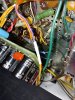
Well, I buttoned up the SDS board. Didn't break anything. I've done my best to articulate the components and wiring underneath. I don't see anything wrong; everything seems well-connected. I'm done with the SDS board. I have to assume it's fine as is. I believe I need to look elsewhere for the hum. I may try clipping the dual-ground lead again and see what I can see. Thank you Larry and Tony for sticking with me. Thorne

tonyg88
Super Member
Were you the one that originally installed the sds board?
Sorry I can't be more of a help between my tech adding red color to all the original fisher colored wires going to sds board and me not being sure what c26 etc mean because my 800c is different.
If you have specific questions like where does your 420v wire go to from the sds board? I can or if you need measurements from meter while fisher is off I could help.
Sorry I can't be more of a help between my tech adding red color to all the original fisher colored wires going to sds board and me not being sure what c26 etc mean because my 800c is different.
If you have specific questions like where does your 420v wire go to from the sds board? I can or if you need measurements from meter while fisher is off I could help.
thornev
Super Member
Tony - I bought the 500-C used. SDS was already installed. It was my very first 21st century venture into tube devices (except for a headphone amp which is very simple so no need to open up and "play". It worked very well and blew me away how much music I was missing with all those cheapo electronics when I was in my 20's and integrated receivers I've been using for my entertainment centers the past few decades). Immediately I knew that I wanted to do something I've always wanted to get into - electronics. And this 500-C blew me away. I was hooked. That was Xmas 2017.
Like I asked before, if you could trace all the wires from the SDS board and measure the voltages at wherever they first connect, I could compare my numbers to yours and see if my SDS board is behaving "normally." Don't worry about different 800-C ID's. I'll figure out the mapping. Just pick a wire on the board and trace it to whichever component or t-strip it is first connected. Then measure the voltage at that point. Thanks, Thorne
EDIT: And please note the point at which you take the measurements so I can map it to my 500-C. Thanks.
Like I asked before, if you could trace all the wires from the SDS board and measure the voltages at wherever they first connect, I could compare my numbers to yours and see if my SDS board is behaving "normally." Don't worry about different 800-C ID's. I'll figure out the mapping. Just pick a wire on the board and trace it to whichever component or t-strip it is first connected. Then measure the voltage at that point. Thanks, Thorne
EDIT: And please note the point at which you take the measurements so I can map it to my 500-C. Thanks.
Last edited:
thornev
Super Member
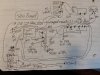
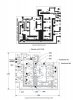
OK here it is. The complete wiring of the SDS board. Apologies for my horrible schematic-like drawing. If 2 wires are not joined by a large dot, they are not connected. Any stock 500-C power stage components that are not in the drawing are probably made inoperational by the SDS board. The SDS board does replace 4 can caps - C91, C92, C97 and C98 as well as 2 diodes (CR5 and CR7 I think), the CR6 diode bridge, and several resistors. The rectangles with large dots are t-strips.
Larry... That controversial ground lead in the YEL/BLK wire is the ground for the "+" leg of SDS board capacitor C11. I believe that makes it required operationally, yes? I believe C11 is equivalent to C97B in a stock 500-C. C10 on the SDS board I believe is equivalent to C97A in a stock 500-C (I might have them reversed as they are identical specs - 2200 uF and 35v electrolytics). I believe those 2 caps comprise the bias filter caps?
Note that I have 330k R121 - R124 on my IBAM board so the WHT wire to them in the diagram is inoperational.
I left out the A - F and GND leads on the SDS board as they are discussed in a previous post.
If you can read my scribble, is there anything you can add about the SDS board that might account for the hum? Thanks, Thorne
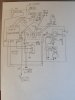
EDIT: I don't know if anyone cares, but I've attached a better-drawn (?) schematic for the benefit of whoever else may have the SDS board. Can someone please recommend easy-to-use schematic-drawing software?
EDIT2: I believe the "wrapped resistor ?" is R132.
Larry... That controversial ground lead in the YEL/BLK wire is the ground for the "+" leg of SDS board capacitor C11. I believe that makes it required operationally, yes? I believe C11 is equivalent to C97B in a stock 500-C. C10 on the SDS board I believe is equivalent to C97A in a stock 500-C (I might have them reversed as they are identical specs - 2200 uF and 35v electrolytics). I believe those 2 caps comprise the bias filter caps?
Note that I have 330k R121 - R124 on my IBAM board so the WHT wire to them in the diagram is inoperational.
I left out the A - F and GND leads on the SDS board as they are discussed in a previous post.
If you can read my scribble, is there anything you can add about the SDS board that might account for the hum? Thanks, Thorne
EDIT: I don't know if anyone cares, but I've attached a better-drawn (?) schematic for the benefit of whoever else may have the SDS board. Can someone please recommend easy-to-use schematic-drawing software?
EDIT2: I believe the "wrapped resistor ?" is R132.
Attachments
Last edited:
thornev
Super Member
Tony - If you can document:
- the tube ID (e.g. V15)
- the tube pin number
- if a t-strip, the terminal number counting from left to right
- the voltage at the above location measured with a MM or from the schematic
...that would be most helpful. I know you said you have a hard time seeing the pin numbers. Usually there is a blank space and then immediately clockwise is pin 1. Just count from there. If there's no space then just do the best you can and I'll figure it out from the picture. I've documented the wiring from the SDS board so I've got a good beat on how the board fits in.
Thanks, Thorne
- the tube ID (e.g. V15)
- the tube pin number
- if a t-strip, the terminal number counting from left to right
- the voltage at the above location measured with a MM or from the schematic
...that would be most helpful. I know you said you have a hard time seeing the pin numbers. Usually there is a blank space and then immediately clockwise is pin 1. Just count from there. If there's no space then just do the best you can and I'll figure it out from the picture. I've documented the wiring from the SDS board so I've got a good beat on how the board fits in.
Thanks, Thorne
thornev
Super Member
Situation seems to have changed. When I move my hand close to the selector switch, the 60Hz hum gets real loud. But the prevalent hum now is 120Hz. I attribute the change to figuring out that the 2-prong cord needs to be plugged in the AC receptacle the same way every time. I marked the plug for this. I'm reading thread "fisher-800b-phono-hum" with great interest as Toob had the exact same symptoms as me (except that when I touch the tube covers the hum doesn't go away). His solution was replacing a filter cap that fed the preamp. Replaced it and moved it closer to tube.
Last edited:

We're back to the Yel/Blk outer wire. Ground or RF Shield. Originally it was designed in as an RF Shield. The positive lead on C10 on the SDS Board has to be Grounded, and it is. C11 POS is input side of the BIAS SUPPLY and HTR FILAMENTS for V14 thru V17 (just like on a stock unit). So the YEL/BLK ONLY Gets it's Center lead connected at the SDS Board. As the outer lead of the YEL/BLK is connected at the other end, nothing else needs done. I'm still thinking you dropped a ground somewhere, Just NOT ON THE FILIMENT / BIAS YEL/BLK. The other possibility is a resistor has gone Hi-Z. I had one do that in that '47 FISHER I DID and everytime I got a tool or finger near one of the pots or selector switch it would go absolfrigginlutely nuts! Ended up replacing every cap and resistor in the area.
Last edited:
thornev
Super Member
Ah so THAT's why the hum goes bezerk near my skin. Oy, lots of parts to check. I'll get right on it.
I should note that I've observed that the 60Hz hum gets the most loud when I touch one of the leads that connects to the PHONO or TAPE HEAD jacks. When I remove my hand, the 60Hz hum goes away leaving the 120Hz hum.
I should note that I've observed that the 60Hz hum gets the most loud when I touch one of the leads that connects to the PHONO or TAPE HEAD jacks. When I remove my hand, the 60Hz hum goes away leaving the 120Hz hum.
Last edited:
on the PHONO and TAPE HEAD jacks. This is mostly normal due to the amplification factor in the Phono/Tapehead amp. Put a couple shorting jacks in the phono/tape head jacks and check again. It should be QUIET when you touch that area. If not you got grounding problems in that circuit. (Didn't we do this a couple pages ago???? Getting Old Timers Dis....what the hell are we doing again????) 

Tim D
Super Member
Thorne, I'm no expert, so take this in the spirit it is intended.
Larry's post is important because it would point to whether your problem is due to nothing plugged in or if the hum is internal or external to the phono circuit if it happens when you are using it with something plugged in. (And yes I think this seems to be a revisit, but don't despair, I have to revisit topics a lot before I figure things out.)
For external problems (meaning you had something connected when this happens), I have chased lots of hum problems inside of my TT's. I end up checking every part of the TT signal path as it usually points to bad connection inside the TT. Many times it might be headstall contacts or muting switch problems or cable problems or the connections at the cartridge, etc. I always sort it out and for my TT's I find that I don't need a dedicated ground connection. With Fishers they often have funky grounding setups and they are easy to create ground loops or differences in potential if you aren't careful. Generally the shield on the RCA's already provides a grounding for the audio path. I find that for me it works better without dedicated ground wires on the TT. YMMV.
The fact that you are getting both 60Hz and 120Hz depending on what you are doing gives me pause though. The experts might comment, but I think it gives an indication of whether the hum comes from before the rectifiers (60HZ) or after the rectifiers (120Hz). If 120Hz then I would think it is coming after the rectifiers and could be bleeding through the DC filter caps (filter cap problem? Or some other part is out of spec or having a problem making it act that way?) or it could be inducing from the power supply if you have signal wires for the phono/tape circuit running near the rectifiers or DC side of the power supply or B+ wires running near the phono/tape circuit (maybe check dressing/routing of high voltage near phono/tape stage?)
Something that I noticed in my recent KX-200 build is that a previous owner went to the trouble of soldering all the ground terminal lugs to the chassis for every terminal strip that provides a ground connection (some are just stand-offs with no electrical connections on them). This is an obvious strategy to avoid resistive connections to ground that might cause problems (including hum). I'm not saying this is what you are experiencing, but it is something to think about.
Did you say that the problems are happening equally on both channels? If they are more prominent on one side that might give an area of focus too.
Larry's post is important because it would point to whether your problem is due to nothing plugged in or if the hum is internal or external to the phono circuit if it happens when you are using it with something plugged in. (And yes I think this seems to be a revisit, but don't despair, I have to revisit topics a lot before I figure things out.)
For external problems (meaning you had something connected when this happens), I have chased lots of hum problems inside of my TT's. I end up checking every part of the TT signal path as it usually points to bad connection inside the TT. Many times it might be headstall contacts or muting switch problems or cable problems or the connections at the cartridge, etc. I always sort it out and for my TT's I find that I don't need a dedicated ground connection. With Fishers they often have funky grounding setups and they are easy to create ground loops or differences in potential if you aren't careful. Generally the shield on the RCA's already provides a grounding for the audio path. I find that for me it works better without dedicated ground wires on the TT. YMMV.
The fact that you are getting both 60Hz and 120Hz depending on what you are doing gives me pause though. The experts might comment, but I think it gives an indication of whether the hum comes from before the rectifiers (60HZ) or after the rectifiers (120Hz). If 120Hz then I would think it is coming after the rectifiers and could be bleeding through the DC filter caps (filter cap problem? Or some other part is out of spec or having a problem making it act that way?) or it could be inducing from the power supply if you have signal wires for the phono/tape circuit running near the rectifiers or DC side of the power supply or B+ wires running near the phono/tape circuit (maybe check dressing/routing of high voltage near phono/tape stage?)
Something that I noticed in my recent KX-200 build is that a previous owner went to the trouble of soldering all the ground terminal lugs to the chassis for every terminal strip that provides a ground connection (some are just stand-offs with no electrical connections on them). This is an obvious strategy to avoid resistive connections to ground that might cause problems (including hum). I'm not saying this is what you are experiencing, but it is something to think about.
Did you say that the problems are happening equally on both channels? If they are more prominent on one side that might give an area of focus too.
Last edited:
thornev
Super Member
Tim - Yes I too feel like I'm venturing back and forth into ground already covered. That's only because I have unanswered questions and those questions seem to return to me in a different form each time. I don't mean to be repetitive and I feel bad that it is viewed that way. The last image I want to present is that I'm ignoring the information I'm given. I'm not. It's just that maybe I'm not understanding how the info I get applies to my questions.
For example, I'm pretty sure the hum has nothing to do with external sources. Connecting external sources changes nothing. Moving the receiver around the room changes nothing. I am convinced the hum is caused by the 500-C circuitry. I believe as has been said that it's either a bad part or a bad ground. As a guitarist I am no stranger to hum. And it has always been a grounding problem. But because of the age of my 500-C, "tired" components have to be considered.
Another example is that I still don't know WHY my hand causes the hum to be louder. Obviously it's an external force, but what is the physics that causes the elements of my body to be inducted into the circuitry to cause an increase in the hum? I know the circuitry amplifies whatever it is. That is what I'm observing. But if I could understand the forces involved, maybe it could be a clue into why the chassis does it on its own. (OK that does sound a bit silly and supernatural). But I think I've explained myself and why more questions arise the more information I get.
I want all who have tried to help to know that I appreciate their time and advice greatly and I try hard to learn and apply so that I can be more knowledgeable. I am always full of questions. It is tiring sometimes, even to me. But I am satisfied that I have grown "electronically" quite a bit in the last 2 years that I've been playing with these wonderful devices. I want to get so much better. My wife sometimes lets me know that I'm spending too much time (for her liking) in my office trying to solve these problems and educating myself. But I'm retired and this is one of the adventures I want to fill my time.
So again, I need to figure out how I can isolate the hum and narrow down its location. In that spirit I've been measuring, replacing parts, temporarily changing circuits, tearing my chassis apart so I can understand the SDS board and how it might fit in to this issue, et cetera. And with these days of isolationism, I appreciate even more the people and activities that go on in this forum.
Yes, the hum is equal in both channels. 7 pages of questions, answers and observations seems way too much for what surely must be a simple problem with a simple solution. If I could only find it ! I am a dog and the hum is my bone !
For example, I'm pretty sure the hum has nothing to do with external sources. Connecting external sources changes nothing. Moving the receiver around the room changes nothing. I am convinced the hum is caused by the 500-C circuitry. I believe as has been said that it's either a bad part or a bad ground. As a guitarist I am no stranger to hum. And it has always been a grounding problem. But because of the age of my 500-C, "tired" components have to be considered.
Another example is that I still don't know WHY my hand causes the hum to be louder. Obviously it's an external force, but what is the physics that causes the elements of my body to be inducted into the circuitry to cause an increase in the hum? I know the circuitry amplifies whatever it is. That is what I'm observing. But if I could understand the forces involved, maybe it could be a clue into why the chassis does it on its own. (OK that does sound a bit silly and supernatural). But I think I've explained myself and why more questions arise the more information I get.
I want all who have tried to help to know that I appreciate their time and advice greatly and I try hard to learn and apply so that I can be more knowledgeable. I am always full of questions. It is tiring sometimes, even to me. But I am satisfied that I have grown "electronically" quite a bit in the last 2 years that I've been playing with these wonderful devices. I want to get so much better. My wife sometimes lets me know that I'm spending too much time (for her liking) in my office trying to solve these problems and educating myself. But I'm retired and this is one of the adventures I want to fill my time.
So again, I need to figure out how I can isolate the hum and narrow down its location. In that spirit I've been measuring, replacing parts, temporarily changing circuits, tearing my chassis apart so I can understand the SDS board and how it might fit in to this issue, et cetera. And with these days of isolationism, I appreciate even more the people and activities that go on in this forum.
Yes, the hum is equal in both channels. 7 pages of questions, answers and observations seems way too much for what surely must be a simple problem with a simple solution. If I could only find it !
I am a dog and the hum is my bone !
Tim D
Super Member
Thorne,
Don't feel bad about asking again - ever. Grounding problems, hum problems can be maddening. I totally understand. (Not applicable to you but as an illustration that repeats aren't a bad thing.... I train people at my work regularly and I tell the trainees. Ask me the same question as many times as you like. I will continue to answer you.)
I hope the experts will chime in as I'm not one. I'll give a try and they can fix what I say.
I have a strong suspicion that the fact that when your hand gets close the hum changes means you have a ground problem. Something in your receiver is acting like an antennae for the hum (and proper grounding should prevent that from happening) and you are changing the reception of that hum by putting parts of your body nearer to it. It's like touching (or getting near to) an old style TV antennae and seeing the picture change. The human body if full of water and minerals and is a reasonable conductor of electricity. As a result your body can have an impact on electro-magnetic signals including low frequency electro-magnetic 60Hz or 120Hz signals. You don't always have to touch it to affect the signals being received.
I haven't re-read all the posts, but did you try the shorting plugs that Larry suggested? That's not a solution strategy for your extreme case but might tell us if the problem is close to the inputs.
You could also go and check every single ground to chassis for perfect zero-ohm connectivity - particularly the ones where the shielded cables terminate.
Many of the input cables are shielded for the low level signals. If your hum is happening on all inputs then I might focus on the shielded cables from the selector switch to the input of the first pre-amp tube first. If the ground wire has broken or is shorted between shield and signal wire that might be your problem. It could easily turn that pre-amp input into a hum antennae. I did see some posts about "not" grounding both ends of the shields because it creates ground loops. I think you addressed this on at least one item. Did you check around to see if there are more?
So does the sound change if you put your fingers on the chassis? Does it change if you put your fingers on the shield side of the RCA inputs?
As a thought: The "Shure" website mentions that, "If hum increases when a human hand is brought near the phono cartridge headshell, it is likely that the metal shield in the cartridge is not being grounded by the connections." (Again: The grounded shield is meant to prevent the signal wire (or in this example - the cartridge) from being an antenna.)
So, I don't want to discount that you might have bad or out-of-spec parts. That too might be on the list of things to check, but the grounds would be my first priority. JMHO - again I'm not an expert, but I'm trying to help as much as I am able.
Don't feel bad about asking again - ever. Grounding problems, hum problems can be maddening. I totally understand. (Not applicable to you but as an illustration that repeats aren't a bad thing.... I train people at my work regularly and I tell the trainees. Ask me the same question as many times as you like. I will continue to answer you.)
I hope the experts will chime in as I'm not one. I'll give a try and they can fix what I say.
I have a strong suspicion that the fact that when your hand gets close the hum changes means you have a ground problem. Something in your receiver is acting like an antennae for the hum (and proper grounding should prevent that from happening) and you are changing the reception of that hum by putting parts of your body nearer to it. It's like touching (or getting near to) an old style TV antennae and seeing the picture change. The human body if full of water and minerals and is a reasonable conductor of electricity. As a result your body can have an impact on electro-magnetic signals including low frequency electro-magnetic 60Hz or 120Hz signals. You don't always have to touch it to affect the signals being received.
I haven't re-read all the posts, but did you try the shorting plugs that Larry suggested? That's not a solution strategy for your extreme case but might tell us if the problem is close to the inputs.
You could also go and check every single ground to chassis for perfect zero-ohm connectivity - particularly the ones where the shielded cables terminate.
Many of the input cables are shielded for the low level signals. If your hum is happening on all inputs then I might focus on the shielded cables from the selector switch to the input of the first pre-amp tube first. If the ground wire has broken or is shorted between shield and signal wire that might be your problem. It could easily turn that pre-amp input into a hum antennae. I did see some posts about "not" grounding both ends of the shields because it creates ground loops. I think you addressed this on at least one item. Did you check around to see if there are more?
So does the sound change if you put your fingers on the chassis? Does it change if you put your fingers on the shield side of the RCA inputs?
As a thought: The "Shure" website mentions that, "If hum increases when a human hand is brought near the phono cartridge headshell, it is likely that the metal shield in the cartridge is not being grounded by the connections." (Again: The grounded shield is meant to prevent the signal wire (or in this example - the cartridge) from being an antenna.)
So, I don't want to discount that you might have bad or out-of-spec parts. That too might be on the list of things to check, but the grounds would be my first priority. JMHO - again I'm not an expert, but I'm trying to help as much as I am able.
thornev
Super Member
Thanks for your kind words. Tim.
I did check all the ground connections and they all measure 2 ohms. I did try shorting the jacks per Larry and the hum went away as he said it is supposed to.
The hum on AUX went away when I took the blue wires off the t-strip per Dave's post. So now the hum is on PHONO, both inputs, and TAPE HEAD where it's slightly louder than on PHONO. The hum is equally loud in both channels.
I have checked other leads for dual ground and there are several from the input jacks to the selector switch IIRC. I'll check them to verify the connections are good. I don't remember seeing any bad connections and I've been checking those, multiple times with probing all the wires with a plastic alignment tool.
Yes the sound changes when I touch the chassis. But the hum gets only slightly less in volume. I don't believe I tried touching the shield side of the input jacks. I'll try that. What am I looking for and what would it mean?
Remember, I'm doing all these tests with NOTHING connected to the 500-C except dummy 8-ohm, non-inductive loads. No TT, nothing. I've proven the hum has nothing to do with external devices. My LED light, when turned on and off, does affect the hum, but with it off, the hum is still there. When I do connect a TT, the hum doesn't change. Still there, still the same volume.
I'm wondering if maybe the hum is being induced by one of the mods I did. Maybe the mod leads are too long or too close to other parts carrying strong DC current or I used the wrong type of part. I don't remember WHEN the hum started unfortunately.
A new symptom last night - when I touched the top of 2 of the caps on the SDS board, I got quite a shock. Wasn't expecting that. Wondering if that's a clue. Maybe that damn SDS board is causing the hum. I wouldn't mind removing it if I could find instructions on how to rebuild the power section. The cap cans are all made inoperative by the SDS board and I'd hate to have to rebuild those cans. I've done it before though. I'd just buy the Hamfest cans and install them.
I agree with you that it's a ground problem. I've seen it with my guitar rigs. Those issues could usually be fixed by lifting the ground, reversing the plug (they're all 3-way now so that solution is out though some of the effect devices are still 2-way) or trying a different AC outlet. The latter I've tried and it doesn't change the hum.
I spent all last night with a scope and with a MM trying to find a clue. I'm really at a loss for this one. It's kicking my butt. I'm not giving up though. Soon but not yet. My Marantz 2265B has been a good substitute.  Thorne
I did check all the ground connections and they all measure 2 ohms. I did try shorting the jacks per Larry and the hum went away as he said it is supposed to.
The hum on AUX went away when I took the blue wires off the t-strip per Dave's post. So now the hum is on PHONO, both inputs, and TAPE HEAD where it's slightly louder than on PHONO. The hum is equally loud in both channels.
I have checked other leads for dual ground and there are several from the input jacks to the selector switch IIRC. I'll check them to verify the connections are good. I don't remember seeing any bad connections and I've been checking those, multiple times with probing all the wires with a plastic alignment tool.
Yes the sound changes when I touch the chassis. But the hum gets only slightly less in volume. I don't believe I tried touching the shield side of the input jacks. I'll try that. What am I looking for and what would it mean?
Remember, I'm doing all these tests with NOTHING connected to the 500-C except dummy 8-ohm, non-inductive loads. No TT, nothing. I've proven the hum has nothing to do with external devices. My LED light, when turned on and off, does affect the hum, but with it off, the hum is still there. When I do connect a TT, the hum doesn't change. Still there, still the same volume.
I'm wondering if maybe the hum is being induced by one of the mods I did. Maybe the mod leads are too long or too close to other parts carrying strong DC current or I used the wrong type of part. I don't remember WHEN the hum started unfortunately.
A new symptom last night - when I touched the top of 2 of the caps on the SDS board, I got quite a shock. Wasn't expecting that. Wondering if that's a clue. Maybe that damn SDS board is causing the hum. I wouldn't mind removing it if I could find instructions on how to rebuild the power section. The cap cans are all made inoperative by the SDS board and I'd hate to have to rebuild those cans. I've done it before though. I'd just buy the Hamfest cans and install them.
I agree with you that it's a ground problem. I've seen it with my guitar rigs. Those issues could usually be fixed by lifting the ground, reversing the plug (they're all 3-way now so that solution is out though some of the effect devices are still 2-way) or trying a different AC outlet. The latter I've tried and it doesn't change the hum.
I spent all last night with a scope and with a MM trying to find a clue. I'm really at a loss for this one. It's kicking my butt.
I'm not giving up though. Soon but not yet. My Marantz 2265B has been a good substitute. Thorne
Last edited:
Tim D
Super Member
Thorne,
Couple of answers. You said:
Question: I did check all the ground connections and they all measure 2 ohms. I did try shorting the jacks per Larry and the hum went away as he said it is supposed to.
Answer: 2 Ohms? Is your multimeter off? What do you get measuring between any two points on the chassis? 2 ohms? Zero?
Question: Yes the sound changes when I touch the chassis. But the hum gets only slightly less in volume. I don't believe I tried touching the shield side of the input jacks. I'll try that. What am I looking for and what would it mean?
Answer: I'd expect in a properly working unit that the grounded shield wouldn't change any sound.
Question: A new symptom last night - when I touched the top of 2 of the caps on the SDS board, I got quite a shock. Wasn't expecting that. Wondering if that's a clue. Maybe that damn SDS board is causing the hum. I wouldn't mind removing it if I could find instructions on how to rebuild the power section. The cap cans are all made inoperative by the SDS board and I'd hate to have to rebuild those cans. I've done it before though. I'd just buy the Hamfest cans and install them.
Answer: Sorry you got hurt. Might want to see there is a potential between the case of that cap and chassis/ground. Can you identify if that cap is part of a voltage doubler? Were you touching anything else when you got zapped? (Because voltage doublers an do that if the case is exposed and you give it a path through your body to say the chassis ground.) If it's a voltage doubler I would have expected it to be covered for just that safety reason. If not a voltage doubler, then time to see where in the power supply that cap belongs. Could be part of the problem, but would need to identify what that cap is doing to determine.
Couple of answers. You said:
Question: I did check all the ground connections and they all measure 2 ohms. I did try shorting the jacks per Larry and the hum went away as he said it is supposed to.
Answer: 2 Ohms? Is your multimeter off? What do you get measuring between any two points on the chassis? 2 ohms? Zero?
Question: Yes the sound changes when I touch the chassis. But the hum gets only slightly less in volume. I don't believe I tried touching the shield side of the input jacks. I'll try that. What am I looking for and what would it mean?
Answer: I'd expect in a properly working unit that the grounded shield wouldn't change any sound.
Question: A new symptom last night - when I touched the top of 2 of the caps on the SDS board, I got quite a shock. Wasn't expecting that. Wondering if that's a clue. Maybe that damn SDS board is causing the hum. I wouldn't mind removing it if I could find instructions on how to rebuild the power section. The cap cans are all made inoperative by the SDS board and I'd hate to have to rebuild those cans. I've done it before though. I'd just buy the Hamfest cans and install them.
Answer: Sorry you got hurt. Might want to see there is a potential between the case of that cap and chassis/ground. Can you identify if that cap is part of a voltage doubler? Were you touching anything else when you got zapped? (Because voltage doublers an do that if the case is exposed and you give it a path through your body to say the chassis ground.) If it's a voltage doubler I would have expected it to be covered for just that safety reason. If not a voltage doubler, then time to see where in the power supply that cap belongs. Could be part of the problem, but would need to identify what that cap is doing to determine.
thornev
Super Member
Tim,
I get 0.2 ohms measuring any 2 chassis ground points. Maybe I meant 0.2 ohms before, I forget.
In an earlier post (116) I did document the wiring of the SDS board. When I got zapped, I was touching the 2 electrolytic caps with 2 fingers on 1 hand like a peace sign. It wasn't a full 120 volts. It was more like a strong tingle, but the sudden surprise made it feel worse. All the SDS board electrolytic, radial-style caps are covered with black or brown plastic except for their tops which expose metal.
I also have tried my best to map the SDS board caps to the equivalent stock chassis caps. This is what I observed:
C1 - C4 map to C92A-D
C5 - C6 map to C98
C7 - C9 map to C91A-D (yes, 3 SDS board caps cover the voltage of 4 stock caps)
C10-11 map to C97A-B (bias filter caps)
C12-13 I couldn't figure out. They are 100 uF 250v caps that I couldn't map to anything in a stock chassis.
C14 maps to C102
D1 maps to CR5
D2 maps to CR7
D3 maps to CR6
R1 maps to R142
R2 -> R136
R3 -> R144
R4 -> R135
R5 -> R137
R6 -> R133
R7 and R8 say 330k in the SDS documentation, but I think I measured them at around 475 vdc (probably connected to other parts so value is off).
I've attached the SDS board schematic again so you can compare.
I just measured voltage from the top of those SDS board caps to chassis. Each of the 2 black-coated caps measure -1.7 vdc. There are brown and black caps. Measuring the top of them, the black ones measure -1.7 vdc. The brown ones measure around -0.2 vdc. I measured other electrolytic caps in the chassis that are not on the SDS board and they measure the same thing.
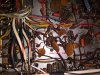
Holy moly... I just realized the voltage I documented in the last paragraph was with the unit powered off. I just powered it on and measured and those 2 caps on top measure 225 vdc !! Is that right?! That sounds like a ground is missing. I did move the SDS board ground last night to be attached to the bolts that hold the power transformer to the chassis. Yikes ! I measured all the caps and they measure all sorts of different voltages. I had no idea that the exposed metal on top are hot !! Could that be my hum problem? Maybe I'd better move the ground wire somewhere else.
I notice that when I haven't had the unit plugged in for a while, when I plug it in, before I turn on the unit, I hear a click emanating from the chassis. Any idea what is making the click?
EDIT: Something I haven't tried... testing the tubes to see if one is bad. I did swap out the PHONO tubes and the replacements made more noise. Getting out the tube tester now.
I get 0.2 ohms measuring any 2 chassis ground points. Maybe I meant 0.2 ohms before, I forget.
In an earlier post (116) I did document the wiring of the SDS board. When I got zapped, I was touching the 2 electrolytic caps with 2 fingers on 1 hand like a peace sign. It wasn't a full 120 volts. It was more like a strong tingle, but the sudden surprise made it feel worse. All the SDS board electrolytic, radial-style caps are covered with black or brown plastic except for their tops which expose metal.
I also have tried my best to map the SDS board caps to the equivalent stock chassis caps. This is what I observed:
C1 - C4 map to C92A-D
C5 - C6 map to C98
C7 - C9 map to C91A-D (yes, 3 SDS board caps cover the voltage of 4 stock caps)
C10-11 map to C97A-B (bias filter caps)
C12-13 I couldn't figure out. They are 100 uF 250v caps that I couldn't map to anything in a stock chassis.
C14 maps to C102
D1 maps to CR5
D2 maps to CR7
D3 maps to CR6
R1 maps to R142
R2 -> R136
R3 -> R144
R4 -> R135
R5 -> R137
R6 -> R133
R7 and R8 say 330k in the SDS documentation, but I think I measured them at around 475 vdc (probably connected to other parts so value is off).
I've attached the SDS board schematic again so you can compare.
I just measured voltage from the top of those SDS board caps to chassis. Each of the 2 black-coated caps measure -1.7 vdc. There are brown and black caps. Measuring the top of them, the black ones measure -1.7 vdc. The brown ones measure around -0.2 vdc. I measured other electrolytic caps in the chassis that are not on the SDS board and they measure the same thing.
Holy moly... I just realized the voltage I documented in the last paragraph was with the unit powered off. I just powered it on and measured and those 2 caps on top measure 225 vdc !! Is that right?! That sounds like a ground is missing. I did move the SDS board ground last night to be attached to the bolts that hold the power transformer to the chassis. Yikes ! I measured all the caps and they measure all sorts of different voltages. I had no idea that the exposed metal on top are hot !! Could that be my hum problem? Maybe I'd better move the ground wire somewhere else.
I notice that when I haven't had the unit plugged in for a while, when I plug it in, before I turn on the unit, I hear a click emanating from the chassis. Any idea what is making the click?
EDIT: Something I haven't tried... testing the tubes to see if one is bad. I did swap out the PHONO tubes and the replacements made more noise. Getting out the tube tester now.
Attachments
Last edited:
thornev
Super Member
Mine had nothing on top. They're going to now ! I'm amazed I never got the full shock from those suckers.I noticed my caps have black masking tape on the tops. Did yours have that and you took it off?
Last edited:
tonyg88
Super Member
I find it odd that it seems we are the only two with these sds boardsMine had nothing on top. They're going to now !
.When I first signed up on here it seemed many people used them.