• The move to the new server is done. There are some software and database maintenance updates in process. This has us passing the hat around to help out. We appreciate any donations. Seriously, even a dollar helps. The payment page may be found here - https://www.audiokarma.org/support.html

Pioneer SA-9500 II DOA

jwhitelan

New Member
Hello,
I purchased a Pioneer SA-9500 II amp a week ago and of course "AS IS" is just that "AS IS" and the SA-9500 II is DOA.

I am wanting to see if it is worth the trouble to fix or get fixed or just sell it as dead and recoup some money. I have $177 in the SA-9500 II.

The amp powers up and I hear the relay click. When I put audio to it there is just nothing.
 
Register to hide this ad
Hello,
I purchased a Pioneer SA-9500 II amp a week ago and of course "AS IS" is just that "AS IS" and the SA-9500 II is DOA.

I am wanting to see if it is worth the trouble to fix or get fixed or just sell it as dead and recoup some money. I have $177 in the SA-9500 II.

The amp powers up and I hear the relay click. When I put audio to it there is just nothing.

Check that your tape monitor switches are off.
 
Last edited:
Doe it have pre-out/main in jumpers on the rear panel ? Or a normal /seperate switch ? Must be in the "normal" position.
 
Doe it have pre-out/main in jumpers on the rear panel ? Or a normal /seperate switch ? Must be in the "normal" position.

It uses the jumpers, make sure they are present and plugged in to bridge the "pre-out/main-in" jacks. If the jumpers aren't there you can use ordinary RCA cables to connect preamp outputs to the main amp inputs. As mentioned above make sure tape monitors and adapter switches are set to source too. If it clicks it ain't DOA, great amp!
 
The 9500II does indeed have preout and main in jacks and is supposed to have jumpers. If the jumpers are missing, you will not get anything. If you hear the relay click, my bet is that the power amplifier section is A-OK.

You can simply substitute the missing jumpers with a pair of RCA patch cords.

EDIT: AUDIOJONES beat me to it by one minute as I was typing. :D
 
Last edited:
A very nice sounding amp I had one years ago make sure all the up and down switches are clean that made a big difference on the one I had I had to dexoit over and over but it was well worth the trouble.
 
It does not have the jumpers so I tried the RCA plugs to the in/out to simulate the jumpers and that did not work. I also tried putting an EQ to the out/in and that did not work either. The tape switch is in the off position as well.
 
It does not have the jumpers so I tried the RCA plugs to the in/out to simulate the jumpers and that did not work. I also tried putting an EQ to the out/in and that did not work either. The tape switch is in the off position as well.

Headphones work ? May want to pop the hood and check all the fuses with a meter.
 
Last edited:
I also own a 9500II. If the relay is clicking in, it usually indicates a good power amp section. Some pics maybe?
 
I also own a 9500II. If the relay is clicking in, it usually indicates a good power amp section. Some pics maybe?

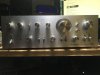
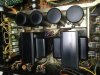
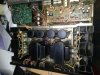
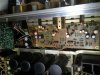
These photos are of the amp.
 

Attachments

  • IMG_0280.jpg
    IMG_0280.jpg
    47.7 KB · Views: 128
  • IMG_0277.jpg
    IMG_0277.jpg
    93.6 KB · Views: 135
  • IMG_0276.jpg
    IMG_0276.jpg
    102.4 KB · Views: 124
  • IMG_0279.jpg
    IMG_0279.jpg
    89.9 KB · Views: 132
Headphones work ? May want to pop the hood and check all the fuses with a meter.

Good idea on the headphones. I will go and get a phones converter for my headphones and give that a try. As for the under the hood. I did pull all the fuses and tested them for continuity and they all seemed to be ok.
 
Just to make sure, you did put the RCA cords in the right jacks yes? Pre/out to main/in?

Oh, and make sure your speaker selector switch is on A with the speakers connected to the rear A speaker connectors.
 
Last edited:
These questions are not meant to demean because we all make mistakes playing with new stuff!

Recheck everything as you go!
 
Another quick item to check - make sure the knobs (especially the speaker selector and input selector) are lined up properly and pointing to the right thing. You might not be set for the input or speaker pair that the pointer indicates. Wouldn't be the first time that's happened! :D
 
Just to make sure, you did put the RCA cords in the right jacks yes? Pre/out to main/in?

Oh, and make sure your speaker selector switch is on A with the speakers connected to the rear A speaker connectors.

I did the connection just as the manual said to do it with the Junction jumpers. I also moved my EQ over from my other amp to see if that would do the trip and nothing.

On the speakers I tried both A and B and still go nothing. The speakers are Pioneer CS 99As that work fine on my SA-9900 Amp.
 
Another quick item to check - make sure the knobs (especially the speaker selector and input selector) are lined up properly and pointing to the right thing. You might not be set for the input or speaker pair that the pointer indicates. Wouldn't be the first time that's happened! :D

Did that as well. When I first got the unit it was obvious that someone had all the knobs off as most of them were not lined up and I had to take them off and realign them. I'm a little OCD when it comes to the knobs.
 
But did you start with the switch itself in a known position...i.e. Turning the knob shaft fully left or right and then lining up the knob mark with that position.

Do you have a multimeter and any soldering ability? The photos show a unit that looks to be in great condition. Check some of the Threads in the Pioneer section to start checking voltages. Usually a good protection click is good news.

Have you taken the bottom plate off to see if there's any broken wires or bad solder joints at the RCA connections or elsewhere?
 
This is odd.

Not to demean your skill, but it's either a silly mistake or an odd failure.

Are you sure you are feeding it audio?

What are you connecting and where are you connecting it?

You said the knobs were off.
Does it look like anyone has been hacking inside.
Your photos don't show the areas needed.
Close ups of the main output transister connections, the function switch wiring, the tone and preamp solder side of the boards and the wires connecting things, etc.
You can't tell anything from the top of the boards where the parts are unless there is burned up stuff.

Have you cleaned the controls (deoxit)?
I have seen stuff with controls so dirty that they would not make a peep.
 
Maybe try an iphone or ipod or another preamp connected directly to the "main-in" (power amp) jacks to see if the power amp section is working. Could be a faulty preamp maybe??
 
Back
Top Bottom