• The move to the new server is done. There are some software and database maintenance updates in process. This has us passing the hat around to help out. We appreciate any donations. Seriously, even a dollar helps. The payment page may be found here - https://www.audiokarma.org/support.html

Pioneer SA-9500 II DOA

Maybe try an iphone or ipod or another preamp connected directly to the "main-in" (power amp) jacks to see if the power amp section is working. Could be a faulty preamp maybe??

Ya, that would be my next move - separate the preamp and the power amp and see if sending a controllable line level signal into the power amp gives results. Somethin's screwy! :scratch2:

Add-on: Just make sure that the output volume of the device that you plug into the "main amp in" jack is turned all the way down at first, then slowly bring it up. Don't plug anything with a fixed line output signal into the main amp or you'll get blasted with full volume and risk damaging your speakers.
 
Last edited:
He's already got an SA-9900, so use that setup to check the 9500II. First use the 9900's Pre Outs to the 9500IIs Main In jacks. You'll only need to switch your speaker wires to the 9500II. then use the 9500II as a preamp to the 9900's Main In jacks. The speaker wires back to the 9900, and take one source (say CD player) that's plugged into the 9900 and move those wires to the appropriate jacks on the 9500II. See if you get sound.
 
But did you start with the switch itself in a known position...i.e. Turning the knob shaft fully left or right and then lining up the knob mark with that position.

Do you have a multimeter and any soldering ability? The photos show a unit that looks to be in great condition. Check some of the Threads in the Pioneer section to start checking voltages. Usually a good protection click is good news.

Have you taken the bottom plate off to see if there's any broken wires or bad solder joints at the RCA connections or elsewhere?

When I did all the control knobs I turned them all the way to the furthest option and aligned them up with that point so they are all in alignment. I have had the bottom of the unit off and looked over and didn't see any bad or loose connections. I don't see anything that is burned out or disconnected.

I do have access to a mulitmeter and have soldering ability.
 
Maybe try an iphone or ipod or another preamp connected directly to the "main-in" (power amp) jacks to see if the power amp section is working. Could be a faulty preamp maybe??

I have tried sourcing the signal from a tuner and iPhone that both work fine on my SA-9900.

So when you say connected directly to the "main-in" jacks where would that be?

This is the online manual. On page 4 it shows the connectors. Which one would I connect it to for the "main-in"

http://thesnowfields.com/manuals/hfe_pioneer_sa-9500_ii-1.pdf

I have connected my iPhone to Phono, Tuner, Aux, Tape 1 and Tape 2 all with no sound.
 
He's already got an SA-9900, so use that setup to check the 9500II. First use the 9900's Pre Outs to the 9500IIs Main In jacks. You'll only need to switch your speaker wires to the 9500II. then use the 9500II as a preamp to the 9900's Main In jacks. The speaker wires back to the 9900, and take one source (say CD player) that's plugged into the 9900 and move those wires to the appropriate jacks on the 9500II. See if you get sound.

Ok here comes the Newbie in me. What ports are the "Pre Out's" and the"Main In Jacks" Attached are the photos of each unit to help.

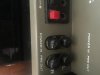
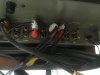
Image 284 is the SA-9500 II and the other 2 photos are the SA-9900 right and left side.
 

Attachments

  • IMG_0284.jpg
    IMG_0284.jpg
    69.3 KB · Views: 90
  • IMG_0285.jpg
    IMG_0285.jpg
    37.6 KB · Views: 72
  • IMG_0286.jpg
    IMG_0286.jpg
    48.1 KB · Views: 76
I think the 9900 does the connecting internally - like Marantz - and therefore doesn't need the jumpers - it's the ones with the little rubber caps on it.

for the 9500 - you want to connect the lower sets together - under the TUNER and AUX
From "L" "pre out" to L "power amp in" and same for "R"
 
Like this

not to beat a dead horse... but
hopefully this will lead to :music:
 

Attachments

  • IMG_0284.jpg
    IMG_0284.jpg
    25.3 KB · Views: 68
This is odd.

Not to demean your skill, but it's either a silly mistake or an odd failure.

Are you sure you are feeding it audio?

What are you connecting and where are you connecting it?

You said the knobs were off.
Does it look like anyone has been hacking inside.
Your photos don't show the areas needed.
Close ups of the main output transister connections, the function switch wiring, the tone and preamp solder side of the boards and the wires connecting things, etc.
You can't tell anything from the top of the boards where the parts are unless there is burned up stuff.

Have you cleaned the controls (deoxit)?
I have seen stuff with controls so dirty that they would not make a peep.

Are you sure you are feeding it audio? Yes as I am able to move the same source to my SA-9900 and it works fine

What are you connecting and where are you connecting it? I am using an iPhone and a turntable. I am connecting it to Phono 1 and Phono 2 for the turntable and Aux and Tape 1 and Tape 2 for the iPhone.

You said the knobs were off. Yes it appeared that someone had the knobs off as they were all out of alignment with the settings on the face plate. I took them all off and realigned them to their correct postions.

Does it look like anyone has been hacking inside. From what I can tell I don't see any signs of non-factory solder joints or parts. When I got it, it still had 40 years of dust, dirt, and grime in it. Once it would not work I opened up the lid and dusted it out just to see the boards better.

I will try and get some better photos. It's hard as it's pretty compact in there and I didn't want to start un-mounting boards right away until I determined that it was necessary
 
not to beat a dead horse... but
hopefully this will lead to :music:

Yeah mine does not have the Junction jumpers. I did however use 2 RCA cords and connected it to each port. I also tried to connect my EQ up to the ports as well and go that route and still nothing. I have ask around to see if anyone know where I could order replacement jumpers but know one has answered that.
 
I think the 9900 does the connecting internally - like Marantz - and therefore doesn't need the jumpers - it's the ones with the little rubber caps on it.

for the 9500 - you want to connect the lower sets together - under the TUNER and AUX
From "L" "pre out" to L "power amp in" and same for "R"

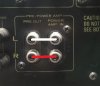
I tried that already with an RCA cord. I just removed them for the photo. Here it is with the cable connected.
 

Attachments

  • IMG_0289.jpg
    IMG_0289.jpg
    73.2 KB · Views: 88
He's already got an SA-9900, so use that setup to check the 9500II. First use the 9900's Pre Outs to the 9500IIs Main In jacks. You'll only need to switch your speaker wires to the 9500II. then use the 9500II as a preamp to the 9900's Main In jacks. The speaker wires back to the 9900, and take one source (say CD player) that's plugged into the 9900 and move those wires to the appropriate jacks on the 9500II. See if you get sound.

So I found on the manual on page 12 Fig. 20 it looks like you want me to connect the SA-9500II "Pre Out" Ports to the SA-9900. In looking at the SA9900 manual on Page 23 its a little more complex than just a port. There is a switch and some ports.

SA-9900 Manual:
http://www.hifiengine.com/hfe_downloads/index.php?pioneer/pioneer_sa-9900.pdf
 
Last edited:
I may be wrong but I still think it's your switches and all your controls. I recently purchased an SAE mark 1B preamp and it had the same symptoms you are having I worked everything for a day and low and behold it came back to life and I haven't had a problem since and it is played 12 hours a day without any problem.
 
Last edited:
I'm thinking you mean fig. 21 and 22 on page 23?

Basically - you'll want to connect from the "pre out" of the 9500 to the "power in" of the 9900, and then slide the switch - figure 21. There is probably still the little plastic stopper that you'll have to unscrew a screw to enable you to slide it down on the 9900.

If that works - then the pre-portion is working on the 9500 and the problem is somewhere in the amp section.
IF it doesn't work, then you'll want to reverse course. Hook the pre out from the 9900 into the power in of the 9500...
This will help isolate the issue.

IF it is just a matter of dirty switches / pots, then the later should work.

Did you try headphones yet?

So I found on the manual on page 12 Fig. 20 it looks like you want me to connect the SA-9500II "Pre Out" Ports to the SA-9900. In looking at the SA9900 manual on Page 23 its a little more complex than just a port. There is a switch and some ports.

SA-9900 Manual:
http://www.hifiengine.com/hfe_downloads/index.php?pioneer/pioneer_sa-9900.pdf
 
Are you sure you are feeding it audio? Yes as I am able to move the same source to my SA-9900 and it works fine

What are you connecting and where are you connecting it? I am using an iPhone and a turntable. I am connecting it to Phono 1 and Phono 2 for the turntable and Aux and Tape 1 and Tape 2 for the iPhone.

You said the knobs were off. Yes it appeared that someone had the knobs off as they were all out of alignment with the settings on the face plate. I took them all off and realigned them to their correct postions.

Does it look like anyone has been hacking inside. From what I can tell I don't see any signs of non-factory solder joints or parts. When I got it, it still had 40 years of dust, dirt, and grime in it. Once it would not work I opened up the lid and dusted it out just to see the boards better.

I will try and get some better photos. It's hard as it's pretty compact in there and I didn't want to start un-mounting boards right away until I determined that it was necessary

You didn't answer the "clean it" question entirely.
Did you clean the controls with something like deoxit?
If there was 40 years of dust in it, it may just have such dirty controls that it will not play
 
You didn't answer the "clean it" question entirely.
Did you clean the controls with something like deoxit?
If there was 40 years of dust in it, it may just have such dirty controls that it will not play

I have not used anything on the unit other than good ole air from a can and Jet Vac and a dry lint free cloth.
 
I'm thinking you mean fig. 21 and 22 on page 23?

Basically - you'll want to connect from the "pre out" of the 9500 to the "power in" of the 9900, and then slide the switch - figure 21. There is probably still the little plastic stopper that you'll have to unscrew a screw to enable you to slide it down on the 9900.

If that works - then the pre-portion is working on the 9500 and the problem is somewhere in the amp section.
IF it doesn't work, then you'll want to reverse course. Hook the pre out from the 9900 into the power in of the 9500...
This will help isolate the issue.

IF it is just a matter of dirty switches / pots, then the later should work.

Did you try headphones yet?

Thanks for the update. On the Fig it was on the SA-9500II manual. I will give this a try in just a few and see what works.

I also picked up a converter for my beats headphones to see if those work in the SA-9500II. I will test the converter with the beats in the SA-9900 first to make sure it all works.
 
Well more bad news. I just got home and tested the converter with my 99 and they worked so I pulled the 95 off the shelf and plugged it in and the power light lights up but there is no relay click anymore. :worried:
 
Well - still try the two together as described above.
I doubt you've "done" anything to it to change it's condition.
 
Back
Top Bottom