• The move to the new server is done. There are some software and database maintenance updates in process. This has us passing the hat around to help out. We appreciate any donations. Seriously, even a dollar helps. The payment page may be found here - https://www.audiokarma.org/support.html

WiiM WiFi Streamer

I’m sure it’s somewhere in the last 72 pages or in a more recent product release that I missed, but has anyone found a good solution for a local music server (ideally with iPhone control functionality and a decent user interface) paired with the WiiM?
 
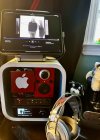
Had a chance to figure out all my connections today. I am using it with the phono input and using a TC_754 preamp as a switch box into the line in. The switch box has an input for my Topping DAC (being fed a stream from my iPad), I have my computer connected via a HiDisz DAC feeding the preamps second input, and a Tivoli Pal radio feeding the third input. I did test the optical input of the Ultra with my Wiim Mini that is going into another room and worked, as well.

I tested it with DLNA using my old version Audirvana and it worked fine. Since it does not have Airplay, my workaround, should I want to Airplay from my phone is to use Airfoil Speaker on my Mac mini (which turns the compute into an Airplay receiver), and it will play via the direct connection. I am not using the HDMI ARC or the USB port.

Very versatile device and it will help free up my iPad for other uses. I also like the ability to control Amazon Music with voice using the included remote or using my Echo Show. Also cool to sync up to my other Wiim devices and hear vinyl in every room of the house.


IMG_3042.jpeg
 
Last edited:
I’m sure it’s somewhere in the last 72 pages or in a more recent product release that I missed, but has anyone found a good solution for a local music server (ideally with iPhone control functionality and a decent user interface) paired with the WiiM?
Option 1: on your music server install and run a DLNA server.
On your iPhone install JPLAY or mconnect.

Option 2: on your music server install and run LMS. In its configuraiton, enable the "UpNP/DLNA Bridge" plugin (possibly not necessary for WiiM Pro & Pro+), change "Web interface" from "Default" to "Material Skin".
On your iPhone go to this URL with a web browser -
http://<music-server-hostname>:9000/material/
This will give you the well regarded "Material Skin" GUI for LMS ...
or on your iPhone install iPeng - an LMS client app.
 
Last edited:
Option 1: on your music server install and run a DLNA server.
On your iPhone install JPLAY or mconnect.

Option 2: on your music server install and run LMS. In its configuraiton, enable the "UpNP/DLNA Bridge" plugin (possibly not necessary for WiiM Pro & Pro+), change "Web interface" from "Default" to "Material Skin".
On your iPhone go to this URL with a web browser -
http://<music-server-hostname>:9000/material/
This will give you the well regarded "Material Skin" GUI for LMS.
The ipeng app in iOS is great with LMS, as well.
 
OK, iPeng added to post #1,428

Another thought regarding Option 2 (LMS) - if your music server is x86, and you're happy for it to be a dedicated music server operating headless - Daphile is a pre-packaged Linux operating system, ready to run as an LMS server.
 
My system includes a preamp with bass management. If I set up my subs using the pre, will the room correction effect the bass settings through the pre?
I think it does adjust the sub out level. So far, so good.
 
Last edited:
OK, so I'm definitely a digital guy now, with the WiiM and all, but I do miss those vintage silver faceplates and the joy of analog VU meters, lol.

My little "vintage" WiiM interface in action (it's a Chrome browser extension). No knobs, but some interactive buttons to push!

 
I’m sure it’s somewhere in the last 72 pages or in a more recent product release that I missed, but has anyone found a good solution for a local music server (ideally with iPhone control functionality and a decent user interface) paired with the WiiM?
Roon works well on both WiiM’s I have (Pro+, Ultra)
 
PLEX is now running good on my Wiim Pro. Looking at their release notes, it looks like they added or improved PLEX support in an October 2024 update. I had been using PLEX on other hardwire for a while and recently noticed the PLEX icon pop up in the Wiim list of available sources. Have been using it daily since noticing that and have not had any problems. It is pulling up the album art for most of the albums I have on the Win 10 PC that has PLEX server on it. On my TV PLEX can display track lyrics on most tracks but I have not yet tried this via the Wiim. The Wiim menu indicates that PLEX is in Beta so there may be some bugs to be resolved. If there are any, I have not noticed them yet and Wiim have a good record for fixing them when & if any are identified.
 
Is there an advantage of lms on a nas over twonky dlna?
Technically, no. DLNA and LMS (now "Lyrion") are equally good server technologies, IMO.

But Lyrion opens the door to the use of LMS control apps, which have a long development history, and are highly regarded by a large user-base.
DLNA control apps are - to be diplomatic - just OK.
 
Last edited:
I bought a Wiim Pro Plus on Prime day.

I have set up a few Wiims for other people to use as stand-alone streamers for folks who just wanted a simple, good sounding streamer and who didn't have tons of digital files and ripped music on a server or computer...but I hadn't taken the plunge personally as I have a Squeezebox Touch and Radio here and wanted the same ease of use as I enjoy with them.

My biggest concern about the Wiim was integrating into my LMS system, I also wanted a streamer in my Ham Radio room as high res streaming would sometimes stutter when using my PC to surf at the same time as playing Qobuz, Tidal, or high res files from my computer.

After a basic setting up of the Wiim and letting it update itself I fired up LMS web control...and Bingo!
My new Wiim was there in the selection of devices in the "Choose Player" drop down box.
All my fears of this being a complicated setup evaporated, it couldn't have been easier!

So, it was much easier than I had imagined it would be and all my presets and subscription links in LMS were there, active and functional.

I have it's optical output feeding a 1Mii DS601 HiFi USB Desktop DAC I bought on sale at Amazon for under $40 this past summer along with USB from my PC and a Pioneer DV563A connected via SPDIF...preamp is an Adcom GFP565, the amp is a TPA3116 cheapie from ALiexpress and speakers are LothX Ion BS-1s.

One of these days I will hook the Wiim's analog output up to the preamp and see just what it's output quality is via headphones, but for now I'm good!

​

 
Yes ... although the installation of LMS/Lyrion on a Synology NAS can be a little messy.
A few years ago it was necessary to downgrade Synology's Perl libraries in order to be compatible with LMS.
But I just Googled now, and it appears this is the latest way to install LMS on Synology -
https://lyrion.org/getting-started/beginners-guide-synology-docker/

If you prefer QNAP, WD, or TerraMaster, you may need to do your own research.
 
It is a Buffalo Linkstation. Looking into alternatives to Twonky. Don't always want to run my computer
which ha Jriver. I find Twonkey to be a little wierd. TY
 
Unfortunately it appears that Buffalo does not provide a way to install third-party applications.
https://forums.buffalotech.com/index.php?topic=24181.msg86680#msg86680
https://forum.minimserver.com/archive/index.php?thread-6214.html

But there's an old slimdevices forum post from 2009 where someone managed to get telnet and ipkg installed on their Linkstation (Pro or Live) and was then able to telnet into the Linkstation and manually install squeezeserver (the predecessor of LMS & Lyrion)
https://forums.slimdevices.com/foru...-linkstation-pro-and-linkstation-live?t=62842

Would this work on a modern Linkstation? It would be best to ask on the Buffalo forum -
https://forums.buffalotech.com/
 
Last edited:
Back
Top Bottom