• The move to the new server is done. There are some software and database maintenance updates in process. This has us passing the hat around to help out. We appreciate any donations. Seriously, even a dollar helps. The payment page may be found here - https://www.audiokarma.org/support.html

Harman Kardon A500 No Sound

This might be a circuit fault, but it's really only a valid test if the unused input is grounded.
But if I reverse this and do it with just Ch A plugged in, I don’t hear it through both speakers? I also don’t have to crank it all the way with Ch A. Ch B has to be full loudness to just start to hear the music
 
Have you cleaned all of the tube sockets? I had a dead channel on my amp and came to find out one of the triodes in V4 wasn't pulling any current. After cleaning all of the pins and sockets I was back in business.

Have you checked voltages at each individual tube to make sure they line up with the measurements on the schematic?
 
So at full volume ch B barely has sound. That’s helpful to know. Next thing I’d do is measure DC voltages at plate, grid, and cathode of each stage for ch B. Compare to same measurements against the good ch A.

If all DC voltages check out fine then next step is to inject a tone into aux and trace which stage drops the signal.
 
But if I reverse this and do it with just Ch A plugged in, I don’t hear it through both speakers?
Right, but if it's the result of stray coupling, the two channels might react differently. It's just something that's easy to try, and it should be standard practice when only one channel is driven.
 
Have you cleaned all of the tube sockets? I had a dead channel on my amp and came to find out one of the triodes in V4 wasn't pulling any current. After cleaning all of the pins and sockets I was back in business.

Have you checked voltages at each individual tube to make sure they line up with the measurements on the schematic?
Before I started mucking with this I had to clean the sockets to get some sound out of Ch A I believe. Though tbh it’s been such a journey I forget lol
 
IMG_3591.jpeg

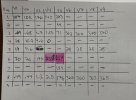
Measured all pin voltages for all tubes against ground.

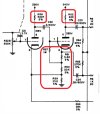
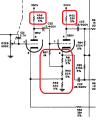
The two highlighted are of note. V4 pin 6 is about 80Volts higher than the schematic, and v5, pin 6 is nowhere near what it should be.

I’m guessing this is likely causing the issue, as it looks like it goes to the potentiometer for Ch B?

I don’t have any more time to look at this tonight but look forward to seeing your responses in the AM.

Cheers!
 
Check the V5 stage.
  1. Check that you have about 340V on the top side of R62 (the plate resistor of V5 for ch B)
  2. Measure the resistance value of R62 (might need to disconnect the 340V source or lift the connection to the 340v source to get a valid reading).
  3. While you're in there, check the resistance values of R57, R59, R60, and R61.
  4. Replace any resistors that are out of tolerance.
  5. Reflow all solder joints in the V5 stage. Add a bit of new solder to each joint if necessary.
Check the V4 stage in the same way. Then power up and see what you've got.

1737351879956.png

By the way, I should mention that in order to measure the voltage on pin 7 of V5, measure at the junction of R57, R61, and R60. There is no current flowing through R57, so no voltage will drop across it. R57 "impresses" the self bias voltage obtained at the junction of those three resistors onto the grid of V5 to bias it properly. If you measure voltage directly at pin 7, the 1M resistor value of R57 could skew the meter reading.
 
Last edited:
So I’m not sure what I was smoking the first night as I’m normally not this careless.

I found two things wrong.

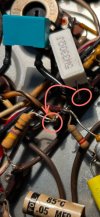
I found the 330 ohm resistor wired to the wrong lug, connected to the replaced cap and not where it’s supposed to go.

IMG_3598.jpeg

IMG_3597.jpeg


So I wired it up correctly and replaced it for good measure.

I found that the 22k resistor was in fact burning. Weird that my current draw wasn’t high to detect this but so be it.

All the resistors in question measure okay. All were in the right place but I had R62 wired to pin 7 instead of 6. I changed it out with a new one, as well as replaced the other 22k.


IMG_3599.jpeg

So I’m terribly embarrassed as this is my first project to go belly up like this. Thank you all for this long journey.

I played some music and it sounds beautiful.


The final problem: I do have to have the balance knob set to about 75% to Ch A, but now the volume is maybe 5/8 and fills the room and sounds lovely on both speakers.

Could this be bad potentiometers over time, bad channel balance pots, or could I have damaged a tube with my carelessness and degraded a channel slightly?

I’ll be retaking voltage measurements tomorrow to ensure each tube is getting what they need. Any advice on further Chanel imbalances. Ch B no longer is at full volume and audibly clipping, but it still isn’t perfectly equal.

At least both sides now sound good!
 
stuff happens. I recently went through this on a much less complicated piece of gear that absolutely would not behave correctly. After poking at it for entirely too long I realized I had a group of parts connected to the wrong point in the circuit. Like magic it all worked properly when it was connected as it was meant to be.
 
Applying +340V to the grid of the 12AU7 (pin 7) has probably damaged the tube. I would toss it, even if it's not the cause of the imbalance.

Jack
 
Applying +340V to the grid of the 12AU7 (pin 7) has probably damaged the tube. I would toss it, even if it's not the cause of the imbalance.

Jack
So I’ve checked all voltages and everything checks out now. The two in question from my previous table have been fixed.

Now money is a little tight, is there anything else to check circuit wise to see why the channels would be off from one another in terms of voltages or values somewhere in the loop of things you he’d with the cap replacement?

I swapped V1,2,3,4 around and that didn’t make a difference.

I’ll try a new cable and aux cord tonight.

Would it be worth using the phono for my turntable to see if this changes anything?

Any other ways to test or troubleshoot this without spending money would be appreciated, unless you truly think my error with that resistor could have caused this?
 
Just read I may be able to play a 60Hz tone from my MacBook into the amp and then measure voltages at various stages. Any thoughts on that?
 
Just read I may be able to play a 60Hz tone from my MacBook into the amp and then measure voltages at various stages. Any thoughts on that?
Ahhhhh did some more reading on another forum and it seems like those two bias pots can cause issue with channel balance too.

Guessing best way to measure them is for resistance on each pin?
 
With the amp on and selector on aux, and with the aux inputs shorted to ground, set the balance pots in the cathode circuits of the output stages so that you measure about zero volts DC between them.

This might sound silly, but first thing I'd check is that the front panel knobs are calibrated. Meaning did someone previously pull those knobs off and reattach them with their markers off center? I think what I'd do is pull the knobs off, turn all the pots all the way to the left, and then reattach the knobs with the markers set to the left most position. It may be that easy to fix it. In other words, nothing wrong except knob calibration...maybe?
 
Last edited:
With the amp on and selector on aux, and with the aux inputs shorted to ground, set the bias pots in the cathode circuits of the output stages so that you measure about zero volts DC between them.

This might sound silly, but first thing I'd check is that the front panel knobs are calibrated. Meaning did someone previously pull those knobs off and reattach them with their markers off center? I think what I'd do is pull the knobs off, turn all the pots all the way to the left, and then reattach the knobs with the markers set to the left most position. It may be that easy to fix it. In other words, nothing wrong except knob calibration...maybe?
So I thought the same thing. I calibrated the knobs and same issue.

As far as the bias pots, I'll clean those with deoxit as well as measure the resistance through the motions to make sure they match. If they don't, that's my answer.

"With the amp on and selector on aux, and with the aux inputs shorted to ground, set the bias pots in the cathode circuits of the output stages so that you measure about zero volts DC between them."

I don't quite understand this part, can you explain this in ever so slighty simpler terms? Confused on shorting the aux inputs. when you say output stages, am I sticking a meter on each speaker output terminal or somewhere on the tubes?
 
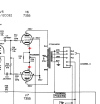
Those pots in the cathode circuit of the output stage are DC balance pots. Place your meter probes on the red dots (pin 5 of output stage tubes for a given channel). Adjust R34 (the balance pot) until you read about zero volts on the meter. Set meter to read DC volts.

You don't want any stray signals to enter the amp and be amplified when doing the above calibration. Easiest way to do that is to set the selector to aux, and connect a jumper wire between the center pin of aux to ground. The aux input is therefore shorted to ground, so no signal can enter through it.

1737482319773.png
 
I usually set this sort of balance circuit for minimum hum in the speaker. When the current is equal, the hum will also be at a minimum. Ideally it should go away completely.
 
Hi all,

So here are the latest results.

I balanced the bias as KWARD recommended and got both channels down to +/-1mv so I'm fairely confident that both pots work just fine. I also cleaned these with deoxit.

I then connected a new aux to rca cable from my macbook, to the aux input. Same story, channel B is quieter. Here's the kicker. When I switched RCA jacks, Channel A was now quiet! It's as if it's the computer / phone, but it clearly isn't as I've used two sources, and two different cables. If I use the Stereo Reverse button, it also switches sides. It's acting as if it's the source is the problem but I don't believe it can be.

So for extra for you all, I then connected my Dual 1019 to the phono inputs. It actually sounds incredible on both Tape HD and Phono Lo (Phono Hi doesn't work but I'm assuming that's a cart issue).

Any Ideas?
 
Back
Top Bottom