• Please note that Audiokarma will be offline briefly for updates early on Monday morning, September 28th.

Marantz 2230 Transformer

Yes on the tape deck. I'm trying to find out where the signal stops so if you select an input source on the 2230, like AUX, put the deck in REC, then you should see the meters move. Increase the record volume if they are too low. Now the L & R channels should be about the same level.

You need to push the Tape Monitor button also.
 
Yes on the tape deck. I'm trying to find out where the signal stops so if you select an input source on the 2230, like AUX, put the deck in REC, then you should see the meters move. Increase the record volume if they are too low. Now the L & R channels should be about the same level.

You need to push the Tape Monitor button also.
 
Yes on the tape deck. I'm trying to find out where the signal stops so if you select an input source on the 2230, like AUX, put the deck in REC, then you should see the meters move. Increase the record volume if they are too low. Now the L & R channels should be about the same level.

You need to push the Tape Monitor button also.
So I did this but I’m not any signal on the tape deck VU’s?
 
You need to make sure:
  • Tape deck is connected to both tape in and tape out
  • Selector knob to anything except TAPE, AM, FM, Aux, Phono... whatever you have a signal on
  • Tape Monitor button pressed in (if you want to hear what is being recorded, out if you want to hear your source)
  • Tape deck in RECORD or REC-Play-Pause
  • You should be able to hear whatever your selector was set at on the speakers.
1789861292108.png
 
You need to make sure:
  • Tape deck is connected to both tape in and tape out
  • Selector knob to anything except TAPE, AM, FM, Aux, Phono... whatever you have a signal on
  • Tape Monitor button pressed in (if you want to hear what is being recorded, out if you want to hear your source)
  • Tape deck in RECORD or REC-Play-Pause
  • You should be able to hear whatever your selector was set at on the speakers.
View attachment 3840073
Morning, thanks again for all this help, so just to make sure I’ve connected things correctly I used two sets of rca cables, connected one set from the 2230 tape out to the tape deck in, and the other set from the 2230 tape in to the tape out on the tape deck. If I’ve done that right, I’ve got even left and right vu readings on the tape deck.
 
Last edited:
You put the deck into REC-PAUSE or REC-PLAY with a blank tape... correct?
You also selected the source as FM or AUX?
With this setup, both VU meters move about the same level?
Try this setup with different inputs to make sure they all work OK... AM, FM, Phono, Aux.
If all is OK, that means that the input and selector is working OK and we can try to go a little further in testing.
 
You put the deck into REC-PAUSE or REC-PLAY with a blank tape... correct?
You also selected the source as FM or AUX?
With this setup, both VU meters move about the same level?
Try this setup with different inputs to make sure they all work OK... AM, FM, Phono, Aux.
If all is OK, that means that the input and selector is working OK and we can try to go a little further in testing.
Ok so I tried all the inputs and they all work and are even except I can’t get any reception whatsoever on am? I get some static but the static doesn’t show up on the tape deck VU’s?
 
Ok so I tried all the inputs and they all work and are even except I can’t get any reception whatsoever on am? I get some static but the static doesn’t show up on the tape deck VU’s?
Ok I tried an external a loop antenna and managed to get one am station that came in decently. Nothing on the tape deck VU’s still though, but every other source works on the VU’s?
 
I tried all the inputs and they all work and are even except I can’t get any reception whatsoever on am?
The built-in AM antenna is the long black bar on the back of the receiver. Does yours still have it attached?
Since all other inputs seem to work, we can start with troubleshooting with those and leave the AM until later.
Do you have any test equipment or only the DMM?
 
The built-in AM antenna is the long black bar on the back of the receiver. Does yours still have it attached?
Since all other inputs seem to work, we can start with troubleshooting with those and leave the AM until later.
Do you have any test equipment or only the DMM?
A.m. antenna bar is still there, I couldn’t get anything we just left. That’s why I switched to the am loop antenna. Unfortunately a DMM is all I have for test equipment basically.
 
One more test, if you press in the MONO button, does it change the weak channel to the speakers at all?

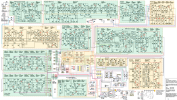
Here is the schematic diagram for the 2230.
  • I shaded green, all of the boards that we have determined are good and at least working
  • I shaded yellow all of the boards that are questionable or not tested yet
  • I shaded red where we have the problem with the R PreAmp output that is low
  • You won't be able to read it, but we can keep track of what is good/bad.
  • We'll leave the AM tuner for now as well as the hum in the L channel output.
1789920633252.png
 
Have you cleaned all of the controls with Deoxit D5 spray or contact cleaner?
If not, get a can.

1789922710094.png
Spray a SMALL amount int the holes of the controls (yellow arrows) and rotate them back and forth for 30-40 times to work it in. You can also spray it on the rotary selector switch and rotate it. I don't know if you can get to the push button switches without disassembly but if you can, spray a small amount in the switch and press in/out many times.

1789922661870.png
 
Have you cleaned all of the controls with Deoxit D5 spray or contact cleaner?
If not, get a can.

View attachment 3840392
Spray a SMALL amount int the holes of the controls (yellow arrows) and rotate them back and forth for 30-40 times to work it in. You can also spray it on the rotary selector switch and rotate it. I don't know if you can get to the push button switches without disassembly but if you can, spray a small amount in the switch and press in/out many times.

View attachment 3840391
One more test, if you press in the MONO button, does it change the weak channel to the speakers at all?

Here is the schematic diagram for the 2230.
  • I shaded green, all of the boards that we have determined are good and at least working
  • I shaded yellow all of the boards that are questionable or not tested yet
  • I shaded red where we have the problem with the R PreAmp output that is low
  • You won't be able to read it, but we can keep track of what is good/bad.
  • We'll leave the AM tuner for now as well as the hum in the L channel output.
View attachment 3840368
I tried the mono switch test, it makes no difference.
 
Have you cleaned all of the controls with Deoxit D5 spray or contact cleaner?
If not, get a can.

View attachment 3840392
Spray a SMALL amount int the holes of the controls (yellow arrows) and rotate them back and forth for 30-40 times to work it in. You can also spray it on the rotary selector switch and rotate it. I don't know if you can get to the push button switches without disassembly but if you can, spray a small amount in the switch and press in/out many times.

View attachment 3840391
I’ve cleaned all of the switches with deoxit yes, the push button switches I didn’t because like you said, difficult to access. I did this a couple weeks ago after I purchased it.
 
Last edited:
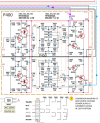
This might be a little hard to read but I traced the path back from the PreOut L/R RCA jacks through the Low Filter and High Filter switches on the P600 Switch board, back to the P400, Tone Amp Board.

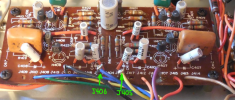
Can you access the P400 board connectors J405 and J406?
If you can then do this:
  • Power OFF and unplugged
  • Low Filter switch OFF
  • High Filter switch OFF
  • DMM set to measure Ohms
  • Put one DMM lead on the PreOut RCA center conductor for the R channel (it might help to plug in an RCA cable to the PreOut jack then clip the DMM lead to the center conductor of the cable).
  • Next, take the other DMM lead and attach it to the P400 board connector J405.
  • You should get close to 0 Ohms, continuity.
  • Next, do the same for the L channel.
  • One DMM lead to center pin of the PreOut RCA L channel, the other lead to P400 board J406.
  • You should get close to 0 Ohms continuity.
This test will verify wire continuity from the output of the Tone Amp board, filter switches, to the PreAmp outputs.
Let me know what you find out.

1789927991096.png1789928061107.png
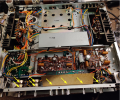
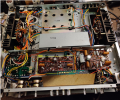
The P400 board is under the bottom cover.
1789929602674.png
 
Last edited:
This might be a little hard to read but I traced the path back from the PreOut L/R RCA jacks through the Low Filter and High Filter switches on the P600 Switch board, back to the P400, Tone Amp Board.

Can you access the P400 board connectors J405 and J406?
If you can then do this:
  • Power OFF and unplugged
  • Low Filter switch OFF
  • High Filter switch OFF
  • DMM set to measure Ohms
  • Put one DMM lead on the PreOut RCA center conductor for the R channel (it might help to plug in an RCA cable to the PreOut jack then clip the DMM lead to the center conductor of the cable).
  • Next, take the other DMM lead and attach it to the P400 board connector J405.
  • You should get close to 0 Ohms, continuity.
  • Next, do the same for the L channel.
  • One DMM lead to center pin of the PreOut RCA L channel, the other lead to P400 board J406.
  • You should get close to 0 Ohms continuity.
This test will verify wire continuity from the output of the Tone Amp board, filter switches, to the PreAmp outputs.
Let me know what you find out.

View attachment 3840446View attachment 3840447
The P400 board is under the bottom cover.
View attachment 3840462

So my resistance readings are all over the place the first few times I tried, left channel eventually settled to around 12ohms and the right is around 60 ohms. But still seem to be different every time I clip them??
 
Tell me exactly how you connected the DMM (where you attached the leads) and the positions of the push button switches.
What happens when you push the Low Filter or High Filter switch in?
 
You clipped you DMM lead to here (green arrows), correct?
Not across them, but individually for L & R channels to PreAmp output RCAs.

1789932906691.png
 
Tell me exactly how you connected the DMM (where you attached the leads) and the positions of the push button switches.
What happens when you push the Low Filter or High Filter switch in?
So I went directly inside of the preouts with one lead and clipped onto the terminal itself on the p400 terminals, j405 has a yellow wire soldered onto it and j406 has a blue wire soldered onto it. Resistance increased with the filter buttons. Once the filters were switched off again the readings are all over the place again, seems to take awhile to settle down again but the right is always higher.
 
Back
Top Bottom