• The move to the new server is done. There are some software and database maintenance updates in process. This has us passing the hat around to help out. We appreciate any donations. Seriously, even a dollar helps. The payment page may be found here - https://www.audiokarma.org/support.html

Microsoft is at it Again

Register to hide this ad
i use win 10, customized to the way i want so it looks like win 7
then i shut off auto update
i will have to take them eventually, hopefully they have the bugs out by then
 
In my house we run one W7 (my main work laptop) and a couple of W10, one of these for ~2 years, the other one year, all w/out issues. I'm working on a Linux-Ubuntu mod @ an older Lenovo (currently XP), to see if/how that "open source" fits my style/needs, but until then the MS OS machines are all working very well... which is more than I can say for ANY of the effin' Apple products (5 ipods, two Macbooks) I'd (foolishly) purchased o'er the years.
 
Win 7 is dead next year. I prefer win 10 over win 7 any day. It is quicker booting, can play FLAC files natively, and less crash prone. If you use Dell, etc as computers, don't blame MS, blame Dell, etc. for using older parts with no driver updates.

I prefer 7 over 10, but (I know I know) the writing's on the wall re: W7. Parting ways w/ 7 will be the cause of mych anguish and sorrow. As Minnie Minoso might have put it, "Windows 7 has been veddy, veddy good to me."
 
Win 7 is dead next year. I prefer win 10 over win 7 any day. It is quicker booting, can play FLAC files natively, and less crash prone. If you use Dell, etc as computers, don't blame MS, blame Dell, etc. for using older parts with no driver updates.

Seconding B's hit @ Dell. Not a big fan (there's a joke there) of HP, either. Pretty much been Lenovo-only @ PC (well, laptop) land for me since circa 1995. Well, make that IBM ThinkPad > Lenovo ThinkPad.
 
clueless writers about Windows 10 or not, my neighbour had her quite recent well known Brother printer unavailable after win 10 update, (according Windows it was there but it had a fault).
I had to reinstall it as a "copy" of it afterwards and assigned it as default printer. A week later, again printer not reachable and I had to remove the "original" printer from the in the assignment.

If people not knowing have no computer literate people in the neighbourhood who at least can get things running, they pay over and over again for professional help.
 
clueless writers about Windows 10 or not, my neighbour had her quite recent well known Brother printer unavailable, (according Windows it was there but it had a fault).
I had to reinstall it as a "copy" of it afterwards and assigned it as default printer. A week later, again printer not reachable and I had to remove the "original" printer from the in the assignment.

If people not knowing have no computer literate people in the neighbourhood who at least can get things running, they pay over and over again for professional help.

In my experience printers, esp. today's "wireless" types, are a genuine bitch. Fortunately for me, I've not been obliged to use a printer for several years, and back (circa 2000) when I did, it was a network-based laser job that was in fact someone's job to keep a-runnin'. Never had a printer at my home office.
 
My neighbours one was a USB one.

I have a Brother B/W laser with scanner, and indeed using the wireless gave trouble. I have it for about a year now and while my Win 7 laptop could not scan over the wireless, Brother seems to have it fixed since I installed a new driver package. My home PC I have it connected to the USB.
 
clueless writers about Windows 10 or not, my neighbour had her quite recent well known Brother printer unavailable after win 10 update, (according Windows it was there but it had a fault).
I had to reinstall it as a "copy" of it afterwards and assigned it as default printer. A week later, again printer not reachable and I had to remove the "original" printer from the in the assignment.

If people not knowing have no computer literate people in the neighbourhood who at least can get things running, they pay over and over again for professional help.

Non-working, conflicted, confused or otherwise, peripheral devices are the plague of those who are technically clueless. Not a knock on those folks, there are many and it's not about smarts. The disadvantage can be costly. I feel fotunate I can dig my way out of most hardware problems as they do happen from time to time.
 
Not always. https://www.dell.com/support/articl...-upgrading-dell-devices-to-windows-10?lang=en

Most of the issues are hardware, as you say. BUT, if people are buying Dell, HP, etc. PC's many of them use older parts to make it cheaper to build a PC.This is my issues with pr-built PC's.

I built my own. I used name brand parts newer parts. It costs more to do, but I have not had an issue with any update with Win 10, other than when I actually first installed Win 10 because installing on a Ryzen CPU, one needed a ewer version of Win 10, so I compiled one off the installer onto a USB stick and installed.

I have been confounded a few times, but usually manage. I can see were you're coming from.

One issue I have not overcome....I have a Lenovo Yoga that the touch screen won't work. It's not hardware. If I do a fresh install it will work until one of the updates catches up, then it's kaput. The most recent Win10 update had me fooled for one boot up, I thought the issue had been resolved :no:

No such luck. This issue seems to be documented on the web, but the "fix" seems to be forever looking at a hardware issue, which it's not, and goes unresolved. I don't know whether to blame MS or Lenovo, but somewhere along the line the hardware becomes unrecognized in the OS. Drivers don't appear to be the problem as the touch screen, I think it's a HID, USB device, just doesn't show up. I am not good enough (or willing to put the time in) to solve it myself, so it goes on without. If I missed it badly, I would feel differently, but touch screen isn't high on my list of needs. I would be willing to try something if anyone had any thoughts.
 
Unfortunately, the writer for Forbes is WAY OFF on this one again. The problem was patched a few moths ago. He is a bit of an alarmist and clueless writer. Ars Technica had a review of his writing and in the end called him clueless and just likes to stir the non-existent pot.
Forbes = clickbait garbage
 
. I prefer win 10 over win 7 any day.

QFT.

Most people do not realize it’s set up like a web browser you search your files not go look for them. I fumbled around until I figured that out. We run 10 at work. You can’t pick and choose your updates according to our IT. Maybe 10 for business is a little different?
 
The key is to read the damn things and pick and choose the important updates.
I don’t need any that pertain to Cortana or whatever the hell her name is.
 
I upgraded my Win7 box with a Mac Mini. Win10 is too bloated. I run LMS on a Synology NAS and have experienced none of the typical Microsoft glitches with its Linux based core.

Last month's Windows update broke applications that run Visual Basic like one used by dozens of my customers. They had to uninstall the update to restore functionality.
 
Win 10 can be pared down. I mean 60 GB and that includes a swapfile for installations (since it does it in a sandbox).
I refer to required activity. I have turned off virtually every resident start up program. Cortana was the first of many. Still runs 150+ processes vs. ~ 50 for Win7.

I bet you were using Dell PC's too. Don't blame MS, blame Dell, not MS.
Nope. I refer to HP laptop still used for work. I blame the bloated, problematic OS. Actually, my ten year old Dell running Win7 is quite lean. I continue to use its internal Blu Ray burner for ripping music and video disks.

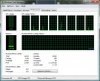
win7.jpg

IUse what ever you want. Just an FYI, Apple doesn't tell you how much it's OS uses for HD space.
Another swing and a miss. You're failing badly at your assumptions. The red section is applications, yellow is photos, green is documents. blue is music creation.

Screen Shot 2019-09-16 at 3.11.38 PM.png
 
Last edited:
Back
Top Bottom