mhedges
Super Member
Thanks. Looks like a nice product. I'll consider one if one of my current amps dies.Post in thread 'WiiM Amp Color'
https://forum.wiimhome.com/threads/wiim-amp-color.1413/post-22224
View attachment 2992339


Thanks. Looks like a nice product. I'll consider one if one of my current amps dies.Post in thread 'WiiM Amp Color'
https://forum.wiimhome.com/threads/wiim-amp-color.1413/post-22224
View attachment 2992339

My "wish list" for the WiiM (or any other streamer) would be to add a display showing the bitrate for all content being played. I really dislike the situation of "driving blind" not knowing what quality I'm playing. For example, I upgraded to Pandora Plus -- would like to confirm that I'm actually getting 192kbps now, would also like to see that Spotify Premium is delivering 320kpbs. It is VERY easy to unknowingly have the settings wrong and not be getting the bitrate you are paying for.
Yes, a DAC could display it also, but I'm pretty wedded to my current DAC that doesn't have a display.

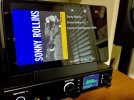
Plenty of ways to add a display to your WiiM. This one’s just a cheap Lenovo tablet with a browser extension, easy enough to implement.
View attachment 2994358

In the WiiM app, if you look at the bottom banner (if one is not displayed, change the window to Device and it should show up), and tap once on it, it will display a window that lists bit depth and rate of what is playing. If it is a lossy source, it will also display the kbps stat.My "wish list" for the WiiM (or any other streamer) would be to add a display showing the bitrate for all content being played. I really dislike the situation of "driving blind" not knowing what quality I'm playing.

This one stays on in its power base, displaying date/time. Material Skin can do the same, but of course, it won’t display everything streaming on the WiiM, only if you’re streaming via LMS.I have too many old phones and tablets. I use them in always on, kiosk mode running an app to display what is currently playing. I power the portable device from a switched power outlet so it charges while the system is use. It is one more thing to turn off when I stop listening, but it is nice to have a local display.


And this is what is not happening.The Wiim should be able to see DLNA libraries:

How to connect to your DLNA media server
For detailed instructions, refer to How to Stream Music from Your NAS or DLNA Server to WiiM.faq.wiimhome.com

Can you see either DLNA server from any other smart device on your network? E.g. TV, BDP, app on phone, etc?And this is what is not happening

What is the extension? I use a cheap Lenovo tablet.Plenty of ways to add a display to your WiiM. This one’s just a cheap Lenovo tablet with a browser extension, easy enough to implement.
View attachment 2994358
I'll investigate. Dealing with other matters tonight, so will test tomorrow. Thanks for your help.Can you see either DLNA server from any other smart device on your network? E.g. TV, BDP, app on phone, etc?
I’ve lost track, as I’ve written so many, but I think it’s the Kiwi browser extension here.What is the extension? I use a cheap Lenovo tablet.
 forum.wiimhome.com
Yes it does. Tidal and TuneIn examples. Android and iOS.The bitrate is displayed in the Wiim app while it's playing, so it's not totally driving blind. At least it is playing Amazon Unlimited.
But yeah, a display on the Wiim would be nice!
Thank you. I have already turned on media streaming . Presumably that is why I can cast MPEG-3 files to the WiiM Pro Plus. I have also tried to cast some FLAC files and I get an "Unexpected device error" message (not the media not supported message that I get with MPEG-4 ALAC files). I was able to successfully cast WAVE files as well as MPEG-3.I use the "built-in" DLNA server in W10 with the WiiM Pro. Works fine with ALAC and AAC music files. All you need to do to use it is turn it on in Control Panel.
EDIT: Here is a link I pulled up describing how to "turn on" DLNA sharing on your home network. This will allow the WiiM to see your media files. Once DLNA is activated, open the WiiM app, scroll down to Home Music Share in My Library and click on it. The name of your media library will show up. Click on it and choose the music you want to hear. The link describes how to give a name to your music library.

How to Turn Your Computer Into a DLNA Media Server
Stream to just about any smart TV, with no third party apps required.www.howtogeek.com
FWIW, progress after a fashion. My Macbook Pro running MC 31 and a Win 10 laptop also running MC 31 (MC has a DLNA server, renderer and controller) are able to see each others' music libraries, control each other, and I hear music. So far, so good.Can you see either DLNA server from any other smart device on your network? E.g. TV, BDP, app on phone, etc?
You're much more likely to find someone with a similar setup over on the WiiM forums, which are quite active.FWIW, progress after a fashion. My Macbook Pro running MC 31 and a Win 10 laptop also running MC 31 (MC has a DLNA server, renderer and controller) are able to see each others' music libraries, control each other, and I hear music. So far, so good.
But...the WiiM app doesn't see the library from either laptop.
This is not a big deal; I can always play out from whatever computer I'm on using MC 31, since my WiiM Pro is seen as a DLNA endpoint. (In MC 31, and I'm sure, other players like foobar.) And as for my Windows desktop holding my master collection of digital files, I can either use MC 31 or get at it through LMS/Material Skin. But I'd kinda like to keep as much as I can on the WiiM app, and besides, I'm just annoyed by my failure to understand what's going on.
s.

Hopefully WiiM support can help. My Wiim Pro can access all the files in my Windows music library, which I made visible and named. Majority of files are ALAC.Thank you. I have already turned on media streaming . Presumably that is why I can cast MPEG-3 files to the WiiM Pro Plus. I have also tried to cast some FLAC files and I get an "Unexpected device error" message (not the media not supported message that I get with MPEG-4 ALAC files). I was able to successfully cast WAVE files as well as MPEG-3.
I moved some MPEG-4 files to My Music on the WiiM App on my laptop. I was then able to play the MPEG-4 files from My Music. However, they did not show on the WiiM Apps on my other PC nor on my Apple devices, all on the same network. Moreover, the next day, following shut down and start up of my PC, the files appeared again in My Music , but would not play. On any album, there was a rapid cycling through the tracks, with no music playing.
I am awaiting an answer from WiiM customer support. They advise that their engineers are working on the issue.
This has become much more complicated than I expected or wanted. While I appreciate the sugestion, using a different server would only make things further complicated in my mind, and would be undesirable. If that is the only solution, I would return the WiiM. I wanted a simple solution to being able to stream Qubuz (achieved) and cast my music files, primarily MPEG-4 ALAC.
By the way, I have no trouble casting the MPEG-4 ALAC files to my Yamaha Musicast device. Again using the Windows casting system.
Does anyone think that I can have a defective WiiM unit? Thank you to all for your patient responses.
How did you rip your CDs? I used iTunes.Hopefully WiiM support can help. My Wiim Pro can access all the files in my Windows music library, which I made visible and named. Majority of files are ALAC.
All of my ALAC files were ripped in iTunes.How did you rip your CDs? I used iTunes.

Did you find some of the cataloguing of the albums was off or weird? When I did it about 4-5 yers ago, sometimes the first song wouldn't be in the album, but on it's own. There was a Chick Corea double album where it was split up and listed as two different artists. I realize this is probably the CD info, but I have yet to go in and fix it.All of my ALAC files were ripped in iTunes.