

You are using an out of date browser. It may not display this or other websites correctly.
You should upgrade or use an alternative browser.
You should upgrade or use an alternative browser.
2385 reconnect PS00 to P400 pin question
- Thread starter sendust
- Start date

I think i found it, just want your thought on this, if you look at the photo , you can see the nine pin connector solder joints, if you start from the left and go to the fourth pin, when you follow the trace it goes to a ground at the bottom., i have no continuity from 4 to ground. I was thinking of just jumping a wire from 4 to ground. peteIt could also be a hairline crack or a cold solder joint on a trace on one of the boards. Going to be hard to track down. Try to isolate it to a single board by wiggling each board separately.
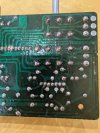

You have not continuity because that trace from "pin 4" (actually JE05 pin 6) does not connect to anything.
Take a look at the board layout and schematic.
The trace from the connector, 4th from the left, is "6". If you trace it down to the bottom of the board it just stops.
Compare the layout to the schematic, connector JE05 in 6. It shows that it is not connected to anything.
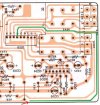

Take a look at the board layout and schematic.
The trace from the connector, 4th from the left, is "6". If you trace it down to the bottom of the board it just stops.
Compare the layout to the schematic, connector JE05 in 6. It shows that it is not connected to anything.
Thanks, i will still need to find out why i have no right channel? I exposed the boards and all components on the right side, i tried with the rubber of a pencil to touch all connections, no luck, when i touch the green, right channel wire i get a louder hum but no sound. Ill keep looking, something is broken.
re tested volume pot ,both channels the exact same values, could the issue be on the board or is there a wire in the area of the volume pot that can affect left channel? , put all back together now even if i wiggle the pot no right channel. May need to get someone with scope to find issue.
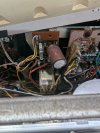
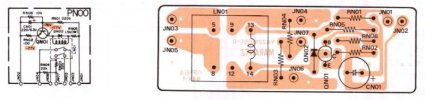
If you remove it, you might as well replace it. I think this is the correct replacement relay. Please check the pin spacing dimensions. Corroded relay contacts could be causing an intermittent channel audio?
EDIT: Not sure what the voltage is? -77V?
Looks like 48V from PL description.


EDIT: Not sure what the voltage is? -77V?
Looks like 48V from PL description.
Last edited:
Did we previously determine if the problem Left channel is in the Preamp or Main Amp? If not, take a short stereo RCA cable and cross connect the L Preout to R Main In and R Preout to L Main In and see if the bad channel switches sides. If it stays on the L then it is a problem with the Main amps, if it switches, then it is a problem with the Preamp.
will do. pete will the test work if the receiver is connected internally pre and main?Did we previously determine if the problem Left channel is in the Preamp or Main Amp? If not, take a short stereo RCA cable and cross connect the L Preout to R Main In and R Preout to L Main In and see if the bad channel switches sides. If it stays on the L then it is a problem with the Main amps, if it switches, then it is a problem with the Preamp.
Last edited:
Sorry i was ending the reply with my name, then thought about the internal connection. peteThis is Dan... Yes, when you push in the RCA cable into the Preout and Main In, it will disengage the automatic jumpers.
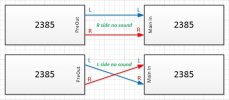
OK, let's summarize. Here is the first test where we swap channels and the dead channel moves from R to L side seeming to indicate that the Main Amp is OK and that the problem is in the Preamp somewhere.
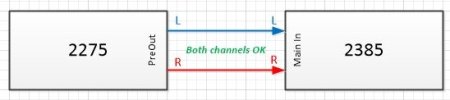
Now your latest test, using your 2275 as a Preamp and BOTH channels work OK. This still shows that the 2385 Main Amp is OK.
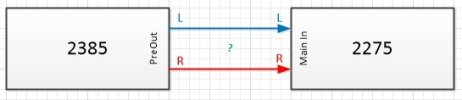
Now try the opposite. Connect the PreOut of the 2385 to the Main In of the 2270. I think you will see that the 2385 has a bad R channel?
It makes sense so far...
Now your latest test, using your 2275 as a Preamp and BOTH channels work OK. This still shows that the 2385 Main Amp is OK.
Now try the opposite. Connect the PreOut of the 2385 to the Main In of the 2270. I think you will see that the 2385 has a bad R channel?
It makes sense so far...
Yes right channel still out but there is a hum on the right that is not affected by increasing volume Does the issue need to be in the volume pot, or board its attached to, or boards in that area because i used to be able to get the right back by lifting the rod on the volume stem, since checking board and replacing no it does not affect right.OK, let's summarize. Here is the first test where we swap channels and the dead channel moves from R to L side seeming to indicate that the Main Amp is OK and that the problem is in the Preamp somewhere.
View attachment 3780167
Now your latest test, using your 2275 as a Preamp and BOTH channels work OK. This still shows that the 2385 Main Amp is OK.
View attachment 3780169
Now try the opposite. Connect the PreOut of the 2385 to the Main In of the 2270. I think you will see that the 2385 has a bad R channel?
View attachment 3780170
It makes sense so far...
Last edited:
Here is a block diagram from the SM.
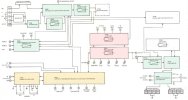
- We know that the Main Amp is good (green)
- I presume that the AM/FM and Phono inputs are good (green)
- I don't think that we tested the Tape inputs? (yellow)
- So the problem seems to be in either the PE00 Pre & Tone Amp or PT00 Filter Amp (red)
- Also, just outside of the Pre & Tone Amp is the Balance control?
- We need to devise a test to isolate the board that has an issue
I saw an earlier thread on testing the voltages on the PE00 board , not sure how to get access to pins while board is attached but i will look into it.Here is a block diagram from the SM.
- We know that the Main Amp is good (green)
- I presume that the AM/FM and Phono inputs are good (green)
- I don't think that we tested the Tape inputs? (yellow)
- So the problem seems to be in either the PE00 Pre & Tone Amp or PT00 Filter Amp (red)
- Also, just outside of the Pre & Tone Amp is the Balance control?
- We need to devise a test to isolate the board that has an issue
View attachment 3780180
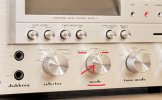
Yes all testing in stereo, also no sound when balance full right on any of the settings.There is a mode control that selects Stereo, Reverse, and L+R. I presume that you have had it in Stereo during the above tests.
Does anything change if you put it in REVERSE or L+R? Right channel still bad in all cases?
View attachment 3780184
If you put the mode control to:
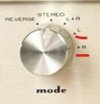 __
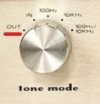
__
- L, do you get sound in both channels?
- R, do you get no sound in both channels?
- Or does it not matter still no sound in R channel?
- Do you have the Tone Mode selected to OUT? If yes, that should bypass the tone controls and eliminate them from the problem.
__
Last edited: