

You are using an out of date browser. It may not display this or other websites correctly.
You should upgrade or use an alternative browser.
You should upgrade or use an alternative browser.
HK CD 401 idler tires confusion!
- Thread starter smead
- Start date



dr*audio
Fish fingers and custard!
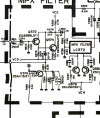
Those are the ones. You can measure at the outer pins of P552.Looks like it's here on the PCB, but not labelled. '+' side of cap connected to Q571 base and Q572 base.
View attachment 2933626

Looks like it's here on the PCB, but not labelled. '+' side of cap connected to Q571 base and Q572 base.
View attachment 2933626
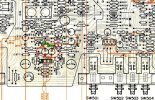
I think you can see one in this photo:
View attachment 2933630
I just noticed that too in the wiring diagram that two polarized caps under Q571 are indeed unlabeled? Doh! I've been going nuts today. OK so those must be C573 and C574, I assume one is for the left and one for the right channels. I'll take the readings tonight. Thanks!
Ok I followed these step to the letter measuring the negative lead on each of these unmarked caps. I did the negative just because it was easier to get to. I also assume I needed to be recording on a cassette when doing this. That is, in step 1. when you say turn tone cal on, you mean press and hold the record calibration tone button right?I would not bother with checking voltages. This type of problem is best fixed by tracing a signal though the circuits and seeing where it is lost. A scope is best for this but you don't have one so we can try to use your meter but we need a reliable constant signal source. Lets try using the calibration tone that is built into the deck.
1. Turn the cal tone on.
2 Put the tape / source switch in Source.
3. Set your DMM to AC Volts, 200mV range.
4. Connect the - lead of the meter to ground or the chassis.
5. Touch the + lead to either end of C573 (L Ch) and C574 (R Ch)
What are the readings?
I'm guessing I did something wrong because I got no readings on either cap, would have expected something on the working channel?
I measured a couple of resistors just to make sure my meter is working, and got good readings.

You did have your meter set to ACV, not ohms or DCV like you would use to measure a resistor. And you had connected the DMM black lead to chassis ground, correct?3. Set your DMM to AC Volts, 200mV range.
dr*audio
Fish fingers and custard!
You were correct. If your meter was on AC Volts and you had Cal Tone pressed and you saw a good level on at least one of the deck's meters, your meter can't read a 400 Hz tone, which 3 not surprising. We have to come up with a way to test this without proper equipment. Do you have any alligator clip leads? Since the deck has an oscillator in it, we can jumper its output to different places in the circuit while monitoring the output and see where the signal gets lost. Alternatively you could spend $69 and buy a scope. https://www.mpja.com/5-MHz-Handheld-Mini-DSO-Oscilloscope-with-1-10x-Probe/productinfo/36873+TE/
I have va couple of spare alligator clips I could wire on to the DMM leads. If that can work I'll try whatever you suggest.You were correct. If your meter was on AC Volts and you had Cal Tone pressed and you saw a good level on at least one of the deck's meters, your meter can't read a 400 Hz tone, which 3 not surprising. We have to come up with a way to test this without proper equipment. Do you have any alligator clip leads? Since the deck has an oscillator in it, we can jumper its output to different places in the circuit while monitoring the output and see where the signal gets lost. Alternatively you could spend $69 and buy a scope. https://www.mpja.com/5-MHz-Handheld-Mini-DSO-Oscilloscope-with-1-10x-Probe/productinfo/36873+TE/
I really appreciate your help.
dr*audio
Fish fingers and custard!
Clip one end of your jumper wire on R479.

Leave the needle end of the meter probe as it is, we will touch that to places in the circuit to see where the signal drops out.
Touch the probe to the L Channel output jack and make sure you hear the tone.
Then touch it to:
R331


Turn the playback volume all the way up and leave it that way.
Touch the probe to each side of C307.
Leave the needle end of the meter probe as it is, we will touch that to places in the circuit to see where the signal drops out.
Touch the probe to the L Channel output jack and make sure you hear the tone.
Then touch it to:
R331
Turn the playback volume all the way up and leave it that way.
Touch the probe to each side of C307.
Thanks, before trying this I have a bunch of questions that I apologize for, but this is new territory for me.Clip one end of your jumper wire on R479.
View attachment 2934101
Leave the needle end of the meter probe as it is, we will touch that to places in the circuit to see where the signal drops out.
Touch the probe to the L Channel output jack and make sure you hear the tone.
Then touch it to:
R331
View attachment 2934104
View attachment 2934105
Turn the playback volume all the way up and leave it that way.
Touch the probe to each side of C307.
1) Am I doing these steps while also doing the setup for the prior 6 steps? That is, tape mon on source, press tone cal while recording, etc..
2) Am I using the two leads of the DMM as a jumper while the DMM unit is off?
3) When you say "Touch the probe to the L Channel output jack and make sure you hear the tone.", what am I hearing the tone through/with? Do you mean look for output on the deck vu meter? Touch the inside (positive side) of the jack where the RCA cable plugs in right?
4) When I touch the needle end of one of the DMM leads to R331 and C307, am I looking to hear the same tone? Again how?
Sorry for all the questions, hopefully I'll have fewer as this progresses..
dr*audio
Fish fingers and custard!
1. No.Thanks, before trying this I have a bunch of questions that I apologize for, but this is new territory for me.
1) Am I doing these steps while also doing the setup for the prior 6 steps? That is, tape mon on source, press tone cal while recording, etc..
2) Am I using the two leads of the DMM as a jumper while the DMM unit is off?
3) When you say "Touch the probe to the L Channel output jack and make sure you hear the tone.", what am I hearing the tone through/with? Do you mean look for output on the deck vu meter? Touch the inside (positive side) of the jack where the RCA cable plugs in right?
4) When I touch the needle end of one of the DMM leads to R331 and C307, am I looking to hear the same tone? Again how?
Sorry for all the questions, hopefully I'll have fewer as this progresses..
2. No. You are going to remove one of the meter leads, connect the alligator clip to the banana plug end, and clip the alligator clip where I told you. You will probe the places in the circuit where I told you with the pointy end, injecting the tone into the circuit.
3. You will connect the output of the deck to an amplifier or receiver and listen for the tone.
4. If the part of the circuit is working you will hear the tone.
5. Leave the tape /source switch set to source. The deck can be in stop mode, no tape in it.
dr*audio
Fish fingers and custard!
You didn't have these, so you have to make one.
You have no test equipment so we have to use the internal tone generator in the deck to produce a reliable signal and we will use your ears as an oscilloscope.
You have no test equipment so we have to use the internal tone generator in the deck to produce a reliable signal and we will use your ears as an oscilloscope.
Ok I think I understand now, the circuits I'm touching should produce the 400hz tone through the output channel that I'll hear through the speakers.
Unfortunately r479 is on the bias tone cal board which is flipped and the topside is not accessible unless I remove the main board to get to it. I can see the solder for each r479 lead on the backside so I'll just carefully touch that with a wire connected to the banana plug end. I'm assuming it doesn't matter which lead I touch.
Thanks for your patience! As long as you remain gracious enough to help me, I'll do everything I can to figure this out.
Unfortunately r479 is on the bias tone cal board which is flipped and the topside is not accessible unless I remove the main board to get to it. I can see the solder for each r479 lead on the backside so I'll just carefully touch that with a wire connected to the banana plug end. I'm assuming it doesn't matter which lead I touch.
Thanks for your patience! As long as you remain gracious enough to help me, I'll do everything I can to figure this out.
Sorry one more question before I proceed, when you say "Touch the probe to the L Channel output jack and make sure you hear the tone.", what exactly am I touching? I have it hooked up to the receiver, do I need to find the right solder lead on the back of the rca jack board? EDIT: which I think would be the bottom lead on J5 on PCB9?
EDIT#2 - when you said touch R331, would that by chance be R321? I don't see R331 on any board.
EDIT #3: when testing C307, by "playback volume", do you mean the output level on the deck or the volume on the receiver? I'm thinking the former..
I guess my one last question turned into three.
EDIT#2 - when you said touch R331, would that by chance be R321? I don't see R331 on any board.
EDIT #3: when testing C307, by "playback volume", do you mean the output level on the deck or the volume on the receiver? I'm thinking the former..
I guess my one last question turned into three.
Last edited:
dr*audio
Fish fingers and custard!
#1 You need to touch it to the signal pin of the output jack. There are 2 terminals; signal and ground.Ok I think I understand now, the circuits I'm touching should produce the 400hz tone through the output channel that I'll hear through the speakers.
Sorry one more question before I proceed, when you say "Touch the probe to the L Channel output jack and make sure you hear the tone.", what exactly am I touching? I have it hooked up to the receiver, do I need to find the right solder lead on the back of the rca jack board? EDIT: which I think would be the bottom lead on J5 on PCB9?
EDIT#2 - when you said touch R331, would that by chance be R321? I don't see R331 on any board.
EDIT #3: when testing C307, by "playback volume", do you mean the output level on the deck or the volume on the receiver? I'm thinking the former..
I guess my one last question turned into three.
Unfortunately r479 is on the bias tone cal board which is flipped and the topside is not accessible unless I remove the main board to get to it. I can see the solder for each r479 lead on the backside so I'll just carefully touch that with a wire connected to the banana plug end. I'm assuming it doesn't matter which lead I touch.
#2 it is clearly R331 on the schematic but it may be a wire jumper.shouldn't be hard to figure out. Do it on the connector or the pad.
#3 The output level on the deck.

Ok guys I did the baseline, one end on R479, the other on the output jack (bottom lead on J5 on PCB9). I do hear the high pitched 12khz signal through the left channel. A modicum of progress!
While I see C307, I'm still just not seeing R331. So I tried the jumper on R351 as suggested, but I do not hear the 12 khz tone. I'll keep trying to hunt down R331.
While I see C307, I'm still just not seeing R331. So I tried the jumper on R351 as suggested, but I do not hear the 12 khz tone. I'll keep trying to hunt down R331.
