• The move to the new server is done. There are some software and database maintenance updates in process. This has us passing the hat around to help out. We appreciate any donations. Seriously, even a dollar helps. The payment page may be found here - https://www.audiokarma.org/support.html

Troubleshooting CD Players

Poking around I see this runs dual-mono DACs. BB PCM56 ("K" spec, which is highest grade as graded by Ti).

It continues to work, so I haven't touched it yet... (It won't act up again until I close the top of course)

And that variable output pot is not tracking either. Left channel fell way low on me (so no point investing time on that for the moment). "fixed" output sounds great, even passing through the tape deck before the headphone amp.
Sounds like several dirty switches; drawer out switch, Home switch, maybe some front panel switches. Was it owned by a smoker?
 
None of the late-70’s nicotine glaze, no, but it was intermittent for the seller as well- and that incompletely seated front control board was the smoking gun but I think it’s suffering mainly from disuse.

This is a pretty rare model it seems as well. I am not finding any for sale on earth at the moment. So, no parts either of course.

I guess I’ll tear it apart and clean it well before I get into the 1300 preamp upgrades.
 
Well, I have the transport out. I found two switches (one double-acting) and got one and a half working perfectly.

Second leaf of the double acting switch is putting up a good fight. It’s wide open and accessible (full tear down requires dismounting all motors as the board is soldered direct to the motors) but deoxit D100/electrical cleaner wasn’t doing it. Went to 1000 grit paper and washing but that’s not working either. About to go to 400 for a few strokes and then 1000 again after I get continuity.

I have access to the switch attachment point to the board so that at least allows me to test it from the switch to termination. (I tested the laser sled switch the same way after cleaning).

This probably explains why the drawer “slams” shut… picture of switch; it acts on a piece sticking out of the loading cam wheel:

IMG_2666.jpeg
 
If I remove the disc, wait for the “no disc” display and shut it down, and then restart, put disc in and close the drawer, the disc doesn’t spin.

I move the laser off the home switch and then all gets back to normal.

I’m going to clean the laser home switch again. I’m somewhat sure I can clean it more without taking the transport out of the box again ( although I’m a pro at it now). The switch above is the tray switch and that seems fine now.
 
Removed the transport again, cleaned the laser home switch (again)- did get some dark stuff so maybe that's something...

Put it back together and the disc spins occasionally. It loads flawlessly every time (so that is improved) but the disc does not spin every time upon loading. There is no mechanical interference, and sometimes it starts spinning just fine to get the TOC. IF it spins up upon load, it works perfectly. But you can load it once, or seven times, to get it to play normally...

I was thinking maybe I have low voltage somewhere, but I'm not seeing test points on the board(s) indicated so I could interrogate it while it's playing, and again next time it acts up. Service manual (NOT) attached: file too large...
 
I’ve been letting it play in the background all day. It will play a disc complete without issue. But if I eject the disc and re-close the drawer, it does the no spin song and dance.

There was this one time (at band camp) where it went in and played after playing and re-i setting, but it was only once all day.
 
Okay, I found the "trick" to getting it to work. (still no idea if this is "normal", which I doubt, or still messed up) Maybe this will help someone in the future.

Once the drawer opens, you can hear a motor trying to do something. I have not been able to isolate the specific motor, but not the disc motor and I don't think it's the laser motor either. Tray motor is not likely either since I cleaned up the switch for the tray (open and close position contacts), the tray does not "slam" closed any longer. That's all the motors... no idea what's going on here.

But, if you wait for the sound to stop, once you close the drawer, it spins and it plays when you press play.

It still acts as if it is not getting a position signal on something, or there is some sort of timing error somewhere in the order of operations. But at least for the moment, it is working and not broken.
 
Am moving into a new (well 500 year old) home at the end of the month, and decided I'd get one of the CD players I've got laying around to add to the stack for the new house and learn about players along the way.

Pulled out a Pioneer P-DX700 and fixed this (drawer belt, dirty lens, one trans gone and some cracked joints) and moved on to a Pioneer P-D70.

The P-D70 will very, very occasionally play a disc (like 1 in 200). Normally it takes the disc, the focus starts with the lens loudly clicking up and down 4 times and then the motor spins the disc anti-clockwise. Occasionally the motor will spin clockwise, but this pretty much instantly makes one of the two relays on the AUDF board click in and out and it stops then goes back to anti-clockwise spin.

Ramp waveform is present, tracking balance isn't. Lasers testing out at 320uW, wheras the one in the working P-DX700 (the same mech) is in tolerance around 270uW (manual says 260uW). Focus and tracking return voltages are fine and the mech does the typical move to centre. As mentioned, the laser makes a loud clacking noise on focus, the same mech in the P-DX700 is silent when the focus up and down movement is happening.

Any tips would be appreciated as keen to learn. Cheers.
 
The motor reversing direction is particularly odd. It’s a DC motor isn’t it? If DC maybe there is a bad diode or rectifier bridge on that circuit. Very strange to me.

An AC motor might have a phasing capacitor that’s bad. But I don’t think they use and AC motor…

I’ve got my popcorn!
 
They just change the description to help the search engine. As long as it says KSS-240A, it's the same part.
Hey Doc,
I'm reporting back to you from April on the Sony CDP-C89ES you were helping me with (starting with post #1358).

I reinstalled the CD table to the spindle motor axle using approximately a 2mm gap as observed from a different working CD player, which worked fine. After a bit of time, I was able to acquire a replacement FFC from a donor machine and installed that. I could have soldered jumpers but that seemed too messy for me. Plus, I like to keep all my machines as OEM as possible.

I also replaced the smaller FFC that goes to the laser using a generic just for good measure. The original cable seemed fine but had a crease or two I didn't like. The replacement is about an inch longer but doesn't seem to be a problem. Finally, I also bought (but didn't install) a KSS-240A from Liberty Electronics, just to have as a spare.

So, bottom line is all this machine probably needed was the slide cleaned, but then I ended up damaging the FFC cable. I'm sorry to have dragged you through the schematics research and voltage testing guidance simply to isolate a bad FFC!

An oddity is that I'm noticing some read errors on some discs. The 89ES is attached to an EAD DSP-7000 DAC via ST-glass cable [decades ago, I sent this CD player to EAD where they added a custom output board with ST and Coax outputs.] The EAD unit is showing some read errors, but they are inaudible, with no skips or gaps. So far, most of my discs show few or no read errors, but some discs are definitely showing a large amount of read errors via the EAD's flashing ERR light. It's been a while since I've had both parts of this combo working, but I don't recall seeing read errors in the past, not even just the few like on my cleaner playing discs are showing. At this point, I plan to just keep an eye on it. Like I said, the errors are inaudible and there is zero skipping or dropouts. I'm wondering if my laser is aging or my CDs are degrading. The laser does read and display TOC very rapidly though.

Thank you so much for your help to me and so many others on this forum!

 
The NAD CD player I have been playing with has a set of lights on the front that indicate read errors. Nothing audible but they do come up sometimes.
 
Am moving into a new (well 500 year old) home at the end of the month, and decided I'd get one of the CD players I've got laying around to add to the stack for the new house and learn about players along the way.

Pulled out a Pioneer P-DX700 and fixed this (drawer belt, dirty lens, one trans gone and some cracked joints) and moved on to a Pioneer P-D70.

The P-D70 will very, very occasionally play a disc (like 1 in 200). Normally it takes the disc, the focus starts with the lens loudly clicking up and down 4 times and then the motor spins the disc anti-clockwise. Occasionally the motor will spin clockwise, but this pretty much instantly makes one of the two relays on the AUDF board click in and out and it stops then goes back to anti-clockwise spin.

Ramp waveform is present, tracking balance isn't. Lasers testing out at 320uW, wheras the one in the working P-DX700 (the same mech) is in tolerance around 270uW (manual says 260uW). Focus and tracking return voltages are fine and the mech does the typical move to centre. As mentioned, the laser makes a loud clacking noise on focus, the same mech in the P-DX700 is silent when the focus up and down movement is happening.

Any tips would be appreciated as keen to learn. Cheers.

So, bit of logic - this laser unit (P-D70) 'clacks' when trying to focus/track, unlike the identical one in the P-DX700 (you can use these units as a replacement for the Pioneer P-D70).

I removed the disc retaining arm with the drawer closed (one spring at rear of arm, 3 circlips - one on the black rod on the right side, two on the brass hinge rod for the arm and the two unscrewable brackets adjacent to the ends of the brass hinge). Popped off the black plastic laser protection cover (2 screws), had to wind the mech back slightly for this as the cover needs to slide forward slightly to remove and the spindle fouls this.

Looking at the laser unit, I noticed the upper laser lens assembly was hanging down slightly, and noticed this is held up by two thin metal strips either side of the magnets. Gently (and I mean gently as the coil wiring is there) prodded these and noticed the one the side of the wires had become detached, meaning the upper laser assembly was hanging down slightly and hitting the metal frame of the mech, causing the clacking noise when trying to focus. I popped a small wooden dowel under the assembly to hold it horizontal and superglued the thin metal arm back to the assembly (see attached piccy, red arrow is the loose strip).

Now the disc spins clockwise and for a brief moment you see TOC being read - then one of the two relays on the AUDF board clicks a couple of times and the disc spins down, so on to working out why when the motor spins up correctly, one of the relays pops.

Anyhow, if you've got a Pioneer P-D70 and the discs spinning anti-clockwise and no TOC and you can hear a clacking, it doesn't mean your lasers gone (if it has get a Pioneer P-DX700 that works for replacement), have a look at the upper assembly before binning/selling as not working.
 

Attachments

  • PD70.jpg
    PD70.jpg
    118.3 KB · Views: 10
Last edited:
Actual relays? If so, I’d sterilize those; maybe replace if you can.
Yeah, there's two on the AUDF board: the players got a built in headphone amp, you can plug HF's directly into the player (there's also a volume slider on the front), so there's a relay for this. The other is hooked up to the audio out. If they were broken or dirty, I don't think the motor starting would cause this, I'm assuming there's an excess (or lack) of voltage getting to the relays causing them to do their job.

Both are fed from the 12v from the Power Board (SYPS), with the one for the audio out also fed from the EMP from the Decoder board.

I've checked both relays out and they're working fine, I'm wondering if either:

The headphone amp is malfunctioning (it's also fed 15 and -15v from the PS)
The SYPS is going crackers when the motor spins up
Or there's a failure somewhere on the spindle motor driver circuit on the Decoder Board/motor itself
 
Okay nothing to do with disc handling other than maybe pulling down power rails.

I’d interrogate the power supply and make sure all voltages match the schematic at test points.
 
I've been dealing with an Akai CD-93 unit. It has the typical sensor issue that it shares with the cd-73 but before I deal with that I have been trying to get the unit actually reading discs when they want to load in. I have gone through the service adjustments and it would seem to have lots of life left as the trimpots for laser focus and gain are not showing as weak. The table of contents barely gets displayed? Typically it will spin up and then just stop showing a 0 which I gather would be the equivalent of " no disc" .
Anything else I can try??
 
I've been dealing with an Akai CD-93 unit. It has the typical sensor issue that it shares with the cd-73 but before I deal with that I have been trying to get the unit actually reading discs when they want to load in. I have gone through the service adjustments and it would seem to have lots of life left as the trimpots for laser focus and gain are not showing as weak. The table of contents barely gets displayed? Typically it will spin up and then just stop showing a 0 which I gather would be the equivalent of " no disc" .
Anything else I can try??
Look at the rf signal with a scope. It sounds like the laser power is low, due to a failing laser, but maybe you just misadjusted everything.
 
Look at the rf signal with a scope. It sounds like the laser power is low, due to a failing laser, but maybe you just misadjusted everything.
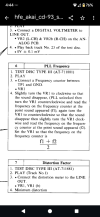
I'll take a look.. the service manual is pretty clear. I had all the adjustments dialed minus the distortion adjustment ( no distortion meter). Let me look at the service manual and see if I can determine where to find the RF signal.. would this be considered the PLL frequency??
 

Attachments

  • Screenshot_20250713-164449.png
    Screenshot_20250713-164449.png
    150.4 KB · Views: 3
Ok.. I'm on the RF board now.. scratch that above post. I'm assuming you are having me check the eye pattern waveform?? It's not looking normal....
PXL_20250713_232450214.jpg
 
Last edited:
Back
Top Bottom