I've been watching this thread with interest, as it seems like this issue is wide spread, and hitting those who have taken some trouble to keep it from getting through. I'm sure the moderators and site admins are doing their best to figure out what the problem is, hopefully a solution can soon be realized. :thmbsp:
I've not seen anything here on Mac OS X or Windows (knock on wood), but I do run AdblockPlus on some of my machines and Flashblock on all of them. Most of my AK activity is done on a Macintosh, but I'm posting right now from a WinXP machine. Most of the time, I am using Google DNS or OpenDNS, both of which have some ability to block DNS lookups to sites known to be distributing malware.
A lot of the problem is that this sort of crap is only getting more sophisticated. After reading the diverse reports, I really think that the attack is multi-pronged...that it tries various things to infest your system until one finally works (if any do).
The very first thing to do is to update all of your software to its latest release. I wouldn't necessarily trust the auto-update mechanisms to do it, especially for Flash player. No piece of software should be overlooked, as many programs can plug into a web browser, even if it doesn't seem like there should be a logical reason for a program to do so. Any security settings the program offers should be looked over. (For example, did you know that Adobe Reader can and will execute JavaScript by default?) Every little bit, every hole that you can close, will help.
I would definitely also recommend looking at your browser settings or add-ons that disable things like scripting and Flash content.
Yet there is one more thing that I would recommend doing, especially if you're on Windows. Use the security model built into the operating system! By default, everyone who is running Windows on their system is basically a computer administrator and can do anything to their system--or have a malicious program do what it wants if it is run.
Make yourself a user account with limited rights (or use the "guest" account, possibly Windows XP and later only) and do your web browsing from there. On Windows 2000 and later, you could create such an account from the Control Panel and then run your browser software under it using the "Run As..." option. This may not stop the malware from posting its annoying messages, but it does significantly reduce the toehold it can get in your system when the user account your browser is running under simply doesn't have the rights to modify the operating system's core. And you can always trash the user account if something bad happens.



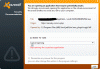
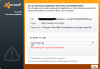


 owloader-gen@bhv[Expl]