• The move to the new server is done. There are some software and database maintenance updates in process. This has us passing the hat around to help out. We appreciate any donations. Seriously, even a dollar helps. The payment page may be found here - https://www.audiokarma.org/support.html

WiiM WiFi Streamer

I picked one of these up, and have been using it for a week or so now. I'm only using AMHD for streaming so far. To help me get a feel for what is really going on with the various streaming options, I ran the output of the unit into a pc and an M-Audio 24/96 card so I could see its spectrum while streaming.
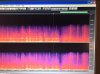
I can get CD quality when using iphone>Airplay>Keiid. However, when I use Muzo, or Audio Pro, though both have AM support, I get a audio that maxes out at 17kHz, with only occasional blips up to 20kHz. This is a typical pattern seen when a compression program (MP3) is in use. This confirms what chicks saw with the data rates from the router. I can post some pictures of the audio spectrum's as soon as I transfer them. There was some visible noise in the output spectrum when the unit was paused, but I didn't take the time to check whether that was from the Luxman R-351 preamp, or the Keiid. The sound quality between Airplay and the Audio Pro (I also don't care for the spinning art on Muzo) are both very similar. M Connect does not support AMHD, and I haven't tried any other control apps yet. Airplay requires me to adjust the volume up a fair bit, vs AP, so a back to back comparison is kind of difficult. Compared to my oppo CD though, both are a bit behind. I have not had a chance yet to try out the digital output into an external DAC. I suspect that there are improvements to be had there. The unit did a firmware update when I got it, but though I hoped that would have been the thing that enabled AMHD, it wasn't. Overall, for $62 this is a good unit. If it ever gets a update to support higher quality audio it will be great.
 
There's a pretty simple API available to query / control the KEiiD. Just need the IP address, then can query via browser, or any programming language.

Example: http://192.168.68.105/httpapi.asp?command=getStatus
Returns a JSON object which shows, among other things, that the firmware is version 4.2.7629, released 20191129, branch stable/wiimu-4.2

So end of Nov 2019 for last stable firmware release, likely there's ongoing development. Will watch for new releases, perhaps enabling AMHD...

Here's documentation for the API, should anyone else want to play: https://github.com/AndersFluur/IEastMediaRoom
 
Here’s the frequency via MUZO.
Note the max highs.
Here it is via AirPlay.
See how we are back to 20kHz.
Not that I can hear those frequencies but it’s a visual sign of the compression program in action.
 

Attachments

  • A2C98CC6-C7A9-4DA3-A5DB-225E3B0D0C29.jpeg
    A2C98CC6-C7A9-4DA3-A5DB-225E3B0D0C29.jpeg
    70.1 KB · Views: 22
  • A4D8A8EC-B125-449C-A02A-3AF756D8A9AD.jpeg
    A4D8A8EC-B125-449C-A02A-3AF756D8A9AD.jpeg
    90 KB · Views: 22
Linkplay's new A98 module supports Airplay 2 and dual-band WiFi. I've yet to find a product using the A98, though. So far, all OEMs are using the A31 module. Clearly, though, they're innovating, hopefully we'll soon see AMHD support.

https://linkplay.com/modules-wifi

upload_2020-2-16_7-42-21.png
 
A couple more tests tonight.
Connecting to the Ethernet port on the back seems to prevent function. It must be for setup only.
I’m sending the digital output to my M Audio card now and the frequency is identical to before, that is limited to ~17kHz. So it’s not just the internal DAC it’s the feed it’s asking for from AMHD. It is putting out a 44.1kHz signal to the card though.
Lastly the DAC in the M Audio is better than the Keiid. It seems like a veil has been removed and the slam is back , and that’s with the compressed signal - likely ~ 320k.
Here’s hoping for a update!
 
Tried Qobuz today and sure enough it streams hires to the keiid. I was kind of surprised at how much content there is up in the ultra high frequency. Not many speakers will be reproducing that for the dogs to hear but it shows that the signal is really a high res signal and hasn’t just been processed to have high bit rates. So for a couple bucks more a month Qobuz will get you the content you pay for but AMHD is more limited in what devices will actually deliver the HD.
 

Attachments

  • 2EFB066D-5124-4035-9280-2AB97ED9B44F.jpeg
    2EFB066D-5124-4035-9280-2AB97ED9B44F.jpeg
    89.7 KB · Views: 14
I haven’t tried the Ethernet port into my router, been using WiFi. Will give it a try this weekend.
 
Tried Qobuz today and sure enough it streams hires to the keiid. I was kind of surprised at how much content there is up in the ultra high frequency. Not many speakers will be reproducing that for the dogs to hear but it shows that the signal is really a high res signal and hasn’t just been processed to have high bit rates. So for a couple bucks more a month Qobuz will get you the content you pay for but AMHD is more limited in what devices will actually deliver the HD.
Yep, one of the main issues with Amazon HD right now. The other was the inability to switch bit rates on the fly when running it on a computer, so there isn't really a good way to get bit perfect with Amazon HD (unless they updated it since the last time I used it in December).
 
Is this a potential unsecured entry to my network?

Like anything connected to your network, there are security risks, and, to some extent, you are trusting that the things you attach are not designed to be malicious or subverting. The wired ethernet and wifi are protected like any other connection, using your physical security and wifi encryption. You should have a strong key, using WPA2/AES encryption on your wifi network. You should also have your router firewall configured to block traffic that you are not expecting, only opening certain ports for certain applications, and controlling where those ports are directed to. I would recommend turning off UPnP control of your router firewall, so that rogue devices cannot simply open a hole in your firewall. ps. This is not the same as DLNA/UPnP media streaming.

Likewise, the other wifi protocols DLNA and Airplay are accessed through your secured local network. Bluetooth might be a means by which an attacker can gain access to your network, but they would have to subvert the Bluetooth implementation in this device (unless you suspect this device is intentionally rogue); it is not designed to provide unfettered network access, and should be restricted to carrying audio data.

If you suspect that any devices you connect to your network are launching internal subversion attacks, exporting your data somewhere (China or Russia might be the obvious candidates), then you need to think about this issue for any device. You can also monitor network traffic with a utility such as WireShark, to see what data is being exported from your network. You will find quite a lot of things 'reporting home'...

If you are concerned about your network security, I would suggest doing some googling and read up on the subject.
 
You can possibly also set these up on your Guest Network, which is segregated from your home’s normal WiFi. I haven’t tried this, because my network is pretty well locked down.
 
Ordered an Up2Stream Mini to test out the multi-room capabilities and analog input casting from the KEiiD.

The good news: it all works.

Plugged an Echo Input into the KEiiD's 3.5mm analog input, grouped the KEiiD with the Mini, which played whatever the Echo Input was playing, in perfect sync with the KEiiD.

The bad news: it's not Sonos, not by a long shot.

The grouping requires the Mini to join a WiFi hotspot created by the KEiiD. That process takes 15-30 seconds every time, compared to the Sonos, which is instantaneous. Would be a pain to use daily, which is a huge use-case for Sonos customers. Also, this means that, even with a Mesh WiFi setup, the grouping won't use it, at all. If the two are separated by more than 30 ft, which will be common in large houses, dropouts will be an issue on "hi-rez" streams. Unlike Sonos, with its internal Mesh, adding more units won't help, at all. So, while Sonos supports streaming to 32 "rooms" simultaneously at CD rates, you'd be lucky to stream to three or four with this unsophisticated setup.

While a Sonos can be set to auto-switch to its analog input on presence of an input signal, and default the output to any/all Sonos units, you must manually select the analog input on the KEiiD, using either the remote control or the switches on the front of the unit. There's no way to route the signal elsewhere, except by grouping. Also, there's no way to set the analog input's level on the KEiiD. Sonos provides multiple level settings, for devices from CD players to phones.

While these are small issues for me (I rarely group, and rarely use the analog input), they would be deal breakers for a large subset of Sonos' customers.

I'm pretty convinced that Sonos will announce "hi-rez" support in May, as all of its newer devices have 32-bit DACs. There's no technical advantage to "hi-rez" for human ears, but there's a huge marketing effort, which they can no longer ignore, especially now that Amazon has embraced "hi-rez". For my current needs, the KEiiD and Up2Stream should suffice, as I don't need all of Sonos' bells and whistles. YMMV.

The Arylic Up2Stream compared to a CCA.

IMG_3367.jpg

Group by drag-drop the slave unit onto the master

IMG_3366.PNG
 
Last edited:
Thoughts on the security of the KEiiD? Is this a potential unsecured entry to my network?
That was one of things that disturbed me when I tried KEiiD - I couldn't find any way to load my WiFi network password into its config for secure connection.
And - no help from the manufacturer - many broken pages and links on their website in cheesey english ...
Paranoid as I am, bad security is a dealbreaker for me, so I packed it up and shipped it back last weekend.

Still using my Airport Express wifi gear for Tidal and Qobuz, for now.

For what its worth, I dumped some Wyze min security webcams for similar reasons - Once I saw their tech connected my home network through China, it was a dealbreaker ... "security"!
 
Last edited:
Another interesting thing. When the units are grouped, the slave unit will be invisible to LMS, since it's no longer on your house WiFi. Playing to the master unit via LMS will, however, result in perfect sync on the slave, something I've never been able to get LMS to do by itself; sync is always very poor using LMS alone.

IMG_3368.PNG
 
Sonos will announce "hi-rez" support in May, as all of its newer devices have 32-bit DACs.

They may accept a 32-bit word, but there's no way in hell they will actually implement a 32-bit DAC. At 2Vfsd, that's a step size of about 1nV...

Even '24-bit' DACs are pushing the bounds of reality, and you're lucky to achieve much more than 20 effective bits due to SNR and SINAD.
 
They may accept a 32-bit word, but there's no way in hell they will actually implement a 32-bit DAC. At 2Vfsd, that's a step size of about 1nV...

Even '24-bit' DACs are pushing the bounds of reality, and you're lucky to achieve much more than 20 effective bits due to SNR and SINAD.

Yes, exactly. They currently support 16-bit streams, but I'm betting they will support 24-bit "hi-rez" on the newer devices once the split happens in May. It's simply a matter of marketing - their competitors (all of whom infringe on their patents) point to their current 16-bit support as "inferior".
 
That was one of things that disturbed me when I tried KEiiD - I couldn't find any way to load my WiFi network password into its config for secure connection.
And - no help from the manufacturer - many broken pages and links on their website in cheesey english ...
Paranoid as I am, bad security is a dealbreaker for me, so I packed it up and shipped it back last weekend.

Still using my Airport Express wifi gear for Tidal and Qobuz, for now.

For what its worth, I dumped some Wyze min security webcams for similar reasons - Once I saw their tech connected my home network through China, it was a dealbreaker ... "security"!

A valid concern. The KEiiD and all similar devices use the LinkPlay architecture, which is hosted on AWS (Amazon Web Services), so nothing is routing to China. However, one would need to trust that LinkPlay is keeping things secure... https://linkplay.com/
 
Plugged the ethernet port directly into one of my Deco routers. Came up and worked without issue.

Mine worked just fine too. Want to see if it is still broadcasting a wifi signal when the Ethernet cable is inserted but haven't checked yet. If the wifi was disabled when the Ethernet cable is used I would just direct cable.

Like anything connected to your network, there are security risks, and, to some extent, you are trusting that the things you attach are not designed to be malicious or subverting. The wired ethernet and wifi are protected like any other connection, using your physical security and wifi encryption. You should have a strong key, using WPA2/AES encryption on your wifi network. You should also have your router firewall configured to block traffic that you are not expecting, only opening certain ports for certain applications, and controlling where those ports are directed to. I would recommend turning off UPnP control of your router firewall, so that rogue devices cannot simply open a hole in your firewall. ps. This is not the same as DLNA/UPnP media streaming.

Likewise, the other wifi protocols DLNA and Airplay are accessed through your secured local network. Bluetooth might be a means by which an attacker can gain access to your network, but they would have to subvert the Bluetooth implementation in this device (unless you suspect this device is intentionally rogue); it is not designed to provide unfettered network access, and should be restricted to carrying audio data.

If you suspect that any devices you connect to your network are launching internal subversion attacks, exporting your data somewhere (China or Russia might be the obvious candidates), then you need to think about this issue for any device. You can also monitor network traffic with a utility such as WireShark, to see what data is being exported from your network. You will find quite a lot of things 'reporting home'...

If you are concerned about your network security, I would suggest doing some googling and read up on the subject.

Thank you for the detailed response.

I have done a little research and took a look at my modem and routers. Found a few issues of default SSIDs and passwords which have been corrected. Confirmed that WPA encryption in place.

Looked at the router firewall, but need to do some more reading and revisit. No sure how to block unexpected traffic, but this seems like a great idea.

As for the KEiiD, it is now on the guest network to isolate it somewhat. The KEiiD wifi signal is only visible to my system for a few minutes, but I suspect a hacker would have tools to see hidden wifi names.

Thanks again for you thoughtful response. With a few simple changes my network is more secure even though there is more for me to learn and do.

Cheers
 
Tonight I got the Keiid to work on Ethernet. Seems it wants to be turned on with it connected not connected while it’s on. With Ethernet I was able to get CD quality sound out of it on AMHD!
Another finding is that the digital output must have the old SCMS “ Do not Copy” signal present in it. Not that many will find that a problem but I have been using the DAC from an old Panasonic DAT player recently. It’s really a good smooth DAC! Anyway my OPPO CD player feeds it fine, as does the CCA. However the Keiid’s digital output causes the DAT to fail to lock. This is a sign of SCMS as the M Audio 24/96 locks on just fine. In 2020 what is the point of SCMS?
A modern DAC would probably ignore this but the DAT cares.
 
Back
Top Bottom